
DOWNLOAD THE APP


Customer Services
Copyright © 2025 Desertcart Holdings Limited
DOWNLOAD THE APP


🚀 Upgrade your rig, upgrade your life — speed and reliability that won’t quit!
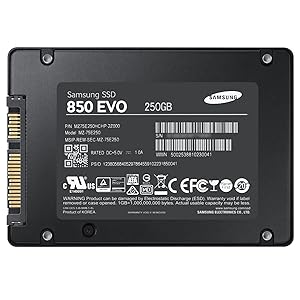
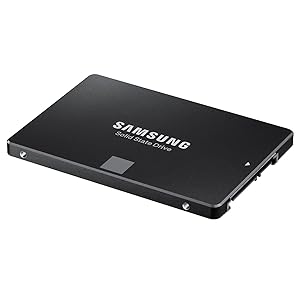
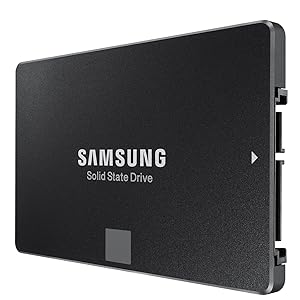
The Samsung 850 EVO 250GB SATA III SSD delivers industry-leading 540MB/s read and 520MB/s write speeds powered by advanced V-NAND technology. Designed for everyday computing, it offers exceptional endurance with a 75TBW rating and a 5-year warranty. Its ultra-low 2.4W power draw maximizes energy efficiency, while RAPID mode software boosts performance by using spare RAM as cache. Compatible with most laptops and desktops, this 2.5-inch SSD is the ultimate plug-and-play upgrade for faster boot times, smoother multitasking, and long-term reliability.


| ASIN | B00OAJ412U |
| Best Sellers Rank | #331 in Internal Solid State Drives |
| Brand | Samsung |
| Color | black |
| Computer Memory Type | WRAM |
| Customer Reviews | 4.8 4.8 out of 5 stars (10,549) |
| Date First Available | December 9, 2014 |
| Flash Memory Size | 250 |
| Hard Drive | 250 GB Solid State Drive |
| Hard Drive Interface | SATA 6 GB/s |
| Hardware Platform | PC |
| Is Discontinued By Manufacturer | No |
| Item Dimensions LxWxH | 3.94 x 0.27 x 2.75 inches |
| Item Weight | 2.33 ounces |
| Item model number | MZ-75E250B/AM |
| Manufacturer | Samsung Electronics |
| Operating System | Windows 7 and above |
| Product Dimensions | 3.94 x 0.27 x 2.75 inches |
| Series | 850 EVO |
| Standing screen display size | 10 Centimeters |
| Voltage | 5 Volts |
J**H
The Perfect Performance Upgrade for Any Laptop or Desktop
The Samsung 850 EVO series is legendary, and the 250GB model is arguably the single best upgrade you can make to any computer still running an old mechanical hard drive (HDD). Even years after its release, this drive remains a benchmark for reliability and SATA performance. This drive is the quintessential choice for an Operating System (OS) drive and primary gaming library. Why the 850 EVO is a Winner V-NAND Endurance: The biggest innovation here is Samsung’s 3D V-NAND flash memory. Unlike older, flat NAND, the vertical stacking significantly improved reliability and longevity. The 75 TBW (Total Bytes Written) rating gives incredible peace of mind for heavy daily use. Blazing SATA Speed: With sequential read speeds up to 540 MB/s and write speeds up to 520 MB/s, boot times are reduced to mere seconds, and applications launch instantly. The speed difference from an HDD is transformative—it makes your whole system feel brand new. RAPID Mode & Magician Software: Samsung’s software suite adds tremendous value. The Magician software is easy to use for maintenance and firmware updates. Even better, the RAPID mode feature (Windows only) uses your PC's spare RAM as a high-speed cache, providing a noticeable performance boost for frequently accessed files. Easy Installation: The standard 2.5-inch form factor and SATA III interface make it plug-and-play compatible with almost all laptops and desktop PCs. The included Data Migration tool simplifies the process of cloning your old drive onto the SSD. A Note on Modern Context It's important to remember this is a SATA drive, meaning its speeds are capped around 550 MB/s due to the SATA bus limitation. If your motherboard supports the M.2 NVMe interface, you can get speeds 5 to 10 times faster. However, for 90% of everyday tasks and gaming load times, the difference between a SATA SSD and an NVMe SSD is negligible. The Final Say: If you are upgrading an older laptop or desktop, or simply want a supremely reliable, fast, and feature-rich SATA SSD that will last for years, you cannot go wrong with the Samsung 850 EVO. It is, quite simply, one of the best SATA SSDs ever made.
M**N
Would buy three times more. Best way to get easy, cheap, performance out of your PC
There are many people out there that can go extremely in-depth with this SSD but I'm planning on just skimming the surface for those who don't know what this product is. SSD? Whats that? An SSD (Solid State Drive) is a storage device for a PC. Its just like a normal Hard Drive but different. A HDD (Hard Disk Drive) works by having a piece of metal spin in circles and there is a small reader and writer arm like that of a record player. As you could imagine that would degrade and parts would break, and that's what happens. A SSD aims to get rid of those problems by storing data digitally rather than mechanically. If you have ever seen what RAM looks like, it uses the same technology for storage. This means that the SSD will not slow down over time, has a longer life-span, and also is faster. This leads to a higher cost of course but over the past three years prices have dropped massively to the point that buying one is no big deal. Should this replace my existing HDD? No, definitely not. While it is faster and better it still cannot hold the same storage capacity as a normal HDD. Unless everything your doing the cloud-based and you have next to no programs or files on your PC, keep your HDD. What SSD's are currently intended to be used for is a boot drive or for video editing. A normal HDD would take 1-2 minutes or more to boot your PC up, however with my PC with this SSD it takes 15 seconds max to boot, log in, and open chrome. Also if you do video editing it makes your loading and exporting times much shorter and time is money. What a HDD would be used for is storing your games, most programs, and any documents / pictures. It will take a while to get used to storing stuff on a different hard drive and not spamming the next button on all installers, but its worth it. Whats all this 3D V-Nand stuff that they are advertising? Words. That's all it is. You don't need to do any research about their technologies or software. All it means is that its an SSD and its trying to look fancy. I'm a gamer. What does this mean for me? Good. I'm a gamer too. This means nothing for you, it does not equate to more FPS or shorter loading times. I found that when upgrading my CPU I saw a lot more performance. Focus mainly on a CPU or GPU if you want better performance. Does that mean that you should not buy it? Of course not! This can make loading programs such as Chrome and your OS boots faster. AKA you can get to gaming sooner. So, Should I buy this? Yes, its one of the cheapest and easiest ways to get more performance and lifetime out of a PC. If you need help installing it feel free to ask me a question or watch one of the many tutorials out there online.
E**S
Still a solid SSD upgrade for older systems
Still a solid SSD upgrade for older systems The Samsung 850 EVO 250GB has been around for years, but it remains one of the most reliable SATA SSDs I’ve used. Installation was quick and simple—just swap it into the 2.5" bay, connect SATA and power, and the system recognized it immediately. For older desktops and laptops still running on mechanical hard drives, the performance jump is dramatic. Boot times, program launches, and overall responsiveness are night-and-day better. Samsung’s reputation for durability shows here. Even after extended use, the drive runs cool and hasn’t shown signs of slowing down. The included Samsung Magician software is a nice bonus for firmware updates and basic optimization, though not essential if you just want to plug and play. At 250GB, capacity is on the smaller side by today’s standards, but it’s perfect for a boot drive paired with a larger HDD, or for reviving an older laptop where storage needs aren’t huge. Bottom line: A dependable, fast, and proven SSD that gives new life to aging machines—well worth it if you want a budget-friendly way to boost performance.
D**X
Bien reçu le disque SSD Samsung en temps et en heure
S**S
One of the main challenges in choosing SSDs is the immense diversity in brands and the components which they choose in the design of the SSDs. Its no longer just about Seagate and WD as in HDDs. SSDs are very fast, yes- but their performance and reliability is dependent on the controllers and the memory they use. There are just too many reviews of how SSD performances are inconsistent in the real world vis-a-vis the bench tests; and of performance degradation over time. The 850 EVO series has very good reviews, and has now aged gracefully, unlike the 840 series which had speed issues. The package has the SSD, a pictorial installation guide; a warranty statement booklet; CD with Samsung's Magician and Data Migration software. No USB connectors though. PROs- 1. High quality and reliability of Samsung (has its own controller and memory, which are more reliable and faster than the Sandforce/JMicron controllers). 2. Very very fast- your system becomes like a rocket (see, however cons below)- in cases where you are not connected to any slower peripherals (like USB HDD, Pen Drive, etc). 3. While test copy speeds are between 3-5 times as fast as HDDs (300-500 MBps for SSD vs 60-100 MBps for HDD), the SSD can move data within itself at astronomical speeds compared to an HDD. An HDD can move data within itself only around 20-30MBps, while the SSD can move it at 500 MBps. This is where you will really feel the difference. 4. Sufficient space- has around 230GB, of which around 10% will be set aside as an unallocated buffer (if you choose), by Samsung's magician software. This leaves 217GB which is more than enough if you are not loading on multimedia content. 5. Higher tolerances- operating temperature limits are 70 deg C, as compared to 60 deg C for HDDs. No moving parts. 6. Actual temperatures are lower than HDDs. My Seagate thin (7mm thickness) would routinely strike 50 deg C when moving data. The 850 EVO touched 48 deg C under load. 7. Much lower copy speeds when copying into the SSD- as it can easily write at 100 MBps, which is the limit for USB3 HDDs (from which you would be copying the data). See cons however. 8. 5 Year warranty. CONs- 1. Full speed cannot always be achieved due to CPU bottlenecks. It's not always about speeds when copying data; in 90% cases, your CPU also processes the program/ data. Laptop CPUs, which are around 1.9-2.7GHz top out much below the SSD capacities. 2. When moving data between an SSD and other media, the speed is limited by the slower components, which are invariably the pen drives, other HDDs and the USB HDDs. Here, you would get speeds of anywhere between 30-100 MBps. 3. Data migration software can be used only if you have a USB casing free for your laptop. In a desktop, this is not an issue. 4. More expensive than other SSDs. But prices are much lower than they were for the 840 series.
R**O
Sem problemas.
A**R
本体に異常な凹みがあり、四隅の一角が反るような曲がりもある酷い品質のものが送られて来ました。
C**A
El producto es excelente y me parecio que esta a muy buen precio. No duden en comprar un ssd samsung ya que esta comprobado que son mejores que los de otras marcas que venden aqui. Ya lo instalé gracias al cd que trae para clonar lo que ya tienes en tu hdd a tu ssd. Solo piensen que van a requerir un cable SATA a USB o un gabinete para transferir los archivos. Mi computadora ya enciende de inmediato y sin esperas. Inclusive el disco duro evo incluye un programa que te ayuda a optimizar el sistema operativo para que el ssd trabaje a su maxima capacidad. Trae tambien el "rapid mode" que agiliza la lectura y escritura de informacion. Algunas personas aquí en amazon se quejaban del empaque por que solo viene en un sobre y se maltrata la caja etc. En mi opinion esta muy bien por que pienso que es mas facil que lo pasen por aduana sin problemas, de hecho no es un sobre común ya que trae plástico de burbujas por dentro y en mi caso llegó muy bien. El tiempo de entrega me indicaron que eran hasta 10 días hábiles con el envío gratis pero me llegó en solo 4 días!!! De lujo! No sé si fuera suerte pero este producto es de importación y no me lo retuvieron en aduana ni me hicieron algun otro cargo ni nada. Me daba miedo pedir de usa por esta razón pero afortunadamente todo bién.
Trustpilot
2 days ago
2 weeks ago