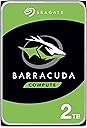
💾 Power your productivity with storage that keeps up.
The Seagate BarraCuda 8 TB internal hard drive combines massive capacity with a fast SATA 6 Gb/s interface and a 256 MB cache, delivering reliable, quiet performance at 5,400 RPM. Ideal for professionals building high-capacity desktops for gaming, multimedia editing, or everyday computing, it offers proven durability backed by 20 years of innovation.


| RAM | 256 MB |
| Hard Drive | 8 TB Mechanical Hard Disk |
| Brand | Seagate |
| Series | ST8000DMZ04 |
| Item model number | ST8000DM004/ST800DMZ04 |
| Hardware Platform | PC |
| Item Weight | 1.45 pounds |
| Product Dimensions | 5.79 x 4 x 1.03 inches |
| Item Dimensions LxWxH | 5.79 x 4 x 1.03 inches |
| Color | PC |
| Flash Memory Size | 8 |
| Hard Drive Interface | Serial ATA |
| Hard Drive Rotational Speed | 5400 RPM |
| Manufacturer | Seagate Bare Drives |
| Language | English |
| ASIN | B07H289S7C |
| Date First Available | September 10, 2018 |
J**.
Fast Downloads and Plenty of Storage for Modern Games!
I’ve been using this Seagate BarraCuda for over 3 years, and it’s still the drive with the highest storage capacity in my computer. I’ve installed heavy games like Call of Duty, FC 25, MK, and many others, and they all run very well. I haven’t had any technical issues with it, and it has definitely served its purpose. For an internal drive (and not an SSD), downloads are surprisingly quick, and performance has been solid. Installation is also very easy. If you’re willing to spend about $20 more, the 4TB version is an even better deal, but if 2TB is all you need, the price for this model is totally reasonable. I have no complaints about this drive, highly recommended!
J**E
A lot of Storage
Great internal hard drive-plenty of space and very reliable. I use it for all my photos and videos without any issues. Highly recommend for large storage needs.
I**S
Perfect for combining multiple hard drives of data.
The Seagate ST8000DM008 BarraCuda 8TB is a standard 3.5-inch internal hard drive designed for mass storage needs in desktop computers. In this unbiased review, we will assess its various aspects to provide a comprehensive overview. **Storage Capacity (4/5):** With a whopping 8TB of storage space, the BarraCuda offers an abundance of room to store your files, games, and media. It's an excellent choice for users who require extensive storage for large media libraries, backups, or extensive data. **Performance (3/5):** The BarraCuda 8TB is primarily designed for storage purposes, so it's not as fast as SSDs or high-performance hard drives. It operates at 5400 RPM, which is a bit slower compared to 7200 RPM drives. While it provides decent performance for sequential data transfers, it may not be the best choice for tasks that demand quick access times or frequent data retrieval. **Reliability (4/5):** Seagate, as a well-established manufacturer, has a history of producing reliable storage devices. The BarraCuda series is known for its durability and dependability. However, like all mechanical hard drives, it is subject to wear and tear over time, and there is always a risk of failure. It's advisable to have proper backups in place when using any mechanical drive for important data. **Noise Levels (3.5/5):** The BarraCuda 8TB is relatively quiet during regular operation but can produce some noise, especially when accessing data. This may not be an issue in a desktop setup but could be noticeable in a quiet environment. **Installation (4/5):** Installing the BarraCuda is a straightforward process. It utilizes the standard 3.5-inch form factor, making it compatible with most desktop systems. Users with basic knowledge of PC hardware should have no trouble fitting it into their setup. **Value (3.5/5):** In terms of cost per gigabyte, the BarraCuda 8TB offers a reasonably good value, especially for users who require a large amount of storage space. However, it's important to remember that the price of SSDs has been steadily decreasing, and if you value performance and responsiveness, you might consider investing in a smaller SSD for your primary storage and supplementing it with a secondary HDD like the BarraCuda for mass storage. **Conclusion:** The Seagate ST8000DM008 BarraCuda 8TB is a capacious internal hard drive, well-suited for users with substantial storage needs, such as media enthusiasts, content creators, or those who require extensive backups. It offers reliability, straightforward installation, and decent value in terms of storage capacity. However, it is not the fastest drive on the market, and its performance may not meet the expectations of users who prioritize speed and responsiveness. Consider your specific storage requirements and performance expectations before deciding if the BarraCuda 8TB is the right choice for your computing needs.
D**S
Best HDD brand for consumer market
Very good quality and storage space for a low price
R**.
Works very well considering value to price
I got the 8tb version. Considering PC part prices rising, this is a great value for 8tb of storage. Works very well for storing files that you don’t need instant access to them. Loads as 7.2TB and speeds vary depending on situation. Highest write number I got was around 250mbps and lowest was 20mbps. Read speeds almost match the advertised numbers. I saw many reviews about the drive being loud, in my case it is very quiet and I cannot hear it even tho I have very sensitive hearing. I also saw reviews about the factory packaging, in my case the drive arrived in a very secure and durable cardboard box that is designed to absorbs some impact. No screw or cables are included, make sure you have them.
A**R
amazing product
easy to use, size is accurate. format is easy to do. great quality. been using this brand for many years.
S**E
Large capacity in a good price. Should last for another 7-10 years.
In short: I’m an IT guy and I find this drive highly recommended for local storage at home. I have many Barracuda Seagate disks of an old models and very happy with their performance and durability and they serve me for years… If you don’t like the idea of storing your precious data in the cloud (safe and sound as it may seem) then managing a local storage is the way to go. And these Barracuda Segate 4TB drives are great for that purpose as they have enough capacity for most users while their price tag is affordable. Keep in mind that having local disks require maintenance, and that hard drives do fail when they wear out – it’s not IF they fail but more of WHEN, as they all die eventually; even the enterprise level ones. So if you consider the route of a local storage \ backup server then you’d better make a backup plan in advanced for redundancy – if you only need 1 drive for your data then buy 2 drives. If you need 2 drives then go with 4. And so on… The rule is to always have an exact copy of your data in 2 separate (physical) places, either by manual copying between disks, or for the advanced users between us to setting up a RAID 1 array for automatic clone (mirror) of one disk to the other; even if it costs somewhat more (if not doubled) at first, in the long run when one of your precious disks fail you’d be very happy that you had a backup. So besides of the loss of the actual disk, your data is safe and sound since it is stored on the second disk you aimed in advanced for this very scenario. And in such scenario it’s a good time to go shopping right away for a new drive to replace the one that failed, since you no longer have redundancy once one had failed. And when it arrives don’t challenge your fate and waste time - go ahead and copy all your data from the backup drive to it to have redundancy once again. My own story and experience: I have many Barracuda Seagate disks. About 10 actually. From my experience with mechanical drives and with Seagate brand in particular is that they *last for about 7-10 years. And when we speak on mechanical hard drives it's quite good. I had an old Seagate disk I stored data on, which was about 7-10 years old, and it failed about 2 weeks ago. I'm very glad that I spent some extra when I bought it and purchased a second one to serve me as a backup. So besides of the actual disk that died I didn't lose any data. This one came to replace it and I’m writing this review while it copies my data from the backup drive. I trust that it will give me another 7-10 years of quiet before it fails too. I'd recommend to check your disks health every now and then and to pay attention for any "clicking" sound from your computer case - even after my rich experience as an IT guy I fell for that very scenario because I was too busy to open my computer case and check where the clicking sound had come from, and thought that it's just from a dying fan... If I was paying more attention and take responsibility I'd probably replaced the disk before it finally died. There are many free tools out there that you can use to check your drives health and to let you know in advanced when a disk shows bad signs and needs a replacement. I'm using CrystalDiskInfo and I set it to launch at startup. So every time I restart my machine it pops-up and shows the actual disks health. *Hard drives will last depending on the user's usage. If you're only storing files on them for accessing later then they will more likely last longer. On the other hand if it's your "scratch disk" for video editing or you create and delete huge amount of data on it on a daily basis and the drive is under a heavy load then it may last less. It also depends on the environment the hard drive is located and the airflow in your computer case. Here are some tips as an IT guy: carefully clean your computer case interior from dust with air spray cans or oil-free dental compressor every 3-4 months. Make sure all fans in your case are working correctly – ventilated computer case will make your entire system and disks to last longer and to perform better; computers don’t like heat. Don’t keep computers in cabinets that have no airflow from the front and back. Don’t force shutdown your computer by holding the power switch unless it’s your last result (if let’s say it hanged or crashed). If you take these tips into consideration then your hard drives will last longer.
M**N
Reliable, Quiet, Mass Backup Storage
I'm using this 4TB BarraCuda drive purely as my backup storage/archive, and it performs exactly as needed. The 5400 RPM speed isn't blazing fast, but it's perfect for bulk storage where reliability matters more than speed. It runs quietly inside my PC case and offers a huge amount of space for photos, videos, and system images. It was easy to install and hasn't given me any issues. Great value for reliable, high-capacity, secondary storage.
Trustpilot
1 month ago
2 weeks ago