Buy anything from 5,000+ international stores. One checkout price. No surprise fees. Join 2M+ shoppers on Desertcart.
Desertcart purchases this item on your behalf and handles shipping, customs, and support to Netherlands.
🖨️ Elevate your workspace with pro-level prints and effortless wireless freedom!
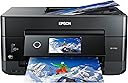
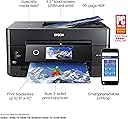
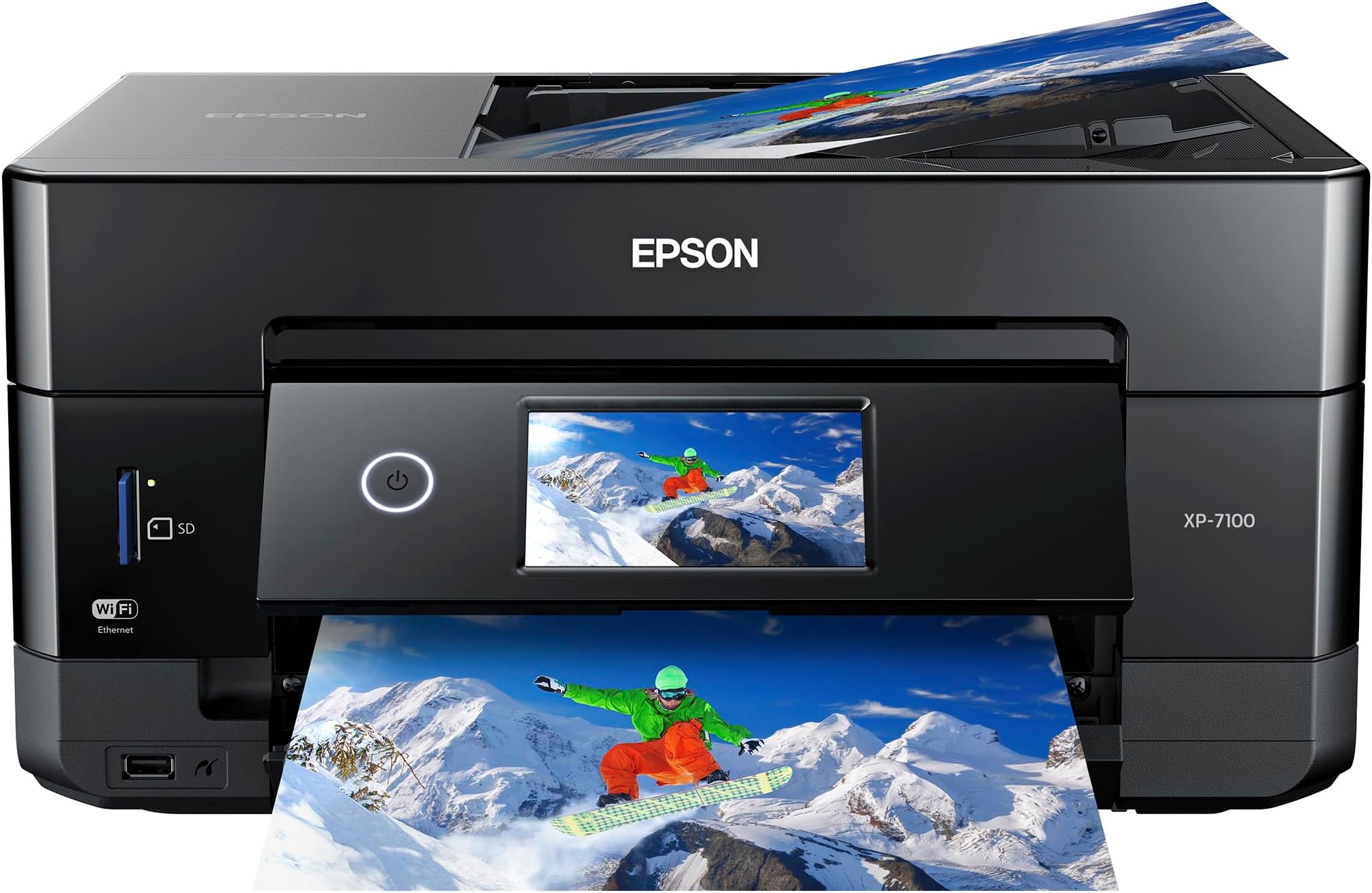
The Epson Expression Premium XP-7100 is a compact all-in-one wireless color photo printer designed for creative professionals and busy homes. Featuring ultra-high 4800 dpi resolution, a 30-page auto document feeder, and automatic duplex printing, it delivers sharp text and vivid, borderless photos up to 8x10 inches. Its intuitive 4.3-inch touchscreen and direct USB/SD card printing streamline your workflow, while wireless connectivity ensures seamless printing from smartphones, tablets, and laptops. Perfect for those who demand premium photo quality and versatile productivity in a sleek, space-saving design.


| ASIN | B07FN93WW7 |
| Additional Printer Functions | All In One |
| B&W Pages per Minute | 15.8 ppm |
| Best Sellers Rank | #12,962 in Office Products ( See Top 100 in Office Products ) #7 in Desktop Photo Printers |
| Brand | Epson |
| Built-In Media | 5 Claria Premium ink cartridges: 1x 410 Black ink cartridge, 3x 410 color ink cartridges: Cyan, Magenta and Yellow, 1x 410 Photo Black ink cartridge, CD-ROM containing software and drivers (Windows and Mac), Expression Premium XP-7100 color inkjet printer, Power Cord, Setup and instruction manuals |
| Color | Black |
| Color Depth | 24 bpp |
| Color Pages per Minute | 1 ppm |
| Compatible Cartridge | Epson Genuine Ink Cartridges designed for XP-7100 model |
| Compatible Devices | Laptops, PC, Smartphones |
| Connectivity Technology | Wireless |
| Control Method | Voice |
| Controller Type | Amazon Alexa, Vera |
| Customer Reviews | 4.1 out of 5 stars 3,829 Reviews |
| Display Type | LCD |
| Dual-sided printing | Yes |
| Duplex | Automatic |
| Global Trade Identification Number | 00010343922693, 00010343937697, 00010343942622, 00010343943674 |
| Hardware Interface | Ethernet, Secure Digital Card, USB |
| Ink Color | Black, Cyan, Magenta, Yellow |
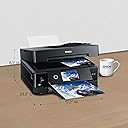
| Item Dimensions D x W x H | 19"D x 10.6"W x 17.4"H |
| Item Type Name | Epson Expression Premium XP-7100 Wireless Color Photo Printer with ADF, Scanner and Copier |
| Item Weight | 21.5 Pounds |
| Manufacturer | Epson |
| Maximum Copies Per Run | 60 |
| Maximum Copy Resolution Black and White | 4800 dpi |
| Maximum Copy Resolution Color | 4800 dpi |
| Maximum Copy Speed Black and White | 15.8 ppm |
| Maximum Media Size | 8.5 x 11 inch |
| Maximum Print Resolution Black and White | 4800 dpi |
| Maximum Sheet Capacity | 30 |
| Maximum print Resolution Color | 4800 dpi |
| Model Name | Expression Premium XP-7100 |
| Model Number | C11CH03201 |
| Model Series | XP |
| Number of Ethernet Ports | 1 |
| Number of Trays | 1 |
| Other Special Features of the Product | Auto Document Feeder, Borderless Printing, Memory Card Slot, Touch ScreenCD Printing, Two Sided Printing |
| Output sheet capacity | 30 |
| Paper Size | 4 inch x 6 Inches |
| Power Consumption | 13 Watts |
| Print media | Paper (plain) |
| Printer Connectivity Type | Wireless |
| Printer Output Type | Color |
| Printer Type | Inkjet |
| Printing Technology | Inkjet |
| Resolution | 4800 |
| Scanner Type | Photo |
| Series Number | 11 |
| Special Feature | Auto Document Feeder, Borderless Printing, Memory Card Slot, Touch ScreenCD Printing, Two Sided Printing Special Feature Auto Document Feeder, Borderless Printing, Memory Card Slot, Touch ScreenCD Printing, Two Sided Printing See more |
| Specific Uses For Product | Home |
| Total Usb Ports | 1 |
| UPC | 010343937697 010343943674 010343922693 010343942622 |
| Unit Count | 1.0 Count |
| Warranty Description | Warranty |
| Warranty Type | Limited Warranty |
| Wattage | 13 watts |
A**R
🙂 Great printer with an even better price.
I just happened to stumble across the Epson XP-7100 while looking for a small photo printer capable of using Letter size paper. The store did not have print samples and I knew nothing about it so I put off the purchase to do some more research. I came across a PC Magazine article titled The Best Photo Printers for 2019. The XP-7100 was listed a one of seven listed as an Editors' Choice, but the 7100 was the only Legal size printer with 2 others not fitting the bill and the remaining 4 being large formats costing 2-10 times as much. With a price of $129, I decided to take a chance. The XP-7100 arrived well packaged and heavier than expected (usually a good sign). It is a elegant contemporary design which takes up very little space and looks good anywhere. No ADF or trays sticking out. Setup was easy and straight forward with the quick setup sheet. The 4.3 inch control screen is a delight with its intuitive interface and bright touch screen. Once the ink cartridges are installed, just push the power button (the only button) and the control panels automatically tilts outward for a better viewing angle. After printing a few test sheets for printer head alignment, it was time to set up WiFi (unless you go with USB). WiFi setup was easy. Just select your network and enter its password (if secured). Last step is to install the software and driver on the computer. The CD did not auto run as it was supposed to so I manually opened the CD in File Explorer. At the root level are two app files. EPWizard.exe and Setup.exe. I ran the EPWizard.exe and everything installed fine. WiFi tried to locate the printer and it failed. This was resolved with a simple Restart of the computer. My first few prints were to test different papers and quality setting. The printer has 2 trays supporting cards, photos, envelops and basically anything A4 or Letter size and smaller. It even includes a CD tray to print on CDs. A motorized output tray retracts back into the printer (along with the control panel) when you power off. As far as construction, the port for the power cable is a little wobbly. I do not know what that is about. Some reviewers wrote the printer is flimsy. The trays do not have rollers or bearing, so yes they are a little flimsy to reduce friction, but tighten into place once fully extended. This is common among printers and helps keep cost down. As for the body, it does have thin panels (available in different colors) which are simply not acceptable for a laptop. Oh wait, this is a non-portable printer meant to, at most, be moved from place to place a few times. Remove from box and place on desk. I purchased the printer mainly for its photographic printing abilities. My first real print was a Student of the Month article (about my daughter) from the website of the local newspaper. The photo and text would be a great test of the printers capabilities so I imported the article at 300 dpi with vector text. I printed it with high quality settings and used Epson Ultra-Premium Glossy Photo Paper. The results were phenomenal. The color photo was vibrant and the blending of the 4 photo colors was seamless. Text (some of it 5pt in size) was very crisp and could rival laser printers. The printer is fast for an inkjet on high settings. I estimate around 35 seconds for the 8.5 x 11 print. I’ll add a follow up on the scanner, ADF, and media ports but for now the 7100 is a very impressive photo printer which can be had as low as $99. Of course they will make up for the losses, and then some, with ink and paper sales.
L**Z
Definite Recommend
Had this for about a month now and ZERO regrets.Takes a bit to learn all the different trays and settings but, it was well worth the money. I've printed on over 100 CD and the quality is amazing, and I still have a lot of ink left. Printed many sheets as well. I printed shipping labels. The multiple trays on here lets you do just about anything you need. Had a few bad prints, but it was because I had to calibrate the printer. Love this printer!
P**S
Does the job & has duplex printing from ADF. Liked better than comparison Canon
Looking to replace a Canon Pixma 922, I've now compared this Epson with 2 Canon printers (TS9521C & MB5120) both of which had their issues. Like the MB5120, this Epson (at 1/2 the cost and 2/3 the size of the 5120) can duplex scan from a lay flat top document feeder. (vs. the vertical fan feeder of the TS9521C.) Automatic duplex scanning was a must-have feature for me. I've so far scanned 50 page dual size documents on the Epson, no problem. It's fast. For more pages I'd do in 2 batches - the Epson allows you to add to a scanned pdf. Canon - no. With Canon, once scanned, you'd have to add pages to the pdf using Adobe. The Epson also lets you skip blank pages, and choose grayscale, something Canon doesn't have. Scanning quality is fine and has better unadjusted tone than Canon's although you wouldn't notice without side by side comparison. I just had to learn that the "top" of the platen is on a different end from the Canon's where I'm used to it. No wonder initial scans got cut off (duh!) The one negative for this Epson: while scanning using the utility on the laptop is easy and affords lots of adjustments, the Scan function on the printer itself just would NOT work for me. Clearly not everyone encounters this issue but I simply cannot fix it. In other words, the printer can't find a computer to scan to, even though they are obviously on the same network because it prints & scans fine, laptop to printer. But printer to laptop = a solid no. After trying every possible fix I could find on the internet, I called Epson. Epson's tech support consisted of someone reading a script and asking the same questions over and over, then saying someone else would call me back which never happened. I almost returned the printer at that point. The "tech support" was truly abysmal. But I decided the size, cost and scanning features of the Epson outweigh the occasional inconvenience of not being able to scan from the printer. The paper tray is flimsy, very inconvenient to reach crap but it's even worse on the Canon. (For comparison the Canon 5120 offers only 1 tray, a super awkward and breakable paper size adjustment, and won't fully close if using regular letter size paper.) Both printers can handle 80# stock which is pretty much just thick paper, I don't know about heavier card stock. Neither has a very good output catch tray. Both print fine if you can handle the Canon disconnecting from the network everytime it or the computer power down and having to rerun a utility program to reconnect. I was spoiled by the now defunct, solidly built Canon pixma 922 (which also had the same disconnect issue - I just kept a shortcut to the utility app handy). The 922 doesn't really have an equivalent replacement, but for me, the Epson comes closest.
C**N
I wouldn't recommend this printer to my worst enemy. Here's why.
I have owned this printer for 4 years. If you need to print less than 10 text-only pages per year, this may be an okay printer for you. Otherwise, avoid this printer (and all others like it) at all costs. If someone tells you they will pay you $1,000 if you buy this printer, do not accept it unless you plan to use it for target practice in which case that would be a great deal. Why do I despise this printer with such intensity? Why would I not recommend it, even to my worst enemy? Why do I waste time daydreaming about packing it full of Tannerite, pouring gasoline on it, setting it on fire, tossing it from the edge of the grand canyon and shooting it as it falls clumsily through the air? #1 - You will spend so much on ink that you may have to file for bankruptcy or at least apply for government assistance. Hundreds of dollars a year, easily. #2 - Want to print only black and white and have plenty of black in in the printer? No problem! Just make sure you buy all the color ink cartridges first. Seriously, while it is unreliable and inconsistent, 95% of the time it will not let you print BLACK AND WHITE ONLY unless the COLOR ink cartridges are plenty full. Hmmm... wonder why that is? #3 - Its wireless printing capabilities are completely unreliable. #4 - After a couple of years of use, the print is uneven, smearing here and there, random lines getting printed. In other words, quality is not great. #5 - It acts like it can be used to print quality photos. Maybe... just keep in mind the cost/picture is probably about $2 given the exorbitant price of ink and how much it uses. #6 - Multiple times when I have needed it most (like today), it has played trick #2 from above on me, putting me in a real bind.
M**E
Great printer
Easy to set up is hook up and start printing within 15 minutes after opening the box great printer
N**R
EXCELLENT PRINTER FOR THE MONEY
This is a well-thought out printer. It has many functions to handle all kinds of print jobs. I especially like the fact that you can print the title, text, designs, photos, etc. directly on CDs/DVDs. It prints fast and does a beautiful job! The touchscreen can be a little confusing but that is a minor complaint.
S**O
This is a great printer !
Let me start off by saying I am 71 years old. I’m not computer illiterate, but I like things easy to install. This printer has. Touch screen that makes installation a breeze. It found my WiFi very quickly and I was able to have it recognized by my windows computer, my Mac laptop and my iPhone without any issues. It was great value for the money and seems to print well from all devices.
8**Y
Prints well but scanned documents are skewed!
Bought this to replace a 13-year-old Artisan 810 which still works fine and prints EXCEPTIONAL photos, only problem is the scanner gave up (scanned images with overlapping vertical banding strips) which prompted me for a new printer. I'd like to stay with Epson so the XP-7100 seems to be a good choice. In comparison it is much more compact, but it packs many newer features such as double-sided copy/scanning, AirPrint, faster WiFi, etc.. The major differences between my Artisan 810 and the XP-7100 is I lose the Fax feature, and the XP-7100 only uses 3 color ink cartridges compared to my old Artisan with 6! This pretty much tells you who's king when it comes to photo-printing. Though the XP-7100 technically uses 'five' ink cartridges, but out of the bunch two are Black! Good thing is both printers still includes the CD/DVD/BD disc-printing feature so that's still a plus in my book! The printer prints well overall, even on plain paper which my older printer lacks. Texts are rather sharp on document printing - even when using the lowest-grade plain paper, but my gripe on this printer is the scanner; which I do mostly than print. Scanned images are askew and distorted when using the flatbed scanner and results are much worse when using the ADF feature. Most people would probably not mind (or even realize this) but this is a definite NO NO for me at any cost! There is a 'skew correct' feature from a separate Epson scan software which can be use but I'd have to do it from my computer instead selecting from the printer/scanner unit itself and that is another NO NO. I do on-the-fly scanning, meaning docs laid on the unit and utilizing its front 4.3" touchscreen panel. Speaking of which, the option to select is more of a task compared to my old one. In order to do anything - whether to copy or scan; you'd have to first: Press scan, Choose printer, Press 'Save' to initiate Compared to on my Artisan 810: Choose scan or copy, Press/select printer and the task starts at once! Flatbed and page orientation: Document orientation is now faced on the opposite end of the bed, on the lower-right corner instead of the upper-left corner where the scanning rod begins. This means it has to travel all the way to the opposite end to capture the top page/image. This slows down the scan process quite a bit especially if you choose for a smaller scan/copy area, say for B6 size (4x9-6x9) whereas the scanner rod would just slightly slide to the nearby scan to capture and process. Wifi: Epson is still iffy about this issue. I find at multiple times my pc isn't detected unless I do a reboot. Printing is fine, but 'scan to pc' is a major issue as it will not work unless your pc is detected. This is managed by Epson 'Event Manager' which is notoriously known for sleeping and not knowing when to wake up. Again, I do most scans than print so the majority of people might not realize this. Photo printing: Still good compared to others such as Canon and HP as nothing beats an Epson when it comes to photo-printing EXCEPT my Artisan 810 still holds title with 'lab quality' prints. Pros: Fast print/scan via WiFi AirPrint Beautiful prints with sharp texts on docs, yields exceptional color Adjustable 4.3" color touchscreen pad control with good tactile response Motorized slide-out tray to capture printed contents Top ADF cover folds flat when not in use Full duplex double-sided print/scan/copy CD/DVD media printing capability Good photo quality prints (when using photo paper) Overall good compact size unit Cons: Scanned or copied results are 'askew' and distorted with no fix Paper tray capacity is small Uses only 3 color ink cartridges Wifi is inconsistent (very common Epson problem) No fax feature (which I still use but seldom) Slow blinking 'standby' white ringed power light is annoying, especially at night. This feature is non-adjustable, but others such as printer standby duration in minutes, sound, touchscreen brightness, etc can be.
S**S
Great printer, but..
It's a great printer, but i bought it because it said it had faxing capability....thinking that meant I could fax right from the printer.. It doesn't have that capability you have to fax from an online app with isn't always convenient
L**H
Prints high quality photos
Love this printer!!! It’s so quiet and it prints in excellent quality. I purchased it to make stickers from my drawings! Highly recommend. Great price too!
G**J
Does everyone
A lot of negative reviews. Even then I think it’s due to unrealistic expectations. Here’s what I like: prints are of exceptional quality. I’ve always liked Epson for that. I’ve started to print Audio CD’s and Blue ray as well. Great prints! Only printer in this price range that can do that. And do it well. Don’t like: it’s terribly slow. The internal software needs patience. Print costs are high. Then again which ink jet printer isn’t? All in all well worth it and a bargain if on sale!
A**N
Excellent printer
Got a great deal on this printer. The setup process was so easy, light years ahead of the HP, Lexmark and Brother printers I've had over the past few years. Print quality is excellent, and it's fast. My HP printer over-inked the pages at high quality and made the page warp, this has no problem at high quality settings, even small text looks great. Has an ADF and auto duplexing which is rare at this price point. A bit confusing with the remote printing options and setup. Overlapping functionality that wasn't very clearly explained, and it installed 2 versions of the printer intiially, a Network version and the regular one, that both functioned exactly the same from what I could tell. So I just deleted the extra Network one and I can print remotely and directly just fine to the other one. Overall an amazing purchase and I'm now sold on Epson printers going forward.
K**N
Bad Image Quality After 1 Week
I bought this printer based on the reviews that matched 400-500$ printers. I liked it for the first week it worked. It was easy to set up, one of the few left that print via USB cables, the first printer I owned that did borderless images, the ink cartridges were separate (allowing only the needed ones to be changed), and the images used to be crisp and beautiful.... for one week. A week later, I started up the printer again to print more pictures (I was printing portrait-sized images of flowers and birds on semi-gloss paper), and the image quality mysteriously dropped. Ink smudges, horizontal streaks, and the colour itself no longer matched the original pictures. I did everything in the troubleshooting, cleaned everything, tweaked every settings I could think of and was recommended. The same ink and paper was used throughout that week. Nothing. My last test after everything was "fixed" was printing an image I already printed to compare the difference... and the problem remained: the colour no longer matched, ink smudges, and streaks. So, it'll be used for text-only documents and for the scan feature. Disappointed that the good image quality did not last more than a week.
Trustpilot
1 month ago
1 month ago