
🔒 Elevate your security game with UltraHD clarity and night vision that never sleeps!
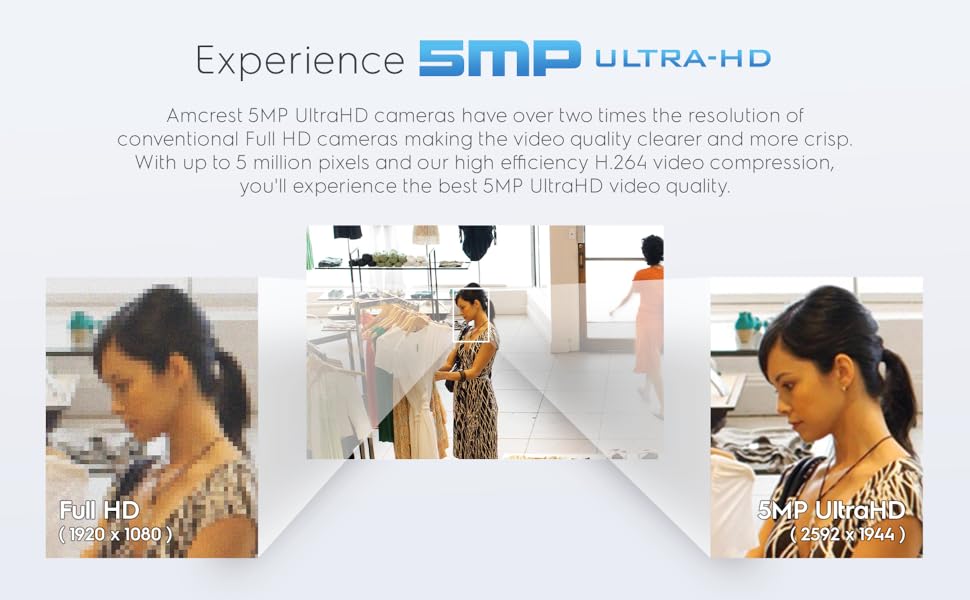
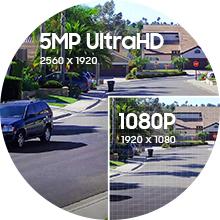
The Amcrest 5MP Turret POE Camera delivers professional-grade 5MP UltraHD video with a wide 132° field of view and powerful 98ft night vision. Designed for seamless Power Over Ethernet installation, it features built-in mic audio, motion alerts, and versatile storage options including up to 256GB MicroSD and cloud backup. Its rugged IP67 weatherproof housing ensures reliable outdoor surveillance in any condition, making it a top choice for millennial professionals seeking smart, secure, and hassle-free home or office monitoring.






| ASIN | B083G9KT4C |
| Alert Type | Audio and Motion |
| Antenna Location | Indoor Security, Outdoor Security |
| Are Batteries Required | No |
| Best Sellers Rank | #81 in Bullet Surveillance Cameras |
| Brand | Amcrest |
| Built-In Media | Camera Body |
| Color | White |
| Compatible Devices | Desktop, Smartphone |
| Connectivity Protocol | Ethernet |
| Connectivity Technology | Wired |
| Control Method | App |
| Controller Type | Iris |
| Customer Reviews | 4.2 out of 5 stars 3,001 Reviews |
| Effective Still Resolution | 5 MP |
| Effective Video Resolution | 5 MP |
| Enclosure Material | Metal, Plastic |
| Field Of View | 103 Degrees |
| Form Factor | Turret |
| Frame Rate | 20 fps |
| Global Trade Identification Number | 00850011990124, 05391539420014 |
| Indoor Outdoor Usage | Outdoor |
| Item Dimensions | 3.7 x 3.7 x 3.2 inches |
| Item Height | 3.2 inches |
| Item Weight | 14.4 ounces |
| Light Source | Infrared |
| Manufacturer | Amcrest |
| Model Name | IP5M-T1179EW |
| Model Number | IP5M-T1179EW-28MM |
| Mount Type | Ceiling Mount |
| Night Vision | Starlight |
| Night Vision Range | 98 Feet |
| Number of Channels | 1 |
| Number of IR LEDs | 1 |
| Number of Items | 1 |
| Other Special Features of the Product | Built In Light, HD Resolution, Local Recording, Motion Sensor, Night Vision |
| Photo Sensor Resolution | 5 MP |
| Photo Sensor Technology | CMOS |
| Power Source | Power Over Ethernet |
| Room Type | Classroom, Kitchen, Living Room, Office |
| Specific Uses For Product | Surveillance |
| UPC | 850011990124 |
| Unit Count | 1.0 Count |
| Video Capture Format | H.264 |
| Video Capture Resolution | 5 MP |
| Viewing Angle | 132 Degrees |
| Voltage | 12 Volts |
| Waterproof Rating | IP67 |
| Wattage | 5 watts |
| Wireless Technology | Wi-Fi |
| Zoom Type | Digital Zoom |
M**N
Price and Performance are top notch, follow up 12-20-2020)
I purchased this camera to replace an older Reolink that cover my Deck. The 2.8MM sensor in this camera has a great field of view. I`m able to capture the entire deck and a portion of the back steps. I`m running it connected to Milestone via its ONVIF feed. Picture out of the box is great, I did not have to make any tweaks. Night vision is far superior compared to my old camera as well. The microphone needed a small adjust of the gain so it didn’t pick up the noise from my heat pump. I would imagine not having the heat pump nearby I could have left it as it. I would give this camera a 5 out of 5 rating. Great performance for a great price. Oh yea, the Amcrest app on iOS is also free. I plan on putting an SD card in it as a backup of my recordings as well. Follow Up 12-17-2020: This is a follow up review to my prior purchase. I`ve since bought another one and have converted all my cameras over to Amcrest. For $50 you can go wrong. The 2.8mm lens has a very wide field of view and actually replaced the 2 Reolinks I had for the same area. Night vision is much better than the Reolinks and the microphone can pick up a conversation from over 50 feet away. I now have all 5 of my Amcrest cameras (two 8MP 4K and 3 5MP) recording 24/7 to Milestone via the ONVIF feed. The H265 compression is a must if you are hosting your own recording server. I dropped the frame rates down to 10FPS for recording but have them maxed out for live view. It’s a top-notch product and their customer service is great. I have been eyeing their WiFi doorbell (currently $80 here on amazon). Reviews looks good and that will be my next purchase. its great to have all my cameras the same brand now. I use their iOS app for live view, its flawless and the quality in real time is fantastic. I would not hesitate to purchase more products from them. Also, they routinely do firmware updates and security patches. A huge plus! Bottom line, don’t hesitate, can’t go wrong for the price!!!
J**O
Great camera!
I got this camera as an upgrade for the Amcrest IP3M-956 that I use to monitor my driveway. The IP3M-956 is a nice camera, but it didn’t have the resolution to read license plates on cars driving by, and the night vision left a bit lacking. I could see pretty well at night—particularly after adding a separate IR blaster to widen the illuminated area—but only in black and white, which makes it much harder to identify people or features. This camera was a definite improvement in overall resolution; the colors are much brighter and more vivid and now I can use color mode at night. I’m attaching a short video at night with the old camera, and also some snapshots with this camera to highlight the differences. I’m MUCH happier in that regard. As you can see in the attached daylight photos, the daytime resolution is better, but still not enough to make out a license plate in good light at 60’. I guess that’s just more than can be expected from a camera at this price point. But the other big difference, one that I wasn’t anticipating, is the much larger field of view with this camera. I’m much happier with the more “square” picture that provides a much wider view down the street. I’m using this camera with AI-HomeGuard surveillance software, rather than Amcrest’s own software. While I noticed the Amcrest software is significantly improved from the old model (including working just fine with Chrome, whereas the old one required a clunky add-on), the AI-HomeGuard is simply genius in identifying meaningful motions and pretty much eliminating false positives. I previously used Blue Iris surveillance software, and found all the options overwhelming—and still creating way too many false positives. But whichever software choice you make, this camera works fine with them (and also works fine with the Amcrest Pro mobile phone software which can be handy). Since this was replacing an already-in-place hardwired camera, installation was easy. This is not clear from the product description, but you don’t HAVE to use POE (power over Ethernet); it also allows for connecting to a wall-wart power supply (but it doesn’t include the power supply, and the connector is semi-proprietary). If you do want to install with POE, you’ll need to purchase a separate POE injector or POE switch. Note that there is no wireless (wi-fi) option with this camera, though I personally see that as a plus. (Since you have to provide a source of power, it might as well be an Ethernet cable, and then you have a more reliable connection and don’t bog down your wifi.) The camera itself appears to be solid construction. It remains to be seen if it’s as weather-resistant as my old one (which has operated fine for 2 years), but the design looks good. I was coming from a “dome” camera that has the advantage of being vandal-resistant, but since this is mounted pretty high up, I’m not worried about someone reaching up and changing the aim of the camera. (Whereas I’d have second thoughts about this design on my porch, where it would be easy to reach.) For that application, it’s much easier to adjust the camera aim, and if need be, to change the micro-SD card (which is MUCH easier to do on this camera than my old one) or hard-reset the device. Speaking of which, I love that this camera allows for recording to the internal SD card (up to 256GB). I have it set to record 24/7 to the SD card, and then use the AI HomeGuard software to record motion only. Overall, if you’re looking for an IP camera and don’t want/need a wifi-connected model, this seems to be an excellent choice.
A**M
Setup was frustrating but the video quality and price made up for the trouble
I recently purchased the Amcrest IP5M-T1179EW-28MM camera when looking for a more affordable POE camera to supplement my Ring Stickup Camera (POE models). Overall, it’s not a bad camera for the price. It has its highs and lows as detailed below, but depending on your requirements, I would recommend the camera if it fulfills your needs (mine were an affordable POE camera that doesn’t require PTZ). The setup process was frustrating to say the least. I unboxed the camera and attempted to follow the included manual for setup using the Amcrest Cloud app. I must embarrassingly admit it took me a while to find the QR code for the camera. I went through the box, manual, and included paperwork several times. I even took the camera out of the base and inspected inside the mount, outside, and the camera. I even had my wife look for it. Just before I gave up, I finally realized the QR code was on the cable itself coming out of the camera. I had it sitting on my fireplace mantle for testing and it wasn’t in view. To say I felt a little dumb is an overstatement. In the next few steps, it required me to change the default password (I’m glad it’s a forced change to be honest), but the app would not let me change the password. I tried at least 10 times making sure to always adhere to the defined password policy, but it never worked. I finally called support and after a bit of a hold, was told that I needed to set it up with the Amcrest View Pro app. It’s very frustrating to follow the manual page by page and find out it doesn’t work. The manual did have steps for using the Amcrest View Pro app after the section on the Cloud app, it should have been first if the Cloud app can’t make the camera work. Support made it sound like the Cloud app cannot even be setup if you don’t’ have a subscription. I planned to use the free trial so I could compare against my Ring Protect Plus subscription, but I never ended up going back to that app. Once the camera was setup in the Amcrest View Pro app, things worked much smoother. The video quality is as good as, if not slightly better than my Ring Stickup Cam (POE), which I considered to be the best quality video from a Ring device (and I own almost all of them). Audio quality was fair, but not the best I’ve heard in extremely quiet times. When there was medium or higher sound in the room, it performed much better. For checking in on live video, I am pleased with the video quality and it will suffice for my needs. I was looking for a cheaper POE camera to ultimately use in my barn to keep an eye on sick or pregnant animals. I don’t need cloud recording or motion alerts (as they would fire all the time) but being able to check on an animal without going out to the barn would be great. Some animals interrupt the birthing process when a human comes in view, so being able to monitor from afar can be better for their health. One feature I like from the View Pro app is the capability to see more than one camera at a time. I can’t do this with my existing Ring cameras and wish I could. This will come in handy when I want to monitor multiple stalls in the barn at the same time. As far as the hardware itself I think the build quality is good. For my testing, I used the camera sitting on the fireplace mantle, which is upside down for how it would normally mount. While the camera does manually rotate to compensate, I wasn’t able to tile it as far down as I would have liked. If it was mounted on the ceiling as designed, there would have been no problem as no one is trying to look up into the ceiling. Once I move it out into the barn as planned, this won’t be a problem, but I did want to mention it as I use several Ring cameras sitting on a shelf and they have a better mounting design for this position. All in all, I think the camera is a good value for the money. I think I’ll stick with Ring cameras in and around my house, so I have a single app for video, lights, and alarm, but I plan to install a few of these in the barn to monitor a couple of stalls. I prefer POE cameras so I don’t have to worry about Wi-Fi signal, and considering I need to run power anyways, it makes sense to do it from the same cable. (Battery is an option, but I don’t like changing the batteries at regular intervals with cameras mounted up high.)
S**K
Excellent Entry-Level POE Camera
This is my first outdoor IP camera, and I was very interested because I wanted a hard-wired POE camera with multiple storage mediums and compatibility with custom NVR/NAS recording solutions (Blue Iris, Synology Surveillance Station, etc) should I choose to set one up later. The camera arrived packaged securely and neatly with documentation, anchors & screws, mounting template, mounting plate (which designates which holes to use if mounting to a junction box), and screw-type weather covers for power and ethernet (should you choose to run the wires external to the unit rather than through the frame). This camera has 2 plugs (12V and Ethernet) should you choose to not utilize the POE feature. I purchased the Amcrest FSE801A Active POE injector as it had good reviews and a reasonable price. Before mounting, I made a temporary ethernet cable to test camera functionality and determine optimal mounting position to make the most of the viewing angle (103°) in the area I would be monitoring. Installation went smoothly and without event. Upon power-up in the final location, the camera immediately provided the expected image and quality as previewed before. Even with this more basic camera model without all the bells and whistles, there are still plenty of configuration options for video, network, storage, and event-based notifications. I performed most of the configuration through the web-based UI but many features are also configurable through the View Pro mobile app. I initially tested the camera with local IP settings, but have since been using the DDNS methodology for remote viewing. That part of the setup is not for the faint of heart, but if you are somewhat tech-savvy and can read documentation and scour forums it should yield the results you need. Otherwise, Amcrest does offer tech support which seems to be able to fix most setup issues from the posts I have read. I attached a few pictures showing day and night screenshots with almost out-of-the-box configurations, which I'm sure could be tweaked a bit more. For my purposes, they are plenty sufficient. I have been utilizing the motion-based recording to SD card with push notifications for video clips. The notifications have been very reliable, and thus far I have had a very smooth experience with both the View Pro mobile app and the WebUI. I plan to add an Amcrest NVR with WD Purple drive as well as additional 5MP+ POE cameras to begin building out my first system. For the price, I am very happy with the performance and stability of this camera. One thing to note is that there have been reported issues about not having firmware available for backup or update. I confirmed through the WebUI that I am not able to check firmware revision nor whether it is current, and Amcrest does not list this camera on their firmware page. If you do some digging, you can find the equivalent Dahua firmware which will unlock IVS and is also more likely to be updated.
E**R
Camera repeatedly loses connection and requires major intervention to restore connection.
I really wanted to like this camera. It was the only one I found that allowed me to view the feed in a web browser without a custom app which was necessary for my desired use. The initial setup was relatively straight-forward. The only installation challenge was that the weather seal cover for the ethernet cable is unusable unless you are planning to terminate the ethernet cable yourself. The weather seal cover needs to be put on the cable before it is terminated because it won't fit over the jack once it is on the cable. The reason I gave this device 1 star is because it continually loses its network connection. Unplugging the power (from the PoE) doesn't appear to reset it. The only way I've found to get the device to reset is to climb up a ladder, remove the device from its mount, unscrew the cover over the microSD card slot and reset button, and push the reset button. Sometimes the device loses connection again even before I get the cover back on and the camera back into its mount. I just went through that above sequence 6 times in 10 minutes before I was finally able to get the camera mounted again with its network connection working. I've had the camera for a bit over a month now and the longest it has maintained a connection is about 4 days. That makes it virtually useless. I plan to contact the manufacturer to see if I can get a remedy but, from what I've found on the internet, there are many other people that have had the same issue and the manufacturer has simply told them to reset the device. That is not a solution. I may have to eat the cost and try to find a camera from another manufacturer that meets my needs.
C**Y
Excellent sharpness, color, night vision and audio for a low-cost camera - Updated 10/14/2021
------------------------------------Updated Post 10/14/2021------------------------------------------------------- I have been running 8 of these cameras for over a year now and could not be happier. For the price, they are excellent. Color, sharpness, low-light sensitivity, and IR illumination are all excellent. Audio is very sensitive and low-noise. The mounting system is very easy to install and adjust, which is important when you're working up on ladder. I have replaced all of my older 1080P cameras with these and am now running 15 of them. I did have one problem that affected a few of the cameras, but working with Amcrest Support have found a good solution. Of the 15 cameras, 5 that were all purchased around mid-2021 and had the same firmware version would "freeze-up" on a regular basis about 4 days from when they were last rebooted. Updating to the newest firmware did not solve the problem. I posted details on the IPCAMTALK forum if you're interested. I tried many things to identify the root cause but never was able to zero in on it. In the end, I just set those cameras to auto-reboot every night. That has taken care of the problem. I did determine that they ran without problems when used in an isolated environment with just a WiFi router, POE injector and the camera. All of the other 10 cameras have worked perfectly since the day I installed them - several of them for over a year now. ----------------------------Original Post------------------------------------------------------------------------- I run a Blue Iris video server with 20+ cameras. Most of them are older-model Amcrest 1080P "eyeball" cameras, but also some 4mp REO cams and several older model PTZ Panasonic cams. In the summer of 2020, I set out to upgrade some of my older 1080P cameras. I tried two different models of REOLink 4mp cams and this 4mp Amcrest. The Reo cams had good sharpness and color, but the audio volume was very low on one model. At night the entryway to my house is illuminated by a low-wattage LED floodlight. The Amcrest camera gives a bright, full-color image in this lighting. A full-color image is much better for identifying people. Infrared night vision is great, but it changes the relative lightness and darkness of objects. For example, black pants may show up as white in infrared. The audio volume and quality on the Amcrest was better than on the REO cams. I'm now running 4 of these cameras and I just ordered two more. I have other cams that cost over $100 that do not perform nearly as well as these. In fact, they are much better than two more expensive Amcrest cams that I'm now replacing. Note: I did not give a "star" rating for motion detection because, in my system, motion detection is handled by the Blue Iris software.
T**K
Awesome camera at a great price!
The first thing I noticed when opening my package from Amazon was how economically packaged the camera was. Amcrest doesn't pass the cost of fancy packaging onto its customers. With that said, the packaging was more than sufficient to protect the camera and the other contents for shipping. The camera itself appears to be contained in an aluminum or some other lightweight metal. The base itself (the part with the Amcrest logo) itself is a hardy plastic. All mounting hardware you need is included. Only the Quick Start guide is included in the box, but the actual manual details all of the UI settings. I wish tooltips or a digital manual were included in the UI as opposed to having to look up the information in a PDF. I initially ran my setup via IP on the web browser but found that remote performance with the Amcrest View Pro app was troublesome. I didn't want to go through the trouble of manual port forwarding in my router just to get remote viewing on the app, so I reran the setup in the app using the P2P mode. This made the camera available from both home and remote with ease. If you already have access to the web interface, you can access the QR code from the browser to set up your app. I mounted mine up high (10 feet maybe) on one side of the garage door. The video quality is fantastic as is the large viewing angle. There is a slight fisheye effect which is to be expected with wide-angle lenses, but it is not so extreme as to be distracting. Low light performance is amazing, especially in BLC mode. I found that this mode provided the best low light results of all the options. I have basic motion detection set up in the app to send push notifications for motion. You can specify motion zones so that passing cars or blowing flags don't trigger notifications. The only problem I have with this camera is that System -> Upgrade -> Check Version doesn't appear to function. I have not investigated this much, but it has been this way since installation. I checked Amcrest's website for firmware, but this model wasn't listed at the time of this review. I can't speak to recording or playback just yet as I have not NVR or SD card for this camera but will be investigating one or both in the future. In conclusion, a great camera. I will most definitely be looking into some additional cameras as well as a PoE switch to supply them.
K**F
If you have an Iphone or IOS, DON'T buy this device. IT WON'T WORK PROPERLY!
After buying this camera, I can say that the picture is very good considering the price. The night vision is excellent without the LED's on. The motion detection works pretty well, but you'll have to spend a few hours getting the settings right. You can tell that the development team lacks something because in the app, there's a setting for audio detection that says "Sensibility" and "Threshold". When you use the browser access, it is "SENSITIVITY" and "Threshold". But that's just the tip of the iceberg. The app, Amcrest Surveillance Pro, and the browser access window don't do the same functions. The app is lacking some items, which again, can only be because of the software team. The Amcrest program for using on your Windows computer is terrible. I couldn't get the PC-NVR to work at all and some of the settings couldn't be made properly. Now here's a trick, use the Dahua brand software, which is a free download, and everything works amazingly on your PC. All I can assume is that Amcrest has a software development team that knows nothing or Amcrest is not willing to invest in software development. The camera itself is a Dahua re-brand, but if you check for something similar from Dahua, the Dahua camera has more advanced features. But it comes at a price, you have to by it from an authorized dealer. Another highly rated brand, Hikvision, has great products too, but at almost three times the cost. But getting back to the IOS problems, if you want to use this camera with an Iphone an you'd like to see easily see the events, you are out of luck. The app cannot keep a list of past events to look over and Amcrest has not corrected this problem since 2017. It may not update settings properly and seems to have problems with certain settings. So don't hold you breath for an update. As for Android, the app has some bugs, but works for the most part. I use the browser access for adjustments and settings, and the app for notices and watching video only. If you are going to use this camera with an NVR that you'll use to access video, then this camera is a pretty good value. Hardware wise, the camera seems pretty good. It seems that Chinese companies don't know how to encode for the American consumer. Dahua seems to have similar issues with their apps also. It's a hit and miss with all of them. Good luck.
Trustpilot
4 days ago
1 month ago



