Desertcart purchases this item on your behalf and handles shipping, customs, and support to Netherlands.
🔐 Elevate your home security with smart style and effortless control.
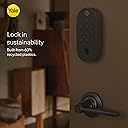
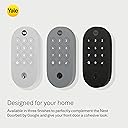
The Yale Matte Black Keyed Deadbolt Smart Lock (YRD510-MT1-BLK) combines ANSI/BHMA Grade 2 security with Google Matter technology for seamless smart home integration. Control your door remotely via the Google Home app or voice commands, create custom entry codes, and enjoy energy-efficient performance with Matter over Thread. Designed for easy installation on most US and Canadian doors, it features a fingerprint-resistant matte black keypad and is made with 60% recycled plastic, blending security, style, and sustainability.


| ASIN | B0BCGH7D8H |
| Additional Features | Auto-Lock, Back-Lit Keypad, Weather Resistant |
| Best Sellers Rank | #29,377 in Tools & Home Improvement ( See Top 100 in Tools & Home Improvement ) #148 in Deadbolts |
| Brand | Yale |
| Brand Name | Yale |
| Color | Matte Black |
| Connectivity Protocol | Bluetooth, Matter |
| Control Method | App, Push Button, Voice |
| Controller Type | Android, iOS |
| Customer Reviews | 3.5 out of 5 stars 268 Reviews |
| Included Components | 4 AA Batteries, Deadbolt, Installation Manual, Key, Mounting Hardware, Strike Plate, Yale DoorSense, Yale Smart Lock with Matter |
| Item Dimensions | 0.88 x 2.56 x 5.38 inches |
| Item Type Name | Smart Deadbolt Lock with Keypad |
| Item Weight | 3 pounds |
| Item dimensions L x W x H | 0.88 x 2.56 x 5.38 inches |
| Lock Type | Deadbolt, Keypad |
| Manufacturer | Yale |
| Manufacturer Part Number | YRD510-MT1-BLK |
| Material | Metal |
| Material Type | Metal |
| Model Name | Yale Smart Lock with Google Matter - Black |
| Model Number | YRD510-MT1-BLK |
| Number of Items | 1 |
| Number of Packs | 1 |
| Number of Pieces | 1 |
| Recommended Uses For Product | External Door |
| Shape | Oval |
| Special Feature | Auto-Lock , Back-Lit Keypad, Weather Resistant |
| Style Name | Keypad |
| UPC | 081023117371 |
| Unit Count | 1 Count |
R**R
A great smart lock with Matter
Exactly what I needed! I'm writing my own Home Smart Devices software and wanted to add a smart lock to my devices. This Yale Matter smart lock was perfect. I have the Yale lock assigned to my own Matter controller that I created. No Google Home, Applet, etc. required. I can add users from within my software, change PIN, etc. And I don't require a PIN to unlock the lock when pressing the unlock button. The Yale lock made it easy to control and access things like the battery level, etc. I like it so much I bought my second Yale Lock with Matter. I'm hoping I can get this software polished enough to offer it up for others to use too.
A**Z
One of the most frustrating purchases I have ever made — borderline scam
One of the most frustrating purchases I have ever made — borderline scam I am extremely disappointed with the Yale Smart Lock YRD 510. Nowhere — and I mean nowhere — in the product description, packaging, official website, or marketing material does it clearly state that this lock is only functional in the USA and Canada. I purchased this lock in good faith to install it in my country house in Colombia, assuming that a global brand like Yale would offer a product compatible with standard smart-home ecosystems worldwide. That assumption was a mistake. After installation, it has been completely impossible to pair the lock with Google Home or even properly set it up using Yale’s own application. The lock simply does not work as advertised outside the US/Canada region. This critical limitation is not disclosed in any clear or visible way before purchase. Had this restriction been clearly stated, I would never have bought this product. Selling a “smart” device that silently fails outside two countries — without explicit warnings — is unacceptable. At this price point, this feels misleading at best and an absolute rip-off at worst. Yale should either: • Clearly label this product as US/Canada only, or • Ensure true international compatibility for a brand that claims global reach. As it stands, I feel deceived and regret this purchase entirely. I do not recommend this lock to anyone outside the United States or Canada.
A**T
Easy setup, flawless operation
Highly recommended.When I set the lock up using the Yale app, I would recommend this since it is simpler than the Matter app setup. Using the Yale app was the breakthrough I needed (I struggled to understand the "Matter" application but I get it now - its advantage is for long-distance (beyond bluetooth range) remote access and logging information). I have not had to use the keypad, which was my goal since my previous keypad was scratched and unusable. (This keypad appears to be more durable.) The lock unlocks when I approach the door and all programmed functions operate flawlessly. The app has an intuitive interface making it easy to allow lock access for co-owners or guests with programmable expiration features. The app for my Apple watch installed automatically and I appreciated having it when my watch settings unexpectedly changed following an IOS update. Finally, the hardware has improved from earlier versions (less bulk, better finish, and the included lock position sensor to provide usage data). Overall, I'm impressed and satisfied.
A**S
Works well as my first smart lock
Installation is pretty straight forward. Build quality seems sturdy enough with a nice heft to it. It took me 40 mins to go step by step using the video instructions with verifying measurements for the door. Set up with the Google Home app could've been better. There's no prompt during set up to set your pin. If you try to use the Google Home app to unlock it before setting a pin, you’ll be greeted with an incorrect pin message. Too many failed attempts and it’ll temporarily lock you out. You’ll have to find the pin settings in the “Household & Access” part of the settings for the lock. You’ll be able to set a pin for each user of your household. Google dropped the ball on this crucial step of the process. Once the pin is set, it gives you an option to have Google Home app save the pin so you don’t have to enter it every time you unlock it from the app. Unfortunately, this did not work initially. I had to clear storage data from the Google Home app, uninstalled and reinstalled the app on my phone to get it to remember the pin. It comes with an Doorsense sensor to place next to the lock and lets you know if the door in the open or closed position in the Home app. There's no option for Doorsense notifications that I found, but it’s good to see whether the door is left open at a glance. Doorsense does require calibration which takes about 5 mins. There's 4 options for locking/unlocking. You can use a physical key (1 included), pin entry on the keypad, Google Home app, or using a voice command with the Google assistant. The assistant does ask you to say the pin out loud to lock/unlock, so keep that in mind if you have people around. Other features include auto locking after a certain period of time (currently only 30 secs to 2 mins) and a vacation mode, which disables the keypad when you're away. Since this is a Google Home preferred product, this will not work with the Yale app if you're using it with Google Home. Overall it's a good entry level Lock. I wished more options were included such as location proximity that locks or unlocks based on your location. Funny enough, that feature is advertised in the manual. Maybe in a future update. Once you get this lock up and running as it should, it’s great. Just make sure whatever Matter hub you’re using is within range. I’m currently using a Google 4K TV streamer as the matter hub.
K**D
Great Lock
This lock has been great so far. I have had numerous problems with other Smart locks, including the Level lock. They frequently stop working, get disconnected, jam, etc. This lock was easy to calibrate and has been working great. The color options are also great, and the White is nice because it blends into my door and still has the satin silver accents to match the other door hardware. My only issue was that it was a bit difficult to set up with Google Home. I had to try a few times before I got it to work. Pro tip: if the lock is giving you issues at first, reduce how tight the screws are. Sometimes tightening it too much causes it to jam.
D**T
USE APPLE HOME APP- NOT GOOGLE!! BEWARE IOS USERS!
While installation was easy- set up was absolutely atrocious with the google home app. I also had no idea I needed a “hub” so the app wouldn’t let me get past a certain point to pair with out a google hub. I went and got one at Best Buy. The problems only continued - I was unable to set any PIN codes within the app to start using the lock- the app also was throwing errors when I’d try to assign a code. I finally broke down and called Yale. They asked me if I had an Apple TV as you can use an Apple TV instead since this device supports matter- I tried going the Apple ecosystem and around the google home app. I used apples home app within the iPhone, put the lock in pair mode and sure enough it immediately synched. So turns out I didn’t need to buy a nest hub. Look at what devices support matter chances are you probably already own one. The google home app is awful. I really am so shocked at how bad it is in terms of set up. Although this is adverted as with google home you don’t have to use it. If you have a newer Apple TV 4K and this lock- use the Apple home app instead. I’m not joking when I say this took me over 8 hours of syncing, buying hubs, factory resets - awful experience. Google should be ashamed of this product. Again— go the Apple route as stated above. This was almost an entire day. Here I was worried about the install with the door but the tech behind it was frustrating. If I had just known I could have used apples home app with my Apple TV .. I would have had this synched in 8 min flat.
C**E
Never Yale again
Awful product. Fiddly to install and then it WOULD NOT pair/connect. And this is my second attempt using a Yale lock. Hours and hours troubleshooting with Yale and Google home. Too bad I can't make a claim for payment of minimum wage to me! Bought a Schlage Encode, it was easily installed and it paired easily. Never Yale. Never again.
B**L
Great smart lock, and Matter support makes them easy to integrate
I had the original Yale Matter locks and it was a fine product but this version is much improved. First it's much more compact than the original, which is great. The indoor side with a battery pack is much, much smaller than the first one and the back just pops off so we're replacing the batteries is super easy. I also love the fact that it comes in multiple colors. I have white doors and these white locks integrate really nicely with my color scheme. Set up was also a breeze. I pulled the old ones out and I had these installed and connected to my Matter hub in about ten minutes. They also seem to be more responsive. I use SmartThings and when I tap the button in th app these seem to lock and unlock very quickly whereas the original took couple seconds or more to respond. Just got them installed so I'll have to live with them for a bit but so far I'm impressed and very happy I upgraded. Would recommend!
R**O
Matter hub is needed and lacking auto unlock if Google Home app is used
The lock itself works perfectly and is easy to install on the door replacing existing deadbolt. It's reliable and responsive if you set it up properly. However, the Google Home app setup can be confusing. If you’re tech savvy, you’ll manage. If not, this may be frustrating, good luck. Before buying, make sure you understand what you’re getting into. First, you need to understand what is "Matter over Thread", do some reading before clicking the buy button. Additional hardware required: You’ll need a Matter hub. In my case, I had to spend an extra $100 on a Google TV 4K streamer, which I’m not even using with a TV. It’s dedicated purely as a Matter hub. Because the lock requires line of sight for reliable performance, I mounted the streamer on the wall using a Spigen silicone wall mount (about $30), double sided tape came with unit, no drilling needed. Unless your home has already setup with a strong Matter mesh such as using existing Samsung SmartThings or Apple TV, that's another story. Matter hub setup: Before mounting Google TV Streamer on the wall, you need to do the initial setup using your TV and the remote. To eliminate issues, use the same Google account as your Google Home app to setup, also make sure you are on the same WIFI you plan to use the Yale Matter lock. App choice matters: You must choose between the Yale app and the Google Home app. There’s a warning on Yale app saying you can only use one (either Yale app or Google Home app), as switching may erase your data, although I read on Internet you can try having both app to access some rich features only on Yale app (such as auto unlock), but I didn't try. The lock has two small QR codes stickers: one on the left for the Yale app and one on the right for Matter (Google Home). I chose Google Home since I have Google Nest cams and doorbell. Setup process tips: Follow the paper instructions carefully. Scan the large QR code on the instruction sheet first. During setup, press and hold the gear button until the bolt extends. This puts the lock into Bluetooth pairing mode. Then, use the small QR code on the side of the lock to add it to Google Home app. At this point, you should be able to add the lock to Google Home app, if not, check 3 things. Move your Matter hub closer to the lock, it needs line of sight. Also you need to check if you have IPV6 enabled on the WIFI (LAN) of your wireless AP/Router. For this to work, you don't have to enable IPV6 on WAN, I never had that. Matter hub needs to communicate with Yale lock using IPV6 Thread mesh on your WIFI, so Client Isolation setting on your AP/Router must be disabled, also mDNS (device discovery) has to be enabled. Keep this in mind. Finally, check if your Google TV Streamer and your Google Home app login account, use the same account. What not to expect: Google Home app supports auto lock after x seconds, but NOT AUTO UNLOCK when you approach the door. Maybe you can try setting up presence sensing automation script, but I heard you still need to click, it's not total hands-free. Unlike August locks, you’ll need to unlock using a PIN on the keypad or using your Google Home app. The Nest doorbell/lock experience is DOWNGRADED and NOT the same as the "Yale x Nest" lock (which announced discontinued in 2025). With this Yale Matter lock, when someone rings the doorbell, you won’t get a quick unlock prompt. It requires extra clicking to unlock the door. Important things to know: You can usually lock or unlock with a single tap in Google Home app without entering a PIN (if saved). Sometimes you’ll see “Hold to unlock” and be required to enter a PIN. Even worse, your lock shows "Offline" from time to time. The most annoying part is that, Yale and Google don't tell you why, there is no log and no detailed error messages. Now, I am telling you how to fix it. This typically happens when the connection falls back to Bluetooth instead of using the Matter hub. This fallback can occur if your hub doesn’t have line of sight to the lock, perhaps too far away or Matter hub has poor WiFi. Proper hub placement and strong WiFi are critical for consistent performance. The optional magnetic door sensor works, but it requires calibration. In the Google Home app, you can only see whether the door is open or closed. It’s somewhat limited in usefulness because it doesn’t support notifications. Unlike Nest cameras, you won’t get alerts if garage door is left open for a certain period of time. Hopefully, this is a feature Google Home will add in the future. The Yale Matter lock may not be the most feature-rich or the most innovative option (such as Apple Home Key support) compared to some other brands on the market. However, the main reason I chose this is because of privacy and digital security. Many smart lock brands rely on cloud infrastructure that may raise concerns (backdoor and delay security patches) such as Eufy or Aqara. Even well known brands like Philips (Dutch company) have smart lock app developed and hosted in China using Tencent Cloud. If privacy, security and ecosystem trust are important to you, sticking with established platforms like Google and Yale may offer more peace of mind. Google Home app always get updated with security patches and they keep rolling out new features from time to time. If you have Nest cameras and doorbell, it's handy because you only need one app. For my use case, it works flawlessly. I installed this lock on my elderly parents’ front door and use it to manage access remotely. It allows me to let in approved strangers, such as PSWs, house keeping ladies, etc. without needing to be there in person.
A**A
Necesita un Google nest hub para conectarse
No funciona con Alexa , Google home, Apple , necesitas comprar un Google nest hub (en teoría porque no lo he probado pero eso dice la inteligencia artificial ) que tiene un costo de alrededor de $3000 lo cual encarece tu chapa . En la aplicación de yale , no se puede asociar en México , USA , Canadá y un montón de países , no es una compra práctica
E**E
Lock does not work!
The lock doesn’t work. I cannot pair it with anything as it’s saying serial number not recognised by Yale app, Google home and also Apple home. Do not buy this!
H**R
No funciona en Mexico
Simplemente no funciona, requieres si o si dispositivos google home (al parecer nest o google wifi) que ni siquiera se venden en México... perdida de dinero
B**R
Doesn't work with Google home
It doesn't work with Google home, at least not for me. Given the mixed reviews there seems to be a software issue with certain phones. Wasted so much time troubleshooting. But it works with Yale access app.
Trustpilot
1 week ago
2 days ago