Desertcart purchases this item on your behalf and handles shipping, customs, and support to Netherlands.
🚀 Own Your Data, Streamline Your Life — The Ultimate NAS for Creators & Power Users
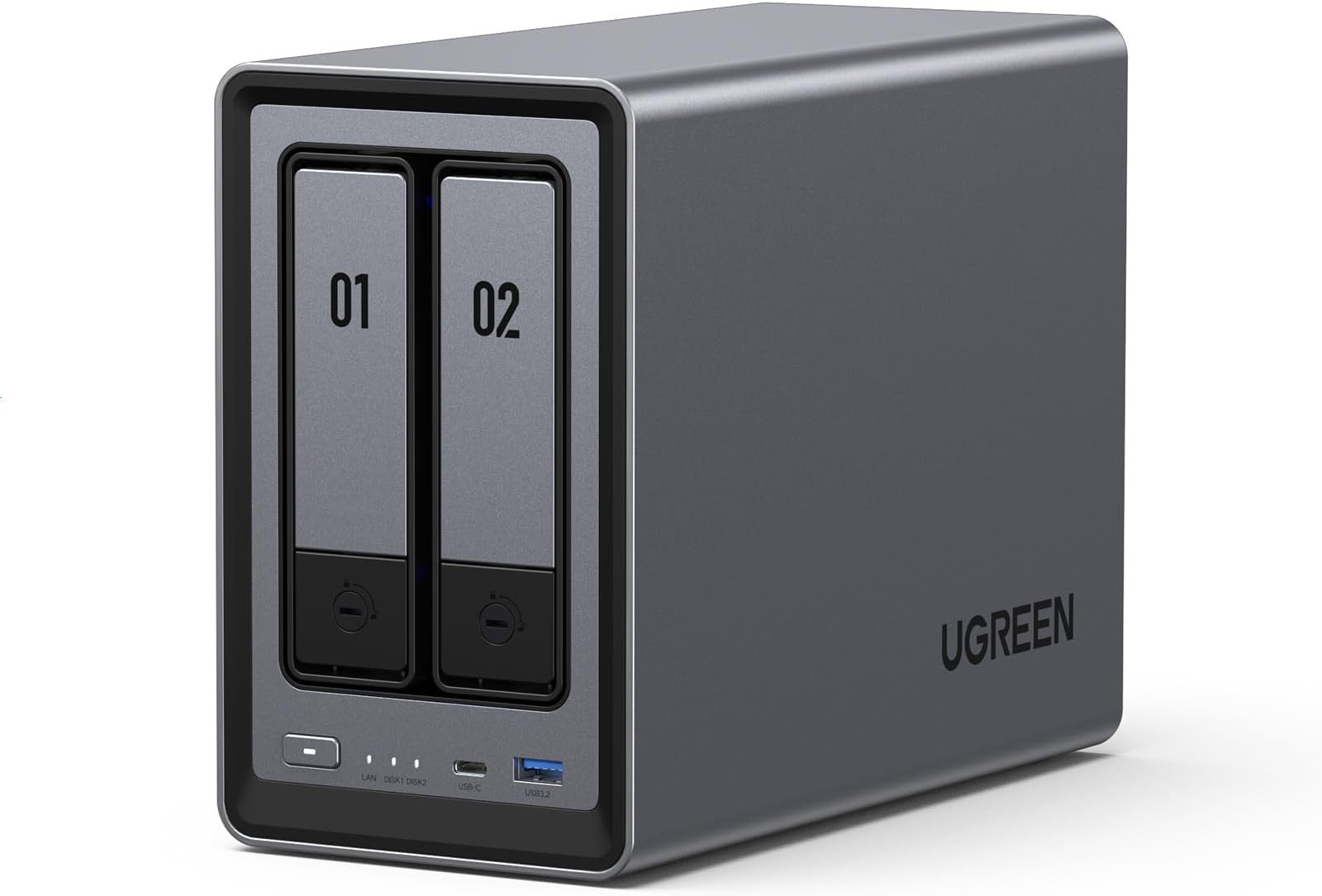
The UGREEN NAS DXP2800 is a high-performance 2-bay network-attached storage device designed for advanced home users, remote workers, and creators. Featuring an Intel N100 quad-core CPU, 8GB DDR5 RAM, and 2.5GbE networking, it supports up to 80TB of storage with dual M.2 NVMe SSD slots for blazing speeds. Its AI-powered photo management and home surveillance capabilities make it a centralized hub for media, backups, and smart home security. Compatible across multiple platforms, it offers a private, scalable, and secure cloud solution without recurring fees. HDDs and SSDs are sold separately.


| ASIN | B0D22HBFK1 |
| GTIN (Global Trade Identification Number) | 06941876239641 |
| HDD容量 | 80 TB |
| おすすめ度 | 5つ星のうち4.5 882 レビュー |
| カラー | グレー |
| デジタルストレージの容量の測定単位 | 80 TB |
| デジタルストレージ容量 | 80 TB |
| データ転送速度 | 334 メガビット毎秒 |
| ハードウェアインターフェイス | SATA 6.0 Gb/s, USB, イーサネット |
| ハードウェアプラットフォーム | 86個。 |
| ハードディスク 種類 | メカニカルハードデイスク |
| ハードディスクのフォームファクター | 3.5 インチ |
| ハードディスクインターフェイス | Serial ATA |
| ハードディスクフォームファクタ | 3.5 インチ |
| ハードディスク回転数(rpm) | 7200 RPM |
| フォームファクター | ATX |
| ブランド | UGREEN |
| ブランド名 | UGREEN |
| メーカー名 | UGREEN GROUP LIMITED |
| メーカー型番 | DXP2800 2-Bay |
| ユニット数 | 1.0 個 |
| 互換デバイス | デスクトップ |
| 付属品総数 | 1 |
| 取り付けのタイプ | 内蔵ハードドライブ |
| 同梱商品 | USBケーブル, クイックスタートガイド, スクリュードライバーキット, 電源アダプター |
| 商品の用途 | ビジネス、マルチメディア、パーソナル、ゲーム。 |
| 商品の追加説明1 | LEDライト, 耐衝撃, 防塵 |
| 商品の重量 | 2.58 キログラム |
| 商品外装素材 | プラスチック |
| 型番 | DXP2800 2-Bay |
| 接続技術 | SATA |
| 特徴 | LEDライト, 耐衝撃, 防塵 |
| 読み込み速度 | 312 メガビット毎秒 |
| 通信・接続インターフェース | SATA |
A**T
Excelente, pero…!
Excelente para uso doméstico. Solo no adquirir los discos duros!!! Son muy frágiles para ser enviados por mensajería. Dos veces devolví los discos duros externos y mejor compré personalmente en tienda!
K**G
Perfect for my uses
This NAS is a game changer for anyone who wants to build their own cloud storage or media server. First, I want to point out that I'm not an expert when it comes to NAS devices or Docker. I used AI a lot to help set up my Docker containers, but it wasn't always correct, so I still had to do quite a bit of troubleshooting. That's not a problem with the NAS, it's just something to keep in mind if you're new to Docker or self hosting. This NAS can hold two HDDs and two SSDs. I have mine set up with the SSDs running the operating system and apps, while the HDDs store my media and larger files. So far, this setup has worked great. The operating system is very user friendly and easy to navigate. UGREEN includes quite a few built in apps, including Photos and Theater, along with several others. The Photos app is very similar to Google Photos and does a great job organizing pictures. It also has AI features that can recognize faces and locations. The Theater app works fine, but if you're planning to build a media server, I think you're better off installing Jellyfin through Docker. It offers more features and worked better for me. The build quality is excellent. The unit feels solid, cooling has not been an issue, and performance has been great. I upgraded from a WD My Cloud EX2, and the difference is huge. Everything is much faster, there are more features, and it's much more flexible. For the most part, the NAS is quiet. I don't spend much time in the room where it's located, so I can't really say how loud it gets under a heavy workload, but during normal use I barely notice it. I honestly haven't found any major downsides yet. I've only owned one other NAS, the WD My Cloud EX2, so I can't compare it to a lot of other brands. If you're coming from a WD My Cloud though, this is a huge upgrade and well worth the money. I would definitely recommend it to anyone looking for their first NAS or anyone wanting to upgrade from an older model.
M**E
Replaces Google Photos and paid cloud storage. Only you see your saved data, without monthly fees.
An easy way to back up music, photos, videos and documents. I've got 2 x 8TB NAS HDD installed in RAID 0 configuration for a total of 8TB of redundant storage. Remember the 3,2,1 rule of data backup: have 3 copies of your data. Two copies on a NAS drive that's mirrored onto a second drive, and one copy of your data stored on a flash drive or external hard drive. If one drive fails (in RAID 0), you have a mirror copy on the other HDD. Replace the failed HDD and your data will automatically be mirrored to the new drive for seamless data storage. One data backup is really no data backup, if that device fails. This unit also functions extremely well as a media server. It has an HDMI output to watch backed up videos or images directly on your TV. The app controls volume, subtitles, playback speed, etc. With the app, you can access your stored media anywhere, as long as there's wifi or a data connection, and you can select the resolution of playback via the app if your network is slow, or you want to save on data fees from your cellphone provider. Forget Google photos and the monthly fees, and gain the confidence that only you can see your saved data. Automatically backs up pictures and media when you connect to your home wifi, or through your data connection on your smartphone if you don't care about using the data. It's crazy that people trust their private data storage with big corporations. The device setup and drive installation is easy. The NAS unit consumes very little power and has active fan cooling. You can setup your very own personal cloud storage without the attached fees. You could select a different RAID configurations to have greater storage capacity, but RAID 0 is by far the safest. If you can't afford two NAS HDDs at first, the unit works fine with just one HDD. The internal RAM and CPU are more than powerful enough to handle your data. Watch stored videos on your connected TV or smartphone through the Ugreen app. The unit has USBA and USBC data ports. I would highly recommend this NAS drive to anyone wanting to break free of the monthly fees for Google Photos or cloud storage. Know EXACTLY where your data is saved. Make the investment. You won't regret it!
M**L
The Best Investment for Apple Users! A Game-Changer for Cloud Storage
I’ve been following the UGREEN NASync series since its Kickstarter days, and as soon as it hit Amazon Canada, I didn't hesitate. After nearly a year of daily use, I can confidently say this is one of the best tech investments I’ve ever made. The "Apple Tax" Solution: The real value of this NAS became clear when I bought my new MacBook. As many know, upgrading internal storage on a Mac is incredibly expensive. By using the DXP2800 as my personal cloud, I was able to buy the base model laptop and store all my heavy files, photos, and media on the NAS. I can access everything from anywhere in the world, saving me hundreds of dollars in hardware upgrades. Performance & Reliability: Even with the stock 8GB DDR5 RAM (I haven't felt the need to upgrade yet), the Intel N100 CPU handles everything smoothly. I primarily use it for: Automatic Photo Backups: It syncs my phone photos instantly, allowing me to keep my phone storage free. Media Streaming: It serves as a flawless movie hub for my home. Fast Connectivity: The 2.5GbE port is a must-have. A great pro-tip: if you need even more speed, you can use one of the USB ports for an extra ethernet adapter! Software & Build: UGREEN has been very consistent with software updates. The app is intuitive and improves every month. The build quality is premium and feels like it was designed to last. It’s quiet, efficient, and fits perfectly on my desk. Pros: Significant long-term savings on phone/laptop storage. Easy M.2 NVMe and RAM upgrade paths. Solid 2.5GbE performance out of the box. Consistent software improvements. Cons: As a "light to moderate" user, I haven't found any real flaws. It does exactly what it promises. Final Verdict: If you want to own your data and stop paying for monthly cloud subscriptions or overpriced hardware storage upgrades, this is the way to go. Highly recommended for families and small teams!
A**A
Buen equipo
Excelente marca muy intuitiva para los que no sabemos mucho de servidores y lo que me gustó que es muy potente con la configuración de memorias que trae por defecto solo hay que buscar un buen disco duro que sea rápido
Trustpilot
4 days ago
3 days ago