🚀 Power Your Productivity with Triple 4K Brilliance!
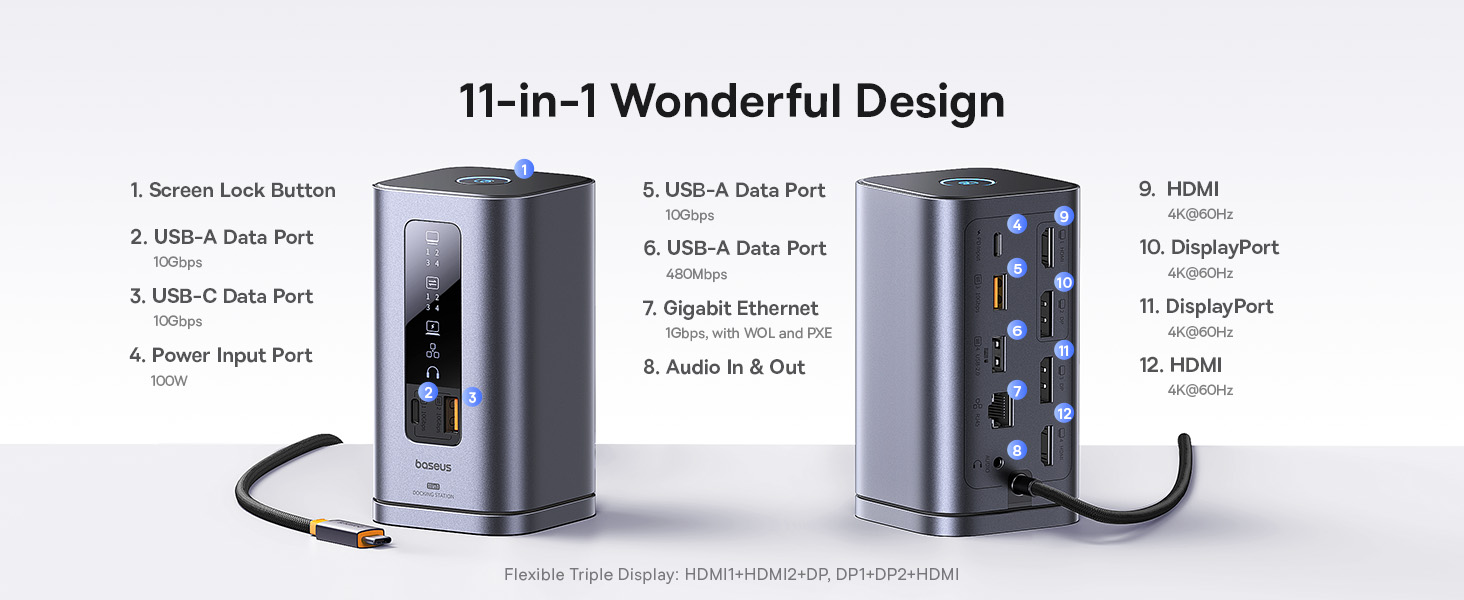
The Baseus 11-in-1 Laptop Docking Station is a premium USB-C hub designed for professionals craving ultimate connectivity. It supports triple 4K displays via HDMI and DisplayPort, offers ultra-fast 10Gbps USB data transfer, and delivers up to 100W power delivery with an included GaN charger. Its sleek upright design with LED indicators and a screen-lock button streamlines your workspace while ensuring security. Compatible across major laptop brands, this dock is a top-rated, award-nominated solution trusted by industry experts.


| ASIN | B0F634PRY7 |
| Best Sellers Rank | #640 in Computers & Accessories ( See Top 100 in Computers & Accessories ) #79 in Laptop Docking Stations |
| Brand | Baseus |
| Customer Reviews | 4.2 4.2 out of 5 stars (5,520) |
| Date First Available | April 1, 2025 |
| Item Dimensions LxWxH | 6.61 x 2.76 x 9.53 inches |
| Item Weight | 2.23 pounds |
| Item model number | Spacemate RD1 11-in-1(WIN) |
| Manufacturer | Baseus |
| Product Dimensions | 6.61 x 2.76 x 9.53 inches |
A**R
[UPDATE: it works now!]. worked like a dream ... for a week.
read the UPDATE at the bottom for the happy ending... ************* INITAL REVIEW: BaseUS for Mac, running on a 2024 M4 Pro Max. Initially, it worked beautifully ... for a week. I have an M4 mac and after installing the driver, it displayed to the laptop display and 2 separate monitors via HDMI. Also plugged in where a webcam to the USB-A, an ethernet cable, and power to the incoming USB-C port. I used the macbook's power supply to power the hub. I was happy. For a week. I then left on a trip and returned a week later. Pluged my macbook back in and ... nothing on either external monitor. I tried: restarting the macbook restarting the monitors restarting the BaseUS (well, unplugging it, unplugging everything from it, waiting a minute, and plugging it back in) using only one monitor (each external in turn) I can validate the cables are working by plugging them directly into the macbook. I can also validate the monitors are working by plugging them directly into the macbook via hdmi. When both monitors are connected to the hub, the front panel lights show the external monitors are connected. The indicator lights also show when the webcam is connected, as well as power. and ethernet. The webcam is recognized and usable by the macbook. Only the displays are buggered. I tried doing the "press option while in the display control panel" trick to force the macbook to recognize the monitors. It did not work. As a final step, I tried with the 3rd HDMI port. (previously I'd only used 1 and 2) Connecting the HDMI to the third port, video appeared on an external monitor. (this, of course, does not work for me since I need two external monitors) I honestly don't remember if I'd only ever used ports 1 and 2, but it seems perhaps both of those ports are bad. Poor soldering and the physical ports are buggered? The only pressure on them is from HDMI cables coming out the back and draping down to where they enter cable management ... so really, no pressure at all. While I've seen multiple reviews regarding the company being very responsive, this is for work and I need a replacement soonest. I'll be ordering another and returning this one to Amazon. Hopefully it was a one-off and the next will work. I'll update this review once the next one arrives and I can determine if it works past a week. I'm leaving two stars instead of one because hey...at least the other features still work. ¯\_(ツ)_/¯ *********************************** UPDATE: (spoiler: it was not a hardware problem. And they have *AMAZING* customer service!!) I received my second unit only to find ... it was doing exactly the same thing as the one I already had! So something was up. I'd gotten rid of the previous one's packaging because, hey, it was working great and if something did go wrong, I was sure the manual was available in a pdf somewhere. (sneak peek .. it was/is. I just somehow missed it) When it stopped working I searched high and low to find a manual. The BASEUS site had a page for the model, but somehow I completely missed the manual. <facepalm> Find it here: https://support.baseus.com/product/452/Spacemate-Series-11-in-1-(MAC)-Docking-Station?n=mxobwklbv9 I opened up the manual (printed with probably 6 point type ferchrissakes .. my eyes are OLD, people!) with the new unit I received and - there it was - the note that the unit needed a driver and the magic link to find it. (here it is for some poor soul coming after me: https://www.synaptics.com/products/displaylink-graphics/downloads ). I downloaded the installer and re-ran it only to be kindly informed "You've already got the newest version." Oh. Right. Ok, I knew that. So what's the problem?! I can't believe I got *another* unit that happened to be borked in exactly the same way that my current one is. (when the current one initially worked great) Now here's the rub. These aren't exactly "drivers" ... it's a driver set/program pack. When you install the driver it launches the controller program and everything works splendidly. However, if you subsequently reboot, the multi monitor feature of the hub stops working UNTIL you relaunch the program - DisplayLink Manager. DisplayLink Manager DOES have an option to relaunch at system restart. But was that enabled by default on install? (you can guess). So from where I sat, the unit just ... stopped working. And nowhere - I mean *NOWHERE* online did I find someone saying "oh, yeah. You not only need those third party drivers - the controller needs to be running or things won't work". I was expecting a driver to be, well, a driver. Something that, once installed, I didn't have to think about again. But even THAT could be forgiven if there had been documentation somewhere that detailed what needed to be done. Even the manual simply had a reference to the driver and nothing more. An additional line saying "make sure you set DisplayLink Manager to launch automatically after login" would have saved no end of trouble. Or even better - a big 'ol notification at the end of the install. In the end, the hardware is fine. I was going to update the review, but only bump it to four stars. But I'm putting it at 5. Why? Because, for everything else that went wrong and frustrating and caused me to burn time ... the company saw this review, contacted me, and offered to refund the purchase price. No hassle, no argument, no nothing. Just "we're sorry it caused you inconvenience". I can forgive an *awful* lot for proactive, respectful customer service like that. So five stars it is.
M**K
Perfect travel docking station. USB-C powered
This Baseus Docking Station makes quickly changing multiple screens between my work and personal laptops very quick and easy. This dock contains 3 HDMI, 2 USB 3.2 (one in front and one in back), 2 regular USB, 1 RJ45 (ethernet cable), 1 headphone jack and 2 USB-C (one for power in back and one for data in front) ports. There is also a lock desktop button on the top of the dock and I really like that in the front you can see exactly what is connected by a showing of lights. The clever thing about this dock is that it is powered using a USB-C cable. This is great because that is 1 less power cable/adapter I have to remember if I travel. Even though it leaves 1 less available USB-C port, between the dock and my laptop itself there are still plenty.
K**R
Great docking station
I really like this docking station. It is functioning much better than some of our previous stations. The charging function is super nice. It is great that I don't have to pull out a power cord every time I sit down. Just plug in the USB-C and it is go time.
D**N
Convenient and functional
This docking station works as advertised, and doesn't require much space. You can fix it to the desk and use the magnet base when yiu need to move temporarily. I use the power adopter recommended (100W type C) and have two monitors connected. Actually have two of them running six months and ao far if cool not issues with compatibility and I dont need to use my laptop charger 😀
C**N
Great Dock, Just Runs a Little Warm
This docking station has been a fantastic addition to my workspace, finally letting me drive three external monitors from my MacBook without any flickering or lag. The port selection is excellent, with fast 10Gbps USB speeds for my external SSD and reliable Gigabit Ethernet. It delivers plenty of power to keep my laptop charged, effectively turning my setup into a one-cable solution. The only reason I'm not giving it a full five stars is that the unit can get quite warm to the touch when it's under a heavy load with all ports in use. It hasn't caused any performance issues, but it's definitely noticeable. Otherwise, it’s a powerful and reliable hub that does exactly what it promises.
J**N
Didn't work
Tried two of these. Plugged two HDMI monitors into a MacBook Pro M1 an d a MacBook Air M4. Only 1 monitor would work. I have a cheap unit that only provides two HDMI ports, and that has worked fine for years. Not sure what the issue with this is, as the reviews claim lots of success. It has not worked for me - with two attempts.
M**H
Sleek Design with Powerful Connectivity
As someone drawn to clean lines and modern design, the Baseus SpaceMate Docking Station stands out. The upright form with magnetic base keeps my desk uncluttered, while the LED screen makes it easy to confirm connections at a glance. The triple 4K display support has been excellent for multitasking, and transfer speeds through the 10Gbps ports are impressively fast. Charging through USB-C keeps my laptop powered without issue. The only thing to note is that you’ll need to install the DisplayLink driver before using the HDMI ports. Overall, a stylish and capable hub that complements a minimal workspace.
M**T
Almost Perfect—Just Needs a Little More Junk in the Trunk
The Baseus Laptop Docking Station is like the James Bond of hubs—sleek, stylish, and knows how to multitask. It fits beautifully on my desk, doesn’t hog space, and connects my laptop to multiple 34-inch monitors without breaking a sweat. For something this compact, it handles a big workload like a pro. That said, it does have a bit of a diva side. With multiple or heavy-duty cables plugged in, it tends to slide around like it’s trying to escape. A lower center of gravity or some extra grip would go a long way. And while it does a lot, don’t expect lightning-fast phone charging—this station’s clearly career-focused, not in the business of juicing up your devices in record time. Still, for the price and performance, it’s a strong contender. Just know you might need to rein it in when the cables start dancing.
M**L
Bra grej, funkar som den ska!
P**O
Ich habe mir den Baseus USB-C Hub 7-in-1 Adapter zugelegt, um die Anschlussmöglichkeiten meines Laptops zu erweitern, und bin sehr zufrieden mit dieser Entscheidung. Verpackung & Lieferung: Der Hub wurde schnell geliefert und war sicher verpackt. Schon beim Auspacken machte das Gerät einen hochwertigen Eindruck. Design & Verarbeitung: Das kompakte und schlanke Design passt perfekt zu meinem Laptop. Das Gehäuse fühlt sich robust an und die Anschlüsse sitzen fest, ohne zu wackeln. Funktionalität: Besonders beeindruckt hat mich der 4K@60Hz HDMI-Anschluss, der gestochen scharfe Bilder auf meinem externen Monitor liefert. Die drei USB-A 3.0 Ports ermöglichen schnelle Datenübertragungen, und der SD/TF-Kartenleser ist ideal für den Import von Fotos. Zudem unterstützt der 100W Power Delivery (PD) Port das gleichzeitige Laden meines Laptops während der Nutzung anderer Funktionen. Kompatibilität: Ich nutze den Hub mit meinem MacBook und hatte keinerlei Kompatibilitätsprobleme. Alle angeschlossenen Geräte wurden sofort erkannt und funktionierten einwandfrei. Fazit: Der Baseus USB-C Hub 7-in-1 Adapter ist ein zuverlässiges und vielseitiges Zubehör für alle, die ihre Anschlussmöglichkeiten erweitern möchten. Klare Kaufempfehlung für alle Nutzer:innen, die Wert auf Qualität und Funktionalität legen!
T**.
Llegó bien.
R**D
USB C Hub Adapter sehr gut alles bestens. Baseus ist eine gute Firma.
A**R
Excelente! Funciona muito bem com o Macbook. Material de ótima qualidade também. Tem 7 entradas, USB-A, USB-C, HDMI, e cartões de memória.
Trustpilot
1 month ago
3 days ago