Desertcart purchases this item on your behalf and handles shipping, customs, and support to Netherlands.
๐ Capture Every Mile, Day or Night โ Your Ultimate Roadside Witness!
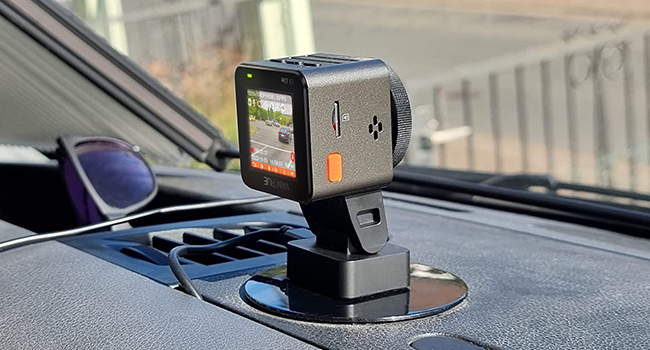
The Vantrue E1 Lite is a compact, Full HD 1080p dash cam featuring a 160-degree wide-angle lens, HDR night vision with an F1.8 aperture, built-in GPS for speed and location tracking, hands-free voice control, and a 24-hour parking mode with collision detection. Designed for seamless installation and discreet mounting, it offers reliable, high-quality video evidence to protect you on every journey.


| ASIN | B0BGGGG4VW |
| Item model number | VT-F010044-VC-IN |
| Manufacturer | VANTRUE |
| Product Dimensions | 8 x 14 x 6 cm; 390 g |
M**.
highly recommendable
top camera < small and soldi and reliable function , easy to use and connect , nice and small
J**E
Great Quality, Many Improvements On Previous Design
I have liked the camera so far. I think they made several improvements on their previous model that I used, although some may not be preferred. TLDR; I like it a lot, I would change some things, but they are mostly personal preferences over general user needs. Pros: Camera and microphone quality are great. The initial startup of the camera is a lot more helpful. When you disconnect the camera from the mount, it saves before powering off, so you do not lose the last recorded video. Video clips made are now 5 minutes instead of 20 minutes, and saved to a different folder with a button press or voice command, which makes finding saved moments the intended way easier. With my last camera I would end recordings early to make them easier to distinguish. The buttons are easier to use when driving. It is easier to remove from the mount, since it is just a slide on with no latch mechanism. I wonder if this will hold in an accident, but I am not worried about losing the previous video from it losing power, so it is not a big deal. The phone app is convenient, and I like that the computer app is not needed for convenient video access with computer. Support on Facebook is still very helpful and will do their best to assist you with whatever the issue is. The manual is clearer on some things I asked support about previously, such as if 1 or 5 is the high for the G-Sensor. Cons: In order to get direct file access connecting to the computer, you need to use the USB-C cable that comes with the camera. I just happened to have 3 other cables for other devices, all of which were just black cables, so that was confusing for a bit. I would recommend adding some color to it somewhere to make it more identifiable. Event folder videos will overwrite each other if there is no open recording space. I can see why this is a thing, but also it is risky if you do not move videos off frequently. This is somewhat mitigated by the format reminder, which is new. The camera does not swivel at all. As a plus, you don't have to worry about the angle changing when hitting a button or a bump or another car, but also you cannot change it if something is happening just off camera. It is easy to accidentally set the time wrong when you first set it up without realizing that it uses military time, ie 6PM = 18. It is an embarrassing mistake, but it took me a while to figure out why my dates and times were off. Both: They recommend using one of their SD cards. I used the one I already had with no issues, although I would like if there were an option to add it to the Amazon order, since I didn't realize about theirs until reading the manual. The manual is a bit long, but well written for the most part. The only big change I would make is adding the voice command list in the manual. It references the voice commands, but the list of commands may only be found in the camera menu itself. I figure this may be because the camera may update in the future, and the manual if saved would not update. It includes and adhesive piece for attaching the camera mount, which is good and I did not have it come loose at all. However, wherever you put it is where it will stay indefinitely, so decide well. There are two though, so you get a redo. I would have preferred if the mount were two pieces, so that you may have more than one mount location, but that would also be more expensive. The voice commands are a great addition, since it lets you control the camera with less risk of affecting your driving. Most worked for me and both the camera and remote microphones pick up well, however I could not get a couple voice commands to work ever. Not sure if it is an accent or enunciation thing, but I never got them to work.
L**Z
Small dash camera with a great power
Vatrue E1 Dash Camera supports wifi connection to the Vantrue mobile app and the camera also allows voice control. Vantrue is taking seriourly the dashcam market. The camera package feels nice. I added an unbox video for the content: - The Vantrue E1 dashcam - A magnetic mount. Very convinient if you want to take the camera with you and connect it to your PC. - A 12V car charger - A USB C cable. It's mainly use for data transfer to your PC. - 2 Electrostatic stickers. Apply the sticker in your widshield and the use fix the camera mount. Don't try to fix the camera mount directly to the widshield. - A wireless remote control. It's has the option to mute/unmute audio, lock the video, and take a picture if you hold the lock video button. Also we may found in the box: - Some warning stickers: Protected by Vantrue - A soft cloth. Convienient at the time before fix the electrostatic sticker in the windshield. - A crowbar to hide the cable. - The user manual. Please, read it first! My experience with the E1 camera. What I liked: - Small size. It doesn't block your field vision and you get less distracted. You can use a voice command 'Turn off screen' to turn the screen off and reduce any kind of distraction. - Wifi connection with the Vantrue App. It's the best option to look at the videos and play them using your mobile. It's easy to use and the app do not ask to create an account to use this feature. - Night videos are amazing. This is one of the strong features. - The remote control. You can stick it in your steerwheel and have the most common function you may need when you are driving: mute the camera, lock the video or take a picture. - Voice control feature. Do not requiere a voice activation command, only say "take photo" and it will perform the operation. The commands I have tested with are: "Lock video", "take photo", " turn off screen", " mute camera" The voice command are available also if you have muted the camera. What I think Vantru should do better: - Give a list of the possible voice command. It has been a discovering process found the commands. Who you should get this camera? If you are in a marked looking a camera with a high resolution: (2592 x 1944P 30 FPS), a wide angle of 160 degrees, a nice quality night videos f1.8 plus the extra of having a voice control, a remote control and wifi app, Vantrue E1 offers a good product.
K**N
Nice camera, adhesive not good
The video quality is great. A little difficult to figure out at first but once I did it was all good. The only complaint I have is the adhesive only lasted a few weeks. It ripped, it literally fell off the window and was ripped when we got the first hot day. No pressure on it or anything. Had to use a replacement adhesive to put the camera back up.
P**S
Best dashcam Iโve purchased so far.
Best dashcam Iโve gotten so far. Iโve used others they have overheated or just stopped working. Especially like the voice control part no reason to take your eyes off the road.
Trustpilot
2 months ago
5 days ago