
DOWNLOAD THE APP


Customer Services
Copyright © 2025 Desertcart Holdings Limited
DOWNLOAD THE APP
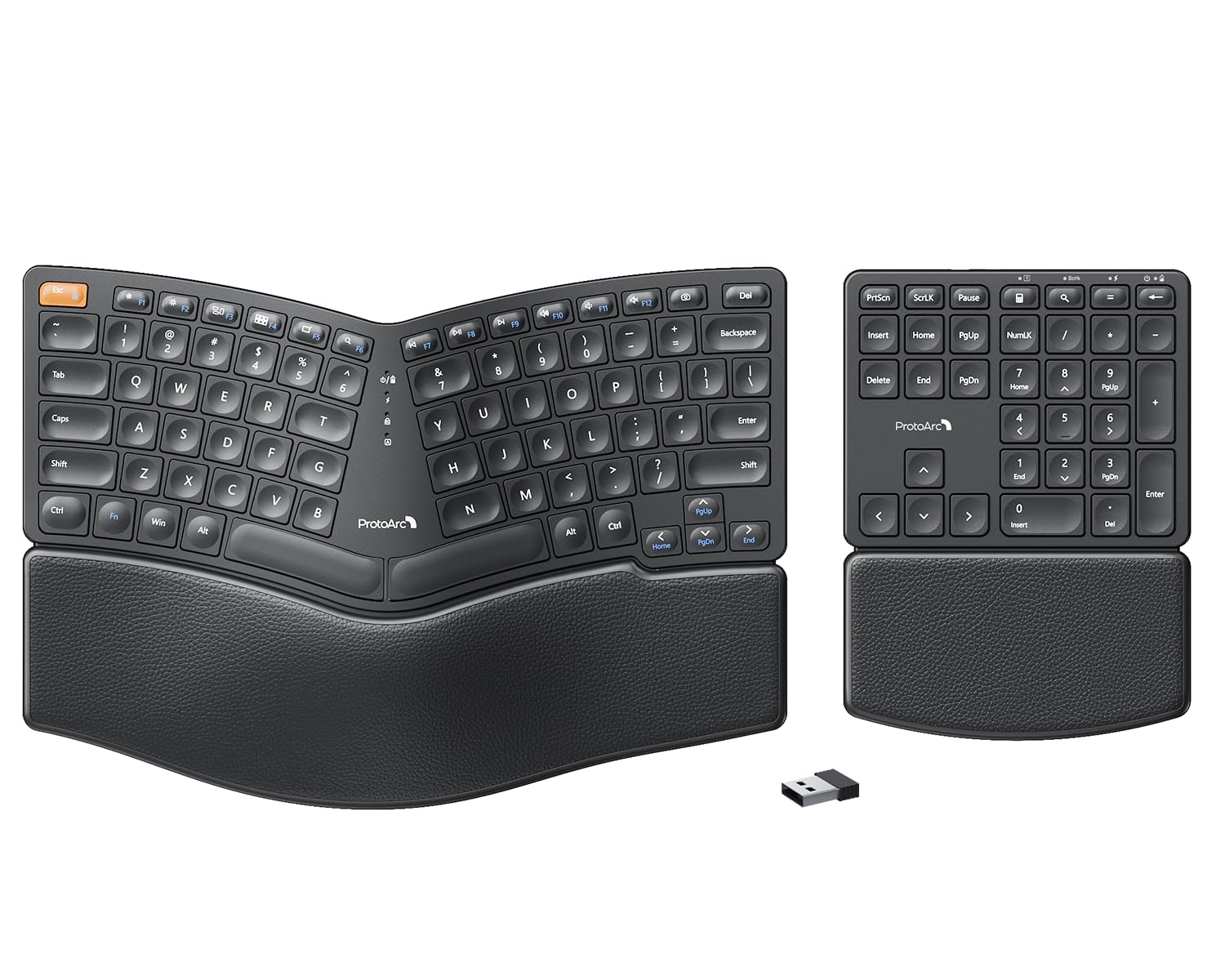


⌨️ Elevate your typing game with ergonomic precision and wireless freedom!
The ProtoArc EK04 Wireless Ergonomic Keyboard features a split curved design with scooped scissors-switch keys to promote natural wrist positioning and reduce fatigue. It includes a separate numeric keypad for customizable workspace layouts and a hard leather wrist rest for durable support. Powered by a rechargeable lithium battery offering up to 250 hours standby via USB-C charging, it connects effortlessly through a 2.4GHz wireless USB receiver compatible with Windows PCs, delivering a premium typing experience without the clutter of cables or batteries.


| ASIN | B0DQ8BG849 |
| Best Sellers Rank | #276 in Computer Keyboards |
| Customer Reviews | 4.3 4.3 out of 5 stars (364) |
| Date First Available | January 14, 2025 |
| Item Weight | 3.04 pounds |
| Manufacturer | ProtoArc |
| Package Dimensions | 14.57 x 10.28 x 2.13 inches |
S**R
Long battery life, good quality, good feel
Works great, love that it’s rechargeable rather than using standard batteries. Been using it for two weeks (at least 100 hours spent), and it’s still running on my first charging session from when I opened it! Love the number pad separated so I can put my mouse where I need it. Key spacing was a little different from my last ergonomic keyboard, but I adjusted pretty easily and it’s not a big deal. Quality is good. Feeling on my palms/wrists is good. No issues at all with connectivity. Very happy with this purchase and would buy again!
K**N
Great, replaced Microsoft natural 4000
Great key placement, performance, noise. I used a Microsoft ergonomic natural 4000 for over 10 years (still going strong), but I decided to try a separate numpad. I'm loving it! The negative tilt is just right. The size is awesome. I think I am even typing better without all that extra keyboard! I can place the numpad on the other side of my mouse, and I am so much more comfortable. The numpad is not perfect for me: it's a bit wide, doesn't have 00 key, backspace or tab key. I'm still enjoying it though. The wrist pad is hard, but the leather is comfortable. I've developed a little callous on my right palm as the Microsoft has a cushioned (but worn and peeling vinyl) pad. Overall, really enjoying this keyboard! (35 hours a week)
M**Y
Great Value, Great Ergonomics
There are a lot of things to love about this keyboard and I'm extremely happy with my purchase after 2 weeks of using it non-stop. I purchased this keyboard as a replacement for an older Microsoft split keyboard. Pros: Setup was fast and easy and I was connected and using it in less than 1 minute. I'm using the USB dongle and my Thinkpad recognized the new hardware instantly. The height of the keyboard and the angle of the split feel just right. As a touch-typer I appreciate that almost every key I need (see comments below re: Home and End) is within easy reach and there is zero learning curve. The keys themselves have a scooped, low profile and are easy to press, with just the right amount of feedback. The leather wrist pad feels so much better against my skin than the weird fabric material found on many wrist rests. I don't notice it even after 8 hours of typing. The tiny indicator lights for function lock and caps lock are well placed and easy to see at a quick glance. Recharging is quick and easy with the usb c connection. Cons: There are only two things I would change that would make this the perfect keyboard. First, although the keys on this keyboard are low profile and have great action and feedback, they are comparatively loud. There is a lot of noise when I'm typing quickly and I miss being able to type quietly on conference calls. I find that I have to mute myself on meetings now whenever I'm taking notes because the sound of my typing is picked up by my microphone now. It's a bummer but not a deal breaker. Second, I'd like to see one more column of keys to the left of the main keyboard containing the Home, End, Insert and Scroll Lock buttons. Currently, those buttons can be found on the separate number keypad. But I use the Home and End keys all the time in everyday typing and I'm finding that I have to keep the number pad immediately next to the main keypad all the times so I can use them. It really defeats the purpose of having a separate number pad if I can't set it aside to save space until I need it. All in all this is a great keyboard and I'm pleased with the comfort and ease of use. It's a good value for the money and I would buy again.
D**N
This is good. Super useful moving the Num pad out of the way
This is the most comfortable keyboard I've ever used. I also have ProtoArcs mouse which is amazing. Typing is smooth, fast typing, easy to travel with, an most importantly, it's strong.
L**R
Working out so far
Working out so far. Not nearly as ergonomic as I'd like. I would really like i the keyboard to be split into three pieces, out at least to have the split going down the middle of the letters. I do like that the numpad is separate, I can use it when I need it and set it aside. I would like if the letters were split as well. I also prefer wired, but I'm also not paying exorbitant amounts for a keyboard. No way in hell in paying $100+ for a keyboard. Anyways this is working out so far, the jets make some noise but it's not ridiculously loud. The actuating distance is a bit short, there are still mistyped characters from neighboring keys. This keyboard can take some force on the keys, so you don't have to be super light on the keys. I found using a little more force helped with accuracy.
K**K
ProtoArc ROCKS!
This ProtoArc keyboard was purchased so that I could include it with one of my laptops. I love ergonomic keyboards and as such, have some difficulty typing on standard keyboards. A full-size ergonomic keyboard, like the Logitech K860 this is replacing, is just too big to fit in most laptop bags. This, being a split design fixes that issue while still being comfortable to type on. ProtoArc has definitely filled the gap Logitech has left by overcharging for their products. This keyboard is light, quite easy to type on, and just looks good. My one and only complaint is that ProtoArc doesn't yet have the equivalent of Logitech's Unifying Receivers — you need a separate USB dongle for each device, or just pair the keyboard and mouse via Bluetooth and not worry.
N**Y
Easy to use
I bought this to use for work and I absolutely love it! The noise level is very low and that’s the best part. I like that there is a separate number pad. It feels so comfortable on wrist. It is well worth the money, rechargeable, and there’s an off switch so you can save on battery power! It also auto shuts off when you don’t use it for a while as a means to save on battery power. When it shuts off there’s no lang between reconnecting when you hit a button! The set up was very easy and it looks good!
A**R
Awesome product
If always used the Microsoft sculpt but since they no longer make them this has been a life saver!
V**A
Je regrette d'avoir passé toutes ces années sans. Bien qu'une adaptation pour réapprendre à taper est nécessaire, la position des mains est tellement plus naturelle et cela enlève beaucoup d'inconfort et de tension. De plus, avec le clavier numérique séparé (que je me sert constamment) je peux le placer de l'autre côté de ma souris et c'est merveilleux. Ce n'est plus a moi de me déplacer pour travailler confortablement. Aucune difficulté a faire fonctionner ça a été du "plug and Play", la batterie sans fil dure très longtemps. Et évidemment l'ergonomie est respectée. Un investissement qui vaut la peine sans aucun doute pour ma part.
M**L
Ergonomics: 10/10 Portability: 10/10 Modularity: 10/10 MAC/PC compatibility: 10/10 Connectivity: 7/10 - no bluetooth connection unlike the EK01, this needs dongle connection Button feel: 7/10 - the EK01 feels so much smoother to press. This feels like a silicon-based keyboard, leaving it feel a bit cheap. Why did I choose it over the EK01? Because the first 4 of the metrics mattered more to me. If you have table room to spare and don't mind the size, EK01 is definitely the better choice. I, on the other hand, am used to TKL keyboards, so I prefer this one despite the drawbacks. You just got to find what works for you.
D**G
Finally, real engineering thinking went into an ergonomic keyboard. I love this. It's the right price. The reason I bought this one was the price, but I was hoping for the best. The simple design logic of splitting the main keyboard from the extended numbers pad is brilliant. It seems so obvious. First of all, people hunting for ergo keyboards also use keyboard trays to make sure their elbows at the right height -- and most of these aren't that wide. This design solves the problem by splitting off the numbers pad -- now you can move it in when you need it without forcing your mouse hand far to the right in an bad ergonomic zone. Simple, right? So why don't more keyboard makers do it? I bought their matching "handshake" mouse as well (the vertical kind -- it's very good too.) Is it ergonomic? It is for my hands (normal sized male hands). I saw one person complain about keyboard click, but I don't notice anything. I have mechanical keyboards, which are far noisier. This one is slightly clickier than a logitech, but way quieter than a mechanical. It's perfect for me. The keyboard layout is good, except I'm a Mac user, so the Windows key I had to train myself to think of it as the Mac Command key -- I just had to force myself to use it. It's counter-intuitive. I like that it's rechargeable on USBC -- charged quickly, and havent' had to recharge so far in heavy use (I type about 10,000 words a day). Highly recommended. I like the faux leather hand rest better than a spongy memory foam style (like Logitech's ergo keyboard, which I have as well -- those foam ones are softer but get dirty from sweat, cat hair (in my case, since my cat likes to sleep on keyboards), etc. I like the faux leather feel and style. Thumbs up all round, except the stupid Win Key, and I think it's a mistake to have the power button on the bottom (Most people probably don't turn off keyboards, but I do, otherwise my cat will be sending emails to people.) .
A**E
It’s the perfect keyboard… it’s ergonomic and perfect for a small space! Wireless and the keys make a delightful clicking sound. I love this keyboard 🙂
C**R
Just got this today. Looking to replace my Logitech K860 ergo keyboard. I am specifically interested in the sepratae number pad so i can grab my mouse a bit more easily. I really like that aspect of it. They keyboard is a great size for me. For some reason, I am finding more typos, but I think I will get used to the spacing soon enough. A couple of gripes. 1) its a bit louder; 2) it has no bluetooth and is not compabitalb with other protoarc devices. I also bought a mouse but I have to use both dongles, which is pretty annoying, I might return it. I like the smaller footprint compared to my logitech but I prefer the logitech typing experience.
Trustpilot
2 weeks ago
1 month ago