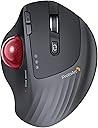
Desertcart purchases this item on your behalf and handles shipping, customs, and support to Netherlands.
🎯 Master precision and comfort with every click—your wrist will thank you!
The ProtoArc EM01 NL Wireless Bluetooth Trackball Mouse features an ergonomic thumb-operated trackball with adjustable angle (0-20°) to reduce wrist strain. It offers 5 DPI sensitivity levels (200-1600) for precise cursor control, a rechargeable 900mAh battery lasting up to one month per charge, and triple wireless connectivity modes (Bluetooth & 2.4G) allowing seamless switching between three devices. Designed for tight workspaces, it supports Windows, Mac, Android, and more, making it a versatile, fatigue-reducing input device for professionals.


| ASIN | B0CWTVY6WQ |
| Antenna Location | Office, Play |
| Are Batteries Included? | No |
| Are Batteries Required | No |
| Battery Average Life | 1 months |
| Best Sellers Rank | 7,630 in Computers & Accessories ( See Top 100 in Computers & Accessories ) 4 in Trackballs |
| Brand | ProtoArc |
| Brand Name | ProtoArc |
| Button Quantity | 8 |
| Colour | Red Roll |
| Compatible Devices | Personal Computer, Tablet, Taptop |
| Connectivity technology | Bluetooth, USB |
| Country of Origin | China |
| Customer Reviews | 4.1 out of 5 stars 3,654 Reviews |
| Enclosure Material | Plastic |
| Hand Orientation | Right |
| Hardware Platform | Personal Computer |
| Included Components | A Type C Charging Cable, A USB Receiver, A User Manual, An Ergonomic Trackball Mouse |
| Item Dimensions L x W | 11L x 7.5W centimetres |
| Item Weight | 0.33 Kilograms |
| Manufacturer | ProtoArc |
| Manufacturer Part Number | Protoarc B0CWTVY6WQ |
| Model Name | EM01 NL |
| Model Number | EM01 NL |
| Mouse Maximum Sensitivity | 1600 Dots per Inch |
| Movement Detection | Trackball |
| Movement detection technology | Trackball |
| Network Connectivity Technology | Bluetooth, USB |
| Number of Batteries | 1 Lithium Ion batteries required. |
| Number of buttons | 8 |
| Operating System | MacOS, iOS, iPadOS, Win, Android |
| Power Source | Battery Powered |
| Product Features | Ergonomic Design, Portable, Rechargeable, Soundless, Wireless |
| Product Finish Type | Smooth |
| Product Warranty | 1 year |
| Range | 10.0 meters |
| Special feature | Ergonomic Design, Portable, Rechargeable, Soundless, Wireless |
| Style Name | Modern |
| Theme | Computer Accessories |
| Unit Count | 1.0 count |
B**9
A really nice comfortable mouse replacement.
I've been using this daily now for almost a year and I find it much more comfortable to use and easier on the wrist than a regular mouse. I bought it to try because I was feeling strain from clicking and holding the middle mouse button whilst also moving the mouse which you have to do a fair bit in Blender and other 3D software. This type of mouse solved my problem as I'm no longer fighting my own grip. It's also a space saver as you no longer need to move the mouse around the desk. This is my first trackball mouse but I quickly adapted and within a couple of days I was just as accurate at moving the ball as I was pointing with a regular mouse. I don't have much to compare to but the build quality feels solid. I've not had any connectivity issues or issues with glide or smoothness, and it works well switching between different devices. The battery lasts a few months between charges and you can use it while charging too. The buttons are all nice to click in both orientations (flat or tilted) and the sensitivity is just set once and forget. You do have to pop the ball out to remove dust occasionally but it appears that's just expected maintenance with this kind of mouse. There's a handy hole you can push something through to help with popping it out. I'm really happy with this purchase and it has become part of my every day setup. I'm not sure how it weighs up against more expensive models but I'm happy enough and not looking to upgrade any time soon.
M**.
Solid Performance, But Falls Short of the MX ERGO
The ProtoArc EM01 NL Wireless Bluetooth Trackball Mouse pairs easily with Windows and looks great next to the ProtoArc keyboard, creating a cohesive, stylish desk setup. The trackball itself isn't bad and provides decent control, but it does require frequent cleaning to maintain a smooth experience. I got it as an alternative to the Logitech MX ERGO, but unfortunately, it doesn't quite match up in terms of precision and overall smoothness. While it’s a good option for basic use, if you’re looking for something that can rival the MX ERGO’s performance, this may not be the best fit. Still, for its price, it’s a solid choice for casual use.
R**T
Great for the price
Very smooth to hold, great design, feel and look. Work great.
R**Y
Matches the device it competes with at a much lower price point
I recently gave up on my Logi MX Ergo trackball for two reasons - the soft touch coating had degraded over time, and I had never found it super comfortable to use. When looking at replacements I saw the ProtoArc trackballs and assumed they would be cheap knock-offs of Logi products. After taking a gamble on the EM01, I was wrong. The EM01 feels well built and the trackball moves VERY smoothly, even smoother than I remember the MX Ergo to be. The click action is a little mushy/quiet but I prefer that as it makes left and right clicking less fatiguing. It also feels like it fits the shape of my hand slightly better than the MX Ergo. It has a soft touch area like the MX Ergo and time will tell if this will share the same fate after a couple of years of use, but with it costing about 40% less than an Ergo I wouldn't mind just buying a replacement when the time comes. Small cons: the scroll wheel and middle button actions feel a touch stiff to me, but not enough to be a deal breaker. Would also have been nice to have an companion app for customising button/key stroke combos or syncing settings across devices, but again not a deal breaker. Very impressed overall.
A**K
Nice trackball, but not perfect
I had high hopes for this trackball and when it arrived, I wasn't dissappointed. The packaging, as one comes to expect with ProtoArc products, was robust with a well made exterior box. Once opened, contained within the box was the usual product, in this case the trackball mouse, an envelope containing warranty and quick reference/installation guide along with a peel off contact sticker to stick on the underside of the mouse, and a further box which contained the 2.4Ghz USB receiver, a more complex manual and a USB lead for charging. As specified within the items description, the trackball has 7 buttons and a mouse wheel, which I presume also acts as a middle mouse button. There's the primary and secondary, back and forward, DPI plus and minus and the connection button which you click to switch between one of 3 connections; 2.4Ghz wireless, BT1 and BT2. Placing the mouse on a smotth table top, the mouse had a tendancy to slightly, very slightly slip such that every few minutes you needed to bring it back to where it started. This I'm sure would easily be solved by a cheap, rubber based mouse mat. The trackball moves smoothly and freely, perhaps a little too freely, but with the numerous DPI settings (5 if I recall, not 3 as it says in the description), more on this later, you can adjust the movement speed to your liking. Personally, I found a mid setting to be the most comfortable and manageable. The primary and secondary buttons are comfortable to click and you can actually "feel" them, rather than "hear" them with very little to no click sound. I'm not one for using back and forward buttons as I prefer the keyboard shortcuts so I can't really comment on them except to say that they also had this definitive "feel" rather than "hear" scenario, although a little less perfected than the primary and secondary buttons. The mouse wheel, which I never tested for "middle mouse button compatability" is nice to the touch although I found it to be a little too far down the mouse (too close to the palm) to be comfortable to use in relation to the primary and secondary buttons. This maybe due to my hand shape, I don't know, but I'm sure, once I'd been using it a while, I wouldn't notice it. Now those pesky little DPI buttons, and I do mean little. The position of them is probablly about right but, as they are so small, with my chubby hands I had a job to feel whether I was clicking the plus or minus one. Sure, there is a light which flashes a set number of times each time you changed DPI setting, but this light, which also acts as a charging indicator which goes out when fully charged, is under the thumb so, unless you move your thumb and/or head, you can't see which setting you're on until the mouse goes shooting off in an arbitrary direction. Now comes the main reason for me only giving this trackball 3 stars. For one, I'm not a pushover so, unless everything is perfect and I can't find any flaws with a product, you wouldn't get 5 stars and on this occasion it falls short of 4. "Don't keep us in suspense, what is the one thing that you're not happy with?" I hear you ask. Well, maybe not, but the thing I have to draw your attention to is the... and we'll be right back after these important messages from our... Whoops! That's for commercials. No, seriously, the one thing I have to draw your attention to, and the only thing I don't think I've covered, is the adjustable angle of the mouse. Firstly, when I read it I thought it was 0 to 20° but it's not. You can set it at 0° or 20° but nothing in between. Apart from this there is no locking mechanism to lock it in place. Rather it relies on, from what I can see look like magnets and, although there is a definite feel to when you change the angle, the angle was being changed much more than I liked. I may be a little heavy handed, but without this locking mechanism, I found I was having to move it to the angle I found most comfortable, which, if I'm honest was 0° so there was no need for this at all for me. Remember, this review is based on my own utilitzation of the **ProtoArc EM01 NL Wireless Bluetooth Trackball Mouse** and your own experiences might be different. Would I recommend the product? That's a difficult one to answer but I would probably say yes; unless you're heavy handed with short and stubby (but not that short and stubby) hands. In this case, I would say you'd have to try it for yourself and see how you get on. As the saying goes, "One man's onions is not necesarily the other man's bird in the bush".
D**E
Logitec MX Ergo Relacement!!
I bought this to replace my Logi Mx Ergo as it was suffering from the dreaded left click fault.. I can honestly say this is a worthy replacement at less than half the cost. truly brilliant Trackball mouse, every ergonomic in fact it feels just like the Logi MX Erco it replaced .. 5 Stars all round and highly recommended
M**Y
Terrible.
I had high hopes for this, but after 2 month's it's crap. The first month it was perfect, then the trackball started to feel notchy, & didn't move smoothly as I did when new. I've tried cleaning it ect, but no joy. This is more of a pain then you'd think it would be. The a few days ago, the scroll wheel started playing up. You'll be scrolling down /up & the wheel would scroll, but nothing on the screen would move. Or it would jump up & down a few lines while slowly scrolling. Very, very annoying. I'm past the returns date, so it's back to logitech
T**T
Good quality and despite what one review video says you can remove the trackball to clean it!
One of the video reviews for this is wrong to say you can't remove the trackball for cleaning - you can - there's a "clean the trackball" photo in the info above and I've done it myself. Absolute plug and play using the dongle. Got used to the 20 degree tilt in a few minutes (and it is very comfortable). Left & right mouse key action is great and very quiet. Unlike the track wheel which is fine but noisy. Also lack of a cut out to store the dongle is a shame but I don't have to travel that much - and I could use the bluetooth option anyway when I do - (hence the 4 stars). DPI buttons also easy to use but I rarely need them. Basically the Logitech MX with a bit more plastic for a lot less money. Unless you really need/want the premium build of the Logitech, this works fine (and I do love my Logitech MX keyboard!)
Z**6
bonne aide quotidienne
avec clavier virtuel car arthrite +++++ aux mains
H**I
コスパを感じる操作性の良さ!
これはとても良い!操作性も扱いやすいし、細かな作業にも気にならない。安価で検討してる方なら、これはお勧めしたい。
G**O
In sostituzione di analogo mouse Logitech Ergo
Ho acquistato questo mouse come alternativa al Logitech Ergo che utilizzo ormai da molti anni. Dopo 3-4 mesi di utilizzo, sono totalmente soddisfatto. Se avete già usato Logitech Ergo, ecco alcune differenze e punti notevoli. a) la base è di plastica (anziché metallica) e si può regolare su due posizioni, quindi risulta più leggero, ma stabile b) il fondo della base è antiscivolo, discreta aderenza c) può essere collegato a 3 diversi apparati via Bluetooth, si cambia rapidamente col bottone selettore, molto comodo d) l'inclinazione della base è minore rispetto ad Ergo, ma ancora comfortevole e) la precisione del puntatore è più che soddisfacente f) si ricarica tramite USB-C, ci vogliono alcune ore - quando è in carica c'è un led rosso acceso, che si spegne a carica completa. Dato il costo significativamente minore, direi che è un ottima alternativa al prodotto Logitech
J**U
Wish I had bought sooner!
Such a game changer for working on my laptop at a small desk! I use this for my online assessments, Word, excel worksheets and it is nice not to have to move my hand all over the mouse pad. Easy with games that don't involve heavy combat and perfect for Baldur's Gate 3 and other turn based fighting. Two months and its still my favourite mouse.
S**S
Good trackball mouse but there are things you should know
TL;DR This is a premium mouse. It is great for CAD and graphic design, and also good for gaming and daily use. I know this is a bit intangible, but, it just feels like a quality mouse in your hand and has all the features you would expect from a premium trackball mouse. So I don't say something is a premium device lightly. Right from the start, before you even touch the mouse you know you're in for something special. There is pride put into even the packaging and presentation as you unbox it. First, I have some big hands, and it fits me well, and my wife has small hands and it works well for her too. the clickable area is about 2 inches long. it hits that sweet spot on size and button postion. The feel of it is great, I like that the angle of the trackball mouse can be changed from 0 to 20 degrees so I can set it to fit more naturally to my hand position when lying across a desk. This leads to less fatigue when using the mouse for extended periods with gameplay or CAD work. The mouse button clicks are nearly silent but with good tactile feedback, so this is great for office work, or at home where you don't want to disturb anyone. this mouse will not wake my wife :) I like that I can use this with multiple devices, using either the included dongle or Bluetooth. You can switch between devices quickly from the top. This is a big deal to me as one of my pet peeves with my other devices is that I ahve to turn it over to switch between devices. Changing the mouse sensitivity / DPI is also done just as easily from the top of the mouse. these two features are productivity multipliers. it says the charge lasts 300 days on Standby. I can't say yet how long a charge lasts in day-to-day use, but it sounds like it will last a long time. They don't say what standby means, does it mean off, or on but not used? I am not worried about it but I do wish the battery lifespan information was more relatable to usage time. Things I wish were better... Now do keep this in mind, I like the trackball mouse, but like anyone, there are always things you wish were different: for me, if it was jsut a little big heavier that would be nice. not that it moves around, i just like a bit more heft to the base. I would have liked it if there was a place to store the dongle on the mouse. it is always nice to ahve a spot for the USB dongle when you are not using it so it doesn't get separated/lost. I wish the angle was adjustable not just 0 and 20 degrees. I wish the mouse worked as a USB mouse also. I wish there was a left-handed version. Although the basic instructions are in all languages, I do think they should have detailed install instructions and images in all languages not just Chinese. None of these things are problems for me, but at least you know before you make a decision. Overall, I find this mouse to be very flexible, allowing me to easily change between 3 devices quickly and change the DPI on the fly. This is a great trackball mouse with features I find indispensable.
Trustpilot
2 months ago
1 month ago