Desertcart purchases this item on your behalf and handles shipping, customs, and support to Netherlands.
⚡ Elevate your game with speed, style, and stamina — the keyboard that keeps up with your grind.
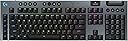
The Logitech G915 X Lightspeed is a premium low-profile wireless mechanical gaming keyboard featuring ultra-fast GL Red linear switches with 1.3mm actuation, tri-mode connectivity (LIGHTSPEED wireless, Bluetooth, USB-C), and up to 36 hours of RGB-backlit battery life. Its sleek aluminum design and durable double-shot PBT keycaps combine style with endurance, while fully programmable keys and advanced media controls empower professional gamers and multitaskers alike.


| ASIN | B0DB1WY5L9 |
| Additional Features | Backlit, Low-Profile Key, Portable, Rechargeable |
| Antenna Location | Gaming, Multimedia, Personal, Programming, Student |
| Best Sellers Rank | #374 in Video Games ( See Top 100 in Video Games ) #33 in PC Gaming Keyboards |
| Brand | Logitech G |
| Built-In Media | G915 X LIGHTSPEED Gaming Keyboard, Lightspeed USB Receiver, USB Extender, USB-C Data /Charging Cable, User Documentation |
| Button Quantity | 104 |
| Color | Black |
| Compatible Devices | Laptop, PC |
| Compatible Operating System Family | MacOS |
| Connectivity Technology | Bluetooth, RF , USB-A |
| Customer Reviews | 3.8 out of 5 stars 164 Reviews |
| Enclosure Material | Aluminum |
| Hand Orientation | Ambidextrous |
| Item Dimensions L x W x H | 19"L x 1"W x 6"H |
| Item Weight | 38 Ounces |
| Keyboard Backlighting Color Support | RGB |
| Keyboard Description | Gaming |
| Keyboard Layout | QWERTY |
| Keyboard Plate Material | Aluminum |
| Manufacturer | Logitech |
| Mfr Part Number | 920-012696 |
| Minimum Required Operating System Version | Windows 10, Windows 11 |
| Model Name | G915X |
| Model Number | 920-012696 |
| Number of Batteries Required | 1 |
| Number of Keys | 121 |
| Number of Sections | 4 |
| Power Source | Battery Powered |
| Recommended Uses For Product | Gaming, Multimedia, Personal, Programming, Student |
| Special Feature | Backlit, Low-Profile Key, Portable, Rechargeable |
| Style Name | Wireless |
| Switch Type | Linear |
| Theme | gaming |
| UPC | 097855195166 |
| Warranty Description | 1 Year Limited Hardware Warranty |
D**O
Premium Low Profile Keyboard Done Right!
The Logitech G915 X Lightspeed TKL is easily one of the best low profile wireless keyboards I’ve used. The build quality feels solid and premium, and the linear low profile switches are smooth, quiet, and extremely responsive. I specifically chose the linear version because I personally dislike loud, clicky keyboards. These switches are much quieter and don’t require much force to actuate, which makes both gaming and long typing sessions far more comfortable. Inputs feel fast and effortless without feeling mushy. Wireless performance is flawless with no noticeable latency, and the TKL layout keeps the setup clean and compact while still feeling functional. Stabilizers are solid, larger keys feel consistent, and the overall typing experience is smooth and precise. Battery life has been excellent, and everything about the keyboard feels refined and well thought out. If you want a premium, low profile wireless keyboard especially if you prefer quiet, easy to actuate linear switches this is absolutely worth it.
A**X
Buyer Beware!! Double Key pressing Issues. Avoid this one.
This was a great keyboard when it was working. Just after 7-8 months of regular usage of office work (not gaming), the keyboard started double key pressing of a random key which someone else has already pointed this out on the other review. I managed to contact Logitech support, and after a few rounds of troubleshooting and testing, I was able to get a replacement. I was happy about this thinking that this was just a fluke. Lo and behold, almost 6 months later, the same issue reoccurred on the new keyboard. I contacted Logitech support again, and explained to them what happened. They understood this is a hardware issue as this has happened before. However, this time, they won't send me another replacement unless I prove to them this was actually happening. They wanted me to attach a video demonstrating the repeating keys issue with the keyboard, while illustrating how the keyboard is connected to the USB port of the PC. Make sure to show both the PC monitor and the keys in one video frame, as you showcase the issue. In the final segment of the video, please ensure that the actual serial number of the device is visible alongside a handwritten ticket number. Wow! What a feat need to achieve!! Since the double pressing issue was happening randomly (more often then it should), it is almost impossible reproduce the issue on cue. It appears that the Logitech support thought I was making this up and not recognizing there is a serious issue of this keyboard model. Also, it appears that Logitech has never resolved this issue. I have a older version G915 which is still working great! (except worn key caps which prompted me to get a newer one). I am actively shopping a new keyboard now since randomly double key pressing will really kill your productivity. IMO, unless Logitech have a newer revision of this keyboard, you should avoid this G915X generation.
J**Y
Excellent Keyboard
Logitech wins again with this wireless keyboard. Feature packed, excellent lighting options and easy to use. The low profile is perfect. The keyboard is also easy to clean. The response time is also excellent. I've never owned a wireless keyboard and thought it might not work well but I was wrong. I would buy this keyboard again but in white if I needed too. The only CON is the the receiver range as all wireless keyboard and mouse has range limits. For some reason when I removed my PC tower from under my desk. The keyboard couldn't find the receiver. So I had to use the receiver extender that it comes with ti make the wireless connection closer to the keyboard. Other than that, it's still an excellent wireless keyboard. Setup was easy and the Linear keys are quiet enough to not disturb anyone when typing.
J**C
Best, overly expensive, keyboard.
I absolutely love this keyboard. No issues, great functionality.
S**H
Great wireless keyboard!
So far, a great wireless keyboard. I purchased this for my fiancé for Valentines day. He was in the market for a new, specifically wireless, keyboard option. He has since loved this one. Keyboard is heavier and more sturdy than I expected. Bluetooth makes the battery last longer but had a slower reaction speed than if he uses the dongle. He has had no specific issues with the battery failing him. If you're looking for a good wireless keyboard, this is a great option!
D**.
Logitech G915 X LIGHTSPEED: Not the G613 Successor I Wanted
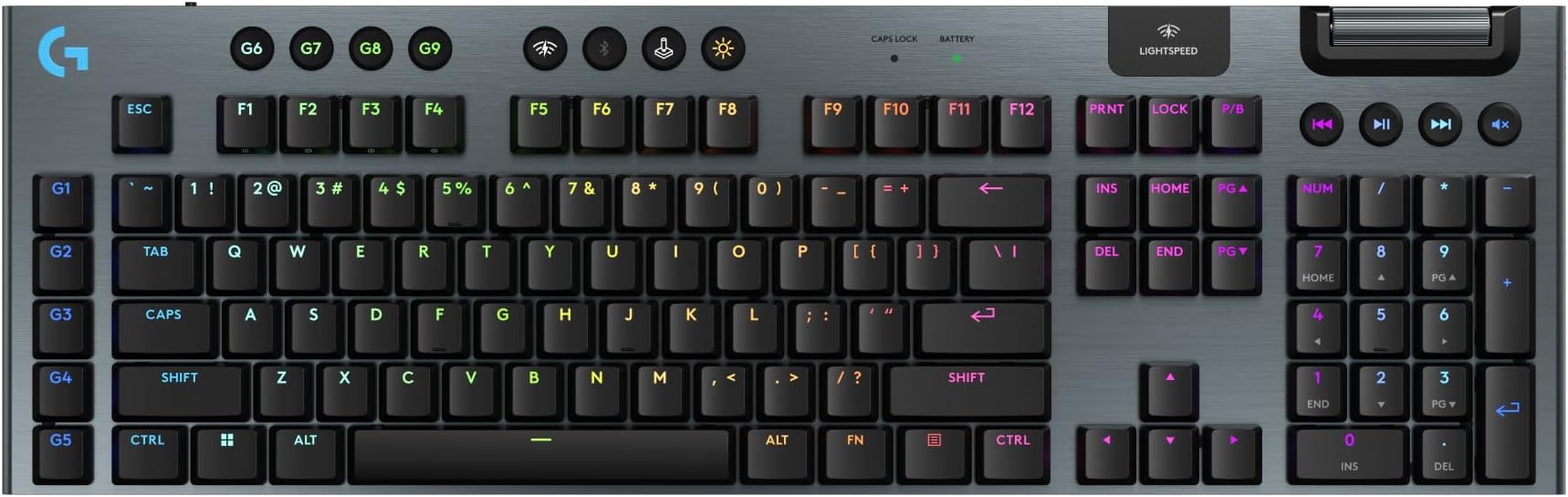
The Logitech G613 was one of the best keyboards I owned. Paired with the G305, it gave me exactly what I wanted for years: strong wireless performance, practical battery life, a full-size layout, no RGB nonsense, and a great price-to-quality ratio. Then I broke the G613. Shortly after, the G305 mouse button finally wore out after millions of clicks. Fair enough. They served me well. I went looking for replacements and found out Logitech had stopped making the G613. What a massive disappointment. I moved to the G915 X LIGHTSPEED with a G309 because I wanted one shared LIGHTSPEED receiver for both keyboard and mouse. On paper, that sounded like the modern version of what I had before. In practice, I hate this keyboard. The G915 X feels like a high-quality toy rather than a professional-grade keyboard. It is well built, but it is not pleasant to type on. The whole design feels like it prioritizes thinness and RGB over practical useage. My main problems: 1. The key labels depend too much on RGB The legends are designed around backlighting. Without RGB, they are harder to read than they should be. That means the keyboard either needs RGB running all the time or needs to stay wired far more often than I expected. The battery life story changes completely when RGB is effectively mandatory. A keyboard that should feel wireless ends up feeling like another device I have to constantly manage. 2. The low-profile layout does not work for me This was my first low-profile keyboard, and I have learned that I hate it. My pinky keeps hitting Caps Lock when I type `A`. That did not happen on the G613. 3. The sound is unpleasant The keys bottom out with a sharp clank. It sounds like banging hollow plastic in the worst possible way: clank, clank, clank. A good keyboard should be as quiet as possible, or at least sound pleasant. This does neither. 4. The feel is mushy and unsatisfying The linear switches and short travel make the board feel soft, shallow, and imprecise. I spent significantly more money and ended up with a typing experience I like far less. What I wanted was: A real G613 successor Full-size layout Normal-height keys No RGB dependency Clear, readable legends Rechargeable AA support Long battery life LIGHTSPEED One receiver shared with the G309 That product does not seem to exist. I have bought a lot of Logitech products over the years, including a Yeti and a Brio. This is the first time I genuinely feel ripped off and disappointed. I also do not understand why so many reviews recommend this board. Go to a physical store and type on it first if this is something you're considering. All of this is subjective, of course. Some people will love the thin profile, RGB, and modern design. I do not. For me, this is an infinitely inferior product to the older G613 in the ways that matter most: comfort, feel, sound, readability, and practical daily use. Thanks, Logitech. I wanted a better version of the G613. Instead, I got a very expensive keyboard with a sealed battery, that sucks to use.
W**T
Overpriced, but almost worth it
Hideously overpriced, but I can't argue with the quality and feature set. Probably not worth it at MSRP, but it doesn't suck.
M**L
Is a good product
Great Product
M**K
Perfect
It’s Logitech! What can I say about the best keyboard out there? Exactly what I want and expect.
J**N
Product Defect
This is my 2nd replacement keyboard from Logitech and after about 1mo, certain keys start to fail by either double tapping or not registering. My 1st one had W and Spacebar issues and this one has A and L issues. It's in my opinion this is an engineering defect.
E**E
Overpriced and unreliable
The fact that you can’t store all of your settings on the onboard memory slots that you can set in freestyle mode is just ridiculous. What’s the point in having on board memory if it doesn’t save all of your settings? Sure you can save key reassignments which is great but custom coloured keys is also important but can only be saved in software mode stupid design, especially for the price of this keyboard I don’t recommend it. For some reason, some of the keys take a few seconds to switch to your custom setup. It's like this product was released in early access mode or something. Oh and one more thing, probably the most annoying thing is the battery charging status light, so incredibly bright it will illuminate a dark room and annoy your eyes while using the keyboard and yet even though almost anything is customizable, you CANNOT DISABLE THE BRIGHT CHARGING LIGHT. Incredibly annoying.
D**N
Too bad had to return due to critical flaws.
First of amazon shipping has become a joke... keyboard was sent in a big box and keyboard banged in the box so hard that it damaged the keyboard. Now the product flaws - keyboard was typing endless spaces when I type a space. May be could be due to the damage I mentioned earlier (could be not) the space bar fit itself is wonky I'm guessing this is QC issue. Critical flaws is the caps indicator displayed elsewhere, May be I could get used to looking at the new spot but the deal breaker is the Num lock, no indicator what so ever unless u have a Logihub software so it displays on ur screen when pressed. I live by numpad, this hinders my flow and can't install logi software on work laptop so each time I had to guess if it's on/off by typing a number key to check. Cant imagine that something this trival is being missed in 2024. Returned. EDIT - it seems to save the numlock setting may be set it once and forget. So i decided to give the replacement a DITL, it gets worse every turn. I could tell lighting on this keyboard is worst implementation. U could have a phd on whales communications, but it takes ages to understand logihub and why it is that way. If you plan on using the onboard memory, be whatever your lighting preference every time keeb goes to sleep it will reset to blue wave. If you have windows 11 ditch the logihub and go with windows dynamic lighting and set to a static color and call it a day. If you are like me stuck with windows 10 n onboard memory, sorry to say that you should build muscle memory of pressing brightness+8/9 to get to your saved lighting preference everytime the keyboard goes to sleep. My mid range 4 yr old steel series keyboard had better onboard effects n user experience.
A**R
Poor quality lettering on keys
Keyboard is less than one year old and the letters have started flaking off of the A, S, & D keys.
Trustpilot
1 week ago
2 weeks ago