Some deliveries may take a little longer than usual due to regional shipping conditions.

DOWNLOAD THE APP


Customer Services
Copyright © 2025 Desertcart Holdings Limited
DOWNLOAD THE APP
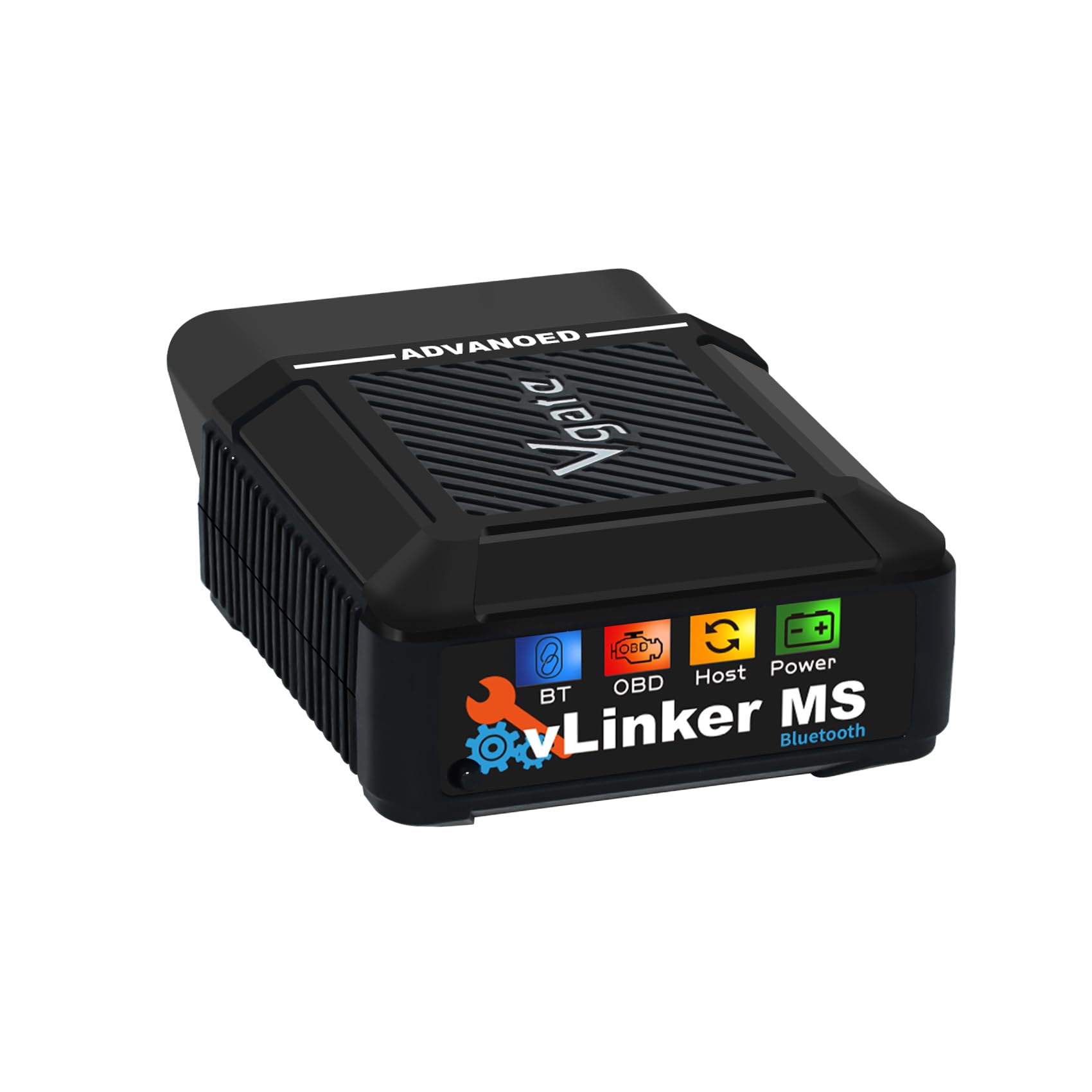
🔍 Diagnose like a pro, drive with confidence!
The V-gate vLinker MS Bluetooth OBD2 Adapter is a cutting-edge diagnostic tool compatible with iOS, Android, and Windows devices. Supporting 5 extra CAN protocols, it offers broad vehicle compatibility including petrol and diesel models from 1996 onward. Featuring ultra-low power consumption with auto sleep mode, it safeguards your car battery while delivering fast 3Mbps Bluetooth data transfer. This Apple MFI certified device enables active ECU testing via smartphone apps, making it an essential tool for DIY mechanics and professionals alike, backed by a 1-year warranty and lifetime firmware updates.


| ASIN | B0DG2T4V3B |
| Best Sellers Rank | #305,747 in Automotive ( See Top 100 in Automotive ) #1,282 in Code Readers & Scan Tools |
| Brand | vLinker |
| Customer Reviews | 4.3 4.3 out of 5 stars (69) |
| Date First Available | September 4, 2024 |
| Item Weight | 1.23 ounces |
| Item model number | vLinker MS - iOS, Android & Windows |
| Language | English |
| Manufacturer | vLinker Direct |
| Manufacturer Part Number | V-gate vLinker MS |
| Model | vLinker MS - iOS, Android & Windows |
| Operating System | iOS,Android & Windows |
| Power Source | Vehicle Powered |
| Product Dimensions | 2.55"L x 1.77"W x 0.98"H |
T**E
Replaces the need for multiple ODB2 cables.
If you have an alfa Romeo Giulia/Stelvio, in order to use the MES tool, you typically need two connectors for the OBD2 port on your car. Basically you use one to connect to the car's computer, then swap out to effect the change of whatever setting you want. PITA really. This vLinker does away with multiple cables. You plug it in, turn on your car, connect it to your laptop's Bluetooth, then run the MES tool. No need to swap cables again to execute the command. Highly recommend.
J**H
Genius OBD II tool
It is a very practical tool, works Well, good quality. My best recommendations.
A**E
It works
Worked better than expected
W**N
Review
As advertised
J**R
Great dongle by VLinker, the MS Bluetooth works great with ForScan, but does not have FEPS abilty
The OBD2 bluetooth dongle by VLinker, the Vlinker MS Bluetooth, is made in PRC (china). This dongle does not have the Ford Programming Voltage (FEPS 18V) ability necessary to work on Ford ECU's with Forscan. The VLinker FS Bluetooth is the dongle with the Ford FEPS ability. I use the VLinker MS dongle with the android version of Forscan with both Ford and Mazda products. This dongle works with Torque Pro as well, and does a great job of reading the various CanBus signals on the Ford and Mazda vehicles I service. This VLinker MS dongle also supports single wire CanBus and chassis CanBus that the FS Bluetooth dongle doesn't support. I found the MS dongle works to read just about any vehicle I connect to with Torque pro. The MS has the widest protocol support for the money in the VLinker lineup. 4 stars
W**R
The latest Bluetooth, iOS MFI upgrade, NOT WORKING WITH DR. PRIUS app
The latest Bluetooth, iOS MFI upgrade, works with DR. PRIUS app (as BLE) Review: My first OBD2 dongle was a WiFi model which worked minimally - the hangup with WiFi OBD2 devices is that they don't hold onto the connection for long so they're best to grab error codes, have a quick look, and then exit. Then I moved on to a Vgate iCar Bluetooth which worked fine with OBD Fusion, Dr. Prius, and a couple of other apps. This Vgate vLinker MS Bluetooth MFI is updated to include the MFI protocol. The Vgate vLinker MS connected easily to my iPhone Bluetooth settings, as a MFI device. I used their firmware upgrade app from the Apple store to check/update the firmware. That worked fine, connected and told me the newest firmware is already on the device. It's good to see the utility works for future enhancements. The apps I use the most are OBD Fusion, Dr. Prius, Car Scanner, and InCarDoc. The only one that would not work is Dr. Prius which is notorious for being picky about OBD2 dongles. I was surprised though because Dr. Prius worked OK with my old Vgate iCar (although the Dr. Prius app crashes all the time). It's a pity because the Dr. Prius app is critical for me, even with its erratic functioning. UPDATE: I contacted Vgate support who replied within a day. They informed me that the Dr. Prius app does not work with MFI devices, and that I should re-configure the vLinker as a BLE device. This is done through their firmware upgrade app - the app has two functions, one to update the firmware and one to reconfigure the vLinker from/to MFI to BLE. It took me several attempts to get the app to properly change the device from MFI to BLE, but stick with it, it will work. Once I reconfigured to BLE, Dr. Prius recognized the vLinker and worked as it should. The other apps work fine once I reconfigured those apps to look for the vLinker as a BLE and no longer MFI. Critically, the BLE protocol devices must NOT be set up in the phone settings, but let the apps find it natively. The vLinker MS is quite a bit longer than the iCar (2.5" vs 1"), so if your OBD2 port is oriented down into the foot pedals area, you may want to get an extension cable (if you keep it installed all the time as I do) so it doesn't get in your way. I used an extension cable to position the vLinker under my center console where it is out of my way and the LEDs are visible. Now that the Dr. Prius app is working as are all my other apps in BLE mode, I'm very satisfied with the device. I only wish vGate did a better job of directing users in the need to change from the default MFI to BLE for some apps. Bottom line, check your app requirements and if they don't spec MFI as an accepted protocol, you may want to change to BLE and see if that works. I'm not sure if the upgrade from my old iCar model to this newer model really "bought" me anything as I had to revert to BLE anyway, but will monitor to see if the Dr. Prius app is more stable with the newer vLinker. ---------------------
J**.
Wasted money
So small. Barely worked.
M**S
Doesn't work for Powerstroke 7.3
After spending 30 minutes downloading app only to find out my vehicle isn't supported! Tried to find out on their website but they have over 13000 ford models. Of course no search box either. After going through about 1000 pages my mind couldn't take it anymore. Maybe it works and maybe it doesn't, just not on Powerstroke 7.3.
R**R
This tool is great! It's a new essential everyday carry for me, and for many reasons! 1. Diagnostic: This tool allows you to scan codes and diagnose problems with your car. So as soon as you get an issue, that issue being a check engine light or a weird noise or behavior, this tool can scan your car for error codes and tell you what's the issue. Some mechanics will charge about $50-100 (CAD) only for scanning for codes, so this tool pays for itself pretty quickly. 2. Live Data: This is my favorite feature. I use the recommended free app "Car Scanner" for this, but any compatible free or paid app will work and may have the same features. But with this app, I can build a live dashboard that displays any data I want, like live fuel consumption data, turbo boost, all temperatures and any metric that one would want to see! And with Apple CarPlay, I can have that data shown on my infotainment screen while driving! This is not only very cool, but also very useful if you have a project car that needs more monitoring. 3. Ease of use: This thing is extremely easy to use. I only plugged it in, maintained the button and voilà, it's ready to connect through the app. And that was the first time I used it, ever since then, I left if plugged in and every time I turn the car on, if I want to use the device, I simply go to the app and click "Connect" and after a few seconds, I'm connected! Leaving it plugged in doesn't drain the battery, I can confirm. The only downside with this is that it's totally reliant on 3rd party apps, and has no app of its own. So hopefully 3rd party apps keep being updated and supported in the future. Overall, would absolutely recommend, this thing is great!
S**1
The V-gate vLinker OBD2 scan tool is a goto for easy personal use when diagnosing or reading car stats. This device connects to your smartphone with ease, while it doesn't have its own app and only operates via 3rd party ones, the 3rd party ones offer many different options for free or paid; there will be one for you! Pros: - Easy to install - Easy to link with your phone - Easy to read status lights - Simple downloading and install of 3rd party app - iOS or Android In the box you get 2 manuals, both easy to read and simple to follow. First will tell you how to connect it to your car, the second will have 3rd party app QR codes to scan. The info page for each 3rd party app after scanning the QR code is fairly detailed, gives a good overview of what it will do and how it connects with screenshots. I tried 3 3rd party apps, each were easy to use, some offered more information for free, others were included. The device connects seamlessly to the app when launched. Connection is a 2 step process, first bluetooth to your phone via setting, then connecting the app when loaded within the app. All 3 3rd party apps I used offered scanning, code reading, and erasing in the FREE version. Some of the free ones I found also offer driving and performance stats with is a nice bonus with the ability to export the data to logs. Con: The only con I have regarding this unit is kind of a double edged sword, where it does not offer its own app and you have to use 3rd parties. However the flipside is that you have the ability of an array of free and paid options for whatever you are looking for. Overall, this is a great tool for home use and substantially cheaper to do your own diagnostic prior to going to a repair shop. For example, you can find out your gas cap is bad without paying $200 at a shop! The apps provide the P code and some will even link it to a web search, however it is easy enough to just search it and generally determine what it could be on your own.
H**E
I have to admit off the start I’m a newbie to this kind of scanner. I have an old school scanner you plug in, scan and it give you a code and that’s it (and you can clear the check engine light). After getting this, its taken me down a rabbit hole I’ve just started exploring. Here is the begging of that journey. It comes with very little instructions other than “pick an app, download, connect and follow instructions”. The first one I picked wanted me to subscribe, I didn’t, couldn’t get anything going, so deleted it. Googled and found out I could use Car Scanner for free on my iPhone. Yay! App was very easy to use. Asked some questions about which car / profile to use, do I want to see MPG or KM per litre, what is the average cost of gas, etc. This thing will be able to monitor and tell me about my gas consumption? Wow! Once all that was that set, it was easy to Bluetooth pair it. I then started playing with the app and was impressed with how it could show me Realtime RPM’s, etc. This was not my old school ODB reader, it was much more. When I ran a scan, I could see it was running over 130 tests. Wow. I did find two faults and with a simple “click”, it searched the internet for explanations of that code. With my old school, I’m provided a code and can search myself, but this was very convenient. Turns out, my car is in good shape. Anyway, be aware of what you are getting. Realize there will be a learning curve and its dependent on an App on your phone but also realize this is next level interaction with your car’s computer and sensors. 5 stars if you really want to be intimate with your car.
D**N
The VLINKER brand V-gate Bluetooth OBD2 automotive scan tool is an increasingly important and necessary device for conducting virtually all types of automotive troubleshooting, maintenance and repairs. Today’s automobiles differ from their predecessors in the relative role and importance of electronic diagnostics to monitor and correct automotive faults and failures. The foundations for the present product under review were laid many decades ago in an era where electronics, circuit boards, and diagnostic modules and other “smart” began to replace traditional direct wiring. The majority of the world’s automotive brands began to develop proprietary codes that effectively made their brand’s dealerships the only place for analysing fault codes and fixes. A class-action lawsuit was instituted on behalf of aftermarket repair shops, the kind of mom-and-pop family operations where most vehicle owners turn to for lower cost repairs when their vehicles are no longer covered by original manufacturer’s warranty. Part of the terms of the settlement was that all automobile manufacturers had to make their specific vehicle fault codes and diagnostic solutions available for all to share. The present product under review is a direct descendent of this landmark ruling and the OBD2 protocols that followed. OBD2 is your vehicle's built-in self-diagnostic system. It is a standardized protocol that allows extraction of diagnostic trouble codes (DTCs) and real-time data via the OBD2 connector. This tool sends 'OBD2 requests' to the car and the car responds with 'OBD2 responses' that can contain e.g. speed, fuel level or Diagnostic Trouble Codes (DTCs) - making it possible to troubleshoot issues faster. The designers have thoughtfully included hacker proof compatibility with Windows, Android and iOS operating systems. This tool should offer diagnostic imaging services for virtually any brand of automobile manufactured after 1996. This unit is the newest model available from this brand that focuses solely on automotive diagnostic technology. The device is compatible with, but does not include, third-party apps, mostly available for free from the usual download sites. This product is a dream device for those who aspire to perform their own vehicle troubleshooting and maintenance activities. It is also useful to double check pre-and post automotive service appointment outcomes for repair work recommended by, and conducted by a service facility to ensure that the shop’s fault diagnosis was accurate and any service work performed was effective in resolving the fault(s) in question. This device has the potential to save unnecessary repairs, evaluate the effectiveness of repair and maintenance work performed, and identify potential vehicle operating faults before they become major safety and expense items. The tool is also an excellent asset to use when evaluating used vehicles before purchasing. The verdict: The VLINKER brand V-gate Bluetooth OBD2 automotive scan tool is an increasingly important and necessary device for conducting virtually all types of automotive troubleshooting, maintenance and repairs. An overall product score of 5/5 is assigned accordingly.
R**Y
This V-gate vLinker MS Bluetooth (MFI) Adapter OBD2 adapter works with any of the ELM compatible software available for free for your phone. It doesn't come with software of its own. This particular one has some faster communications built in, which may be nice if you have graphs or digital gauges that are updating in real time in your app. Using this name brand OBD2 dongle alleviates concerns about plugging a badly made no name OBD2 into your car's computer and causing damage. It works well as a diagnostic scanner and with my Jeep specific app, no problems.
Trustpilot
2 months ago
1 month ago