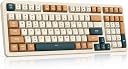
⌨️ Elevate your workspace with the ultimate triple-mode mechanical keyboard — where precision meets freedom!
The Qisan Wireless/Wired Mechanical Keyboard QS400042 is a versatile 100-key (98% layout) mechanical keyboard featuring hot-swappable Gateron Brown switches, triple-mode connectivity (2.4G wireless, Bluetooth, USB-C wired), and rechargeable RGB backlighting. Designed for professionals and gamers alike, it offers universal compatibility across Windows, Mac, and Android devices, combining ergonomic compactness with durable build quality for seamless productivity and immersive gaming.


| ASIN | B0CNKDT2MD |
| Batteries | 1 Lithium Ion batteries required. (included) |
| Best Sellers Rank | #8,839 in Video Games ( See Top 100 in Video Games ) #644 in PC Gaming Keyboards |
| Customer Reviews | 4.3 4.3 out of 5 stars (291) |
| Date First Available | November 17, 2023 |
| Item Weight | 1.67 pounds |
| Item model number | QS400042 |
| Manufacturer | Qisan |
| Product Dimensions | 15.35 x 5.55 x 1.61 inches |
S**Y
Good keyboard, be aware that a 40% takes getting used to for typing / coding.
PROS: * Dedicated arrow and pgup/pgdn keys. (quite rare on 40%'s) I think. * Affordable. Most 40's are in the expensive specialty market. CONS: * Lack of a way to program the key layout. Of course this can be done to some extent in OS software, but there isn't AFAIK a way to move the fn keys as this key does not generate a keycode. * No numpad layer NEUTRAL: *monochrome (blue) LEDs, not RGB. I'm not into a lot of fancy bling on my kbd, so this doesn't bother me at all. TIP: use a typing tutor program or website to learn the symbol keys even if you already know how to touch type. Isolating symbols and getting them into muscle-memory one-by-one really helped me. I am coming from a thinkpad (membrane) keyboard, and do not use this kbd for gaming. The initial appeal of this keyboard was a youTube review stating that 40% keyboards are analogous to using vim as a text editor. I was sick of reaching and missing with my pinky for common coding symbols like quotations, backslash, and pipes (|). I suspect it will take several days to get used to this 40% form factor. I've been using it for a couple of hours, and I am starting to enjoy it a lot more, so I'd suggest giving it some time. That said, I think my preferred layout would be a 60%, with dedicated number keys. None of this is the fault of the keyboard. It's well built and feels good under the fingers. It's my first mechanical, so I can't compare the switches to outemu or cherry, but it feels fine to me. I am not fully used to the split, left-side only space bar (I sometimes try to press space with the left thumb and as a result mywordsruntogether). While I thought I'd enjoy having the parens and brackets on or close to the home row, my first impression is that I don't like chording (pressing fn-shift-key) for shifted symbols. At present the layout is over-using my left hand, because I am using the left thumb for both space and fn. In any case these are all expected growing pains of getting used to a 40% layout, so I'm not holding it against the keyboard. Key programability would be nice on a keyboard like this, and that's the main thing that's missing. Overall, this seems like a perfectly good keyboard for the price, just make sure that what you want is a 40% and that if it's your 1st 40%, give it a couple of days to get used to.
M**.
Fantastic Compact keyboard with top rated switches
I was looking for a small form factor mechanical keyboard and after much searching found this 68-key model. I preferred a black keyboard, and this was one of the few mechanical keyboards in this price range. First, I will also confirm that this model with the black keys has white backlighting, and is not blue and red as shown in the pictures. I actually prefer the white backlighting, so that helped influence my purchase. Now for some quick details: - Small form factor. It's a small compact layout, but still has arrow keys and del, ins, PU, PD. I had a 61-key keyboard for a while, and realized after I didn't have one, that I use the delete key a lot more than I thought. Having to use the function key to initiate a delete command really slowed down my typing. With a separate delete key, this keyboard makes logging into my workstation (ctrl+alt+del) easier, and also doesn't slow me down when typing or working with PDF document mark-ups. Also, it's the perfect size for setting on top of, and replacing the keyboard on my 14" notebook! - Good Construction. The lower part of the case is plastic, but the upper plate is metal (aluminum?) which gives it rigidity and weight. It's not super heavy, but the rubber pads are large enough that the keyboard won't slide around on the desk. The back of the keyboard has 3 dipswitches that change up a few keys, and lock the windows key. I flipped the middle switch, which swaps the location of the Windows key and Fn key, so I can easily hit F1 through F4 with one hand. - GATERON Brown switches. I think this was the only keyboard I found in this price range with Gateron switches. I've had a few mechanical keyboards with various blue and brown switches from 3 different brands. Gateron browns are my favorite out of all I've tried so far. They feel a bit lighter than the "C"-brand browns, but have a bit more of a tactile bump at the start of the keystroke. They feel very smooth and are fast (like red switches), but have that nice little positive bump that you don't get in linear switches like reds & blacks. They don't make a click sound during the keystroke like blue switches, but they do make a lower pitched clacky noise when the key bottoms out the switch. So expect some noise when using this keyboard, but Not as much as with blue switches. Personally, I love it :) - Keycaps. The keycaps are double-injection molded (probably ABS material). They have a light sandblast texture and feel pretty nice actually. The only thing I'm not crazy about is the font used for the letters and numbers. It's a modern typeface That makes some characters look kinda weird (especially the 8 and B). that's really the only thing I'm not crazy about on this keyboard, but it's not a dealbreaker for me. Overall, considering the price, this is a fantastic keyboard!
L**N
Got it for my brother who wanted to try a mechanical keyboard for his home desktop setup. So far so good.
A**.
Great keyboard. Good key switches (however, I did need to put O rings on the key caps to dampen them). Good range of light shows and good range of brightness levels.
E**P
I originally bought the one with blue switches, but that proved to be to noisy for my office mate (wife). This one with the brown switch is quieter and doesn't bother my office mate as much. The keys have a satisfying click and a very comfortable tactile response. You know when the switches have been actuated. My typing speed and accuracy has improved a lot with this keyboard. It takes a bit to get used to having to press the Fn key and the ESC key in order to get the back tick symbol since that symbol shares the ESC and the tilde key. Fortunately I rarely use the back tick character. The build is very sturdy. No wobbling. I can punish this keyboard with heavy key presses and it takes the punishment. The only negative thing I can think of is that the keyboard is pretty tall. The base of the keyboard is about half an inch high, then the keys sit on top of that so that the top of the keys is about an inch or more above the desk. Puts a little bit of strain on my wrist. But using a 3/4 inch thick foam strip as a wrist rest in front of the keyboard raises my wrist high enough so I can type comfortably on this keyboard. I haven't really needed the backlighting, but I occasionally turn it on at night to see the effect. Beautiful.
Trustpilot
2 weeks ago
4 days ago