


Desertcart purchases this item on your behalf and handles shipping, customs, and support to Netherlands.
🚀 Mini PC, Major Impact: Power, Portability & Performance in One
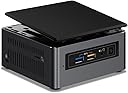
The Intel BOXNUC7I3BNK NUC Kit packs a 7th Gen Intel Core i3-7100U processor with integrated Intel HD Graphics 620 into a compact mini PC. It supports up to 32GB DDR4 RAM, offers flexible storage with M.2 and 2.5" SSD/HDD bays, and features USB 3.1 Gen 2 and DisplayPort via USB-C for high-speed connectivity and 4K output. Ideal for professionals seeking a sleek, portable, and powerful computing solution for multitasking, media streaming, and light server use.


| ASIN | B01N4EOJNG |
| Additional Features | Alcohol-Free |
| Aspect Ratio | Unknown |
| Brand | Intel |
| Built-In Media | NUC |
| CPU Model Number | NUC7i3BNH |
| CPU Model Speed Maximum | 2.4 GHz |
| CPU model | Core i7 |
| CPU speed | 2.4E+3 MHz |
| Color | Black |
| Compatible Devices | Devices with necessary specifications to operate the mini computer case and compatible interface connections |
| Connectivity Technology | यएसबी |
| Cooling Method | Air |
| Customer Reviews | 4.3 out of 5 stars 98 Reviews |
| Display Resolution Maximum | 3840x2160 |
| Display Type | LED |
| Global Trade Identification Number | 00735858320047 |
| Graphics Card Interface | Integrated |
| Graphics Card Ram | 32 GB |
| Graphics Coprocessor | Intel HD Graphics 620 |
| Graphics Description | Integrated |
| Graphics Ram Type | DDR4 SDRAM |
| Graphics card description | Integrated |
| Graphics co-processor | Intel HD Graphics 620 |
| Hard Disk Description | SSD |
| Hard Disk Interface | eSATA |
| Hardware Interface | SATA 6.0 Gb/s |
| Human-Interface Input | TrackPoint pointing device |
| Item Dimensions | 11.5 x 5.1 x 11.1 centimeters |
| Item Type Name | Intel® NUC Kit, NUC7i3BNH |
| Item Weight | 0.6 Pounds |
| Keyboard Layout | QWERTY |
| Manufacturer | Intel |
| Memory Clock Speed | 2133 MHz |
| Memory Slots Available | 2 |
| Memory Speed | 2133 MHz |
| Memory Storage Capacity | 32 GB |
| Model Name | BOXNUC7I3BNH |
| Model Number | BOXNUC7I3BNH |
| Model Year | 2017 |
| Native Resolution | 1920 x 1080 |
| Number of Component Outputs | 1 |
| Operating System | Windows 10 |
| Operating system | Windows 10 |
| Personal Computer Design Type | Mini PC |
| Power Plug Type | No Plug |
| Processor Brand | Intel |
| Processor Count | 2 |
| Processor Series | Core i7 |
| Processor Speed | 2.4E+3 MHz |
| RAM Memory Installed | 32 GB |
| RAM Memory Technology | DRAM |
| RAM Type | DDR4 SDRAM |
| Ram Memory Maximum Size | 32 GB |
| Resolution | 1920 x 1080 |
| Screen Size | 2.5 |
| Speaker Description | integrated stereo speakers |
| Specific Uses For Product | personal, gaming, business |
| Specification Met | PERSONAL_COMPUTER, Wi-Fi, Bluetooth |
| Style Name | Core i3|Tall |
| Total Usb Ports | 1 |
| UPC | 735858320047 |
| Unit Count | 1 Count |
| Video Output | DisplayPort via USB-C |
| Video Output Interface | DisplayPort |
| Video Processor | Intel |
| Wireless Compability | 2.4 GHz Radio Frequency |
| Wireless Network Technology | Wi-Fi |
| Wireless Technology | Bluetooth |
M**O
Schick und schnell aber mit Boot Problem
Erstmal mag ich den nuc sehr ist ein toller Zuspieler für den 4 k fernsehr. Als Mediaplayer und zum Surfen im Netz echt super, endlich mal YouTube ohne Werbung. Jedoch hat das Gerät Probleme beim booten, er fährt nicht richtig runter und hat Probleme beim starten, geht an geht aus. Normal ist das nicht. Mal schauen ich lass mir eine erstatzlieferung kommen. Amazon natürlich top wie immer.
D**N
Great little mini server
I bought this to replace a 2009 iMac I was using as a Web server. I use this as a Web server, a Minecraft server, a samba file server, and for media consumption. I was considering the i5 model but didn’t want to spend $150 more in addition to ram and a keyboard. With that in mind, I can tell you this mini pc is incredible even with an i3. I bought 8 gig (4x2) DDR4 Crucial ram sticks and the Logitech k400 keyboard. I had a spare 256 Crucial SSD which I also installed. This thing is really small, it’s amazing how much computer can be packed in such a small package. It’s just a bit bigger than a wallet. Because it’s so small, it’s easy to move around, for example, going from an office to a living room setup. I installed Ubuntu Mate and It handles my LAMP stack with no problem. I also have a Minecraft server that runs 24/7. I did not see official documentation for running Ubuntu Mate specifically so I had planned to install Linux Mint if I had issues. Fortunately, I’ve had no issues running the OS. All the hardware works. Sound, wifi, Bluetooth, SD card, etc. I was also pleasantly surprised to find this thing had a built-in mic which I didn’t know prior to purchasing. Note that the first thing I did after taking the NUC out the box and setting it up was to flash the latest bios. I did not try installing Windows, but it’s well known these NUCs run Windows pretty good so if you plan to put Windows on, you shouldn’t have issues. For giggles, I even setup a virtual machine running windows to see how well this model would perform. The VM ran pretty much like on my i7 gaming rig. This is the first mini PC I ever bought and I’m quite pleased with it.
N**A
Absolute BEAST
Tried several android boxes and was disappointed in all of them. Sadly, I think android as an OS works very well but the hardware just isn't there. Yes the NUC is significantly more expensive and I didn't have to get a Core i3 model, but it was worth over-doing. It supports 4K@60Hz provided you are using HDMI 2.0 hardware and it plays many different formats of 4K video very well. I can also use my super old Logitech Harmony remote from 2005 on this thing! Still hard to believe how small this thing is. BEAST!
M**A
CÁMARA PIVOTE Y LLANTA
Chidota la recomiendo banda... ya para que trabajen rapidon y vean que Intel rifa califa y sino le creen pues ahí se ven
K**5
色々ありましたが概ね満足しています。
NVMe(M.2SoketのPCIex4-SSD)の小型PCを試したかったので(衝動的に)購入しました。 GW前に購入したのですが、DRAMとNANDの品薄から部品が揃うのに少し時間が掛かりました.... で、早速組み立てると...M.2のSSDが飛びました!! NVMeのSSDは高温になるとの情報から『松原1丁目』を取付 下カバー無しの状態でWin10Pro(x64)をインストール=>成功!! よくよく、このNUCのSATA取付金具の裏を見ると(たぶん)熱伝導のゴムが丁度M.2ソケトに当たるように付いていました。 『ま~寸法的に問題無いかな??」ってことで『松原1丁目』を付けたまま、SATAに2.5"-SSDを付けて、下カバーを取付しましたが... 『少し無理があるかな??』と思いながらネジ締め... <=悲劇の始まり 電源ONすると...「Bootデバイスが無い」旨のエラー発生!!! BIOS画面を見ると、PCIデバイスを認識しない.... 試にTrancendのM.2-SATA-SSDを付けると認識しますね。 こりゃ~M.2 PCIex4-SSDが飛んだかなぁ...仕方が無いので、M.2-PCIex4-SSDをもう1つ購入 たまたまAmazonに1個在庫があったの購入=>明日には届くらしい.... 翌日、無事にNVMe(PCIex4)のSSDを交換=>慎重に組み立てで無事に完成しました。 システム構成 Intel NUC7i3BNH SoDIMM:KOMPUTERBAYのDDR4-2133 16GBx2(購入時\21K=>現在\37Kですね) Cドライブ:ADATA XPG SX8000-256GB(NVMe PCIex4接続) Dドライブ:ADATA ASU800SS-256GT-C(SATA3.0接続) OS:Windows10Pro(x64) メインPCがZ97+i5-4590S+Win8.1Pro+16GB-MEM に比べると多少「モサモサ」感があるようにも思いますが、サブPCには充分です。
Trustpilot
1 month ago
4 days ago