


Desertcart purchases this item on your behalf and handles shipping, customs, and support to Netherlands.
โ๏ธ Stay cool, stay ahead โ the ultimate low-profile CPU cooler for the discerning pro.
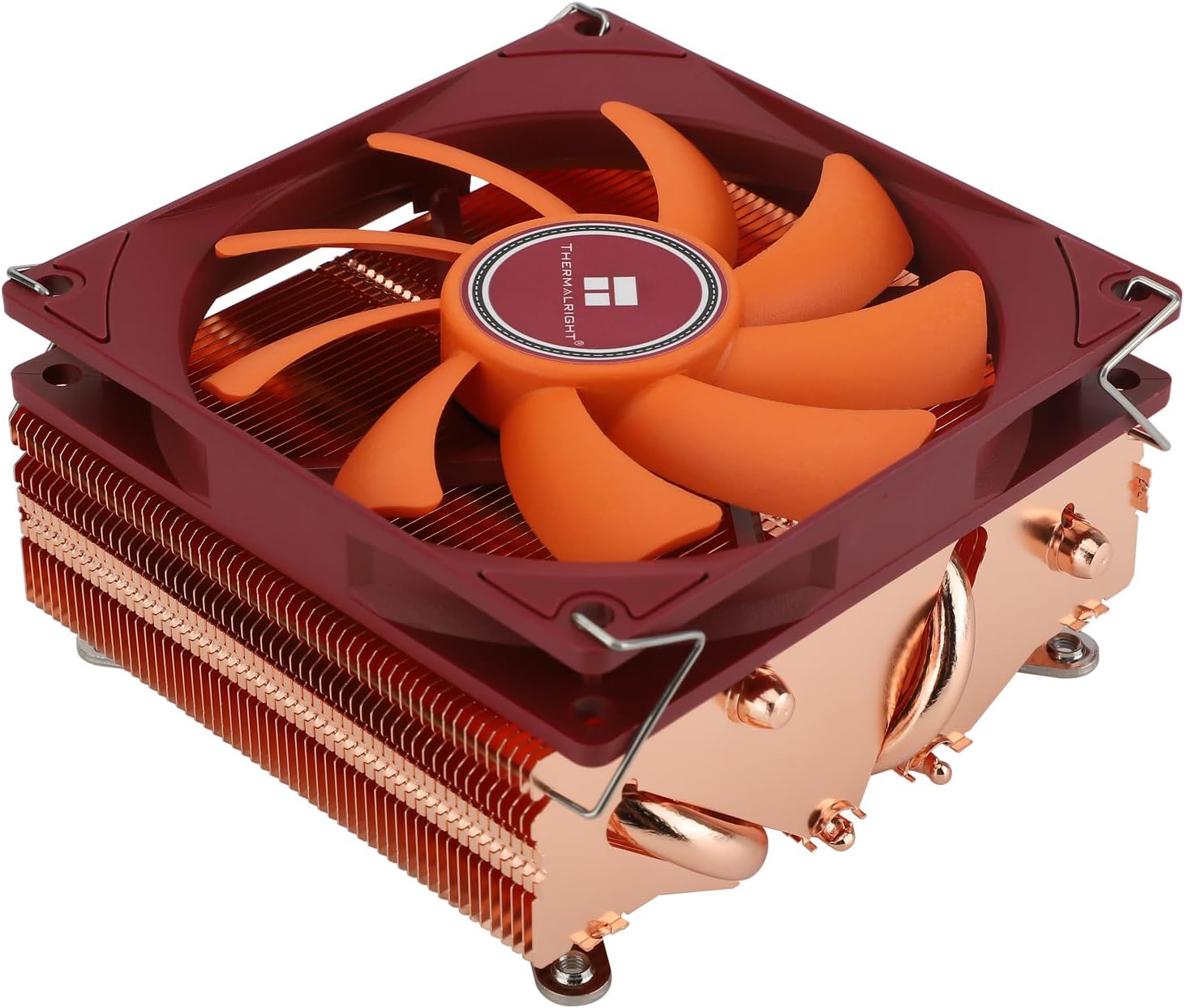
The Thermalright AXP90-X53 Full Copper Low Profile CPU Cooler is engineered for compact ITX and HTPC systems, featuring a 53mm height and advanced 4th generation AGHP heat pipes that double heat transfer efficiency. Equipped with a silent 92mm PWM fan delivering 42.58 CFM airflow at just 22.4 dB, it ensures optimal cooling without noise disruption. Crafted from pure copper with micro-carved fins for enhanced oxidation resistance, it supports a wide range of Intel and AMD sockets, making it the go-to choice for professionals seeking powerful, quiet, and space-saving CPU cooling.



| ASIN | B0CMTPN7NF |
| Air Flow Capacity | 42.58 cfm |
| Best Sellers Rank | #11 in Computer CPU Cooling Fans |
| Brand | Thermalright |
| Brand Name | Thermalright |
| Compatible Devices | Desktop |
| Cooling Method | Air |
| Customer Reviews | 4.5 out of 5 stars 146 Reviews |
| Included Components | CPU COLLER |
| Item Dimensions L x W x H | 3.72"L x 2.09"W x 3.74"H |
| Item Weight | 100 g |
| Manufacturer | Thermalright |
| Material Type | Metal Plastic Copper |
| Maximum Rotational Speed | 2700 rpm |
| Model | AXP X53 FULL |
| Noise Level | 22.4 sones |
| Number of Items | 1 |
| Number of Packs | 1 |
| Part Number | AXP X53 FULL |
| Power Connector Type | 4-Pin |
| Product Dimensions | 3.72"L x 2.09"W x 3.74"H |
| UPC | 755225219361 |
| Unit Count | 1 Count |
| Voltage | 12 volts |
| Wattage | 145 watts |
F**Z
Best cooler for itx
Works great with the stock fan but if you have a few extra bucks put a bigger not so slim fan on with better static pressure and you got yourself a great copper cooler it can cool the 9600x easily and keeps it around 75โฐc installation was simple and easy on am5 fits really well in any case looks amazing as copper should
G**R
A Must have
Have a previous review on this- it's a must buy for SFF builds. Keeps temps not far from what a 120mm tower would be. Have used in 4 builds now ranging from 11.5L to 3.8L cases with am4 to am5 cpu such as 9600x, 9800x3d. Did lower voltages -20 on 9800x3d.
B**O
The copper design really catches the eyeโ10/10.
It's heavy for its size. I struggled to assemble it, but that was my own fault for being stubborn and not checking the instructions. It's a good cooler and maintains better temperatures than my stock heatsink.
M**S
Great cooler. Terrible mounting.
The cooler itself works flawlessly. I don't recommend pairing it with a high wattage CPU, but anything under 100 w it'll handle without any issues. The mounting design for this cooler is atrocious. Definitely look at YouTube videos more than once to make sure you don't mess up your board. Also would have been nice if it came with clips to use aftermarket fans. Great cooling though.
L**H
Beat Noctua
This dropped my home server from an idle 70 to an idle 62 and no longer hit 80 under load. I swapped from an NH-L9x65. I also put a full thickness Arctic fan on top
B**Y
Works well on AM5
I got the copper version setup on AM5 and it's working well. I'm seeing some confusion about installation on AM5, but the install is simple: 1) Remove the stock plastic brackets from the motherboard, but keep the stock backplate. 2) Remove the "arms" that the cooler comes with and install the AM5 arms. The arms are not marked with anything telling you it is for AM5, but only one set will fit the motherboard. Make sure the stamped Thermalright logo on the arms is facing towards the fan. 3) Install the short thumbscrews onto the arms and install the cooler onto the motherboard. The screws will go through where the screws for the plastic retention brackets used to be. 4) Install the four nuts from the other side of the motherboard. Make sure you alternate when you gradually tighten each one. 5) At the end of the process, the screw should be sitting slightly lower than the top of the backplate. Ensure all four are about equal in depth, otherwise you'll have a crooked cooler making uneven contact with the CPU.
G**L
Good
lowered my max cpu temp by like 10c and the standing temp as well, used stock paste that comes with the cooler and it holds up just fine
S**W
Really did well dropping the temperature by 5 degrees.
Did real well on my Ryzen 7 5800X. The Wraith cooler I had just couldn't keep the 107watt 5800X cool enough when playing BF6. This cooler (Thermalright) dropped the temperature by 5 degrees. Install was tricky in my case. But others might have an easier time of it. It will depend on the plate you're motherboard is mounted on.
I**.
Ugly but does a great job.
J**D
MISSING VITAL SCREWS
Item DID NOT INCLUDE THE SCREWS TO MOUNT THE METAL LEGS IT CAME WITH NO METAL LEGS JUST LGA AND AM4/5 LEGS NO SCREW HOT TO MOUNT
Trustpilot
2 weeks ago
2 months ago