
DOWNLOAD THE APP


Customer Services
Copyright © 2025 Desertcart Holdings Limited
DOWNLOAD THE APP

📸 Unlock your creative flow—fast, universal, and hassle-free!
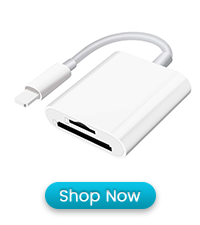
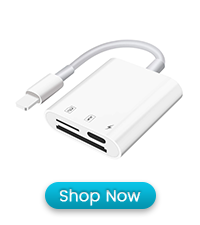
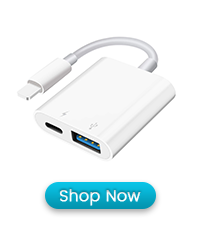
The SUNTRSI SD Card Reader USB-C is a versatile, plug-and-play device supporting SD, Micro SD, and CF cards with up to 1TB capacity. Compatible with iPhone 15, Android, iPad, Mac, and laptops, it delivers high-speed data transfer at 20-30MB/s without requiring drivers or extra power. Perfect for professionals and creatives who demand quick, reliable access to their digital media on the go.






| ASIN | B0CN13ZDYQ |
| Best Sellers Rank | #8 in Computer Memory Card Readers |
| Brand | SUNTRSI |
| Color | White |
| Customer Reviews | 4.4 4.4 out of 5 stars (21,548) |
| Date First Available | November 9, 2023 |
| Item Weight | 1.44 ounces |
| Manufacturer | SUNTRSI |
| Operating System | iOS, macOS, Windows, Linux |
| Package Dimensions | 3.9 x 3.43 x 0.75 inches |
J**B
Great product
Very handy device to review photos from a camera and then send/store on iPhone. I use a Nikon camera for work and sometimes need to review photos and send them in real time to coworkers. This allows me to plug the SD Card into the iPhone, open the card in Files App, review and send the photos. It’s great, convenient and hasn’t failed at all. Bonus works for older iPhones using lightning and new standard of USB-C.
M**T
Great price for a very useful item
Works great. I’m not very tech savvy so I’m so happy that it came with instructions on what to do when an SD card reads “no photos to import”. I was able to recover so many treasured memories from my old samsung phones, so I couldn’t be happier. And so happy I didn’t have to buy a $40 adapter from Apple.
M**N
Convenient and Fast Card Reader
This SD card reader is very handy! It works perfectly with my iPhone, iPad, and camera, and the dual card slots make transferring files quick and easy. The USB-C and USB 3.0 connections are fast, and it’s completely plug-and-play—no app needed. Compact and portable, great for photographers or anyone needing quick access to their memory cards.
H**N
Cheap and works as long as you need Lightning + IOS support
TLDR: Consider other options if you don't need Lightning and IOS compatibility! Long version: This card reader is cheap and works but tested a bit low (~33MB/s) for read speed. (See screenshot) In nontechnical terms: This is fast enough to browse and view photos and most 4k video directly off a card, but slow enough that copying them to your device would a while. Back of napkin example: copying a full 64gb SD card would likely take 30-40 minutes! Screenshot shows some quick test results from a v90 card and this reader using the included Lightning->USB C adapter and plugged into my Windows PC. This same card with a higher performance reader shows read speeds around 275MB/s and Write speeds closer to 80MB/s - a SIGNIFICANT difference. Thing is, THIS reader supports lightning and IOS and the faster one doesn't...
J**R
Super Easy Plug-N-Transfer
I got this card reader to move photos from my iPhone onto a micro SD card to free up space, and it works perfectly. The transfer was really fast, and using it couldn’t be easier — just plug it in and go. Such a handy little tool and totally worth it!
B**A
Perfect for my digital camera.
This is compatible with my cameras SD card, the storage capacity is okay. The design is good, it has both of the iPhone usb cords so it's really useful. Reading speed is good and this connects easily too.
C**S
Great reader
Great so card reader. I used it a lot this deer season. It never let me down
B**E
Simply good
Works perfectly and easy to use
A**O
Perfetto, usato molto
A**M
Funciona muy bien, no hay misterio ni tampoco hay que esperar maravillas, hace bien su función.
K**Y
Works well and I do like that it has a micro sd card slot also
F**I
Amzon should stop untested items from providers. Bad things west time and give bad reputation for Amzon
P**E
Fonctionnement sur Ipad différent de l'iphone. Notice incomplète. Marche à suivre sur iphone (13) 1) Mettre la carte dans l'adaptateur et le brancher 2) Ouvrir l'application photos d'Apple 3) Tout en bas à droite un icone 'Importer' doit apparaitre sour l'icone 'Toutes', il suffit de cliquer dessus. Note: si on passe par l'icone 'Appareil photo' c'est plus long (il faut ouvrir la dernière photo, puis cliquer sur le mot 'Photo' en haut à droite et vous arrivez sur l'étape 3 ci-dessus. Marche à suivre sur Ipad (Pro, mini5) Ios16 1) Mettre la carte dans l'adaptateur et le brancher 2) Ouvrir l'application photos d'Apple 3) Cliquer sur l'icone (petit rectangle) tout en haut à gauche qui ou un menu déroulant 4) chercher 'Appareils' et juste de dessous vous avez 'Untitled' ou le nom de votre carte mémoire, il suffit de cliquer dessus et le contenu de la carte apparait 4)
Trustpilot
2 days ago
1 week ago