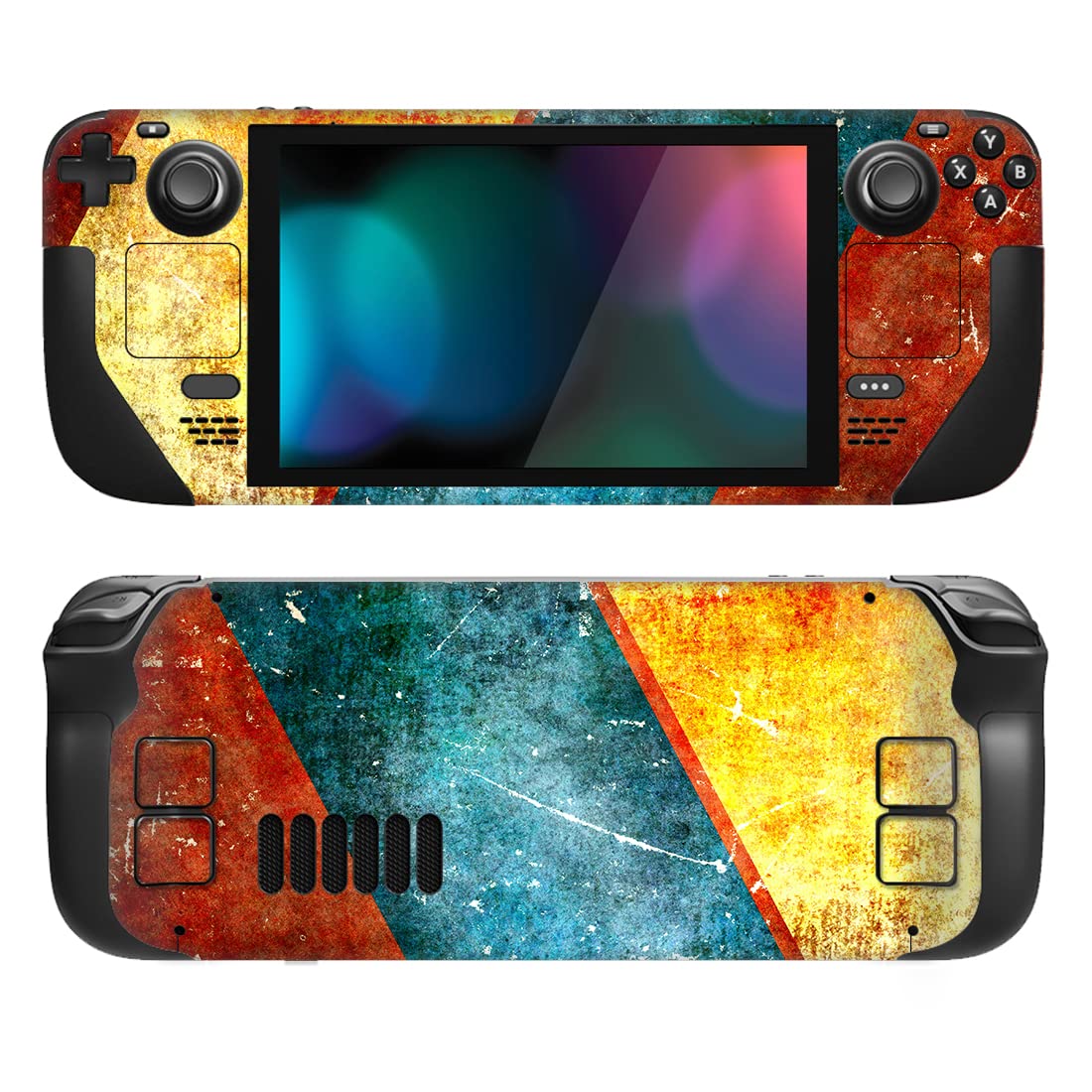
🎨 Elevate Your Game with Style!
The PlayVital Full Set Protective Skin Decal for Steam Deck is a custom-designed vinyl cover that offers a perfect fit for both Steam Deck LCD and OLED models. With a variety of patterns to choose from, it provides superior protection against scratches and bumps while ensuring a smooth touch experience. Easy to install and remove, this skin enhances your gaming device without compromising functionality.


| ASIN | B0BV5QMN65 |
| Customer Reviews | 4.1 4.1 out of 5 stars (1,553) |
| Date First Available | February 8, 2023 |
| Item Weight | 0.705 ounces |
| Item model number | SDTM048 |
| Language | English |
| Manufacturer | PlayVital |
| Product Dimensions | 4.72 x 2.76 x 0.79 inches |
V**H
Be patient and it will look amazing. 👌
Great price for a pair. Easy to install, looks great. The trick is to install the front touch pads first, for the front and the back bumpers for the back. Peel about ⅓ of the decal going left to right and adjust accordingly, match the square touch pad and screen. for the front; line up the top and the bottom borders going around the screen, for the ⅔ of the decal. Once you got to peel the whole thing off it should fit just right. ( remember to remove the tiny decals covering the speaker holes.) For the back do the same, start from left to right this time peel ⅔ of the decal and line up the vent holes first. Once those line up it should fit perfectly.
J**.
Good fit for the Deck
Cutouts on this were sized and spaced exactly right for the various vents, holes, and buttons. I will say due to the many thin, long lines on parts of this, it was actually pretty difficult to align perfectly without any bubbles or bumps. That is no fault of the skin itself though, and more my inexperience along with the very thin strips. I've seen complaints about this skin not sticking well, but the instructions (very thorough) do address this. Once the skin is in place, you're supposed to use a heat gun to warm it up and set the adhesive. A hair dryer on medium heat can sub for this quite well. If you skip this heating step, there's a good chance the skin will fall off at some point. Also, I don't know if I got a fluke or if it's standard, but my package had two copies of the skin included. I figure that's helpful if you completely bork the first try and ruin it, you're still able to try again without having to order a new skin and waste the money. Found that bit thoughtful, and hoping it was intentional. Otherwise, you have a spare for when the first one wears down.
C**T
Pretty decent skin
I decided to try one of these skins because they're cheap and wanted to see if I could install one before spending the big bucks. I would recommend watching a video on how to install it, because it doesn't come with very good directions. It did come with two sets, which is nice if you mess up. I followed the video and didn't have any issue. It does take some time and patience, and you may need a toothpick to help remove some of the small parts of the sticker - like the speaker holes. Some parts stuck to the paper too much and were difficult to separate. The yellow part of the design were the hardest to see and separate. I think the design I picked looks pretty good, finer detailed designs might not. So far I haven't had any issues with it peeling, but time will tell. Edit - I didn't have any issue with the skin peeling or anything with a lot of daily use. I peeled it off on purpose and it didn't leave any residue at all. I'd buy this brand again.
A**A
Make Your Deck Look Perdy
Amazing skin and goes with my set up and the Wave designs I got on my Switch & PS5. Now my Steam Deck feels more personalized to me. You'll need to be patient as it takes some time to align and put on. Recommend some tweezers. I only have one minor complaint and that is the speaker holes aren't all cut out when you put the skin on the Deck. But most of them are. Also, a few screw hole cutouts on the back aren't accounted for. So keep that in mind if you want to upgrade storage or get into the Deck. You are given two sets so if you rip the first or it wears you got back up. Overall though its easy to apply and re-stick if you need to adjust it. Easy to remove and no residue. High quality and a good price as well!
G**S
Tried with and it hour heat gun
These are /alright/. There’s two in the pack and the first one I put on without a heat gun after cleaning the deck with 90% alcohol because I was impatient. The skins have a nice feel to them and the image on it was pretty good quality. It took about two weeks before the edges started peeling up. Not a lot just enough to catch cat hair and be annoying. The thin strips around the screen don’t stick for anything. I peeled that one off and it left quite a bit of residual glue which I cleaned off pretty easily with more alcohol. The second skin I put on with a heat gun. Went on much easier and has a much flatter feel to it. It’s been on much longer before I started having issues with peeling, mainly on the sides where my fingers got up to the triggers and on the back buttons. This is a nice temporary skin to keep the deck safe while you wait to get a better skin but don’t plan on it being permanent.
N**N
Imperfect but does the job and priced appropriately.
Update 9/23 Removing will leave vinyl glue everywhere. An absolute mess to remove. Glue gunk will get everywhere on the system when trying to remove the glue. Don't buy. Would give 5 stars if it was cut better and was a little more accurate. For the price and comparison to others I think it's a good trade-off. The laser cutting leaves something to be desired. The vinyl is not 100% accurate but very close. They provide two full skins per pack so you can try if you completely fail the first time. The laser cutting missed a spot on both prints I purchased so theres a small jaggy. Sometimes the laser cuts too deep and you have a hard time separating the print from the paper and the paper comes with. Even perfectly aligned in the center of a zone, you'll still have some minor misalignments. The instructions are weak and are for a ps4. This is a much more intricate install. Dbrand has a good install video that will suffice but you take the same approach because dbrand uses 3m paper. You're best to just freehand it. It will not be pixel perfect. Using a hairdryer does help to smooth it out. A word of advice is to carefully pop out all the speaker pips before you remove the vinyl from the paper because its near impossible to remove them later. They should just stick to the paper when you peel but they don't.
K**7
First of all, adhesion is brutal. I did manage to get the back one sticker on completely flush (to my surprise) and even after heating and the rest of it, there's still peeling that started a few hours later. The front one I gave up on as both (it comes with 2 sets) just didn't line up in some way. Whether it was the venting grills or around a button, the fit just wasn't there. I'm glad some people are having success with these skins. I'm not going to both with a refund but if I can save someone else from this, that's worth it
S**K
The vinyl did not have perforated removal like the application video showed making application extremely difficult. The image/colors do not line up and instead are reversed when moving between the front and top/rear images as you can see in the pictures. Blue goes to orange, orange to blue, clearly a misprint or design issue. Explains why this was cheaper than the rest. Once on it looks okay, still undecided of I'll leave it on. Hair drier helps to smooth out it at the end. Also useful they give you 2.
C**D
I loved the design of the rusty armour skin, however when I received the item the print was such low image quality it looked awful, sent straight back!
C**E
These are not the first skins I've bought and to honest I was presently surprised how easy they went on compared to other more expensive one's I have bought. Some parts are fiddly but not frustrating, and they have not over done it with the adhesive allowing you to mess up, my only gripe if any would be the cut outs for the vents not sticking to the backing paper so found myself with a craft knife and a pair of tweezers carefully removing them. Overall an easy process and really nice finish, I never bother with the hairdryer because if you do the job well the adhesive is more than adequate and the decals are very forgiving if you need to make minor adjustments.
I**R
I would recommend this
Trustpilot
3 weeks ago
2 weeks ago



