Buy anything from 5,000+ international stores. One checkout price. No surprise fees. Join 2M+ shoppers on Desertcart.
Desertcart purchases this item on your behalf and handles shipping, customs, and support to Netherlands.
🎧 Command your soundscape with style and freedom
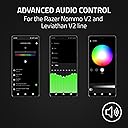
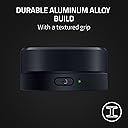
The Razer Wireless Control Pod is a premium, durable aluminum device designed to wirelessly manage audio and RGB settings for Nommo V2 and Leviathan V2 speakers. Featuring a rotatable, clickable dial and source button, it offers seamless switching between USB and Bluetooth connections. With up to 8 months of battery life on two AAA batteries, it delivers precise, customizable control over your audio environment and lighting effects, making it an essential tool for a sleek, clutter-free battlestation.


| ASIN | B0CHLBQLM8 |
| Best Sellers Rank | #721 in Portable Bluetooth Speakers #5,299 in MP3 & MP4 Player Accessories |
| Brand | Razer |
| Customer Reviews | 3.6 3.6 out of 5 stars (193) |
| Date First Available | September 12, 2023 |
| Item Dimensions LxWxH | 2.76 x 2.76 x 1.18 inches |
| Item Weight | 5.6 ounces |
| Item model number | RC30-474C0100-R3U1 |
| Manufacturer | Razer |
| Power Source | Battery Powered |
| Product Dimensions | 2.76 x 2.76 x 1.18 inches |
| Series | Wireless Control Pod |
V**R
Perfect as a Volume Controller
I bought this only to control my volume on my PC running Windows 11. I have no other Razor products, this works directly with my PC's Bluetooth. It works directly from the box without drivers or using Razor software. Functions - Turning right or left controls the volume - Pressing down once mutes - Double press pauses the audio (Does not work with Youtube) 1. Unlike other reviews it wasn't hard at all to install batteries, turn to release the back, turn the opposite way to lock the back, super easy. 2. I place the controller on mouse mat material and turning the wheel does not move the base as well, this would have been a deal breaker for me but was happy this wasn't the case for me Only Negative - If I were to really nit-pick, I would say the the wheel is chucky (not alone isn't bad), it's a solid piece of hardware, being that the wheel is on the large size, the volume increments is smaller since it takes longer to turn the wheel. So going from 0 to 100% will take a few full turns to complete (but how often do you need to go from 0-100% quickly). Again, not a deal breaker. Overall, I'm really happy with it and recommend it fully as a volume controller.
G**N
Yes, you want to spend $40 on a knob that site on your desk
It works great, good battery life (sleeps when not in use), perfect size, strong and durable, connects easily to bluetooth, I wish it was heavier but it seems to be the best one on the mid-level market
E**S
Software and firmware are garbage!
I really wanted to like this device, but it is complete junk. Physically, the knurled knob feels nice, but it lacks heft and slides on the table too easily. The click is far too sensitive and doesn't have tactile feedback commensurate with a $50 device. Turning the knob is okay, it's smooth and just firm enough. However, with the lack of stability (slides around too easily), you can't just poke at it with a finger, you have to grab the knob. Also, there is no tactile feedback nor customizations. That's the good part. The bad part is that the Windows software is absolute garbage. I was not able to get it to properly install and run on my machine. I did get it to install and "run", but was never able to access any of the functions I wanted -- the ability to map the actions on the wheel to different behaviors. And it doesn't stop at the software. The firmware on the device is so bad, sometimes it takes 30 seconds or more for the wheel turn to take effect on my machine. I wish I had an alternative to suggest, but I do not at this time. I will not buy another Razer product due to this experience, they are far overpriced and only have a thin facade of quality. Run away from this junk and don't look back. Your life is better without this.
G**B
Works with Linux
So I ordered this with a *slightly* different product in mind and was not disappointed. It’s a wireless volume nob, Mute/Pause, and skip button. If you’re someone with a smaller form factor computer or someone who likes the physicality, this is pretty good. Wireless with Bluetooth, batter powered(I’d rather type C charging but batteries is nice, I’ve had it months and not needed to swap them once.) it worked under Linux (again, Bluetooth) and has more features and an app if you’re running other OSs. I haven’t tried to get the app working under Linux but if I do I will update this. Cons: battles, no type c charging. Wireless ONLY. Pros: wireless only, slight resistance on volume nob gives the feeling of a physical adjustment like on speakers, very simplistic and easy to setup. Compatible with basically anything that supports current Bluetooth.
C**O
Makes controlling my setup so much easier!
I didn’t realize how much I needed this little module until I got it. I use it with my Razer Nommo V2 speakers, and it’s just perfect — feels premium, super responsive, and the wireless connection hasn’t dropped once. The volume dial has a really smooth turn to it (not cheap feeling at all), and it even lets me control lighting modes and inputs without having to open Synapse every time.
D**Z
Really wanted to love it, but simply not for Mac.
To start, these are mostly nitpicks: - It's pricey for what it is. - Build quality is so-so. It has a clean and subtle design without any overly obnoxious branding, but it has no heft to it. - Battery cover was almost impossible to get off the first time and I ended up scratching it. After getting it off the first time it seems like it's easier. - Takes AAA batteries. I personally would've preferred USB-C charging but I realize this is probably very subjective. - Bluetooth latency/input lag is very noticeable. All that said, the real reason for the low score is that the software simply doesn't work on MacOS. I downloaded both the old and new versions of Synapse and the software doesn't pick the device up at all. I dug up some years-old threads to try troubleshooting, going as far as to remove some system level protections in recovery mode, but the guides I found were obsolete so it ended up being a dead end. The default functions work fine out of the box, but if you're looking for something to customize this isn't the right product. Sadly I can't seem to find any other products that fill this one's niche, so for all it's flaws I'll probably end up keeping this and battling it out with the software to try to get it to recognize the device.
B**V
Cool concept for creators, but ruined by terrible software, lag, and design flaws.
As a product designer, I bought the Razer Wireless Control Pod for a very specific experiment. I am developing my own Generative AI application, and my UI features a virtual control knob. I wanted to map this physical Razer pod to my virtual UI for a tactile experience. The Good: Aesthetics and Feel: The build quality is solid. It looks premium on the desk, and the tactile feedback of turning the dial and pressing the buttons is very satisfying. The Bad: Software Nightmare (Synapse 4): The software experience is horrendous. Synapse 4 detected the device, I bound the keys, but Windows absolutely refused to register any inputs. I scoured Reddit for a fix and found many users complaining about the exact same issue with no official solution. I spent 2 hours uninstalling, reinstalling, and fiddling with it until, by some miracle, I got Synapse 4 and the Pod to communicate properly. Razer's tech support and software stability here are practically non-existent. Too Light: The device is simply too light. When it sits on my mousepad and I try to turn the dial with one finger, the whole pod slides around. You have to awkwardly change your grip to hold the base while turning it. It desperately needs more weight or a better rubberized bottom. Bluetooth Latency: There is a very noticeable input lag over Bluetooth. It was so prominent that I actually had to tweak the code in my app and extend the UI animations to mask the lag and make it feel like a "feature." Batteries: It uses AAA batteries. At this price point, it really should have a built-in rechargeable battery with Type-C. Verdict: I eventually got it working for my custom app, and it’s a fun toy, but the functionality is too limited, and the software is a headache. Unless you are ready to spend hours troubleshooting Synapse and don't mind a laggy, sliding dial, look elsewhere.
M**K
Easy volume controller for your Mac/PC
This works perfectly with my MacBook Pro. Very easy setup; you just need to connect it via Bluetooth and it automatically is in control of your volume with no other settings to be made.
C**R
Well engineered.
Performs flawlessly.
P**R
Works Well
Works well. Rarely losses connection.
C**N
Es un capricho que vale la pena.
Este control de audio es medamente un capricho ya que siempre hay mil maneras de poder subir o bajar el volumen pero es un accesorio bastante bueno, la calidad de los materiales es tal cual se ve en la imágenes, tiene acabados de calidad y es el diseño está bien pulido. Si bien no es recargable la batería le dura muchos meses, yo lo uso diario ya que trabajo desde casa y por lo regular siempre tengo música. La conexión bluetooth es bastante estable y no suele perderse además que tiene buena responsividad. Le puedes configurar varias funciones con Razer Synapse para que haga muchas más cosas que solo subir, bajar, play y mute, puedes incluso asignarle macros.
A**A
Works great! Works with or without other Razer products!!!
One of my late friends made me an amazing keyboard, but it doesn't have volume dial. I looked all over for a wireless volume control dial with little luck. I was concerned because this one says it only works with razer speakers- not true. It does work! I have Logitech G560s- as long as your computer has bluetooth, this will work for you <3 It also pauses and mutes audio by pressing the top! I love it.
W**K
Awesome
So far I use this all the time for the volume on my PC and mutin you just pressed down, which is wonderful. I’ll have to learn how to handle it with lights an other options.
Trustpilot
5 days ago
2 weeks ago