Buy anything from 5,000+ international stores. One checkout price. No surprise fees. Join 2M+ shoppers on Desertcart.
Desertcart purchases this item on your behalf and handles shipping, customs, and support to Netherlands.
โฐ Own your space with time thatโs always on point!
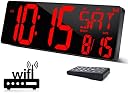
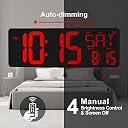
The XREXS Large Digital Wall Clock features a striking 16.5-inch LED display with WiFi synchronization for precise timekeeping. It shows temperature, date, and week info, and offers adjustable brightness with auto-dimming for optimal visibility. Controlled remotely and designed with a foldable, durable polycarbonate frame, itโs perfect for home or office environments seeking both style and smart functionality.


| ASIN | B09YD84R3N |
| Alarm Clock | Yes |
| Are Batteries Included | Yes |
| Best Sellers Rank | #1,196,558 in Home & Kitchen ( See Top 100 in Home & Kitchen ) #10,619 in Wall Clocks |
| Brand | XREXS |
| Clock Form | Multi Display |
| Colour | Red |
| Customer Reviews | 4.2 out of 5 stars 225 Reviews |
| Dial Color | Red |
| Display Size | 16.5 Inches |
| Display Type | Digital |
| Enclosure Material | Polycarbonate (PC) |
| Frame Material | Plastic |
| Indoor Outdoor Usage | Indoor |
| Item Dimensions W x H | 25W x 25H Millimeters |
| Manufacturer | XREXS |
| Manufacturer Part Number | W0088R |
| Model number | W0088R |
| Mounting Type | Wall Mount |
| Number of Items | 1 |
| Operation Mode | Electrical |
| Power Source | Corded Electric |
| Product Dimensions | 25W x 25H Millimeters |
| Product Features | Adjustable Brightness, Alarm, Foldable, Large Display, Mood Light |
| Room Type | Garage, Kitchen, Living Room, Office |
| Size | 16.5 inches |
| Special Feature | Adjustable Brightness, Alarm, Foldable, Large Display, Mood Light |
| Style | red |
| Theme | Love |
| Unit Count | 1 Count |
| Watch Movement | Automatic |
K**N
The wifi works, good bye to my previous non-wifi clock
I like wifi sync feature. Liked the remote. Not many chimes, I wish the chime can run every hour with a set time range.
H**2
Feels disappointed
I tried everything to activate the WiFi but nothing happened
M**W
Good display, lots of features, minor setup difficulties
I dealt with setting my Alexa echo displays to a red clockface, however, it is not an OLED screen, has some backlight bleed, and likes to mess with your settings and display unnecessary menus when shouting voice commands. I just needed a red digital clock that could be held to the accuracy of atomic or wi-fi connections. This device seems to fit the bill. Pros: - Large print digits, as large as would be reasonably necessary - Batteries included - Battery backup for settings - Functional and responsive remote - Timer and alarm functions - Auto-brightness or multiple manual brightness steps - Brightest setting is as bright as you'd ever need it - Helpful paper mounting guide included. Sorta cons: - Wi-fi setup was confusing. See steps below. - The lowest brightness is acceptable, and is not obtrusive in a dark room nor invisible while lights are still on, but I do honestly think they could update the unit to have just a few more dimmer settings. The clock's firmware can be updated, so, it seems like this is in the realm of possibility for the future. - The auto-brightness feature is nice, but also kind of dumb. Turn a light on next to it, full brightness. Turn it off, lowest brightness. The sensitivity range should be increased by a firmware update. - The "DST", "[Date]", "Month", "Day", and "Date" labels are effectively unnecessary and just extra light that's not needed. Firmware should allow these items to be "hidden" and not display. I used blackout stickers to cover them and the design is less cluttered as a result. I'm sure the wi-fi signal is useful for first setup or troubleshooting, but the others I'm not sure who would ever need to decipher what the clock is saying. - "AM" and "PM" labels should have been larger or just "A" "P" to make them larger. It's hard to see from a distance. - Setup document is not perfect, follow below for Wi-Fi setup: 0. Do not "Forget" your wi-fi network. They mean "disconnect". This is important! 1. HOLD (do not "continually press") Alarm Set and Timer buttons BEFORE plugging in 2. Plug in. You will hear a beep. 3. The network will appear as "HQX2128" on a phone. Connect to it. 4. Navigate to 192.168.88.1. 5. Select "Web-Config" 6. Enter your Wi-FI network, Password, and DST settings. [Note, this is where the instruction to "forget" your network will get you into trouble. It only seems to account for networks your phone "remembers". Therefore, merely disconnect from your wi-fi, do not "forget" it.] 7. It will give an "updated" or "saved" type of response. 8. The clock will display the wi-fi icon. Time will be kept by wi-fi. - Temperature function is a bit useless as it reads ambient temperature. This should be a setting that should/could be checking for local temperature online. I don't personally care for this setting though, so it doesn't bother me. After getting through the setup hiccups, I'm honestly quite satisfied. It's big, it has considerable options, it has a working remote, it connects to wi-fi, and it displays the correct time as you see fit. I also like the date and day presentation. They could certainly do a few improvements as they have the firmware capability to do so, and the instructions could be written a bit better. Ultimately, this is seemingly the only large format, Red LED clock with wi-fi capabilities. My projector clock has been firmly beaten.
A**.
Excelente compra
Ya lo estamos usando durante un buen ntiempo y con mucho calor y el reloj sigue funcionando muy bien. Lo recomiendo totalmente!!!
M**A
return
one is not work , kindly arrange to replace
Trustpilot
2 days ago
1 month ago