Desertcart purchases this item on your behalf and handles shipping, customs, and support to Netherlands.
โก Elevate your workflow with the ultimate macro powerhouse!
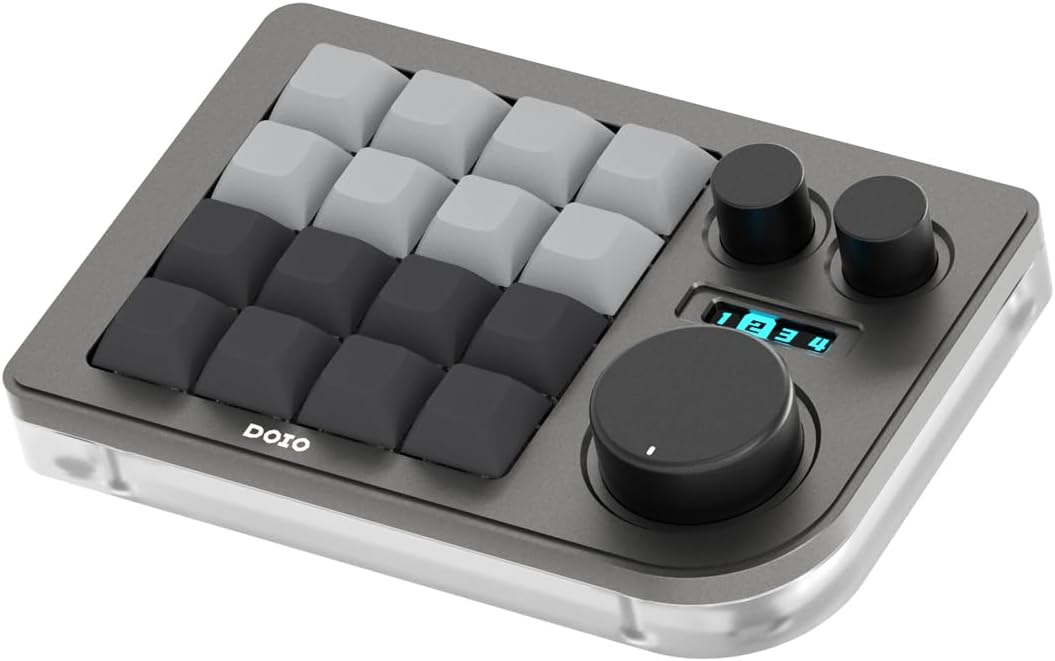
The KEEBMONKEY Megalodon Macro Pad is a compact, high-performance 16-key programmable keyboard featuring 3 clickable knobs, hot-swappable Gateron Yellow switches, and vibrant 16-zone RGB backlighting. Crafted from aluminum and acrylic, it offers a premium, durable build with USB-C wired connectivity and an intuitive web-based programming interface supporting 4 layers and 64 macrosโperfect for professionals seeking to automate tasks and boost productivity.


| ASIN | B0C1STYFFS |
| Additional Features | Portable |
| Antenna Location | Gaming, Multimedia, Photo Editing, Programming, Video Editing |
| Best Sellers Rank | #578 in Computer Keyboards |
| Brand | KEEBMONKEY |
| Built-In Media | 16 Blank XDA keycaps, Type-C Cable, Manual, Megalodon Macro Pad - Triple Knobs VIA JSON File |
| Button Quantity | 16 |
| Color | Grey |
| Compatible Devices | PC |
| Compatible Operating System Family | Windows |
| Connectivity Technology | USB-C |
| Customer Reviews | 4.1 out of 5 stars 239 Reviews |
| Enclosure Material | Aluminum |
| Generation | 4 |
| Hand Orientation | Ambidextrous |
| Item Dimensions L x W x H | 5.91"L x 3.94"W x 1.18"H |
| Item Weight | 320 g |
| Keyboard Backlighting Color Support | RGB |
| Keyboard Description | Macro |
| Keyboard Layout | QWERTY |
| Keyboard Plate Material | Aluminum |
| Manufacturer | KEEBMONKEY |
| Mechanical Keyboard Switch Model | Gateron Yellow |
| Mfr Part Number | 24365409796245 |
| Model Name | Megalodon Macro Pad - Triple Knobs |
| Model Number | 24365409796245 |
| Number of Items | 1 |
| Number of Keys | 16 |
| Number of Packs | 1 |
| Number of Sections | 2 |
| Power Source | Battery Powered |
| Recommended Uses For Product | Gaming, Multimedia, Photo Editing, Programming, Video Editing |
| Special Feature | Portable |
| Style Name | Contemporary |
| Switch Type | Gateron Yellow |
| Theme | gaming and productivity |
| UPC | 633183419767 |
| Unit Count | 1 Count |
| Warranty Description | 7 days |
| Water Resistance Level | Not Water Resistant |
C**T
Excellent Choice!
I will preface this by saying I have searched and read reviews for a while before deciding on this one. Why did you pick this product vs others?: I chose this one because it has the features of the others, however; one thing stood out for me- the ability to program this without having to download a clunky app. You go directly to an https:// website and viola. Connectivity: It connects via USB C on the device and USB A to your pc. I would prefer to have a wireless option but a cable is the most stable. Once in the webpage- you link it and it brings up your device. Ease of use: So, for me, it wasn't difficult. But ai will mention this is not my first macro pad and I have been in IT for almost 20 years. I can see how it would be confusing to an unskilled user, but I assure you that you will catch on quickly. Keyboard quality: This came packaged very well. I have included pictures showing it. Very protected. Excellent care. The quality of this is great considering the cost. It is solid and has some weight to it. The keys have a nice feel and are hot swappable. Which I have already done as well. Functionality: Overall, if you are buying this to be more productive then you have found something that is quite useful. Automating tasks is a huge time saver for me. This little pad has the ability to save macros for 16 keys and 4 layers = 64 different macros. My longest thus far is approximately 20 keystrokes. The dials an also be programmed but I am not quite sure what I want to use them for yet. Should anything change in the future- the quality or issues that arise, I will update this review. But for now, I am super glad I got it and it has worked flawlessly since I first turned it on.
D**N
Best macropad on the market! Buttoned screendeck for less!!!
Best macropad on the market. If the amount of sales doesnt skew you then let me. More layers than ideas you can come up with to fill them up. To be clear there is 64 macros you can do total. I use them to help me with python codes I use a lot but the ideas are endless. You could use it for games, productivity, etc. Works in VIA without any updates. The button clicks are nice and satisfying. You can edit all the rgbs in VIA as well. The scroll wheels are awesome. Ive been using them for page scrolling, volume control, and the enter button. Construction is also high quality. The device is a lot heavier than I expected. Best value for the money. If you prefer buttons over a touch screen screendeck this is it.
I**E
Great build quality, Setup is some of the worst I've seen anywhere
Edit: two days later after dissembling the product, per their item directions, resetting, updating the firmware, and then rerunning Via this is running well. It's tactile and heavy. Do not buy if you're not a tinkerer who already has very small hex screwdrivers. Via was pretty easy to get running. Macros weren't too bad to set up. The knobs were the hardest part because you have to know the key codes but you can find that easily enough. I'm happy I got it, but less happy about having to disassemble to get it running. Original: Setup was a nightmare. I'm still not done. I can't get it to switch layers. I believe the keymap is shifted by 2, so layer 1 (actually Layer 0, but that's not how it's listed on the pad) on the pad is layer 3, but I have absolutely no idea what layer 0 and 1 map to because once I toggled the swap none of the keys are doing what I've programmed them to do. I'm going to reset it to factory and see if I can dig out the issue issue with it being shifted. Which means I have to take the back off (per the instructions on the Keebmonkey website). 2 stars gained for absolutely amazing build quality, feel, and the freaking awesome tactile knobs. Seriously. It is heavy enough that it won't go sliding around the desk. If I can get it to function with the layers in the right place I'll come back and update depending on how hard it is.
J**E
Perfect for my editing work setup
This little beauty made my book-editing work so much easier and faster. It's super high quality and works exactly as advertised, and the customization software gives me a lot of flexibility for using macros and shortcuts to speed up my work even more. I originally got this only to replicate the scroll wheel on a previous keyboard I had to replace, but very quickly all its buttons and dials became a necessary part of my work setup. Couldn't do my job as efficiently without it. I use the dials a lotโa LOTโso after about a year, one of dials stopped working (I think I stripped the metal grips inside the dial cover somehow), so I had to replace it. But I had gotten the extended warranty at purchase, so the unit was replaced without issue. It's so important to my work that I keep a spare on hand in case I wear out the one I'm using, but I'm still on that first replacement (so my second unit total, with one waiting in the wings). I also use a programmable layer for the light gaming that I do, and it works great for that too.
L**E
Horrific color changes
I've had this on my wish list for a very long time. Back then, the pink option had a lovely metallic rose wine color that is akin to the knobs. The primary picture they use for advertising has this color on the product. Apparently, Keebmonkey changed the color on several options for this macro pad and they're now ugly AF. They didn't update the main product picture; only the secondary pictures. For people like me, who put this on the wish list, we will never know about the change unless we revisit the product page and drill down to the secondary pictures. It bothers me so much that I'm thinking of returning it for another one. It's that bad. I was planning to use this at work but the color clashes with my setup and is downright embarrassing since it's cotton candy pink in the worst way possible. To be fair, the overall build and ease of use are good. I'm super bummed out that Keebmonkey did this.
M**N
Fantastic for artists
This keyboard is fantastic. I needed something a little better for my workflow than the side keys on my tablet. The side keys are fine, but the angle of my wrist when using them just becomes uncomfortable. And they are in a line, which forces me to move my arm over, and over, and over. Other macro keypads/boards designed for use with tablets (like the huion ones) you use your thumb, or attach them to your tablet, which causes thumb pain, or blocks out a good portion of your drawing surface. And if you lay them down, they are flat and thin, again causing problems. This little macro keyboard solves those problems. It's small enough I can have it right next to my tablet screen, and heavy enough it doesn't slide or move around. Via compatibility is perfect, quick to load (on chrome only), and easy to adjust hotkeys. There's for layers that I can switch through for my different programs! Krita? 1. Painter 2. All it takes is a turn of the knob. No more wrist pain from holding a lightweight pad (huion), or having to hold my wrist at an angle for hours. I'm so mad at myself for never having this before. It's basically the same as a 9key, but the knobs - while taking forever to figure out how to program, are just lifesavers. I love that in Krita I can just set them to adjust my colors by turning them. Is it worth 80 bucks? For me, yeah. I think it's a device that should only cost 50 (as you can grab them elsewhere for that price). In my opinion, it was worth it to buy from a reputable seller like Keebmonkey. The only things I would change? Maybe some stands to change the angle. And wireless. But, I could probably just go buy a wireless dongle for it? And I could probably buy attachable stands. Anyway, thank you for saving my hand Keebmonkey and Doio.
A**0
Feels great but it is not plug and play
Bought this and followed the instructions it came with (which are probably out dated) and the device is not detected. It turns on so I know it's working but from what I've been reading you'll likely have to flash the device with the software it should be pre-loaded with. If you have no experience with PCs, software, or just want something quick and easy to use then look elsewhere. I'm going to keep trying but I will likely return it since it didn't work out of the box. UPDATE: I got it working but just know ur experience may vary. I recommend checking reddit and YouTube to see if its worth it for you
E**.
Sturdy, Responsive, and Useful
Iโve used this pad for over a week now and it has been great! Itโs a sturdy reliable keypad that takes getting used to, like many new efficiency tools, but has helped quite a bit. I enjoy the satisfying mechanical keys and switches. I bought the yellow one with black keys and knobs and it has been helpful to get me away from my previous Clip Studio Tabmate, which relied on constant use of the thumb, often giving me cramps or fatigue. The key mapping was intuitive, granted I have previous experience with mapping a similar tool. As long as you stick with it and test it a bit, itโs perfect. I like how responsive this keypad. Iโm actually glad that I got the wired version because it means that the keypad is always ready for use and I donโt have to keep turning it on and waiting a few seconds before using it. The smallest obstacles can tend to put me off my motivation to work, but this helps. The knobs are smooth with the smallest clicking resistance that you feel but do not hear, assisting the pleasing tactile experience. I donโt often write reviews unless Iโm very displeased or really excited about something. The price point was just right on this too!
K**R
Super useful
Amazing, useful for a ton of stuff
H**E
Solid build, Android tablet compatible and very customizable
Purchased this as controller to use Clip Studio Pro running in my Samsung tablet. Already came preloaded with 4 layers of keymaps for Ps, Ai, Premier and Blender plus the keyboard is VIA compatible and came with quick start guides, customization is a breeze. Came with many RGB effects to use and silent linear switches used for each key. Highly recommended keyboard.
R**E
Top.
Genau wie Beschrieben. Bisschen teuer, aber sehr hilfreich fรผr Makros.
K**N
Easy to Program and Looks Great
Great little macro keyboard that was easy to set up and program. The software is intuitive and straightforward to use, which made customizing it simple. I really like the LED lighting, and it looks great sitting on my desk. The multiple layers are a big plus and add a lot of flexibility for different shortcuts and uses. Overall, very happy with it.
J**H
On the fence? Just so it
Quite possibly my favourite piece on my desk. Came with milky yellow switches (my favourite), works perfectly with VIA, with plenty of options
Trustpilot
3 weeks ago
2 weeks ago