We remain fully operational. Our teams are working around the clock to ensure your deliveries continue safely.

DOWNLOAD THE APP


Customer Services
Copyright © 2025 Desertcart Holdings Limited
DOWNLOAD THE APP


🚀 Upgrade Your Network, Upgrade Your Life!
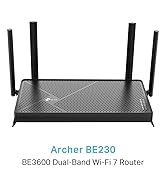
The TP-Link Archer AX1800 is a cutting-edge WiFi 6 router delivering up to 1.8 Gbps dual-band speeds powered by a dual-core CPU. Designed for busy homes and professionals, it features beamforming technology and four antennas for extensive coverage, plus Target Wake Time to extend device battery life. Easy to set up via the TP-Link Tether app, it supports all previous WiFi standards and ensures secure, lag-free connections for gaming, 4K streaming, and multi-device households.


| ASIN | B0C46RPBZT |
| Best Sellers Rank | 1,277 in Computers & Accessories ( See Top 100 in Computers & Accessories ) 25 in Routers |
| Brand | TP-Link |
| Colour | Black |
| Customer Reviews | 4.3 4.3 out of 5 stars (124) |
| Date First Available | 3 May 2023 |
| Guaranteed software updates until | unknown |
| Item Weight | 830 g |
| Item model number | Archer AX1800 |
| Manufacturer | TP-Link |
| Operating System | OpenWRT |
| Product Dimensions | 26.02 x 13.5 x 4.16 cm; 830 g |
| Series | Archer AX1800 |
| Wireless Type | 802.11ac |
J**K
Great Router and Access Point
I used this device briefly as my main router as my ISP hadn't yet shipped their own brand router before my internet was upgraded to fibre. I now use it as a reliable access point to extend the range of my network for 4k streaming, light gaming, and general web browsing. Setting this thing up was really simple. I'm pretty knowledgeable with tech, but I don't think I'd have much trouble if I had less experience. To use this with fibre to the property connections, you have to change the router settings to PPPoE and use login details specific to your ISP. (Search for 'PPPoE login BT/Sky/Plusnet/EE...). The web interface is remarkably simple and modern so poses no problems! Once my ISP router arrived, I switched this over to access point mode to reach some dead spots in my flat. Again, really simple to do with one button in the web client. Devices connect seamlessly and quickly. This router has been incredibly reliable, being consistent on delivering 500Mbps speeds. The range is good, but no improvement over the one I have from Plusnet. If you're looking to buy this to extend the range of your WiFi, you won't see much difference if you have anything from the past few years. One minor complaint is the shiny black plastic on top which is a nightmare for dust and scratches. This is, however, a great value for money buy for those looking for an access point, or upgrading anything that caps out at 100Mbps!
J**K
Improved unstable WIFI
I have suffered with WiFi issues since I recently moved into a rented flat. I went with NOW Broadband as my partner was with them living in the same area and had no issues with them. First few days were great with no issues then started to have connection dropouts, losing a bar of WiFi signal leaving the living room where the hub was etc. Phoned NOW 3 times, replaced the hub, sent an engineer out who supposedly replaced a contactor in the box outside, gave me money off my bill to buy a booster, nothing worked. I found this item as it had great reviews. I thought why not. I thought this replaced my NOW hub but it doesn’t. You keep your internet set up the way it is and this item is connected to your hub via an ethernet cable. You then connect your devices to this router and you should get all green lights. Initially I had green lights but no internet connection. I panicked thinking it wasn’t going to work with my WiFi. However on the instructions there is details of a website to troubleshoot and eventually it done a firmware upgrade on my phone for the router which took a few minutes. This is all easy to do so do not worry if you’re not tech minded, either am I. After the firmware upgraded, everything was sorted. I had internet. The next thing was to test if it had improved my speed. My NOW hub was situated in the living room and when lying in bed I would only ever get 2 bars of WiFi on my iPhone and videos would rarely load. After I was connected to the TP router I went through and it did drop to 2 bars but then straight away went back up to 3. I done 2 speed tests (see photo above). The bottom one is connected to the TP router and the top one is connected to the NOW hub. It’s almost double the speed. That’s another thing, because you need both your normal broadband and this router set up, you can just switch between the 2 if you want too. I have the Tether app which again it tells how to install in the instructions and I can now control my devices etc. It’s really easy to use and you can customise your settings to your preference. To conclude I was initially skeptical that this would work with NOW but it did and has improved my connection massively. If you’re thinking about it, just do it. Hope this helps anyone who was confused like I was before buying.
J**M
Boom. WiFi 6 . Great router.
Bought as an AP for my Oculus 3. Works a treat and very easy to set up.
P**D
Impressed with it
Bargain basement performance . I have an ASUS gaming router and this one I just slung at the back of the house so I could get a signal when Im in my workshop. It constantly if faster than my ASUS and completely stable..never glitches..had it two years now and its still as fast as day one. TP link make some nice stuff for reasonable money. My ASUS was 3x the price and just varies so much in speed I cant rely on it..one day is 350mbps next is 80 mbps..the TP link keeps constant at around 330 . I have other TP link kit bought after being impressed with this and that's too performs very well
A**Y
An impressive piece of kit
I just upgraded to full fibre as the providers router didn’t have a very good wifi coverage. Most people like me have a spare router in a cupboard somewhere and thought that I could use this as an extender. Well that didn’t go to plan, Teams dropped out, games were unplayable due to the lag and steaming was non existent. So decided to purchase this 3rd party router from TP-Link. After reading the instructions and not having a degree in network engineering. I thought what have I done. Static, dynamic, bridge mode DHCP, IPV6 along with another 30 other different settings. Anyway after plugging it in. It worked perfectly along with great wifi coverage and still achieving the full fibre speeds. Also you get amazing support from TP-Link via live chat and email.
K**.
No usb
I bought it to take more control over my kids Internet connection . Parental control on this router is very good. Second reason was usb connector for HDD which was missing like you see on picture. I think there was few versions of this model. 3 stars for misleading information
S**B
Game Changer
Being with virgin media, wifi is intermittent and slow despite their app saying it is 250+. I already have a TP link account so that made things quicker. The TP Link was easy to set up and we now have actual fast wifi. Now no TV buffering and no delay when on the internet. It is a disappointing you have to buy things like this due to rubbish equipment from broadband providers. Well worth the £58
Trustpilot
3 weeks ago
5 days ago