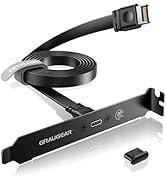
![GRAUGEAR 3.5 Inch Front Panel USB C Hub, SD/microSD Internal Card Reader, 20Gbps USB 3.2 Gen 2x2, USB3.2 Type-E Key-A 20-Pin Header & USB3.0 Header & 15-Pin SATA Power Connector Required [G-MP01CR]](https://m.media-amazon.com/images/I/61hmiqWx4pL.jpg)

🚀 Upgrade your PC’s front panel to pro-level speed & versatility — don’t get left behind!
The GRAUGEAR 3.5 Inch Front Panel USB C Hub is a premium internal expansion device that fits into a 3.5” drive bay, delivering 20Gbps USB 3.2 Gen 2x2 speeds via USB-C, alongside 2 USB 3.0 ports and integrated SD/microSD card readers. Designed for Windows PCs, it offers stable, noise-shielded connections with included power and mounting hardware, making it an essential upgrade for professionals seeking fast data transfer and expanded connectivity right at their fingertips.


| ASIN | B09QXGVM8Y |
| Additional Features | Fast Data Transfer, Plug and Play, Powered |
| Best Sellers Rank | #289 in USB Hubs |
| Brand | GRAUGEAR |
| Built-In Media | 1 package |
| Color | Black |
| Compatible Devices | Card Readers, Desktops |
| Customer Reviews | 4.2 out of 5 stars 783 Reviews |
| Data Transfer Rate | 10000 Megabits Per Second |
| Enclosure Material | Metal, Plastic |
| Hardware Interface | MicroSD, USB, USB 3.0, USB Type C |
| Item Dimensions L x W x H | 4.02"L x 4.02"W x 0.98"H |
| Item Type Name | Front Panel USB Hub with Internal Card Reader |
| Item Weight | 170 Grams |
| Manufacturer | CHAB GmbH |
| Number of Ports | 6 |
| Operating System | Windows |
| Special Feature | Fast Data Transfer, Plug and Play, Powered |
| Total USB Ports | 4 |
| Total Usb Ports | 4 |
| Warranty Description | 2 Year Limited Warranty |
O**W
Works great. Quality product. Five-star product all the way
Bought this to add more usb ports to front of pc case. Would have liked it to be 5.25" wide for case bay, but I had to buy an adapter tray for it from Silverstone to fit their SETA D1 case and that solved issue. Adapter is stamped aluminum which is much stronger than the plastic one I bought first which had a real sloppy fit between the Graugear frame and adapter frame. As for use, this is great. usb 3.0 ports work great and nice to have a 20Gbps and 5Gbps usb-c port. I purchased Xiwai 20Gbps USB 3.2x2 adaptor for my empty m.2 header on my ROG X399E-gaming MB. Nice to have the SD/Micro SD card slots. No need for the small card reader anymore. Back to the pc storage box for old things pc. After a couple days of use, the transfer speeds are very good, and I am getting consistent connections with the m.2 slot am3242 based adapter card. Have transferred data between all of the ports and they all work well. As expected, depending on the type of media you have connected to panel will make a difference in transfer speeds. Also turn over the usb`c cable and see if speeds change on your system. Surprised me so just try it. Still very good investment. This is a quality product because the two interface cables are round and shielded so there is no need to worry about noise affecting signal transfers between MB or within the panel when transferring between SD and usb. Flat ribbon cables really are something I do not like to see on usb 3.0 and above. They are susceptible to noise. Wish Graugear included a 3.5" to 5.25" adapter or had one listed for their product on website. If they do have one, I must have missed it. Definitely recommend and would buy again if needed and will recommend to others to get this if they need more usb options.
E**E
Very usable front panel USB hub. Don't forget the 5.25 to 3.5 mounting bracket!
Convenient way of getting more USB ports. The device has (as shown) two connectors. One is a standard 19 pin USB 3.0 cable that serves 2 USB A sockets, a lower speed USBC socket, and a very handy SD card and micro SD card reader. The second cable brings out a USB Gen 3.2 2X2 connection from your motherboard, providing a 20 Gbps connection. Everything works as designed, and cables were long enough for easy connection to the motherboard. You need to provide power with a SATA type power connector from your power supply. The web page shows you what kind of connectors to look for on your mobo, which was quite helpful in making a purchase decision The unit fits directly into a floppy drive bay. ***Note that you will need to have or purchase a 5.25 to 3.5 front bay mounting bracket if mounting the USB hub into an optical drive slot.***
M**Y
Front panel USB access with most of the inputs and connections that you are likely to need.
The screw hole placement seems to match that of an internal drive holder, not something that will protrude through the front of a computer case. This meant I was only able to insert one screw per side. I also had to replace the cable (which includes the front USB-C port) for the 20 Gbps port with one that ended in a 90-degree Key-A Type-E plug because for some reason, most 20 Gbps PCIe internal connection adapter cards (stupidly) have the socket facing to the side, interfering with other cards and the case and pretty much everything. Otherwise, this device seems to work well. I've attached the results of benchmarks of a Crucial X10 Pro Drive on the 20 Gbps port (which is really just a direct connection to the PCIe adapter) and the 5 Gbps USB-C port which is controlled by the included USB hub that also supports the two USB-A ports and the SD and Micro SD Slots. There is also a benchmark of a Sandisk Extreme Pro U3 microSD XC card. I docked one star for not having enough screw holes in the correct locations.
J**E
Very happy.
Every few years I build a new PC with the latest and greatest components. This Graugear front panel fit perfectly in my Cooler Master HAF 932 full tower case for my latest build. It’s got the latest USB-A and USB-C connectors, as well as micro SD/TF and a standard SD card slot. Everything seems to work as advertised in testing, and the only thing I noticed is that it appears to have been waking up my PC randomly. The problem went away when I went to the power management tab for this component in Device Manager and unchecked its ability to wake the PC. Oh, when I first connected this device, I wasn’t getting the high speed until I realized I hadn’t connected a SATA power cable. This definitely needs a power cable connection to function properly. Other than that possible SNAFU where it would wake up my PC, I’m happy with this. It’s very compact and does everything it says it will. I hope this helps.
M**N
MicroSD and SDXC Randomly Disconnect - DO NOT BUY!
The MicroSD card and SDXC inputs randomly disconnect. I tested multiple cards from multiple manufacturers. The cards always randomly disconnected. Also, after I initially installed the item, the computer would not boot up. I pressed the "Power" button, but the screen remained frozen in black for over two minutes. I turned the computer off, and then turned it back on several times. Eventually, the computer did boot up. However, the very first time I tried inputting a microSD card, the card randomly disconnected. This confirms the negative things other people said in their 1-Star Ratings are true. Other people talked about how the poorly soldered connections on the device were the reason for the weak connections that randomly disconnect. Similarly, other people talked about how all of their installed hard drives were ruined from fluctuations in electric power as a result of this defective product from Grauger. Worst of all, other people talked about how their entire computers caught on fire. This is something I experienced THREE TIMES in the past with an HP printer/scanner/copier, so I know it can happen. It isn't worth having a fire hazard around. So, I am returning this product from Grauger to Amazon. I purchased this product in May of 2025 and the product requires the SDXC card to be "upside down." There is a sticker on the device saying so. Also, the product is designed poorly in fundamental ways. For example, if you put the SDXC card in first, it is virtually impossible to enter a microSD card into the device because the size of your thumb is too large to place the tiny card into such a small input such a short distance away from the SDXC input. Your thumb will keep hitting the SDXC card. Similarly, you look and see two USB 3.0 inputs and think that is good. But, you cannot connect two USB Flash Drives simultaneously, because the cards will collide with each other. Only very tiny USB devices would be able to be used simultansously. I'm very disappointed with this product from Grauger. I read the reviews before purchasing, and I saw the negative things in all the Ratings with "1-Star." But, I thought, "There are good reviews, too, so I will give it a chance." But, after personally seeing for myself the product failed with the random disconnects, there is no reason to risk a potential fire hazard. Grauger needs to completely redesign this product and make it better.
H**Y
Good way to modernize and old case
I have a 10 year old Corsair case that is of the generation that had a front opening for three 5.25 inch devices. I love the case and have used it through multiple motherboards. But the drawback is that the built in ports of the case only support USB 2.0. With my latest build I wanted to expose the USB 3 type-C ports but not lose my CD drive or my hot swappable drive bay. I was skeptical of buying this because I had bought one previously that was the same form factor and looked similar but once installed I found that I couldn't read the SD memory cards while also using the USB ports. When I received this one from GRAUGEAR, I was happily surprised that all ports work simultaneously. I can read a SD card, connect a game controller to the USB Type-A ports, and an external hard drive to the USB Type-C ports. All work in parallel and at full speed. I did have to get an adapter to make the 3.5 inch format fit into the 5.25 inch slot of the case, but that was expected from the start. It looks nice and is fully functional.
B**R
Best front panel USB hub & card reader I've ever owned bar none
This unit is heads and tails above all the other front panel USB hub & card readers I've owned over the years. First, it's far more solidly built with the front bezel being solid metal so no chance of breaking those awful plastic tabs that most other units come with, being a part of the case itself which is also very sturdy and well-made. Second, perhaps earlier versions of this required you to insert the MicroSD card upside down, but I must have a newer version where they're inserted facing up. Also and more importantly, the faster of the two USB-C ports on the one I got was USB 3.2 Gen 2x2 so it goes up to 20Gbs, not 10Gbs as in the product page description and datasheet. This of course depends on your motherboard's capabilities and what you insert into it. Finally, it's fast. Not quite as fast as my X570S motherboard built-in ports, but just a hair slower. For example using CrystalDiskMark my Samsung 256GB USB-C flash drive tested at 433/118Mbs read/write on the MB's rear USB-C 3.2 Gen 2x2 port, and 399/118 on the Graugear's 5Gbs USB-C 3.2 Gen 2 port and 403/119 on its 20Gbs USB-C 3.2 Gen 2x2 port. That's close enough for me. Installation took longer and was more difficult than I expected, but that was entirely because of the way that my PC is set up with cables, connections and such. But the device itself is very simple and easy to install if you know your way inside a PC. I can't attest to long-term regular use as I only got it a few weeks ago and haven't been using it much, but on build, performance and even looks, it's a winner. A bit more expensive than what I've usually paid for such devices in the past but justified by its much higher quality.
J**B
Good value for the options.
Everything works as expected. Speeds are satisfactory. Installation was easy and everything fit perfect. My only minor issue is with the design. It's not easy to see the card-reader slots since everything is black (maybe if they added a light internally to illuminate the open slots). Also if using a micro-sd (contact-side down) along with a regular SD card (contact-side up), you'll have to remove the SD-card first before you can pull the micro-SD since they're so close together to get a good grip.
Trustpilot
2 months ago
1 month ago