Buy anything from 5,000+ international stores. One checkout price. No surprise fees. Join 2M+ shoppers on Desertcart.
Desertcart purchases this item on your behalf and handles shipping, customs, and support to Netherlands.
๐จ๏ธ Print smart, print fast, stay connectedโbecause your workflow deserves the best.
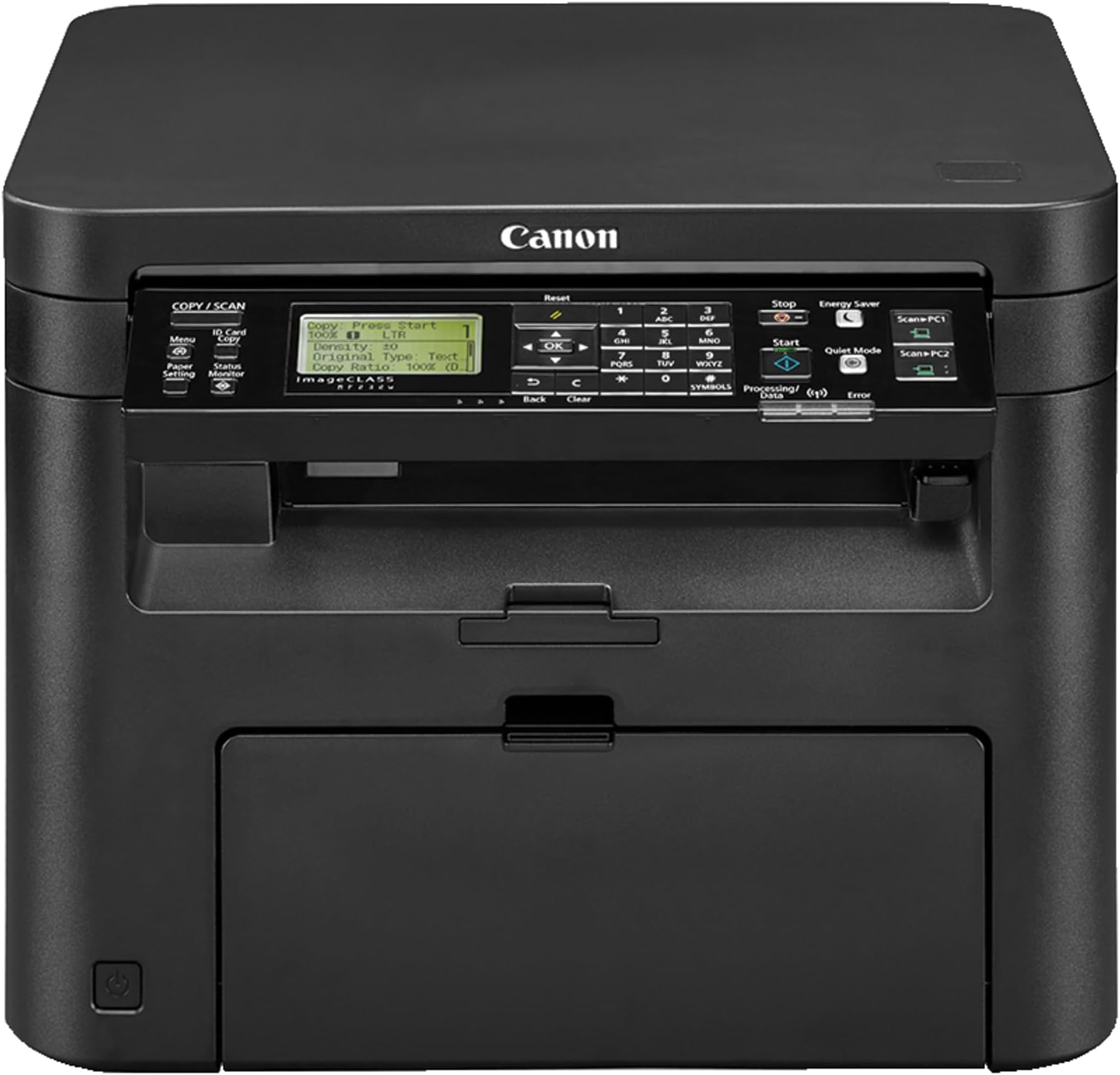
The Canon imageCLASS MF232w is a compact, monochrome laser 3-in-1 printer designed for professionals who demand fast, high-quality printing, copying, and scanning. Featuring 23 ppm print speed, WiFi Direct for wireless convenience, and automatic duplex printing, it delivers sharp 600x600 dpi output with easy installation and intuitive controls. Perfect for office environments where space, speed, and connectivity matter.
| ASIN | B01LZKJGTX |
| Additional Printer Functions | Copy, Scan |
| B&W Pages per Minute | 23 ppm |
| Best Sellers Rank | #287,123 in Office Products ( See Top 100 in Office Products ) #412 in Laser Computer Printers |
| Brand | Canon |
| Built-In Media | Printer Accessories |
| Color | Black |
| Color Depth | 1 bpp |
| Compatible Cartridge | Canon laser toner cartridge (e.g., Canon GENUINE Toner, Cartridge 137) |
| Compatible Devices | Printer |
| Connectivity Technology | Wi-Fi |
| Control Method | App |
| Controller Type | Android |
| Customer Reviews | 4.4 out of 5 stars 421 Reviews |
| Display Type | LCD |
| Dual-sided printing | Yes |
| Duplex | Automatic |
| Global Trade Identification Number | 00013803275131 |
| Hardware Interface | USB |
| Initial Page Print Time | 6 seconds or less |
| Ink Color | Black |
| Item Dimensions D x W x H | 7.49"D x 8.25"W x 7.83"H |
| Item Weight | 22 Pounds |
| Manufacturer | Canon, Inc |
| Maximum Copies Per Run | 250 |
| Maximum Copy Resolution Black and White | 600 dpi |
| Maximum Copy Resolution Color | 600x600 dpi |
| Maximum Copy Speed Black and White | 24 ppm |
| Maximum Media Size | 8.5 x 11 inch |
| Maximum Print Resolution Black and White | 600 x 600 dpi |
| Maximum Sheet Capacity | 250 |
| Maximum print Resolution Color | 600x600 dpi |
| Model Name | imageCLASS MF232w |
| Model Number | imageCLASS MF232w |
| Model Series | imageCLASS |
| Number of Drivers | 1 |
| Number of Trays | 2 |
| Other Special Features of the Product | Wireless |
| Paper Size | 8.5 x 11 inches |
| Power Consumption | 2 Watts |
| Print media | Envelopes, Labels, Paper (plain) |
| Printer Connectivity Type | Wi-Fi |
| Printer Output Type | Monochrome |
| Printer Type | Laser |
| Printing Technology | Laser |
| Processor Count | 1 |
| Resolution | 600 x 600 |
| Scanner Type | Flatbed |
| Series Number | 23 |
| Special Feature | Wireless |
| Specific Uses For Product | Office |
| Total USB 2.0 Ports | 1 |
| Total Usb Ports | 1 |
| UPC | 013803275131 |
| Unit Count | 1.0 Count |
| Warranty Type | Full warranty |
| Wattage | 2 watts |
T**B
Copies Anyone?
Nice Copy machine. Wi Fi connection works well and install was easy. Prints fairly quickly and ink seems to last a long tie. Too bad itโs not color copies but I wasnโt looking for color right now. Unit is not bulky and fits on a shelf easy or on a desk.
D**Y
Great printer and the WiFi connection works well
I had an older Canon laser printer and wanted to update to a new one that had WiFi capability, so I bought this one and gave the older one to my daughter who uses it almost every day. The printer, scanner, and copier on this multi-function unit work very well. All the features perform properly and the control panel is easy to understand and operate. The paper storage tray and paper feed work very well. One performance aspect that I had to adjust to was the time delay when printing a Word or PDF file using the WiFi connection. It is very noticeable and lasts about 15-30 seconds as the data is sent from the computer to the printer. No such time delay occurs when printing via a USB connection. Also, the printer needs to be in wake mode (i.e., not in sleep mode) to print successfully using the WiFi connection. Note that the 30-second time delay does not include waking up the printer. It is purely transmission delay.
M**S
Great Printer/Copier/Scanner
8 years later, still works great - purchased back in 2018 - paid $114 one tiny problem- now it costs almost triple ($300)
D**N
Great for price but print too light
The price is great and although it was a bit tricky to set up it has worked flawlessly. The scanner/copier are easy to use. AirPrint from my iPhone and iPad works well. It doesnโt do duplex printing but I knew that when I bought it. My biggest complaint is that the print isnโt very dark. Iโve set it to the highest print density but it didnโt really make any difference. Inkjet is much darker.
A**N
SUPER easy to install. Excellent and very FAST printing
Pretty much "Plug and play". Easy to find and download the driver etc online at the Cannon site. Easy to unbox, set up and install. Operating panel on front of unit is intuitive. Makes GREAT scans and prints, FAST! Only been working with it a week or so now but have put it through some heavy paces. Not a glitch! Unlike color inkjet with its expensive ink and SOMETHING going wrong almost daily with most of them, laser blk and white printer is THE printer to get for homeschooling and THIS one is the one to get! It's so intuitive to operate my young grandaughter was scanning and printing like a pro inside 5 minutes on the thing. And will be doing her own daily printing of homeschool worksheets. (wink) It comes very solidly packaged for mailing, and arrived earlier than stated. If there is no update on this review, it means it's still going strong.
A**Y
Great printer for the price!
I researched and bought this printer after my old one(Brother 4yrs) decided to not want to connect to the internet and eventually wouldnโt turn on due to over use of the power button to reset it to get it to connect to the internet. The printer came 6 days faster than what the ETA said for the delivery, which was Awesome!! Out of the box installation took literally 10-15 minutes. I tested it with my iPhone and the first printed page looked great. That was wireless printing. My wife has a Mac computer and the installation took a little bit more time for her. We had to download the software from the website and then get it added to her computer. It took a little longer to actually print anything from her computer, but it did. Iโm hoping that it was just slow from the initial startup and that it will be faster after being setup. I tried Canon because my experience with others had left me disappointed. Thus far I am satisfied. Another note I liked about Canon is that their IT support is 100% US based. So, you donโt get someone you canโt understand from an exotic island speaking who knows what, trying to help you troubleshoot. :)
C**R
Terrible printing...ink splatters all over the page...DON"T BUY
I bought this product to have speed and clean printing. Just started to use the product and it's the worst. The return window has closed so now I have 2 additional toners and print quality that only puts out about 50% of what it should. Ink splatters across the entire page and it's so light you can barely read the document. I tried to load a sample document but was unsuccessful. Very, very disappointed that I am stuck with a $200 machine that is useless!!!! Beware of this brand; DON"T WASTE YOUR MONEY. YOU WILL NOT BE HAPPY!!!!!! The seller is no where to be found?
J**Y
Great Laser printer
I looked at a lot of black and white laser printers, a lot. Like all of them. And the trick to getting a good printers is one that is dependable and the toner carts are cheap to buy and print lots of sheets per toner. So to do this, look for a good printer you like with good reviews then before buying, look up that printers toners to see what it costs, plus the number of sheets it makes per toner. There is lots out there and most of them have over priced toners. I was about to give up when I finally came to this printer and found what I had been long looking for. The price wasn't bad and the reviews were good and the toner was about as good as it gets. So I placed my order and it arrived within the week undamaged and opened the box and set it up. I didn't have any problems with the driver it self installed and I did a test print, worked great.
J**S
Good printer, poor directions/information from Canon
I really do like this little printer. It's fast, and the pages come out clear as any higher priced printers I've worked with. I would have given it five stars except the setup procedure was quite difficult and hard to follow. The drivers and downloadable user's manual were hard to locate, and the DVD that came with it didn't even work on my Mac. The fact that it didn't include the required USB cable needed to update the firmware was annoying as well. Canon should have done much better than this.
S**E
Tricky but a good deal
A bit tricky to set up & has some weird quirks (will not print a PDF from my desktop Mac & I could find no advice online or in manual, I had to figure out by trial & error that if PDFs are copied into Notes they can be printed.) ... however both price & print quality are excellent if you are able to macgyver your software a little
B**S
need usb cable
Please include USB to use with this printer Thanks
Trustpilot
3 weeks ago
2 months ago