Buy anything from 5,000+ international stores. One checkout price. No surprise fees. Join 2M+ shoppers on Desertcart.
Desertcart purchases this item on your behalf and handles shipping, customs, and support to Netherlands.
๐ Simplify your smart lifeโcontrol more with less effort!
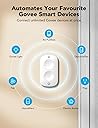
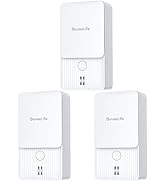
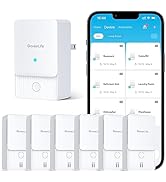
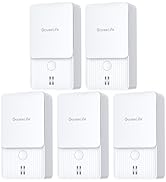
The GoveeLife Smart Mini Double Button Switch is a compact, battery-powered wireless controller designed to manage up to 50 GoveeLife smart devices. Featuring dual buttons with alternate on/off functionality, it supports both Bluetooth and Wi-Fi connectivity with an effective range of 55 meters. Ideal for creating seamless group controls and smart home automation, it offers a guest-friendly physical interface that eliminates the need for app access, making smart living effortless and accessible.


| ASIN | B0BQYGSKLG |
| Best Sellers Rank | #25,187 in Tools & Home Improvement ( See Top 100 in Tools & Home Improvement ) #32 in Home Automation Hubs & Controllers |
| Brand | GoveeLife |
| Brand Name | GoveeLife |
| Circuit Type | 2-way |
| Color | white |
| Compatible Devices | GoveeLife smart products (Wi-Fi/Bluetooth) |
| Connectivity Protocol | Wi-Fi |
| Connector Type | Wireless |
| Contact Material | Copper |
| Contact Type | Normally Open |
| Control Method | Push Button |
| Control Type | Advanced |
| Customer Reviews | 4.2 out of 5 stars 564 Reviews |
| Included Components | Button Sensor, Battery, Adhesice Tape, User Manual |
| Item Dimensions | 2.2 x 0.6 x 2.4 inches |
| Item Type Name | sensor |
| Manufacturer | GoveeLife |
| Material | Plastic |
| Material Type | Plastic |
| Model | H5126101 |
| Mounting Type | Wall Mount |
| Number of Items | 1 |
| Number of Positions | 1 |
| Operation Mode | ON-OFF |
| Part Number | H5126101 |
| Smart Home Compatibility | Smart Home Compatible |
| Switch Type | Touch Switch |
| Unit Count | 1.0 Count |
S**E
Excellent Simple Solution for Smart Home Control
Iโve been gradually adding GoveeLife products around my home, and this Smart Mini Double Button Switch is one of those small additions that makes a big difference in everyday use. Setup was quick and straightforward through the Govee app. It paired easily and let me assign each button to control specific devices and even groups of devices. I especially like being able to use one button for a single light and the other for a grouped scene. The response time is fast, and itโs been very reliable so far. What really makes this a standout for me is how practical it is when guests are over. I love smart lighting, but I donโt want to make visitors download an app just to turn lights on or off. Having normal, physical buttons available makes everything feel intuitive and accessible. Guests can simply press a button like they would with a traditional switch, and it just works. It keeps the smart home convenience without the awkward explanations. The compact size is another plus. Itโs small enough to place almost anywhereโon a side table, near an entryway, or mounted where a switch would normally be. Since itโs battery powered, thereโs no complicated wiring to deal with. If youโre building out a GoveeLife ecosystem and want an easy, guest-friendly way to control your devices, this little switch is a fantastic addition. Simple, reliable, and genuinely useful. Highly recommended.
C**E
Works great for convenience or special scene setups.
Awesome for instances where you need a light on fast without pulling your phone out or there is not an echo nearby. Have them in my daughters rooms so as they walk in, they can turn their ceiling light on/off white (top button) or same light on/off nightlight mode (bottom button). Pretty much if you can make it an auto-run routine in the govee app, this runs it with the push of the button!
N**M
Good, but not amazing.
Itโs a pretty good button. Itโs designed well, it feels high quality. But it does glitch sometimes and doesnโt turn on the lights, or it takes 30 sec+ to do it. Usually itโs fine, but sometimes it happens.
T**E
Not what I expected - Update
This was purchased to use for two seperate Govee brand lamp sets in our living room. Initial setup through the Govee app was somewhat simple and straightforward. The switch worked well for the first week or so when used, only a slight delay in function from pushing the button to the lamps turning on or off. This was expected as the process is running via wifi or Bluetooth. However, after sitting for a week and not used, this switch no longer works at all. Press the buttons and nothing happens. It appears as though the programming was lost and the switch will need to be setup again. Given the fact that the lamps are on a preset timer through the app, this switch would only be used on one off occasions when extra light would be needed during the daytime hours. Since it has lost programming from what I guess is a lack of being used consistently, this two button switch is not usable for me. Update - Govee customer service reached out to me and apologized for the item not working as expected, and they made it right. Moved from one star to five stars for outstanding customer service. Thank you Govee!
A**O
Requires internet to work. Cannot work locally either over Bluetooth or the local network.
What a shame, I was liking Govee even though they have a banner ad in the app for hardware I bought. Still, I was happy it allowed either Bluetooth for direct offline connections, or WiFi, on its smart plugs. Well, turns out that this button doesn't work locally, even over WiFi, if said WiFi doesn't have internet. Doesn't work with Bluetooth at all, and it took me a while to find out because there's no warning in the app that if the smart plug is only connected over BT the button won't work. This also led me to the realization that the smart plugs also don't work over wifi if there's no interernet. So what happens when Govee's servers are down? The button ceases to function altogether.
H**Z
Awesome button with countdown timer for water recirculating pump.
I used 2 buttons with one Govee smart plug and it works great for what I needed. I'm using it for my hot water recirculating pump. I did not want it to run 24/7 and our schedules are so random that timer on the pump does not work for us. I was able to use 2 of these buttons (one in Primary bathroom and other in the kids bathroom). The automation is set up to switch it on and then a delayed reaction to shut it off after 10mins. The other button is just a back up off switch for the pump. This is perfect for us since the pump is not always running and it works reliably when we are ready to take a shower. The Govee button seemed to have the best reviews so I went for it and the app was easy to use and set up . I use Meross for my lights but they do not offer a button yet (at least that I found). Both platforms are great. I'm glad that it worked out and would recommend it!
S**N
Gets the job done
It does an okay job. It is easy to program it to govee accessories. I also like how it had adhesive to place on a wall or something else. The most frustrating part is that generally you have to press the button twice before it will actually complete the action. It is worse when it has not been used recently. I don't know if it enters a sleep mode of sorts, but it is frustrating having to wait and press the button multiple times to get it to work.
D**6
5/5 would recommend if you have Allot of Govee lights
I love this switch, i replaced my bedroom switch with this cause i only have Govee lights in my room. And was easy to set up and worked will all my Govee lights
F**O
ok
comodo per le luci della famiglia godvee
A**R
Good. But has a delay
It works as expected for the govee ceiling light I have. Loses a star because it is not a local option, ie, you require internet for it to work. Evidenced by the fact that when my WiFi is down, it fails.
Trustpilot
4 days ago
2 days ago