🖱️ Elevate your workspace with precision touch—because your productivity deserves the best.
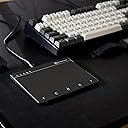
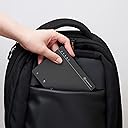
The MANO-603UV2 Compact Wired Touchpad by KEYMECHER is a sleek, portable external trackpad designed exclusively for Windows PCs. Featuring a large, ergonomic touch surface and multi-touch gesture support, it delivers smooth, accurate control with integrated mouse buttons and LED indicators. Its wired connection ensures zero lag and no charging interruptions, making it an ideal productivity booster for professionals seeking comfort and efficiency in work, study, or travel setups.


| ASIN | B0B93RSRLM |
| Additional Features | Ergonomic Design, Portable, Rechargeable, Shortcut Key, Windows Touch Gestures Setting Support |
| Antenna Location | Office |
| Are Batteries Included | No |
| Are Batteries Required | No |
| Best Sellers Rank | #94 in Computer Touch Pads |
| Brand | KEYMECHER |
| Built-In Media | USB Cable |
| Button Quantity | 3 |
| Color | Black |
| Compatible Devices | Laptop, Personal Computer, Tablet |
| Connectivity Technology | USB |
| Customer Reviews | 3.8 out of 5 stars 222 Reviews |
| Enclosure Material | Plastic |
| Finish | Glossy |
| Hand Orientation | Right |
| Hardware Platform | Tablet |
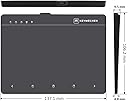
| Item Dimensions L x W | 5.4"L x 4.18"W |
| Item Type Name | Trackpad, Touchpad |
| Item Weight | 0.41 Pounds |
| Manufacturer | KEYMECHER |
| Mfr Part Number | MANO-603UV2-BK |
| Model Name | MANO-603UV2-BK |
| Model Number | MANO |
| Movement Detection | Precision Tracking |
| Movement Detection Technology | Precision Tracking |
| Number of Buttons | 3 |
| Operating System | Windows 10, Windows 11, Windows 7 (Support Partial Gesture) |
| Power Source | Corded Electric |
| Range | 5.0 meters |
| Special Feature | Ergonomic Design, Portable, Rechargeable, Shortcut Key, Windows Touch Gestures Setting Support |
| Style Name | Modern |
| Unit Count | 1.0 Count |
J**P
Purchased for work
Overall review is an excellent product. I've loved trackpads, they are easy to use and less hurtful to the hand. For windows there has never been a good trackpad other than the laptop installed ones. Till I tried this. This works exactly like my apple magic pad just not Bluetooth yes that's a con but not terrible because you never have to charge it. They allow you in the setting under Bluetooth to control the gestures used. You can make it exactly like the apple trackpad or not. you just have follow their manual. So for myself I change the scrolling directions to match the apple magic pad since that is the one I use for personal use. Design wise its great, I wish they didn't have the bottom portion but if you struggle using the gestures it really helps. The track pad has no lag between touches and scrolling. It is mostly plastic sadly, I would love to see a high end metal, but the plastic is probably what makes this super cheap and affordable in comparison to the apple. In the future if they were to offer a high end I would definitely buy it, I would also buy this one again. This is a great option and has worked flawlessly with my windows 10 work computer.
N**Y
Very nice touchpad
Ok so I tried a few before I got kept this one. Keymacher makes a bunch of these trackpads and they all work nicely... however I liked this one cause of the buttons all being on the top. Some of the other models had buttons on the bottom and that just messed it up for me. Also, the left middle and right click buttons stick. So if you click the left button you can then drag it to select multiple files. Yes, you can double click and hold on the last click to select.. but this just makes it easier. Also, I love the back and forward web page navigation buttons. The REAL CLINCHER for me though is the Synaptic Touchpad driver. Use this coupled with that drive and you can use windows touchpad settings. This opens up a BUNCH of gestures.
A**S
Good except for one GIANT flaw
I like how responsive this touch pad is. I like how easy it was to set up. The surface of the touch pad is pleasant to the touch. I like the multiple gestures it supports. However, the beauty of using gestures to control your computer (at least in my opinion) is that you don't have to look at the touch pad while you're using them, And this touch pad feels purpose-built to make you look. For me the "buttons" are at the bottom (not really buttons, but places you can touch that simulate clicking one of the mouse buttons or using the scroll wheel). For me these buttons are entirely superfluous, because I can use gestures to perform the functions they are there for. But I've searched the user manual and finally contacted the company to be told that I can't disable them. Normally this would not be a problem, except there is no seam or ridge or anything for me to feel to know when I have my finger over the "button." Thankfully, they have engineered it so that the buttons are disabled while you are performing gestures (otherwise a gesture could cross one of the buttons and make the touchpad totally unusable) but when I am not looking and just put my finger down on the pad to use the mouse, half the time I end up touching one of the buttons instead, and something completely different than what I was expecting happens. (By the way, I'm not convinced the buttons automatically disable when you're forming a gesture on the rest of the pad.) There is no way for me to tell where to start my gesture on the pad without looking, and that is why I say that the pad is made in such a way as to be impossible to use without looking. Furthermore, what if someone did want to use those buttons (for click and drag)? There is no way to tell where to tap on the pad to use the specific button you want to use without looking. It defeats the purpose of learning to touch-type! I am so frustrated and I am considering returning this.
L**G
Lasted EXACTLY 2 MONTHS! - VERY DISAPPOINTED!
I got so used to using a touchpad on my laptop, using a mouse just seems out of place. Decided to try this touchpad and very impressed with the responsiveness and quality. Very well made and works just like I'd hoped. UPDATE: 02/17/2023 Started noticing that the pad was jumping me all over the place on my screen, but was very random and started a few days ago. Today I can't do anything, without it grabbing things I don't want to move or just randomly grabbing tabs or items on the screen as I am scrolling. Highly DISAPPOINTED> I was hoping for at least a year out of this thing (so my initial expectations weren't even that high!)... Got 2 months to the day!!! And of course this would happen exactly 30 days after I can't return this thing! If you are looking for a 30 day solution, this is your answer! DO NOT RECOMMEND!
N**.
Fantastic windows USB trackpad with 2 unfortunate flaws
I have been using this as my new trackpad when working at my home desk computer, where I do a lot of writing and video editing. I've been trying to find a good replacement for my old Magic Trackpad, that would not require additional software or third party drivers to use with Windows. After testing several pads from those currently available (2024-Feb), this is the one I've decided to ultimately stick with. The pad uses the the built-in Windows Touchpad settings from the control panel, making it entirely plug and play. I am really tired of devices that require custom config tools, so this feature is a big plus for me. The pad is smooth and responsive, except for one specific flaw (further below). The gestures are simple, the sensitivity is exactly right for my preferred touch, and I've had zero problems with jittery movement or input skipping. Now for the flaws. The first one hinted at just above is that the pad will regularly go to "sleep" as if it were a Bluetooth device. But since it's not Bluetooth, I have no idea why it is doing this, and it's quite frustrating. When it's asleep, it can be difficult to wake it back up. What usually (but not always) wakes it up is a quick repeated tapping on it. But when that doesn't work, the only solution seems to be to unplug and reconnect. The second flaw is the bottom row of shortcuts that cannot be disabled. As someone used to the more common gestures that touchpads tend to use these days, having space dedicated to simple functions like single and double tapping is a pointless waste of valuable surface real estate. Making matters worse, unless you are watching your hand directly, it's really easy to accidentally glide across these buttons, adding erroneous (and sometimes disastrous) clicks where you intended none. The only work-around I found was to paste small textured stickers on top of the buttons, giving my fingers warning when getting close and also preventing them from being accidentally triggered. Some others have complained about the top strip of dedicated LEDs as well. While I agree that is also a waste of space, I find it far less annoying than the bottom strip. I've yet to run into the top bar myself, so it hasn't impacted my own personal use. I hope the company updates the model in the future to remove the bottom bar, and get rid of that annoying sleep function. If they did that, it'd be near-perfect.
X**X
Maybe worth 10$ - in short not worth money.
Mano Multi-Gesture Wired Trackpad offers a promising concept, but its functionality is hampered by a notable limitation. While its design is appealing, the trackpad's performance suffers when used with dry hands or in low humidity environments. This drawback leads to frustration and diminished usability, particularly when compared to the smooth responsiveness of a smartphone screen. Unfortunately, these issues proved significant enough to prompt a return, making the trackpad's potential usefulness undermined by its struggle to operate effectively under specific conditions.
A**R
You get what you pay for...
I've been using this touchpad for 3 months and am very pleased. The pad has solid construction and the high precision pad is very responsive compared to other pads I've used in the past: either keyboard or laptop ones. The LED lights help keeping track of clicks, though I don't refer to them often. I still "suffer" with some errors due to my touching the pad with multiple fingers at the wrong time. With use, that has declined significantly....so be prepared for some self-training. I'm using this on a Win10 system desktop PC. Installation was easy via the USB connection. So far, very happy overall. In regards to ergonomic: I purchased the pad to use in lieu of my vertical mouse: its use reduces aggravation of arthritis and tendonitis in my wrist due to an old sports injury.
P**N
Not an Apple touch pad for sure!
Well, that's a harsh evaluation, but true. It's not even as good as most notebook touch pads, in feel and performance. In the Windows 11 environment it was spotty, the screen pointer moving then stopping. Then you wiggle your finger and it won't move at all, until seconds later it moves for you. Very odd behavior. But the plug and play operation leaves something to be desired. In my environment I use a KVM to switch between multiple computers, and it always took time to recognize the thing, which may just be a Windows thing. Ergonomically is doesn't work when your finger strays into the bottom row where the mouse lock buttons are, it would be extremely useful to have a tactile sense that you are at that row, perhaps just a small rise across the width would help. I think I could have gotten used to the button hold for drag and drop/select, but didn't have it long enough because it simply would stop working then restart.
P**S
Does what I hoped it would do
I have several computers in use around the house including a newish windows 11 laptop and an older W10 laptop. The touchpad on the older one is not working as well as it used to. It has single finger scrolling but the surface of the touchpad is wearing out. The newer W11 laptop does not have single finger scrolling and I think the touchpad has other limitations. With some older software it doesn't scroll at all and I have to use the down arrows. I've tried to install more features but it isn't having it. I looked for a usb touchpad and all the ones around at the moment except this one seemed pretty basic. This Keymecher one was an extravagance as it is quite expensive, coming as it does via the US (there were no delays for import duty as that was all dealt with in the purchase). I'm using it now and I'm delighted with it. I'm only just exploring it and it works fantastically. It's a little larger than a laptop touch pad, sits nicely by the side of the computer. When I use the laptop to cast catchup TV to an old smart tv it will be very useful. By the way, it's made in Taiwan.
J**E
Laggy and frustrating to use
laggy and slow
L**.
Funktion identisch mit Laptop-Touchpad
Ich habe mich inzwischen so an das Touchpad im Laptop gewöhnt, dass ich es auch am Büro-Arbeitsplatz antelle der Maus nutzen wollte. Nach langer Suche habe ich endlich dieses Touchpad gefunden. Ich habe keinen Unterschied zum internen Touchpad bemerkt und ist es ist kompatibel zu den aktuellen Windows-Versionen - Treiberinstallation läuft unbemerkt im Hintergrund. Für mich ist es der ideale Ersatz für eine Maus. Aber nicht dass es Missverständnisse gibt: Das Verhalten wird unter Windows mit den Touchpad-Einstellungen gesteuert. Die Maustasten-Felder im unteren Bereich sind eigentlich überflüssig - die Touchpad-Gesten funktionieren prompt, manchmal etwas zu prompt - Gewöhnungssache.
E**E
Writing pad
Pad is a bit small. Have yet to use more.
G**O
Zu Beginn ganz in Ordnung. Mit der Zeit weniger verlässlich.
Das Touchpad war zu Beginn ganz in Ordnung. Nervig war allerdings, dass es immer ne Sekunde gebraucht hat, um „aufzuwachen“, wenn man den Finger drauf gelegt hat. Der Ruhezustand hat sich auch recht zügig nach wenigen Minuten wieder eingeschaltet, was die Sache noch lästiger gemacht hat. Nach einem halben Jahr wurde das Touchpad aber immer unzuverlässiger. Trotz dass es stationär betrieben wurde, gibt es irgendwie Probleme mit der USB Steckverbindung und das Kabel scheint manchmal nicht richtig in der Buchse zu sitzen. Außerdem war es zunehmend komplizierter das Touchpad aufzuwecken und zielgenau einzusetzen. Selbst für 50€ gibt es zuverlässigere Lösungen, daher kann ich das Produkt nicht empfehlen.
Trustpilot
2 weeks ago
1 day ago