

🚀 Upgrade your desktop’s USB game—speed, space, and simplicity in one sleek card!
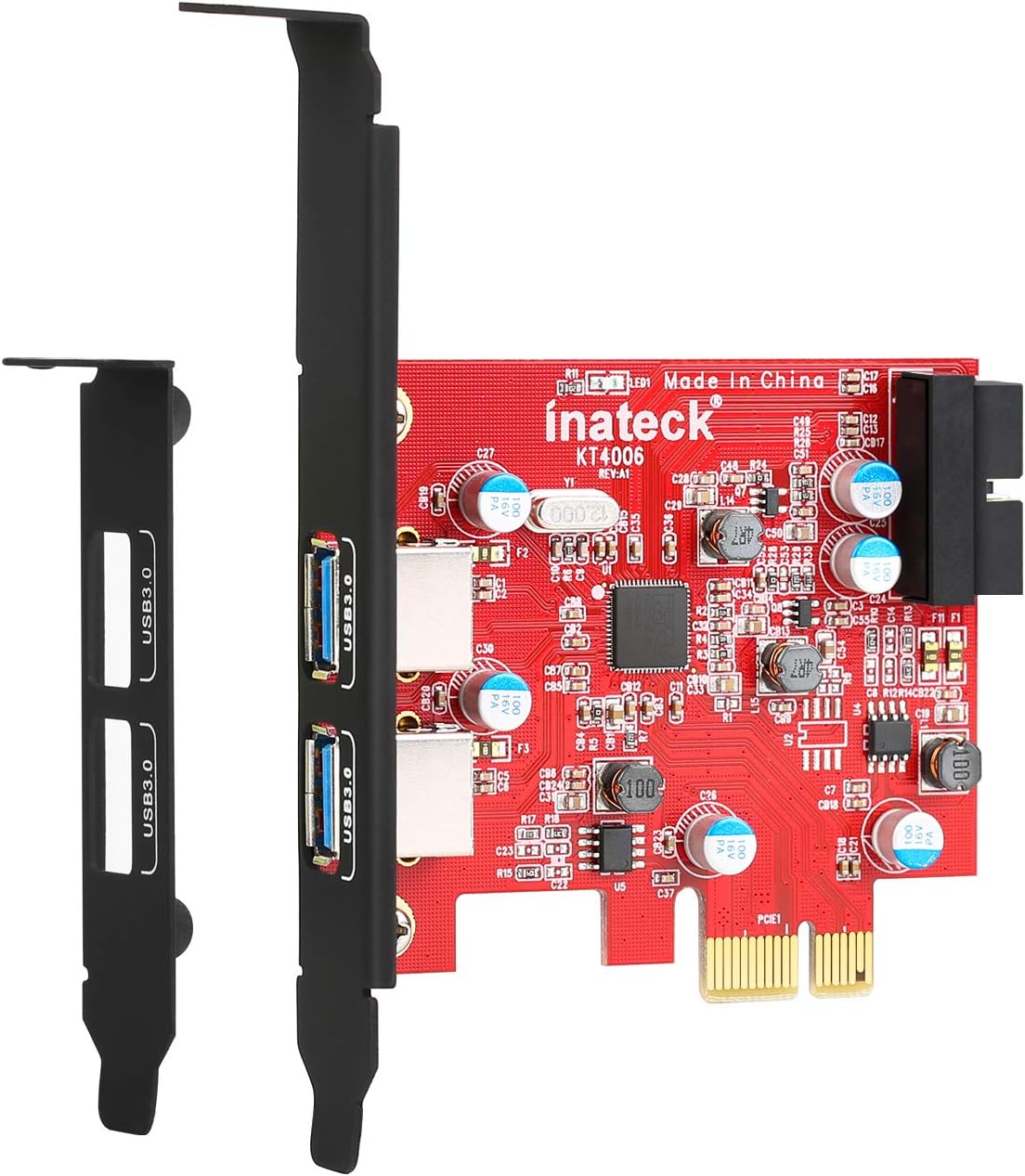
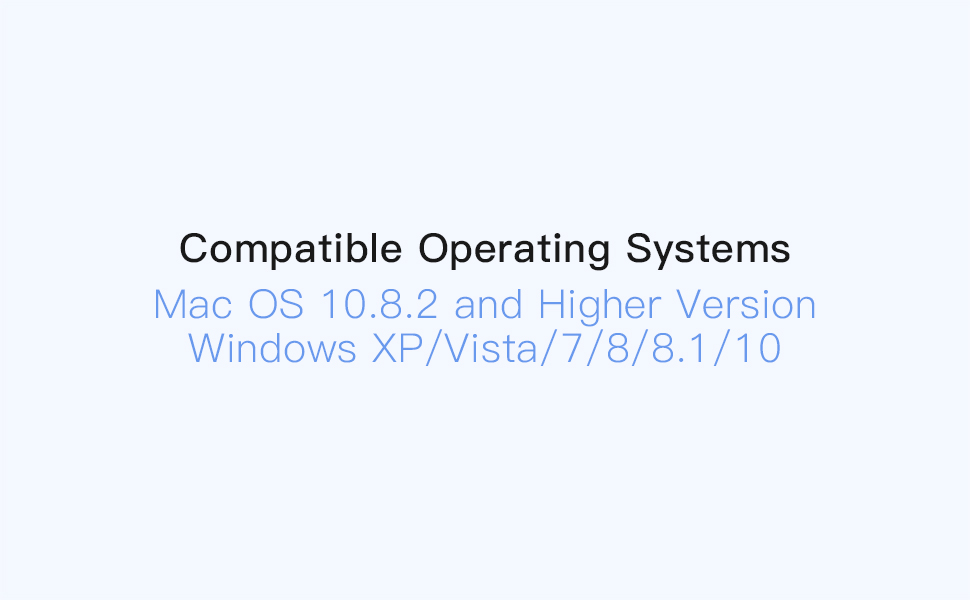
The Inateck KT4006 PCI-E USB 3.0 Express Card adds two high-speed USB 3.0 ports to your desktop via an internal 20-pin connector. Supporting transfer rates up to 5 Gbps, it offers easy plug-and-play installation without extra power supply, compatible with Windows XP through Windows 10 and Mac OS 10.8.2 and later. Ideal for professionals seeking to expand USB connectivity and boost data transfer speeds on classic or modern PCs.




| ASIN | B00JEVLEFQ |
| Best Sellers Rank | 416,802 in Computers & Accessories ( See Top 100 in Computers & Accessories ) 737 in USB Port Cards |
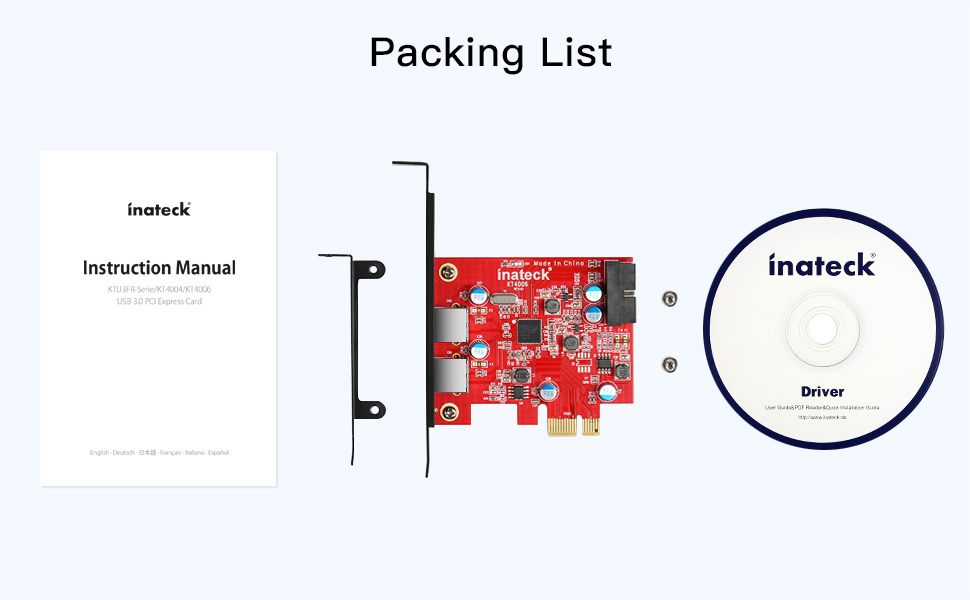
| Box Contents | manual instruction |
| Brand Name | Inateck |
| Compatible Devices | Laptop, Personal Computer |
| Customer Reviews | 4.4 4.4 out of 5 stars (1,471) |
| Global Trade Identification Number | 06957599310253 |
| Hardware Interface | USB 3.0 |
| Item Weight | 0.11 Pounds |
| Manufacturer | F&M Technology GmbH |
| Manufacturer Part Number | KT4006 |
| Model Number | KT4006 |
| Operating System | Windows |
| Product Warranty | 1year |
| Style Name | 2 USB A Ports |
N**N
Great USB3 Card For classic Mac Pro 2009-2012 even with Mojave 10.14.6.
Recently upgraded my classic Mac Pro 2009 v4,1 to v5,1. Also upgraded firmware to 144.0.0.0.0 and OS to Mojave 10.14.6. This card seems to work well via internal PCIe slot. Speeds much faster than USB2 - usually twice as fast. Only problem that ALL these cards seem to have is due to Energy Saver settings in System Preferences. If you select to save power and turn off hard drive and computer after a few minutes, the Mac OS cuts all power and can unmount any devices connected to this USB card. To avoid this, turn off Energy Saver as and when needed. I also found that this card seemed to interfere and reduce WIFI connection speed. Solution was to directly connect to Sky router via ethernet cable - so effectively no WiFi on the Mac. No big problems so would say geat value card and easy peasy to fit.
B**R
Just what I needed
I recently bought a new PC case to house my self-built desktop. This has 2 x USB 3.0 ports at the front. I intend to carry out a major upgrade in the near future but, for the time being, my current motherboard only has 2 USB 3 ports at the rear and no usb 3 risers I can use to connect the front panel ports to. The Inateck device is just what I needed. It has two rear USB 3 ports and, most importantly, a 20pin internal connection that the USB3 front panel cable plugged straight into. Physical installation was a 5 minute job. When I booted up Win 10, the card was recognised but was non-functional -evidently, Win 10 had not installed any drivers. The included CD includes drivers for Win 8 and earlier but not Win 10. I was about to visit the Inateck website to see if any Win10 driver was needed and/or available. Meanwhile Windows update popped up a message saying I needed to reboot my PC (to install a .net update). I decided to do the reboot there and then. I did so and discovered drivers were now installed and the card was completely functional. I guess the moral here is that if you use this card under Win10 try a reboot or two. The card may possibly be redundant when I upgrade my motherboard. I paid £8 or so and it would be no big deal if the card was redundant.
P**C
Good Product - Very Pleased - Would Recommend
I bought this Inateck KT4006 "2-Port USB 3.0 + 20-Pin USB3.0 PCIe Card" to enable two USB 3 ports on this KKmoon dual bay product: KKmoon Dual Bay 3.5" + 2.5" Inch SATA III Hard Drive HDD & SSD Tray Caddy Internal Mobile Rack Enclosure Docking Station with USB 3.0 Port Hot Swap That dual bay USB 3.0 unit needed a PCIe card that had a 20-pin USB 3.0 connector on the PCIe card, this Inateck PCIe card provides that. What I really liked about this Inateck product was that it didn't require a separate power lead to be plugged into it to power the card; the card draws its power directly from the PCIe slot. I didn't have spare power connectors on my PC so this card was just the job. So when the PCIe card arrived I found the following: Well packaged, easy to open. Mounting plate for standard size ATX case (already fitted to the card -- this would fit most PC boxes just fine) and also a mounting plate for a mini-size case, it would be very easy to transfer to the mini-size plate if that was required. Two mounting screws supplied. Instruction Manual in English and German. Driver installer CD. Installing the card was very easy to do. I would though strongly recommend that you plug the 20-pin connector plug of your PC setup into the 20-pin socket on the card *before* you fit the card into the PCIe socket of your motherboard. The reason is that plugging the 20-pin plug into the 20-pin card socket might not be easy. My plug was a very tight fit and wouldn't go into the card socket. I had to file a fraction of a millimetre off two of my plug edges to get it to go in the socket. Even at that it was very tight and required very careful sheer brute force to get it pushed into the socket. Hence, do this before fitting the card into the PCIe socket on your motherboard. Once the card was fitted it is then necessary to install the drivers from the Drivers CD. And that was where I ran into a couple of issues: (1) The installer gave no indication of the driver version to be installed. (2) Install Choice was "Red Card (Fresco Chip)" or "Green Card (NEC Chip)" I chose "Red Card" because the colour of the hardware card was "red". This really isn't explained well in the Instruction Manual which says, "2. Run the 'Autorun.exe' file, click '"Drivers", and select the appropriate driver version." The instructions should really say something like, ". . . select the driver *type* according to the colour of the physical card "Red" or "Green". The installer then installed the appropriate drivers type on the Drivers CD. Once the drivers were installed I rebooted my PC and then went to test if the USB 3.0 ports on the PC were working. None of them were working. I then went to the Inateck website to look for updated drivers. (To find the webpage google -- Inateck KT4006 driver -- click the Inateck link that the search shows up and you will find the latest driver installer at the bottom of that webpage.) Sure enough, updated drivers were available. I downloaded the latest drivers installer. Then I made the mistake of trying to install those drivers over the top of the drivers that were installed from the Drivers CD. I won't go into what happened then, too complex, so do listen to this warning go to the Inateck website and download the latest drivers from there -- forget about the drivers on the supplied CD. (Note: I later found out that the drivers on the CD were years older than those offered at the Inateck website. The CD drivers were version 3.6.8.0 dated 30/07/2015 the drivers downloaded from the Inateck website were version 3.8.33709.0 dated 06/06/2017 -- get the picture. If, once installed, you go looking for the drivers then they are produced by a company called "Fresco Logic" so that is what will appear as folder names in Windows Explorer, in the 'Universal Serial Bus controllers' section of Windows Device Manager and in the registry.) If you did install the drivers from the CD then, again I give you fair warning, do not try to install the downloaded latest drivers over the top of the old drivers. Completely uninstall the old drivers via Windows normal 'uninstall' route, reboot the PC, and then do a fresh install of the new drivers from there. Once I had the new drivers installed and reboot done I found my USB 3.0 ports to be working, good! So, in all, I'm very pleased with this Inateck KT4006 product and would recommend it strongly. Really I would give it 5 stars but I withhold one star on account of the Drivers CD, the associated relevant instructions in the manual, and their deficits. Inateck need to have a look at these issues and sort them out. P.S. At a later date I was poking around the Fresco Logic website And found the following information posted by Fresco Logic (I quote), "Fresco maintains our host controller driver for use on Windows 7 because Microsoft doesn't support USB 3.0 controllers in Windows 7. For all newer versions of Windows using the built in Microsoft driver will provide the best user experience." So it would seem you don't need the Fresco Logic drivers at all for the Inateck card if you are on Windows 8.x or Windows 10. Hope this has been of help. :0)
P**N
Best USB 3.0 card for 2008 Mac Pro
I'm very pleased with this card. It works as expected. That is not to say absolutely flawlessly, but my expectations are fairly realistic having read through numerous forums. Yes it will abruptly eject attached devices if you sleep a 2008 Mac that's to be expected. Eject drives manually first, if you want to sleep your computer. I did have some minor issues with two external hard drives that would produce an error when copying large files to an internal disk, but swapping the ports they were connected to fixed that. Was going to leave four stars but seems a bit mean, as the compromises commonly reported with USB cards in older Macs are due to the nature of those machines. This card came up as least compromised of the many different ones I looked (including fewer issues reported than the 4 port version) and it just works for the most part, so I'm leaving 5 stars because it's well made, was delivered quickly and well presented.
B**T
ONLY works with PCIe 2.0 and above!
If you happened to look through the product photos, you'll already know that this requires a PCI-e revision 2.0 or higher slot. It won't work on PCI-e 1.0 or 1.1, as found on many 2nd- and 3rd-gen Intel chipsets. Ironic, because these are the most likely boards to need a separate USB 3 card; generation 4 and onwards had USB 3 native on the board. I didn't look through the product photos, because guess what - I already know what a USB card looks like. This information about PCI-e revisions is not mentioned ANYWHERE else - not in the product description, not in the technical information, nothing. The card works fine if you happen to have PCI-e 2.0, but again, this is all backwards - boards with 2.0 generally have USB 3 on them already. Boards that don't have USB 3 onboard generally don't have PCI-e 2.0. Ridiculous thing to omit from the product details.
L**N
Ich betreibe die Karte in einem kleinen Linux-Homeserver und bin sehr zufrieden. Gekauft habe ich mir die Karte, um meine USB-3.0 Frontanschlüsse benutzen zu können, da mein Mainboard keinen Anschluss hat. Zusätzlich war für mich das Kriterium wichtig, dass die Karte keine zusätzliche Stromversorgung benötigt. Die Karte wurde in einer antistatischen Hülle geliefert und die Verarbeitung ist sehr hochwertig. Zusätzlich beigelegt war noch eine CD (wahrscheinlich Treiber). Betrieben wird die Karte unter Debian 10 (Buster) auf einem ASRock Q1900M J1900 und wurde auch ohne Treiber-Installation problemlos erkannt. Im 24/7 Dauerbetrieb (bisher 13 Tage) macht sie sich auch gut und wird nicht warm. (Ist bei mir auch keine sonderliche Last drauf.) Die rückseitigen Anschlüsse habe ich noch nicht getestet, die Frontanschlüsse haben bisher nur Maus und Tastatur gesehen. Zu den Übertragungsraten kann ich leider nichts sagen, da wie gesagt bisher noch keine Massenspeichergeräte angeschlossen waren. Falls sich etwas ergibt, werde ich diese Rezension aktualisieren. Alles in allem läuft die Karte, wie ich es erhofft habe. Deshalb volle fünf Sterne.
O**Y
A ver... Mi placa tiene cuatro usb 3.0 controlados por chip NEC (supuestamente de lo mejorcito), dos traseros y dos para conectar al frontal por cabezal. Por algun problema la conexion para el cabezal frontal usb 3.0 que lleva la placa dejó de funcionar, problema del conector o a saber... La placa es version pcie 2.0 que es el requisito indispensable para poder sacarle partido a esta tarjeta de inateck y su velocidad de tranaferencia de datos. La tarjeta se puede conectar a un puerto pcie 1x 4x 8x o 16x indiferentemente del tamaño de la ranura del puerto. Una vez dicho ello puedo decir que la instalacion es muy facil, pinchas la tarjeta y en mi caso W10 64 bits la reconoce a la perfeccion. Yo la tengo instalada en un puerto pcie 1x y mi consejo es que dejeis que W10 la haga funcionar con los drivers que instala el propio sistema en vez de utilizar el suministrado por inateck. Con Windows mas antiguos lo mismo habrá que usar el cd del fabricante para el driver. Gracias a esta tarjeta dispongo otra vez de cabezal para conectar el frontal usb 3.0 de la torre sin necesidad de cable de alimentacion adicional ya que la tarjeta no lo necesita y ademas de dos puertos traseros mas. Y aqui viene lo mejor...Copia y lee archivos a pendrives usb 3.0 y disco ext usb 3.0 mucho mas rapido que con el usb 3.0 nativo de la placa!!!. La clave está en que esta tarjeta de inateck (otro motivo por el que la he comprado) incorpora la tecnologia UASP que ayuda a que las tasas de transferencia de datos mediante usb 3.0 sean muchismo mayores y mas rapidas. Por si alguien lo quiere saber, monta el chip de Fresco Logic FL1100LX que no se monta en muchas placas base y dispositivos no porque no sea bueno sino porque es mas economico montar VIA o NEC por ejemplo... Un detalle para que sepais que la tarjeta funciona ok es que incluye un led verde indicador, es decir, que si no se enciende pues puede que la tarjeta no este ok o este mal conectada o que el puerto pcie tampoco este bien. Se agradece muy mucho que incluya un adaptador de perfeil bajo para poder instalar la tarjeta en torre de tipo slim... Para mi es un gran producto en definitiva y como siempre el servicio de entrega de amazon impecable.
S**E
Deze kaart had ik nodig in een small form factor PC. Hierdoor heb ik nu twee usb 3 poorten tot mijn beschikking. Handig! In mijn geval was het nodig om een backplate te hebben in twee maten, want een volledig formaat backplate past niet in een SFF model PC. In de toekomst kan ik op de interne aansluiting ook nog extra USB poorten aansluiten.
P**E
Works great in my Mac Pro 5,1
G**Y
J'ai installé cette carte dans un DELL Inspiron 580 acheté en 2010 (Age 12 ans) pour booster ses ports USB plutôt faiblards en débit (30 Mo/s). Le résultat est spectaculaire: passage de 30 à 120 Mo/s pour des transferts de fichiers entre disques HDD soit un débit 4 fois plus rapide. Entre disques SSD, ce débit passe à 180 Mo/s (Soit un facteur 6), ce qui reste inférieur à la limite de débit théorique des SSD, mais répond largement à mes besoins (Je ne suis pas fan de jeux...). Carte installée en moins de 5 minutes et immédiatement reconnue par Windows 10! Après l'installation d'un SSD interne il y a 2 ans et de ce contrôleur USB3, mon vieil Inspiron a pris un sacré coup de jeune, et nous allons encore passer de nombreuses années ensemble!
Trustpilot
1 month ago
3 days ago