🌦️ Stay ahead of the storm with precision weather insights at your fingertips!
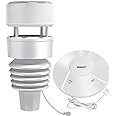
The ECOWITT Wittboy GW2001 Weather Station combines a solar-powered 7-in-1 outdoor sensor with a Wi-Fi IoT hub, delivering hyper-local weather data including temperature, humidity, wind, UV, light, and rainfall. Featuring a cutting-edge haptic rain sensor and IPX5 waterproof rating, it ensures accurate, durable performance. With long-range 915 MHz wireless transmission and compatibility with multiple weather platforms, it offers seamless integration and real-time alerts, perfect for smart home enthusiasts and professionals seeking reliable environmental monitoring.


| ASIN | B09TZZTYPK |
| Additional Features | Dual-Power Supply, E-mails Alert, Haptic Rainfall Sensor, IPX5 Waterproof |
| Are batteries included? | No |
| Best Sellers Rank | #27,212 in Patio, Lawn & Garden ( See Top 100 in Patio, Lawn & Garden ) #43 in Weather Stations |
| Brand | ECOWITT |
| Brand Name | ECOWITT |
| Color | White |
| Connectivity Technology | Wi-Fi |
| Customer Reviews | 4.4 out of 5 stars 496 Reviews |
| Display Type | NO Display |
| Frequency | 915 MHz |
| Included Components | GW2000 Wi-Fi IoT Hub, WS90 7-in-1 Outdoor Solar Powered Weather Sensor, Battery |
| Item Weight | 1 Kilograms |
| Manufacturer | ECOWITT |
| Material | Plastic |
| Material Type | Plastic |
| Power Source | Outdoor Sensor:solar Powered Or Battery Powered; Wi-fi Hub: Usb Cable |
| Recommended Uses For Product | Garden, Home, Office |
| Sensor Technology | Solar |
| Shape | Rectangular |
| Special Feature | Dual-Power Supply, E-mails Alert, Haptic Rainfall Sensor, IPX5 Waterproof |
| Specific Uses For Product | Humidity, Rain Rate, Temperature, Wind Direction, Wind Speed |
| Style Name | GW2001BU |
| Temperature Accuracy | 0.5 °C |
| Upper Temperature Range | 140 Degrees Fahrenheit |
A**A
Nice entry level weather station, great family of sensor devices for Home Assistant
This is a great entry level weather station for getting extremely local weather information, and I love how it can be used on the local network, and even be blocked from external connections and still work, that's a rarity in today's tech world. I will say that I'm not so sure the rain gauge is accurate, BUT, if you have a normal rain gauge (I do not currently), you can take readings, compare, and alter the rain gauge on the local webpage for the hub to help it be more precise. It easily integrates into Home Assistant, and plenty of scripts can be written for it, like in the second picture in this review. Every sensor highlighted is straight from either the weather station or the included hub, but the ones not highlighted are calculated custom template sensors I added. The 'Feels like' temperature takes the wind speed and current temperature into account for wind chill (not 100% accurate, but I bet it could be if I included the sunlight/”radiation” into the equation), or it will take the temperature and the humidity when applicable and calculate the heat index. Still have yet to try the latter out, as it is a bit cold here at the moment, but looking forward to testing it out this spring. The 'Fire risk' takes the rain average over the last 10 days (default data storage for home assistant – haven't changed it), the current humidity, and the temperature into account to calculate the current fire risk. I am still learning, but this is all with sensor data that this weather station can output! Looking forward to doing more with it, and if you have smart lights, you can make a sliding scale for how bright they may be based on the sunlight the weather station is receiving, etc. Nearly endless possibilities. The hub itself supports much more than just this weather station, and we currently have three Ecowitt thermometers connected to it with no issues. Also looking forward to expanding our Ecowitt device collection and doing more home automation with them, too! Side note - if you are wanting to power your weather station via normal power, or use the heater, the cable for that is not available on Amazon (At least it wasn't for us at the time of purchasing), and it was quite pricey.
A**T
excellent consumer-grade weather station
This unit replaces a ten+ year old Oregon Scientific station that over the last five years had steadily decayed. This HP2564 is far better in every respect. The package came with the WS90 all-in-one sensor ultrasonic anemometer/vane, piezoelectric rain gauge, light and UV sensor and thermo-hygrometer; the HP2560_C color display; a ring of bird deterrence spikes; and two paper manuals. The all-in-one sensor is compact and easy to set up. I installed two AA lithium backup batteries. I have it mounted on a PVC pole. I did not opt for the A/C heater module. I can't swear by the rain gauge, but it seems close to nearby station rainfall readings. The display is bright (brightness is adjustable) and easy to read. My unit is about 50 feet and two walls away from the sensor with all-bars on the WIFI icon lit up. It also comes with an interior thermometer and hygrometer, and micro-SD port, 32GB max FAT. The micro-SD card continually outputs readings in CSV format which are easy to analyze in Excel or similar spreadsheets and the card will take a long time to fill up. There is no battery backup (although the micro-SD card could be considered an approximation of same), so get a small UPS for the AC input if that's an issue. It's a little wonky to initialize, although the paper manual is adequate and online resources a little better. However, once you get used to the cumbersome sequential menu drill-down and value setting system (i.e., no touch screen nor direct go-to-setting shortcuts), it becomes quite usable. A cool feature is that if the unit is in a bedroom, it can be scheduled to go dark and then re-enable at certain times (or can be manually darkened and re-enabled at any time). This might also be useful to prevent long-term screen burn-in, but the manual does not say that's a problem with this kind of display. Setup of WIFI and communication with the optional internet Ecowitt.net service is straightforward. I have not tried linking to Weather Underground. The Android app is easy to use, showing current readings. It also shows graphs of various measurements over different time intervals, including yearly. At this point, my only fear is that as opposed to systems with separate sensors, with long-term use if part of the all-in-one sensor fails, then the whole thing must be replaced unless repair is possible. Otherwise, this is an excellent consumer-grade weather station.
C**S
Reliable Temperature and Humidity Sensors
I recently purchased the Ecowitt WN32(WH32) Wireless Outdoor Temperature and Humidity Sensor, along with the WH31 Indoor Sensors and the Ecowitt GW2000 Wi-Fi Hub. These devices were recommended on some Home Automation Forums, and they don't disappoint. First and foremost, reliability is a key factor when it comes to temperature and humidity sensors, and the Ecowitt sensors have proven to reliable. Once paired with the hub, they update frequently, much more often than battery-operated devices running on zwave or zigbee networks. In the past, these other sensors would simply stop reporting, or update only every 10-15 minutes. These update approximately every 60 seconds so I always have access to the most up-to-date information. The app also provides a handy graph or chart displaying the historical temperature data, allowing me to monitor trends and changes over time. I am using this to help hone in my HVAC system, and know the temperatures of different rooms around the house. Setup was easy - just select the channel, go into the App for the Hub, and it will detect the device. From there, you can setup the name, order in the app, and view the data. While the Ecowitt sensors can function perfectly well as standalone products for monitoring temperature and humidity throughout the house, I opted to integrate them into HomeAssistant so I can now leverage the data in automations and display it on customizable dashboards, adding an extra layer of functionality. It's worth noting that the Ecowitt GW2000 Wi-Fi Hub does have some limitations regarding the number of devices it can accommodate. For the WH31 Indoor Sensors, the hub supports up to 8 devices, which is more than sufficient for my needs. However, for the WH32 Outdoor Sensor, I believe only one device can be connected per hub. It's essential to review the hub documentation before making a purchase to ensure it meets your specific needs and device requirements. You could also purchase another hub to pair more devices - Each of them have a channel select in the battery compartment which is how it registers to the hub. In the future, I may also bring in their soil sensors for better lawn care as well. Current Devices: - GW200 Hub, Wired (Can also use Wireless) - 1x WH32 Outdoor Sensor - 5x WH31 Indoor Sensor
6**R
Great all in one, documentation could be better...
This is a very nice all-in-one sensor that brings all the moving components together into one, solid unit. Compared to other units, you no longer have to properly provide radiation shielding for the temperature/humidity sensor, and you no longer have to worry about debris clogging the rain gauge sensor. Since everything is in one unit now, you only have to worry about battery replacements on one unit versus potentially at three different places. It is also reasonably priced and is priced around the same as a lower-grade sensor replacement. As the item description suggests, however, the sensor itself is not able to work alone, and must be combined with an Ecowitt gateway or display console. Luckily, you most likely do not need to purchase a new console or gateway if you have an existing one available. I am using the HP3500 series (HP3501) display console, and it works fine with the WS90 with the latest firmware upgrade. I have also tried this with the older GW1100 USB gateway, and it was also able to read directly from the sensor (after the firmware upgrade). There is a compatibility chart on the website if you are uncertain whether your existing console/gateway is compatible. Although there is very little documentation stating so, the WS90 does not really work out of the box unless you have one of their newer gateways. As mentioned previously, you will need to make sure you are on the latest firmware version for your gateway/console device (which can be downloaded from the website), otherwise, you will not see any data from the sensor as the sensor type is quite new and has not yet been integrated with most older firmware versions. Furthermore, if you are replacing an older sensor array, old data from that array can conflict with this array, hence causing unexpected readings. So that I can cover all the quirks, I have written out my setup procedure for this array. This assumes you have connected your gateway/console to the Ecowitt portal already (including setting up the long/lat coordinates on the console and adjusting your pressure differences for a relative barometric measurement). Upgrading firmware for console/gateway: You must be running the latest firmware version in order to read data from the WS90. For graphical consoles, you need to download the firmware on the website and upgrade the firmware via the embedded SD card slot. Gateways can be upgraded by using the WSView app. Deregistering old array: If you have an existing array, turn off the data reporting in the console/gateway's array settings page. This will stop the old array's data from conflicting with the new array sensor. Note that taking out the batteries from the battery compartment is not sufficient since many sensor arrays have a battery/capacitor backup and will keep transmitting data even when the batteries are taken out and is left in the dark. You may be able to deplete the battery/capacitor backup using the contacts inside the battery compartment, if applicable (although not necessary if you are able to turn off the reporting for the sensor ID in the settings page). If you have a traditional rain guage/collector, that sensor can remain on as rain tracking is separate for the sensor types. If you have a graphical console and would like to read data from haptic rain sensor instead of the traditional rain sensor, you will need to select the Piezo Rain option from the rainfall data priority settings to get the proper readings. Note that while data from both sensors will be uploaded to the Ecowitt portal, the console can only display one rain sensor type at any given time. You can switch between the rain gauge types without losing any data as the console is tracking both sensor types in the background. You can also see the accumulations for both types and change the rain display settings by holding the Rain button for 2 seconds. For gateways, you must use using the WSView Plus or the Ecowitt app in order to read Piezo Rain values. The older WSView app will show the basic weather information, although the piezo rain information will be missing from the view. Upgrading firmware on WS90 (optional, but recommended): Unbox the WS90 sensor array and peel back the silicone wrap on the sensor and USB port. Download the firmware from the Ecowitt website and connect the sensor to the computer using a microUSB cable (not included). Note that there are a few different variations of the firmware, with different mist/rain sensitivities. Choose the one best suitable for your location and follow the instructions to upgrade the firmware. Mounting the array: The array uses a 3/4" ID or 1" OD pole. The fit should be snug to prevent the sensor from moving around when it's windy. On some poles, the fit maybe somewhat loose. To fix this, wrap a few rounds of masking or electric tape around the top of the pole and ensure the fit is snug. Using a smartphone with a compass app, put your phone next to the W marker next to the wind sensor opening, with the front of the phone facing the N marker. Slowly rotate the sensor along with the phone while keeping the phone to the left of the W marker, until the phone's compass read 0/360 degrees. This will ensure that the wind direction reporting is correct. Install batteries: Install 2x AA batteries by unscrewing the battery plate and replacing it afterward. Either rechargeable NiMH or alkaline/lithium can be used. Connecting 12v/1A DC power supply (optional): If the installed location is affected by snow, you will need to connect a power adapter on the sensor to prevent snow accumulation. This is not needed unless temperature drops below freezing with snow accumulation blocking the wind port openings. Change the battery threshold alerting (optional): Depending on the type of batteries installed, you may want to change the alerting threshold on the Ecowitt portal so you can be alerted when the internal batteries need to be recharged/replaced. This can be done by clicking the cogwheel and the bell icon on the battery panel, and setting the following alert: Battery: Haptic Array(Battery) less than or equal: For NiMH, set the value to 2.4v, for alkaline/lithium, the value should be set to 2.7v. Once all the steps are done, the console/gateway should pick up the data automatically from the WS90 sensor. Here are my thoughts of this sensor after using it for a month: Readings: The readings are very good and is comparable to the old sensors I have before. I like the fact that the sensor has a built-in radiation shield so no additional components are needed to get an accurate temperature reading. The wind readings are also quite consistent, although the faster 8.8s reporting period may make the wind readings a bit more jumpy compared to the older legacy sensors. Piezo Rain: The piezo rain function does work quite well and is able to detect very small amounts of rain that the traditional rain gauge is not able to detect. However, because of this, dense evening fog can sometimes register a 0.02" of rain on the sensor. If this is bothersome, you may want to flash the firmware with lower moisture sensitivity to avoid this problem. Combined with the faster 8.8s reporting period vs the 49s reporting period on the traditional rain gauge, the reported values can end up to be slightly different as the piezo rain gauge is quicker to react to changes compared to the traditional rain collector, but they are close enough as far as trend reporting. Battery Life: This sensor is powered both by the AA batteries and the built-in supercapacitor that provides the primary source of power. Because this sensor provides so many functionalities in one, its power consumption is much higher compared to the more basic sensors. I have asked the manufacturer how long a set of AA batteries are expected to last on this sensor, and I was given an answer of ~9 months, depending on weather conditions. Compared to my old wind/UV/light sensor, I have not replaced the battery on that unit for over 3 years and it was still going strong. That being said, battery life appears to be affected especially by rain, and rain alone can cause power consumption to go up by 3-4x. Under dry conditions, the solar panel is usually self-sufficient to keep the built-in supercapacitors fully charged even on overcast days. A fully charged supercapcitor (5.3v) is generally sufficient to keep the sensor running for 2-3 nights on especially dark days, but one night of rain is all it takes to fully drain the supercapacitor down to 2.3v (the lowest it will go). Once the supercapacitor reaches the battery voltage, it will also start to use the battery as backup power. The sensor will report the numerical voltage values for both the supercapacitor and the batteries back on the Ecowitt portal, and you can alert on these alerts and see historical values just like any other weather attributes. Although the solar panel does not charge the AA batteries that are inside the battery compartment, creating an alert with the specific voltage values should allow you to change out / recharge the batteries before the sensor runs out of power. If the location where the sensor is installed is mostly dry, then it is very likely that you will get much more than 9 months of battery life as the solar panel itself is sufficient to power the sensor without tapping into the batteries. If you live in an area that rains consistently around the year, then your results is probably going to look much different. For reference, it takes about 5 hours of "somewhat cloudy / partial sun" light to fully charge the supercapacitor from empty back to full. It takes about 2 hours of the same intensity of light to recharge a partially discharged supercapacitor assuming dry weather. Overcast days are also generally sufficient to maintain the charge as long as it does not start to rain. Update: 9/2/23: It has been about 9 months since I have purchased this item, and so far the NiMH rechargeable batteries are doing well at 2.54v (1.27v each) without recharging them since the installation. For rechargeable such as NiMH, this is still relatively a high state of charge especially given NIMH also self-discharges itself after some period of time. I would say the NiMH batteries would probably last a least a few years given how it has fared so far, and the supercapacitor has only been drained on days where it's relatively dark with rain throughout the day. Even with the rain, the daylight generally is sufficient to recharge the supercapacitor partially such that the batteries are only used for about an hour or two towards the early morning timeframes. Overall, I think this sensor is a great value and works well. Although the specific quirks can be better documented and explained.
D**E
I couldn't be happier, what an excellent weather station!
My wife gave me a Tempest weather station for my birthday, and to my disappointment it would never read the humidity correctly, being about 20 percent off other stations in my neighborhood or area. We sent it back for a refund and I decided to give this Ecowitt unit a try. I couldn't be happier! Setup was easy and the base station is excellent. It's customizable, you can calibrate the temperature, humidity levels, the barometric pressure, etc. This is a very useful feature. The best thing besides it working like a charm is all the other sensors you can purchase to use with it. Soil sensors if you are a gardener, air quality sensors to keep an eye on the air quality in your home, leak detectors so you have peace of mind, extra temperature sensors, etc. For the price it's a great product and I love the fact that sensors can be adjusted, changed, added, removed, etc.
G**T
Simple to install, working very well
I wanted a weather station to add to my Home Assistant, mostly just for fun. But after using it for a couple weeks now, I'm impressed with how accurate it is. I have it mounted about 20 feet in the air, and I was concerned about the nearby trees (40'-60' Oaks and Poplar all around our yard, some within 50' of the station) distorting wind readings, but when I have compared with our nearby airport, they consistently match. The rain readings also matched our manual rain guage. So, whatever solid-state magic ECOWITT is using is very impressive. Relative pressure also matches the airport (just looked up my elevation online, and entered the pressure offset in the ECOWITT configuration web page). Integration into Home Assistant was very easy, I'm using ApexCharts and WindRose cards, which give very appealing displays for all the data I want (temp, humidity, dewpoint, wind speed & direction, pressure, even sun light). And by chance I installed the "base station" inside my chicken coup (just to be nearer the weather station), and found the precision and finer granularity of the temperature tracking much better than the YoLink X3 I was using - showed me a problem with the previous thermostat. So, I ended up replacing that too. Wish I would have started with the ECOWITT and never bought the Yolink or previous thermostat control (now just using a WiFi switch and an HA automation, much more flexible).
R**N
Not Worth the MONEY!!
The primary reason for a weather station is for temperature, humidity, wind and RAINFALL. I’m not sure about the accuracy of the first three factors but I guarantee you that the rainfall accuracy is in the TOILET! I now have 4 rain gauges. Last night it rained. Here are the readings of all four. Ecowitt WH40BH .19 inches: AcuRite 01014M .16 inches: Stratus manual gauge .18 inches: ECOWITT WITTBOY PRO .75 inches I already had the AcuRite for many years. I just got the other three. I bought the Stratus and the WH40BH to compare accuracy. Don’t buy the WITTBOY. Instead get the display and other wanted components individually and create your own station. Just had a storm. The NWS issued a severe thunderstorm warning with high winds. This thing showed 13.4 mph as the highest. Way off. Actual rainfall was .50 inches. WS90 showed 1.10 inches . Now wish I hadn’t bought it! I do like the display. I’m gonna trash the WS90 and buy separate components to use with it. I am not returning it to Amazon, it is not their fault. I should have trusted the negative reviews.
W**K
Verified accuracy, great instrument
Fits on a 3/4” PVC pipe securely and makes it easy to mount anywhere. Used two hose clamps to attach it to a roof vent. Just align North as indicated (and I did attach the included bird-repelling wires,) and it’s good to go. Had a series of rain events over the weeks since installed and the results closely corroborate with the local weather station reports. Wind indicator is clever and seems to be accurate. The trendline reports on the app are great - terrific performance from a compact and economical instrument. Solar power is a plus, and the app indicates charge level.
Trustpilot
5 days ago
3 weeks ago