
DOWNLOAD THE APP


Customer Services
Copyright © 2025 Desertcart Holdings Limited
DOWNLOAD THE APP


🚀 Elevate your Raspberry Pi game with touch—small screen, big impact!
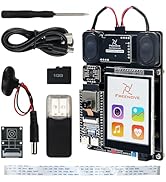
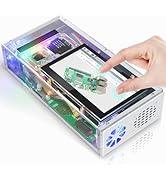
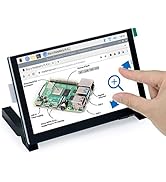
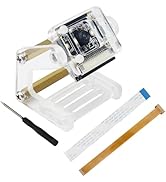
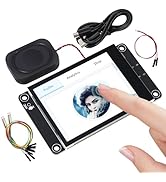
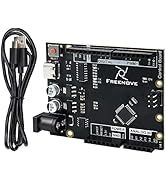
The FREENOVE 5 Inch Touchscreen Monitor is a dedicated Raspberry Pi accessory featuring a vibrant 800x480 IPS display with 5-point capacitive touch. It connects effortlessly via the MIPI DSI port, requiring no additional drivers or HDMI connections. Designed for seamless compatibility with Raspberry Pi models 1 through 5, it offers a compact, lightweight solution ideal for developers, makers, and IoT enthusiasts seeking a responsive, high-quality touchscreen interface.










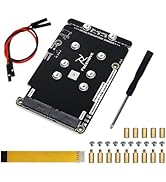
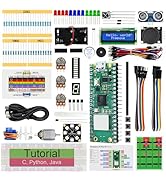
| ASIN | B0B455LDKH |
| Best Sellers Rank | #12,427 in Electronics ( See Top 100 in Electronics ) #384 in Computer Monitors |
| Brand | FREENOVE |
| Color | 5 inch IPS touchscreen |
| Computer Memory Type | SRAM |
| Customer Reviews | 4.5 4.5 out of 5 stars (535) |
| Date First Available | June 15, 2022 |
| Item Dimensions LxWxH | 8.35 x 5.51 x 1.5 inches |
| Item Weight | 6.7 ounces |
| Item model number | FNK0078A |
| Manufacturer | Freenove |
| Max Screen Resolution | 800x480 Pixels |
| Operating System | Embedded |
| Processor Brand | Freenove |
| Product Dimensions | 8.35 x 5.51 x 1.5 inches |
| Screen Resolution | 800 x 480 |
| Standing screen display size | 5 Inches |
| Voltage | 3 Volts |
D**K
Not A "PnP" Setup, But Once Done It's Great!
I recently built a music streamer based on the Raspberry Pi mini-micro computer, and it was a nice replacement for a very old (way over 15 years) Squeezebox Classic streamer that was beginning to suffer its own version of digital dementia. I used a Raspberry Pi 4B, with an InnoMaker DAC HAT for audio line-out to my stereo receiver, and after an easy assembly and setup, it worked marvelously, though I needed to use a phone app to actually control it. So, I decided to take a step up and add a 7" touchscreen. While there is an "official" Raspberry Pi screen, this one was about half it's price, and had decent reviews... so I pulled the trigger on it and a week later it was in my hands. Physical setup was quite easy, as the basic standoffs, ribbon cable (three different sizes... I used the short one) and other hardware was included and easy to identify. The touchscreen included a link to a "tutorial" PDF on physical assembly of the touchscreen to the Raspberry Pi, and it was straightforward enough to easily get that job done. And finally, hook up power and RCA cables to the Raspberry Pi and boot it up. And that's where it became a challenge, partly because I'm a bit of a Noob at this. The system booted just fine, and would play music from the server, but the display was NOT the music streamer interface I'd expected. It was instead the command line interface to the Raspberry Pi, and I am most definitely not experienced enough with that to even contemplate finishing the setup through that. So, what next? A lot of internet sleuthing, and finally learning that I had not yet installed "JiveLite", but that turned out to be an easy thing to do through the PiCorePlayer interface. Once that was done and I rebooted, I got into the PiCorePlayer setup screens and quickly discovered that something was very wrong: no matter what setup selection I made, I ended up with something else instead. Grrrr! After some trial and error (lots of error, actually), I discovered that the touchscreen orientation was set up rotated by 180 degrees from the display screen. At that point, a lot of internet sleuthing ensued, I discovered that there is a dearth of step-by-step guides on how to set it up properly. I also discovered that I could connect a usb keyboard to the Raspberry Pi, and with the up-down-left-right arrow keys manage to work my way through the basic setup to get to a working PiCorePlayer display. But I still had the upside down touchscreen. I could probably have managed to get the guidance I needed from the manufacturer website, but I was impatient and plunged ahead to eventually find that I needed to change some settings in the /boot/config.text file (Yikes!!!). Fortunately, those setting changes were relatively simple, involving the "display_rotation=n" and "lcd_rotation=n" commands. It was trial and error, but what eventually worked for me was to use "lcd_rotation=0" and display_rotation=0". While I could have done this through the ssh terminal access, it was (for me) easier to simply remove the microSD card from the Raspberry Pi, mount it on my PC, and then simply edit the config.text file using the NotePad app. Once properly configured, the display and touchscreen mapped together most excellently, and the rest of setup was a breeze. Properly configured, this touchscreen is a great addition to a PiCorePlayer setup, and it is very easy to use. A bonus with this touchscreen is that it doesn't add much to the power demands of the system. Without the touchscreen, I was able to measure the load at a little over 500 mA from the power supply. After adding the touchscreen, I expected to add another 1,500 mA, but was very pleasantly surprised to see that it was consistently less than 1,000 mA, even with the screen at its brightest setting. The negatives about this... the information provided with the touchscreen did not adequately address the setup required to make it work properly. A simple step-by-step guide would have helped immensely, and I doubt that the problems are just confined to setup with the PiCorePlayer. Also, if you ever need to remove/replace the necessary SD card, you will find it nicely hidden by the ribbon cable connector between the Raspberry Pi and the touchscreen. I ended up using sturdy tweezers to remove and replace the card, and that was not as simple as it sounds, especially for re-inserting the card. Would I buy this again, knowing what I do now? Certainly! It works great and the price is right. But better instructions on setup from the manufacturer would have greatly reduced my frustration level at several points during my setup adventure.
R**.
Cool but affordable monitor for PI IOT projects
Many of my IOT solutions don't require a monitor in their final state but it is really nice to have one handy and non-combersome during development or even as a nice add on to a product where a monitor isn't an absolute necessity. The resolution is good especially for the price point. The color is pretty good but may be better if your eyesight isn't as poor as mine. The power supply is adequate and the unit worked great right out of the box. Due primarily to the reasonible cost, these are also perfect for providing a complete and super convenient system for trainees in classes I provide to young folks for free. With use of these monitors, interest can be improved serving as a great incentive to get young folks involved in what may end up being a lucrative skill in this heavily IT focused world.
L**Y
Great screen for Pi projects
This screen works really well with the Raspberry Pi. Just plug and play in my experience. The only negative I can see is what others have mentioned - the mounting hardware on the back can break off very easily. I have lost one of these and now treat the remaining hardware very carefully. Probably better for one time mounting and leaving it alone, not for a use case where you will be mounting and unmounting the unit repeatedly. If you can live with that, or just use the included feet, these are great units.
A**R
Perfect for Klipperscreen
Great 5inch screen for a raspberry pi. I have tested it with both the RPI3b and the Pi 4b. I have the Pi powered by a POE hat and so far has been great. Works great for klipperscreen. Great viewing angles. I can see it from across the room.
J**Z
Solid unit if you're cool with ribbon cable
Pretty cool unit for a good price. I like how the unit comes with little legs for stands, has provisions for pi mounting incorporated, and although ribbon cable isn't my favorite, it does keep all the usb ports cleared up. Paired this unit with an 8g pi 5 with a 64gb card. Mounted on the back of this screen, & has fan installed on the pi. Just finished operating system installs as well as docker, git & piHole to get started. I like how the screen has adjustable backlighting, the touch feature is perfectly accurate & sensitive, and it even comes with little legs.
I***
Great little touchscreen for a great price.
Very pleased with this thing, so far. Worked perfectly out of the box for my Raspberry Pi 4 Model B, didn't have to fiddle with any code. Display is sharp and crisp, and it recognizes touch accurately across the whole screen with no dead spots. It comes with a small button on the top right on the PCB that controls the brightness, which has 10 settings (if you count 'Off' as the first one). The only minor complaint I have is that I wish it could go a bit brighter. In a low-light environment, it's maximum brightness is okay, but I think in brighter light environments it could do with being brighter.
M**G
Good screen. Good price.
For the price and expediency of arrival you can't complain. It works as it should, right away. Advise for others: make sure you get the right standoffs if you're putting Hats, etc. M2.5. Not M3, which I now have an abundance of.
A**R
Works well. Glad I got the board revision that I got.
Perfect for what I wanted, I have only a single complaint so far. The ribbon cable for connecting to the RPI is significantly longer than it should have been. I had to design the case to accommodate the extra loop of ribbon cable sticking out. Besides the length of the cable, I have one other concern. The instructions included seem to indicate that some revisions of this had pogo pins on the board that were meant to make contact with the _top_ of the RPI's header (looks like they would be used for power). Clever, but wow is that a terrible design (it would mean the screen would not work if the RPI weren't mounted directly to the screen or if a non-RPI SBC with different pinout was used)! Fortunately, the board I received did not have these pogo pins.
J**1
Wollte mir ein Touchdisplay für einen Raspberry Pi für meinen 3d Drucker kaufen. Dieses display ist perfekt. Einfach zu installieren, Treiber sind schnell heruntergeladen, es gibt einen Knopf mit welchem man verschiedene Helligkeitsstufen einstellen kann, touch reagiert super und die Farben sind einfach Top. Fast schon zu gut für den Preis.
ネ**ロ
この手の商品ではあるあるだと思いますが、同封の取扱説明書と実際の製品が異なって届きました。 説明書では「基板上のポゴピンを介してラズパイ本体から電源供給するので、接続を確認しろ」との表記がありましたが、実際にはそのようなピンどころかパターンすらありませんでした。 不安ながらリボンケーブルで接続したところ問題なく映像出力及びタッチ操作が可能でした。 映像自体はきれいで、タッチ操作の感度も問題ないため☆5とします。
P**M
Un display touch con un’ottima risposta al tocco, la risoluzione è sufficiente per utilizzi standard (ad esempio domotica, oppure per realizzare un semplice stream deck come nel mio caso). Date le dimensioni e la risoluzione di 800x480 pixel, non lo consiglio come sostituto di un tablet o simili, nonostante sia ben leggibile e con retroilluminazione (che si può spegnere con un pulsante sul bordo del display). Il monitor arriva con tutti i cavi necessari per i vari modelli di Raspberry, ma senza una custodia esterna: sono presenti solo due piccoli supporti da avvitare sul retro del monitor che consentono di tenerlo in posizione verticale e leggermente inclinata, nessuna protezione per l'elettronica (foto); in effetti il produttore lo dichiara compatibile "solo per sperimentazione". Messo in funzione da un paio di mesi, anche se non utilizzato spesso, finora si è dimostrato affidabile.
J**E
Couldn't be easier. Plug it in, and that's it. Perfect. Screen looks good, it's not super high res or anything but it's bright and clear. Touch works well. Power draw running rpos is about 2.7 to 3.3 watts, actually pretty good. Nothing to complain about here, this is a great little screen. Note! Raspberry-pi OS supports touchscreen but NO WAY TO RIGHT CLICK.
A**O
Muito fácil de usar e o ecrã táctil funciona perfeitamente.
Trustpilot
5 days ago
1 week ago