We remain fully operational. Our teams are working around the clock to ensure your deliveries continue safely.

DOWNLOAD THE APP


Customer Services
Copyright © 2025 Desertcart Holdings Limited
DOWNLOAD THE APP
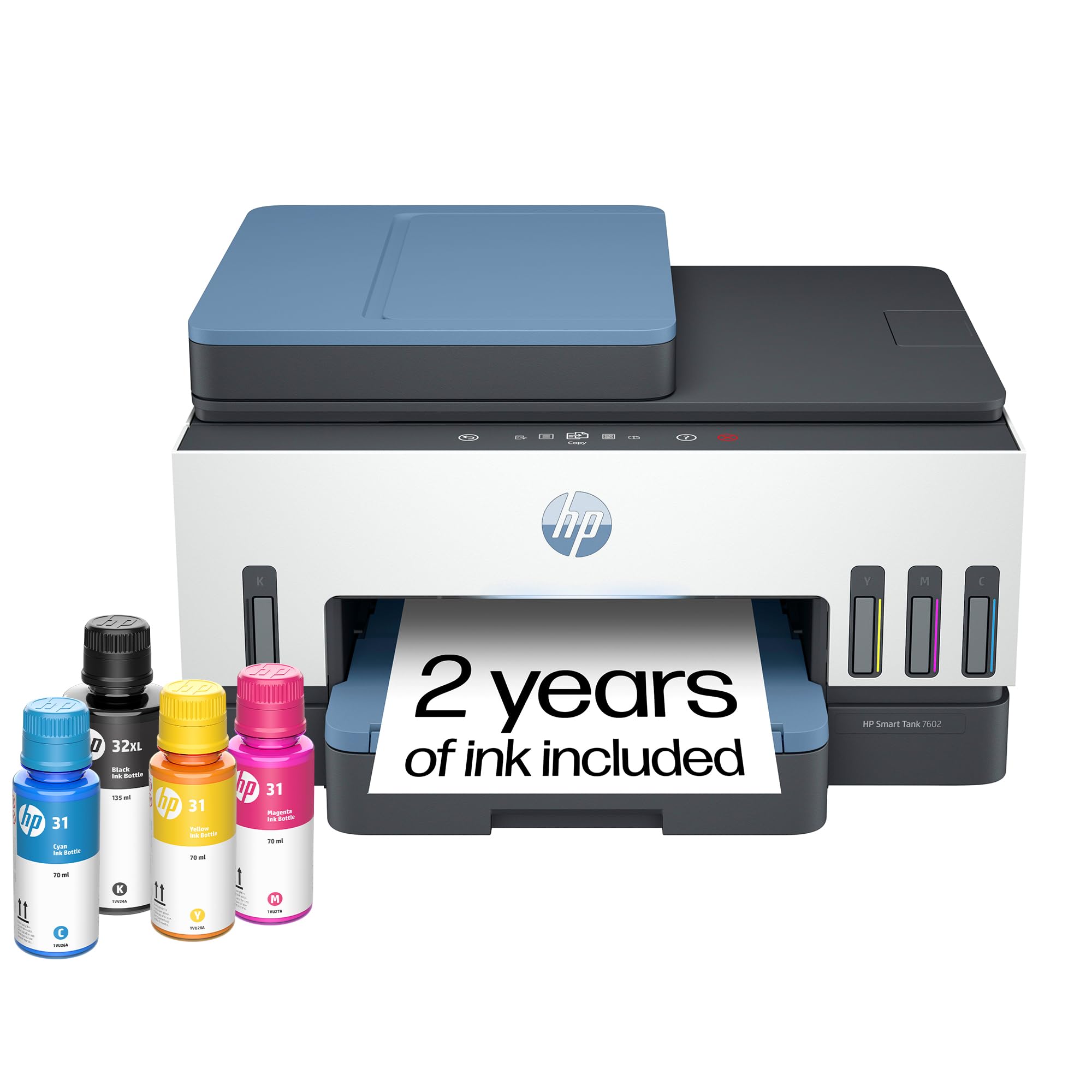
🖨️ Print smarter, save longer — the last printer your home office will ever need!
The HP Smart Tank 7602 is a high-capacity, wireless all-in-one ink tank printer designed for home offices and small businesses. Featuring cartridge-free refillable ink tanks with 2 years of ink included, it delivers up to 8,000 color pages with sharp 4800x1200 dpi resolution. AI-powered printing optimizes layouts for zero waste, while a large 250-sheet tray and duplex printing boost productivity. Compatible with multiple devices and smart home systems, it combines reliability, cost-efficiency, and seamless wireless connectivity in one sleek package.



| ASIN | B09CJCNJBL |
| Additional Printer functions | All In One |
| Best Sellers Rank | #4,300 in Office Products ( See Top 100 in Office Products ) #12 in Ink Tank Printers |
| Color Depth | 24 Bits |
| Compatible Cartridge | HP 32XL 135-ml Black bottle (~6000 pages), HP 31 70-ml Cyan bottle (~8000 pages), HP 31 70-ml Magenta bottle (~8000 pages), HP 31 70-ml Yellow bottle (~8000 pages) |
| Compatible Devices | Laptops, PC, Smartphones, Tablets |
| Control Method | App, Touch |
| Controller Type | Amazon Alexa, Android, Hand Control, iOS |
| Customer Reviews | 3.9 3.9 out of 5 stars (1,867) |
| Date First Available | April 18, 2022 |
| Dual-sided printing | Yes |
| Duplex | Automatic |
| Hardware Interface | USB 2.0 |
| Included Components | 28B98A HP Smart Tank 7602 All-in-One Printer; HP 32XL Black Original Ink Bottle; HP 31 Cyan Original Ink Bottle; HP 31 Magenta Original Ink Bottle; HP 31 Yellow Original Ink Bottle; HP Black Printhead; HP Tri-color Printhead; Power cord; Ink caution flyer; Setup guide; Reference guide; Regulatory flyer; Warranty flyer |
| Initial page print time | A4 Black 14 sec; A4 Color 16 sec Seconds |
| Ink Color | Black, Cyan, Magenta, Yellow |
| Item Weight | 16.98 pounds |
| Item model number | 7602 |
| Manufacturer | HP, Inc. |
| Max Copy Speed (Black & White) | 13 ppm |
| Max Input Sheet Capacity | 250 |
| Max copy resolution black-white | 600 dpi |
| Max copy resolution color | Up to 600 x 600 dpi |
| Maximum Black and White Print Resolution | 1200 x 1200 Dots Per Inch |
| Maximum Color Print Resolution | 4800 x 1200 Dots Per Inch |
| Maximum Media Size | 8.5 x 14 inch |
| Maximum copies per run | 99 |
| Memory Storage Capacity | 256 MB |
| Model Series | Smart Tank 7602 |
| Number of Trays | 1 |
| Number of USB 2 Ports | 1 |
| Output sheet capacity | 250 |
| Power Consumption | 1.1 Watts |
| Print media | Envelopes, Glossy photo paper, High-resolution paper, Labels, Paper (plain) |
| Printer Ink Type | Pigment-based (black); Dye-based (color) |
| Processor Count | 1 |
| Product Dimensions | 16.83"D x 9.46"W x 14.33"H |
| Scanner Type | ADF, Flatbed |
| Series Number | 7602 |
| Sheet Size | 3.5" x 5", 4" x 6", 5" x 7", 8" x 10", 8.5" x 11", 8.5" x 14", A4, A6, half letter, legal, executive) Inches |
| Smart Home Compatibility | Smart Home Compatible |
| Specific Uses For Product | Home and small business |
| Supported Media Sizes | 11 x 14 inches, A4, A6 |
| Total Ethernet Ports | 1 |
| Total USB Ports | 1 |
| UPC | 195908302605 195908302599 |
| Warranty Type | Limited |
| Wattage | 1.1 watts |
O**1
Color me impressed!
Compact, high quality unit, SUPER easy ink refills, great value, fast print and good color. I've lived with 2 printers and moved them between 5 states. A laser printer for good, fast, low cost prints and an all in one ink jet. It was a total pain, they were both big, both have me headaches, heavy and I needed 2. FINALLY, FINALLY I have 1 printer to replace both, do anything I might need and the ink refills MAKE SENSE! Imagine that?! Haha. A printer that doesn't come with just enough ink to print a test page, but comes with 2 full years with of COLOR ink! This is the way forward and thank you HP for going this route. The idea that buying a new printer is cheaper than buying ink refills warms my heart because there are so many printers that end up in landfills, not to mention how much of a consumer headache it is. I will say that I had concerns regarding color print quality and that it might be messy to refill. I'll put your mind at ease - impressive color print quality, speed and adding ink couldn't be easier! (Idk how this printer would travel while full, but everything seems tight and sealed) Overall I couldn't be happier with the end result. The cost, functions, ease of use and low ongoing ink cost are 100% with it in my opinion. I forgot to mention that I've never found a personal or work printer that was easy to use wirelessly. I'd have a headache adding the printer to my PC or couldn't get a crappy app to work. Once I did, I'd get error codes or a jam... Idk, I'm very techy but that's been my experience. This HP worked without issue and the app was very straightforward. I haven't tried advanced options but it does what I need... It just works! I did try scanning and they was fast and easy as well. I have the printer on a 6ft hutch, so fingers crossed everything continues to work and I won't have to bust out the step ladder 6x like I used to.
M**.
Why didn’t I buy this sooner?
I am so happy I shelled out for the 7602. HP makes less expensive Ink tank printers but this is perfect for me. Pros: 1. The printing quality is great. I’m in the middle of a massive project that requires thousands of pages to be printed. I upgraded to 32lb paper to ensure the project would be quality, but also to handle double sided printing with images. The images with this printer and clear with zero smudging. 2. It’s fast. It said 12 pages per minute, but I’m getting more than that double sided. 3. The paper tray. The ad doesn’t go into this, but the paper tray is rad. I have terrible back pain so to sit and do a project for hours is hard enough. To have to get up to reload a paper tray sucks. This paper capacity has got to take 200-250 sheets. I grab about half the package of paper to fit a load snuggly. I LOVE this feature. 4. The cost I was worried about the reality of the savings on ink. The initial cost is over $300. However the little ink jet cartridges are between $30 to $50 each time. They run out so fast. Plus, HP changed the machines to only read their proprietary cartridges, so you can’t order a cheap fast cartridge off Amazon. I printed close to 1,000 pages last night and I’m only seeing a slight dip in the ink levels. That’s crazy. Now consider the ink. The bottles are designed so they fit over the loading tube. No mess. I was worried about this because I am a stone cold clutz. I did spill a drop of blue, but I was moving fast. The bottles have a plastic top the presses into the tube creating a seal. Imagine when you pull a gas nozzle out of your tank. If you are in a rush you might drip gas on your car. This is the same. You pull the bottle up slowly allowing the plastic barrier to seal. I just whipped off the bottle but only 1 drop spilled, by the tube. I haven’t tried the scanner. I will update in awhile. The only con is the paper catch. This is where the prints come out and stack up. It has a manual slide out. If you forget to pull it out your pages will end up on the floor. I’m a bit spoiled from the automatic arm that extended on my ink jet when you press print. To me that is such a small sacrifice for all the advantages. I highly recommend this printer. In the last 3 months I spent $600 on cartridges. I wish I had done this sooner!
D**G
HP Warranty: Know this before buying; Unit malfunction in less than 5 months
UPDATE: Not even 5 months using this printer and there are problems. 1 - the printer's black ink is not working. A blank paper comes out for documents printed in black ink only. The problem: the black ink is not running through the tube that connects the blank ink tank to the ink cartridge. The tube is totally clear. 2 - The ink cartridge does not move to the center when opening the printer cover, preventing access and removal of the ink cartridge. HP Tech Support: Spent about an hour with tech support for them to tell me what I already knew - the printer is defective. HP Warranty: HP is not abiding by the terms of the warranty. According to the standard warranty, HP is to first ship a replacement. To ship the defected unit back, the customer is to use the prepaid shipping label provided by HP and use the box of the replacement unit to ship the defective unit back. Without any advance notification to the customers, HP has indicated to me that this policy does not apply to Smart Tank printers. Smart Tank purchasers are responsible to bear the cost of shipping the defective unit and providing the box. Once HP receives the defective unit, they will then ship the replacement. This policy obviously extends the period the customer is without a working printer. I tried pushing back, but to no avail. Replaced a HP Officejet Pro 8600 printer. The HP 7602 takes up less space, is well made, looks nice and the printing quality is better. The printing speed is slower, which will be much more noticeable when printing multiple, double sided pages. The paper tray does not have a slider from the top to ensure that the paper stays level and in place. It only has sliders on the side. I would have liked to see an Officejet Pro 8600 equivalent tank printer. The cost of ink cartridges for regular inkjet printers can not be justified for someone that does not print much.
T**T
Works great Wifi setup was easy. Following easy instructions and everything was setup in 20 minutes.
N**R
The setup was very difficult but once it was the printer works very well. Reasonable print speed and excellent print quality. One minor drawback is that it doesn't print borderless photos.
S**Y
Tried for hours to set up printer. Went thru every step with hp rep. Software would not set up had to return!
D**I
Overall a good printer. Even tough from a tech point of view it is only an incremental inovation ... the printer is still using cartriges that are filled as it needs from the tank. Some of us remember the day when we were re-filling the cartriges with ink using a syringe to cut ink cost .... so I'm not sure how the smart tank solution is that innovative. Remain to be seen how often these cartriges have to be changed. From an environmental point of view, I have doubts that this is the best solution. I think HP can and should do better! Then the firmware that the printer comes with seems to be buggy. The WebService & firmware upgrade did not worked from the HP Smart. That forced me to do an upgrade from the PC and I got the dreaded 8AF300001 firmware error. Kudos to 'Ryan S' that wrote in his review how to recover the printer. It did worked - I had to try several times until I got the maitenance screen, since the red 'X' button did not react well. Afterwards, the WedService worked & the firmware tool from the HP Smart showed the latest firmware version, etc ... I did not get dirty with ink when I purred in the tanks but I did got dirty when I put the cartriges in. Otherwise the printer seems of good quality. A bit noisy at startup/shutdown.
B**N
This printer was actually a breeze to install - just make sure you read instructions and have a block of time uninterrupted. Crisp, clear printing in both colour and black & white - at least on printer paper. The scan features are fabulous too - simple. Absolutely recommend!
Trustpilot
1 day ago
2 months ago