We remain fully operational. Our teams are working around the clock to ensure your deliveries continue safely.

DOWNLOAD THE APP


Customer Services
Copyright © 2025 Desertcart Holdings Limited
DOWNLOAD THE APP


🚀 Elevate your home network to pro-level speed and control—because buffering is so last decade.
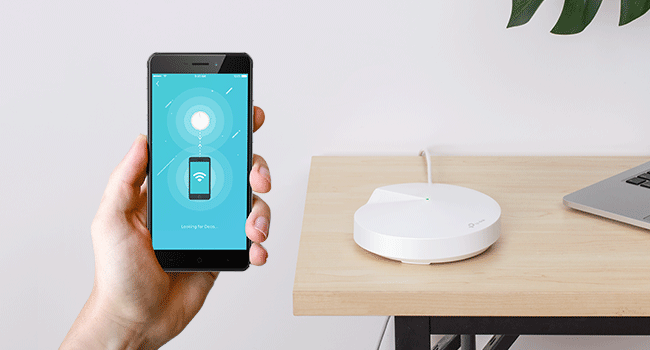
The TP-Link Deco M5 Mesh WiFi Router combines dual-band gigabit wireless with a powerful quad-core CPU and MU-MIMO technology to deliver seamless coverage up to 2,000 sq. ft. Its advanced HomeCare suite offers customizable parental controls and robust security, all managed effortlessly via the Deco app. Compatible with Alexa for basic voice commands, this router is designed for modern smart homes seeking reliable, high-speed connectivity and easy network management.










| ASIN | B06WRSBYVK |
| Best Sellers Rank | #1,215 in Electronics ( See Top 100 in Electronics ) #10 in Whole Home & Mesh Wi-Fi Systems |
| Customer Reviews | 4.6 4.6 out of 5 stars (3,281) |
| Date First Available | April 1, 2017 |
| Is Discontinued By Manufacturer | No |
| Item Weight | 1.1 pounds |
| Item model number | Deco M5 1-Pack |
| Manufacturer | TP-LINK USA |
| National Stock Number | 0 |
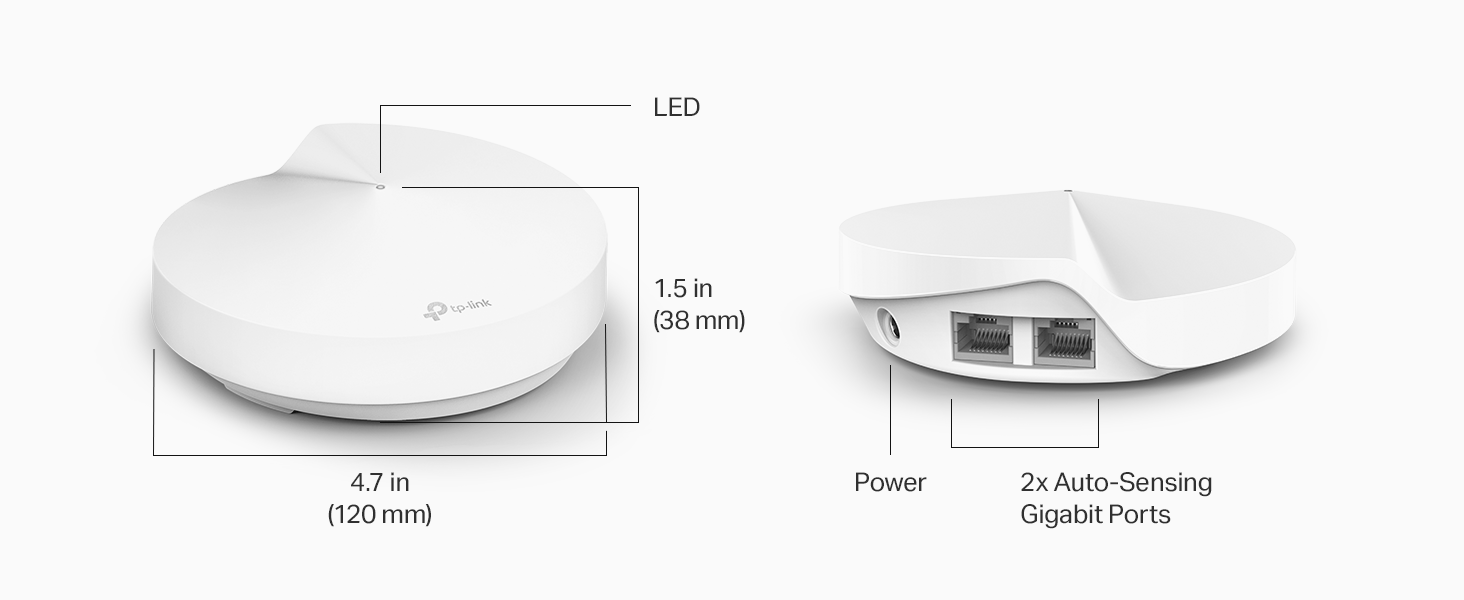
| Product Dimensions | 4.72 x 4.72 x 1.34 inches |
M**.
Like everybody, my needs have changed over time
As an IT professional, I have tried hundreds of combinations of routers and switches and wireless AP's. Like everybody, my needs have changed over time. The kids are old enough now to be using the internet, the house is getting smarter all the time, and even my television comes in over the web now. After exhaustive research and feature and price comparison, I decided to move on to the Deco m5. I was using a cisco asa firewall and cisco 3900 series switch with a netgear router in AP mode before, but it lacked the ability to easily implement parental controls. I get annoyed with the kids for staying up late playing on the internet after we go to sleep. I un-boxed the deco m5, very nicely packaged by the way, to find everything in order and ready for install. I powered down my firewall, called the ISP to have the IP address released, (I work for the ISP, so that was convenient) and got the router plugged into the internet connection. I am fiber to the house, so I don't have a modem. I had already installed the TP link app on my galaxy s6, so I was ready to get started. (Everybody else was at work/school so no complaining about the lack of internet while I did all this. YEA!!!!) The app found the deco with no issues and ran through the VERY basic setup process. Everything immediately came up and worked. I have 80 meg service and speedtest.net was reporting 82.7 download consistently over wireless. I started playing with the app, and under the advanced tab is an option to check for updates. I clicked it and it did indeed find one. 5 minutes or so later, the led indicator on the router went green again. This is where things went a little sideways for a few minutes. I spent the next 10 minutes losing and gaining wifi on my phone, and had to force stop the app a couple of times. Everything else in the house seemed fine, it was just my phone. I have six echos/dots in the house, and they all came right back up after the swap out. The echos/dots are usually the problem children to get connected after a power outage, so I was suprised. My wink hub didn't even seem to be affected. everything was functioning normally except the stupid phone. A quick restart on the phone seems to have fixed it. I did have 2 of my 5 wink relays lose connectivity, but I think they may have already been disconnected. A quick restart fixed them both. I plugged the second port into my cisco switch and all my wired devices reported for duty. Next step was to walk to the far corners of the house and run speed tests with my phone, which was still giving me pause because of its recent bad behavior. My home is 1400 square feet, and about 4 years old, with tech shield in the attic. (the aluminum foil looking coating on the inside of the roof decking to block the heat) wifi seemed to be great everywhere with speeds at maximum in every corner. (I bought the single Deco m5 unit) The router is actually in the garage in the corner for now, so it will probably cover significantly more ground once located in the center of the house. Next step was to setup parental controls. Yeah, this is the good part, talk back to me one more time you obnoxious little turd. Setup the profiles and went hunting MAC addresses. The only downfall to the process was finding all the mac addresses. Nothing has a logical name in the table you are looking at, everything just says "android" or "amazon". I started with "amazon", and that is when it hit me. I opened up my alexa app and went to settings, and then to devices. At the bottom of each device's settings page is the device's mac address. I found my trusty pencil and an envelope from some junk mail, and my list was soon made. You can change the name of the devices in the table on the Deco to recognizable names. I then went to the android devices and PC's. That was a little more time consuming, but not too bad. Next, assigning who the device belonged too. You do that at the bottom of the device settings page, just make sure you have already built that person's profile. When you set up the profile you give them a movie like rating system, and can disable or enable various types of websites or specific websites. Next option is setting time limits for daily usage, and last is setting hours to shut them out completely. Kids got pg-13, adults get "adult". Now that that's done, time to explore. I knew it was "alexa" enabled, so that was next. Honestly, don't waste your time. Alexa can do very little besides run a speed test and change the led's status. I was hoping to pause the kids internet just by telling alexa, but that is a no go for now anyway. It also cannot control access to wired devices with parental controls, so if you want to disable the kids smart tv's, make sure they are connected wireless. I probably should have given 4 stars due to the setup issue with the phone app, but everything is just working too good now. the parental controls shine, and the wireless connection seems to be rock solid. Only major negative I will give it, you cannot change it's lan IP address yet, but I have read that this feature is in the works in a future update. If you have anything set static on your current network like I do, you may have to change some IP's in a few devices. (Cameras, network servers, stuff like that) I only have a few devices like that, so I can handle it, especially for the price I paid for this. Overall, if you are on the fence, this is a great little mesh system. I wish it was POE powered and wall mountable, that would have made it perfect, but I guess it can sit on top of the fridge and do its thing. I'll update if anything changes, but I don't suspect I will have any trouble. Oh, and for anybody who is wondering, it does look like you can manage it remotely, as I can log in and change settings right now while I am at work. That could be handy for pausing the internet to make sure the kids do their homework before I get home from work, or to make sure they are doing their chores on time. I wonder if that will work with the old lady too???
M**.
Easy peasy!
Fast and easy installation, and a seamless quick addition to an existing deco mesh network using the Deco app. Works as expected with 4k speeds for streaming and gaming.
R**H
Easy to set up, works great
This product has incredible bang for the buck, I've never been disappointed by TP-Link and I'm glad I went for this mesh network versus competitors. I don't really need Wi-Fi 6 yet, so these units are the best value for my my AC Wi-Fi household. Four of these units are enough to cover my two-story house plus detached shop and even my well house / chicken coop outbuildings, so all my gadgets and sensor network is happy. It's a little weird how only one SSID is published for both the 2.4 GHz and 5 GHz bands because the Deco units decide which network to connect your device to automatically, but they seem to do a great job of deciding when to switch my phone over from 5 to 2.4 as I walk further out into the yard and need the extra range. I'm happy with their algorithm for switching, and after I got used to it I'm actually also happy there's only one SSID and I don't have to think about which one to connect to. My other favorite part is that the app makes these super easy to get started with, and it was easy for me to add a 4th unit later on (I originally bought the 3 pack, but wanted to put a 4th one in an outbuilding later). Great value for the price!
A**.
Good product but with shortcomings over long distances.
I thought the product was good and easy to set up from the app. The only downside is that the long-distance signal strength is not very powerful.
J**N
Finally, a solution for our plaster and brick condo!
When we first bought our condo, I bought the same Nighthawk router I experienced success with at another home. Sadly, even with adding a Netgear extender, it could not cover our relatively small (1200 sq ft) condo well. At our old home, I would get signal outside 500ft away while I was mowing the lawn and streaming music. The condo is brick and plaster construction, and outside of the room the router was in, coverage was spotty at best. I could barely get a signal less than 30ft away from the router, and the extender didn't help much at all. I did lots of research and decided on the M5. The price was right, and I chose not to go with the M9 as I didn't want it seeing or trying to control my ZigBee devices on my Iris Hub. Setup was not perfect; discovery has to fail twice before you are given to option to connect to each additional router via bluetooth. However, the end result is nothing short of spectacular. I now have full signal strength in every corner of the condo; I especially like how I can prioritize those devices that are most important for better connections. I'm not sure if it would have been necessary, but I did add a fourth router so there would be one in every bedroom and one in the main living/dining/kitchen area. It may seem like a bit of overkill, but this is the first time I've been able to count on WiFi working everywhere in our home, so I'm not changing a thing!
C**E
Most affordable mesh system
I love the Deco M5. It is one of the best, most versatile units. For the price, you can’t beat it. I use it to create coverage across my entire property. The app makes it easy to set up a mesh system for your whole property. The good thing is you can buy as many units as you want and keep connecting them. Being mesh technology, the speed does not degrade with added units. The size and footprint make it for almost anywhere and you can’t beat even buy a wall mount that hangs it from the outlet. Also these feature wireless or wired backhaul and have a dedicated wireless backhaul channel. So you can extend your network as far as you want with Ethernet cable from unit to unit or simply connect each one wirelessly. Simply the best, mesh WiFi system you can get at an affordable price.
C**W
Pleased with router and would purchase again.
Very pleased with this router. Easy setup without any failures. Haven’t had any problems in the 8 months I’ve had it. Security cameras, Roku and internet all work great.
P**O
Excelente roteador. Trabalha perfeitamente, também, como redistribuidor, mas, nos pontos mais distantes, com uma redução de velocidade, mesmo assim é muito estável....
C**H
I already have 3 Deco M5 units and wanted another unit to extend the range. Product delivered quickly and was as described. Having read other reviews regarding the power lead I was expecting there to be an issue with this. The unit was supplied with a 2 pin power adapter, but the vendor had included a 2 pin to 3 pin plug in the box. Therefore no need to purchase a new power lead. Very impressed with this. Connected without a problem and works well. Would recommend.
K**D
لا يحتاج فني لتركيبه و تشغيله. جودة الشبكة جيده فيه.
L**M
Good product overall work great easy to set up.
P**R
Working well. Used to setup 5 security cameras on outside perimeter and indoors. As a CCTV setup, it works!
Trustpilot
2 weeks ago
1 month ago