Desertcart purchases this item on your behalf and handles shipping, customs, and support to Netherlands.
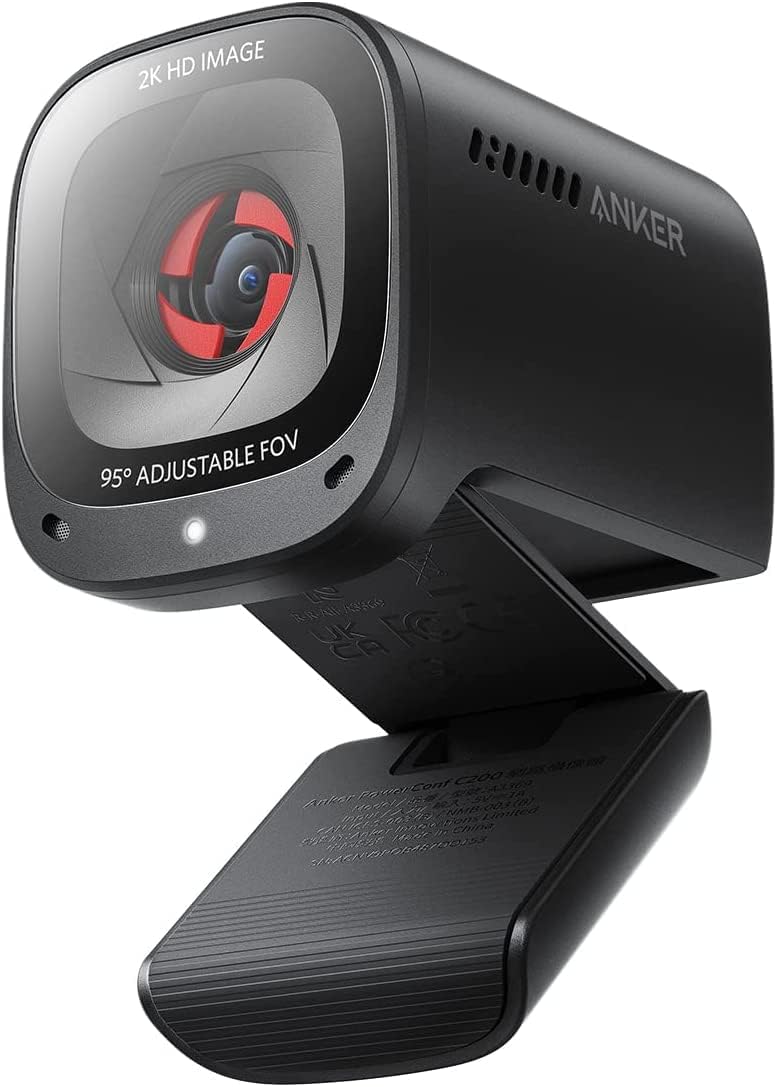
🚀 Upgrade your virtual presence with the Anker PowerConf C200 — where clarity meets confidence.
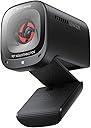
The Anker PowerConf C200 is a compact, 2K resolution webcam designed for professionals seeking superior video and audio quality. Featuring AI noise-canceling dual microphones, customizable viewing angles, and an integrated privacy shutter, it delivers crisp visuals and clear sound even in low-light conditions. Compatible with Windows 7+ and macOS 10.11+, it offers easy plug-and-play setup, making it an ideal choice for seamless, high-quality virtual meetings and streaming.


| ASIN | B09MFMTMPD |
| Antenna Location | video conferencing, computer camera applications |
| Are Batteries Included | No |
| Best Sellers Rank | #6 in Webcams |
| Brand | Anker |
| Built-In Media | Anker PowerConf C200, USB-C Cable |
| Camcorder Type | Webcam |
| Color | Black |
| Compatible Devices | Laptop |
| Connectivity Technology | USB |
| Customer Reviews | 4.4 out of 5 stars 9,238 Reviews |
| Display Resolution Maximum | 2K |
| Effective Still Resolution | 2 MP |
| Effective Video Resolution | 1440 Pixels |
| Exposure Control Type | Automatic |
| Features | Low Light |
| File Format | JPEG |
| Flash Memory Bus Interface Type | SD |
| Flash Memory Type | Micro SD |
| Focus Type | Auto Focus |
| Form Factor | Compact |
| Has Image Stabilization | No |
| Image Aspect Ratio | 16:9 |
| Item Dimensions D x W x H | 1.97"D x 1.57"W x 2.17"H |
| Lens Type | Zoom |
| Manufacturer | Anker |
| Maximum Aperture | 2 f |
| Maximum Focal Length | 30 Millimeters |
| Minimum Aperture | 1 f |
| Minimum Focal Length | 15 Millimeters |
| Model Name | A3369 |
| Model Number | A3369 |
| Number of Speakers | 1 |
| Operating System | Windows 7 or later, macOS 10.11 or later |
| Photo Sensor Technology | CMOS |
| Screen Size | 2.7 Inches |
| Sensor Type | CMOS |
| Shooting Modes | Automatic, Easy |
| Style Name | 2K Webcam |
| Supported Audio Format | MP3 |
| Supported Image Format | JPEG |
| UPC | 194644088194 |
| Unit Count | 1.0 Count |
| Video Capture Format | MP4 |
| Video Capture Resolution | 2K |
| Video Resolution | 2K |
| Viewing Angle | 95 Degrees |
| Warranty Description | 18 months warranty |
| Water Resistance Level | Not Water Resistant |
| White Balance Settings | Auto |
| Zoom | Adjustable Zoom |
C**Y
After a few months, I'm still glad I bought this one.
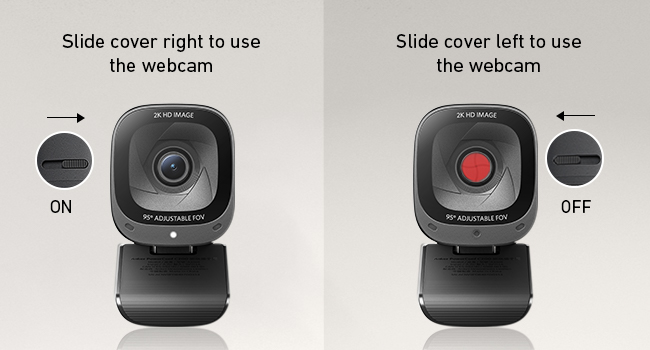
I'm not a "techie" person, so I needed something simple to install, yet that would provide a clear and professional image to my clients when I do virtual meetings. I was replacing a camera that had stopped being reliable (sometimes worked, sometimes didn't), and I was dreading having to do through a setup or install process with a new one. Fortunately, the install process was a piece of cake! In fact, the install was MUCH simpler than tinkering around trying to get my old camera to work! What a relief! I've had it for a few months now, and it was a good choice for me. It was SO worth a little extra money to get this camera in terms of quality and ease of use. One small detail I really like is that the lens cover for privacy is INSIDE the camera. That is a nice design touch. It's orange, so you can easily tell whether the lens cover is on or off, but it doesn't attract and hold dust the way the little ridges on an external privacy cap does. At first, I thought the lens cover looked "thin" and I was waiting for the day when it would jam and ruin the image from the camera. That hasn't happened -- however, I might recommend that anyone with small children keep the camera and the kids away from one another. I can see a kid really enjoying making the orange appear and disappear with the slider -- until it breaks. The lens cover should be fine with adult use, but it's not a toy for children. The picture is clean and crisp. So far (knock on wood) the camera has been reliable and there have been no headaches. I've used it with Teams and Zoom without issues. I can recommend this one without hesitation.
G**W
Fantastic Webcam
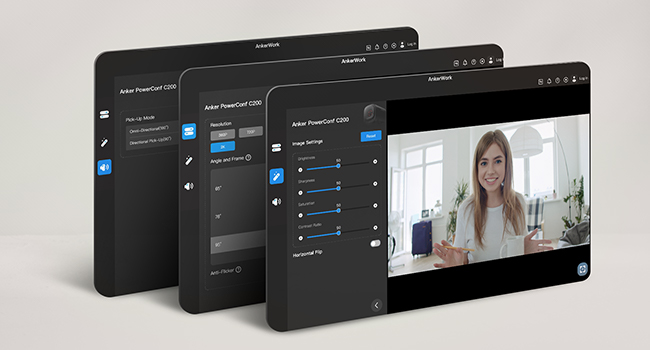
I was setting up for some work interviews, and I wanted a webcam to use for my desktop. After searching for a bit - and looking for something with a low-cost price range - I came across the Anker PowerConf C200. This camera is great. It was extremely easy to setup and has its own app that you can download to adjust settings to your liking. Setup was very simple...plug it in and you're ready to go. The camera has a privacy shutter built in, the microphone is clear and does a good job of pickup, and it does extremely well with various lighting situations. Low light...no problem. The colors are very nice, stable images and even has various zoom levels you can choose from when you're on-cam. Overall, a perfect addition for any computer for video conferencing, and I'd even consider it for small and general video recordings.
M**D
This is more than basic
Camera was about as close to “plug and play” as you can get. Downloaded basic controls for some minor adjustments. Color, lighting and picture quality is excellent. As other reviewers mentioned I would like camera to have more close up options and sometimes the camera takes a moment to focus. For a webcam at this price point these are not deal breaker issues. For Zoom meetings I am more than satisfied. I still use a stand alone microphone so I cannot give any opinions on the built in microphone. The camera sits securely to my monitor and the color coded privacy shield is brilliant. This is more than basic but if you need more professional set up you need to look elsewhere and spend more.
I**R
Surprisingly clean image for the price — solid everyday webcam
I bought this webcam for a mix of use cases: work meetings, online classes, occasional streaming, and letting my son use it for online chess tournaments. It’s not a single-purpose setup, and that’s actually where this camera shines. Setup was completely plug-and-play. I didn’t have to install or configure anything to get a good image. I’ve mounted it both on a tripod and directly on top of a monitor. The tripod mount worked as expected, but the monitor mount was a pleasant surprise — very stable and secure. I remove the camera after each use since it’s shared, but if this were staying on a monitor full-time, it would easily be a set-and-forget situation. Lighting in my space is mixed (standard room lighting plus Nanoleaf LED panels), and the camera handled it well without any tweaking. I haven’t needed to adjust settings beyond enabling or disabling the microphone. The image is clean and looks especially good for this price point. I did notice some difficulty when trying to use a green screen, but that’s likely more about my lighting or OBS setup than the camera itself. Autofocus has been solid — it stays locked and doesn’t hunt or distract during calls. I can’t really comment on the built-in microphone because I immediately disabled it and use dedicated RØDE audio gear instead. Likewise, if there’s optional Anker software, I didn’t feel the need to use it. Compared to other webcams I’ve used, this is definitely better than basic Logitech models. I haven’t used an Elgato webcam, but for most people this falls squarely into the “good enough, stop shopping” category. Who should NOT buy this: Anyone expecting 4K resolution or professional-level camera results. This is not a replacement for a real camera setup. I have limited need for a webcam, and this fits my needs perfectly. Bottom line: For the price, the image quality is surprisingly good, setup is painless, and the mounting is more solid than expected. Easy 4 stars.
E**D
Great Camera, Great Quality for the Price!
With my old webcam, I was having trouble during work video call because of low light, which caused bad quality video during my calls. I was looking for a camera that could adjust for low light while still maintaining a great video feed. The Anker PowerConfC200 fills that gap. For the price point, most cameras only offer 1080p resolution. For low light, this causes those cameras to become pixelated and have poor quality. The only way to fix that is to 1) spend more money on a higher quality camera that compensates. Or 2) purchase a small clip light fort he webcam to provide additional light. I didn't want option 2 because I didn't want that artificial light staring me in the face. Option 1 didn't need to happen either because the Anker is a 2K resolution camera that will automatically adjust to lower light, and still provide a great picture. My only slightly negative feedback is I wish the camera software was a bit better. Granted for the price, you aren't going to have a ton of controls. The other issue is the software doesn't allow me to login into my account and just refreshes the login page. This is minor in comparison to the camera's quality. It's small, lightweight, easy to adjust and doesn't block a big portion of your screen like other cameras that I've had. It also features a manual privacy shutter, which some models at this price do not have. It also allows you to adjust the field of angle, or allow you to manually adjust the zoom using the software. The microphone also offers a 360 degree field of pick-up, or 90 degree to keep the pickup more focused. Overall, I'm very happy with this purchase and would recommend it for people in similar situations.
K**L
Great Webcam, Easy to Set Up
This 2K webcam turned out to be a great purchase. The image quality is very sharp and clear. It was easy to connect to my PC and it works perfectly. I am very happy with it, 100% recommended
C**B
Highly recommended device.
This is definitely one of the best rated devices that we seen online. A small compact 2K camera that is very adjustable to sit on top of the screen. Check the video. It is portable and compact so can be put on different devices if needed. There is a software to download and you can make adjustments in there as well.It is lightweight. And easy to set up. I do have a light on top of my desk so that is able to provide a good view of what the camera seeing. It has a field of view of 65° 78° or 95°. Other features include but are not limited to, 2K at 30 frames per second 1080 P at 30 frame per second. It also has dual stereo microphones and the voice pick up distance is about 3 m. There are no lights on the device just a light in the center of the bottom of the camera to let you know that it’s on.
M**S
Autofocusing is an issue
This is a really solid webcam and it looks great. You can use it out the box or you can download the software to adjust it if you need to so its very easy to use. It sits nicely on top of your monitor if thats where you need it. However, if you have bad lighting it can cause some issues with the auto focusing. I'm not a lighting expert so I have no idea how to fix it for certain lightings, but the webcam has a hard time auto focusing if you have issues with lighting which can be very annoying to deal with if you just want one that simply just works. So because of it I can only give it 3 stars because its a very annoying issue to deal with as a beginner so noobies be warned.
D**N
Bardzo prosty w obsłudze, bardzo dobra jakość
Bardzo łatwy w użyciu, a jakość obrazu jest bardzo dobra. Wideo jest ostre, a ustawienia łatwe do zrozumienia. Podłącz i graj.
C**E
bonne webcam
comme n'importe quelle autre de gamme similaire. mais j'y mets 5 étoiles car : - SOC Ingenic : potentiellement, Thingino est supporté, - incroyable, un de ces bricoleurs fous a réussi à prendre la main sur la caméra sans avoir à la démonter, - et encore plus incroyable, un de ces bricoleurs fous a soumi un profil expérimental thingino pour ce modèle. Si vous ne voyez pas de quoi je parle, "thingino" est un projet axé sur les caméras de sécurité etc. équipées de SOC ingenic, visant à les libérer des logiciels et clouds propriétaires. Cette webcam est un un membre incongru de cette catégorie :) Tellement content que j'en ai pris d'autres.
J**O
Amazing image quality and build for its price!
I just got this today, but I am blown by the quality of this webcam. Upon opening the box, I was expecting some cheap plastic based item. Still plastic alright, but the finish, the thickness of the usb cable that came with it, how it was packed, the care of producing a quality brochure...it is better than the rest in its price class, or even compared to something more expensive. The image quality is just as amazing. And the autofocusing really works, as well as in the selection of the field of view. I am thinking of getting another one, as I type this review. I just plugged it into my Mac running OS Monterey, and then I'm ready for my online zoom session. We'll see how it performs in the next few months. But as of now, I am so pleased with this product that I would like to share this through a review here in Amazon.
M**O
Ottima webcam 2K con audio davvero notevole
L’AnkerWork PowerConf C200 è una webcam USB davvero valida per uso su laptop e computer, sia per lavoro che per lezioni o riunioni online. Il grandangolo copre bene l’area davanti al tavolo e la definizione 2K restituisce un’immagine chiara, ben contrastata e con colori naturali, anche in condizioni di luce non perfette. Il lato audio è un punto di forza: i microfoni integrati catturano la voce in modo pulito e preciso, riducendo il rumore di fondo e rendendo la comunicazione molto più piacevole. Nel complesso è una soluzione completa, facile da collegare e pronta all’uso, ideale per chi cerca una webcam di qualità superiore alla media per smart working o videoconferenze.
J**J
Budget Webcam King
[GERMAN Below] Anker C200 nails it with a razor-sharp image, affordable price, and great audio. The autofocus issues are annoying from time to time. It easily outperforms budget options like Logitech C920, Microsoft Modern Camera, and Aukey Webcam 1080P, making it my go-to for budget-friendly quality. Positives: + Clear Picture: Love how sharp the 2K image is! + Budget-Friendly: Wallet-friendly without sacrificing quality. + Clear Sound: Audio quality is on point. + Easy-to-Use Software: User-friendly setup and customization. + Flexible FoV: Three options for different scenarios. Negatives: - Auto Focus: Noticed occasional autofocus tweaks, but manual focus sorts it out. Only works with a dedicated desk though! GERMAN Positives: Klare Bildqualität: Liebe die Schärfe des 2K-Bildes! Preisgünstig: Günstig, ohne die Qualität zu beeinträchtigen. Klarer Sound: Die Audioqualität ist ausgezeichnet. Benutzerfreundliche Software: Einfache Einrichtung und Anpassung. Flexible Sichtfelder: Drei Optionen für verschiedene Szenarien. Negatives: Autofokus: Gelegentliche Autofokus-Anpassungen bemerkt, aber manueller Fokus behebt dies. Funktioniert jedoch nur mit einem dedizierten Schreibtisch! Kurzfassung: Der Anker C200 überzeugt mit einem gestochen scharfen Bild, einem erschwinglichen Preis und exzellentem Audio. Er übertrifft problemlos Budget-Optionen wie Logitech C920, Microsoft Modern Camera und Aukey Webcam 1080P und ist meine erste Wahl für budgetfreundliche Qualität.
Trustpilot
2 weeks ago
1 week ago