We remain fully operational. Our teams are working around the clock to ensure your deliveries continue safely.

DOWNLOAD THE APP


Customer Services
Copyright © 2025 Desertcart Holdings Limited
DOWNLOAD THE APP

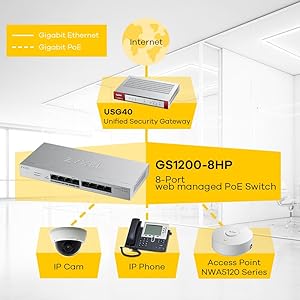
⚡ Power your smart office with confidence — the GS1200-8HP keeps you connected and secure!
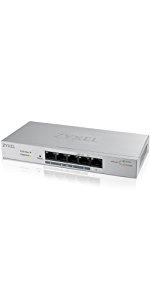
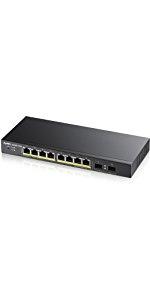
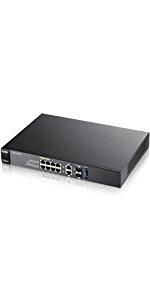
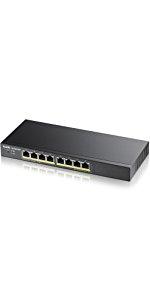
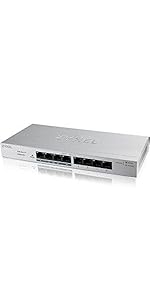
The Zyxel GS1200-8HP is an 8-port gigabit PoE+ managed switch offering 4 high-power PoE+ ports with a 60W budget, ideal for SMBs deploying IP cameras, VoIP phones, and wireless access points. Featuring an intuitive web-based management interface, advanced security protocols, and broad compatibility with 802.3af/at devices, it combines energy-efficient performance with robust network control. Its compact metal design, limited lifetime warranty, and US-based support make it a reliable, cost-effective choice for professional-grade networking.





| ASIN | B01LX9925Z |
| Best Sellers Rank | #500 in Computer Networking Switches |
| Brand | ZYXEL |
| Built-In Media | Installation Guide, Power Supply, Switch |
| Case Material Type | Metal |
| Color | silver |
| Compatible Devices | Camera |
| Customer Reviews | 4.4 out of 5 stars 406 Reviews |
| Data Transfer Rate | 2000 Megabits Per Second |
| Global Trade Identification Number | 00760559125967 |
| Interface | PoE |
| Item Height | 9.45 inches |
| Item Type Name | ZyXEL GS1200-8HP 8 Port GbE PoE Switch Web Managed PoE+ 802.3at 802.3af |
| Item Weight | 1.43 Pounds |
| Manufacturer | ZyXEL |
| Maximum Power | 60 Watts |
| Number of Ports | 8 |
| Platform | Not Machine Specific |
| Switch Type | Managed PoE+ Switch |
| UPC | 760559125967 |
| Unit Count | 1 Count |
| Upper Temperature Rating | 60 Degrees Celsius |
| Voltage | 48 Volts (DC) |
| Warranty Description | Limited Lifetime |
O**N
Great little switch, would buy again!
This is my second zyxel switch, the GS1200-8. I also have the GS1900-8HP. They make great switches from what I can tell, but I’m no expert. $25 for a web managed gigabit switch is impossible to beat I think. The web management interface (WMI) is pretty intuitive, if simple. I doubt the GS1200-8 has all the most advanced features of more expensive managed switches. Its WMI is pretty sparse compared to screenshots of others I’ve seen, but it does what I need. Interestingly, the GS1900-8HP Power over Ethernet switch from Zyxel has very different firmware compared to the GS1200-8. I haven’t compared them feature per feature, but I believe the 8HP might have more options and customizable features. Need to do side-by-side comparison of their firmware, maybe I’ll add to this review after I do that. The power brick is tiny compared to the Power over Ethernet power brick from the other Zyxel switch I own. The switch itself is also tiny. I didn’t realize when I bought that it would be physically about 1/3 the size of the 8HP PoE switch I already had. Very sleek little unit. Solid metal case with a nice rough (anodized?) texture. Case screws are quite tight, but I got ‘em loose and opened it up to take a peak inside. Don’t know anything about electronics manufacturing, but these internal components are of as high a quality as I’ve seen. I’m seeing blazing fast speeds on all my devices passing through the switch. I have not done any formal, rigorous testing, but so far I am quite pleased with this switch. It works great for a home or small business network. If you have high end enterprise-grade networking requirements, this switch may not be ideal, although for the price it’s certainly worth seeing if it meets your needs because you will pay far more for a Linksys, Netgear, or Cisco switch. Also of note is that Zyxel actively patches their equipment. The firmwares for both of my Zyxel switches have fairly recent updates, need to check the dates for their latest firmwares and I’ll include them in a future edit. It’s not as if Zyxel slaps these things together and ships them without intending to support the firmware and issue bug fixes and security patches. No they seem to do a pretty good job of staying up to date with these things Instructions that come with the unit are a bit sparse, but Zyxel’s online tutorials and videos are good, and although I haven’t needed it yet, I believe their customer support is decent as well. This would be a great choice for a managed gigabit switch even if the price wasn’t so competitive, just make sure it has the features you need.
F**N
Good Switch at a Great price
Only have had this product for a few days and I love it so far. It does exactly what I need it to do for my personal home ESXi Media Server and File server management. Supports IPv4 & IPv6, port LAGs (to link the file server to the Media Server with a 2Gbps LAG group), limited to 32 Vlans, which is plenty enough (not that one would need more than half a dozen for a simple home network) which allows for the traffic from the file server to the media server to never leave the switch and kept separated from other traffic. I still have to play with the Vlan tagging features more to figure out if there is a way to support more than one Vlan ID per switchport as the WebGUI is not very explicit as to how the Vlan tagging feature works. Now for the bad. A lesser concern I found is that here seems to be no feature to force the link to be at a 1000 full. It can be set to auto, 10 or 100 full but there is no 1000 full option available (granted, any device capable of 1000 full will auto-negotiate such a speed, but this seems like a bit of an oversight). The Management interface seems to also only accept simple AlphaNumeric characters (A through Z, lower and upper case and 0 to 9) but no special characters whatsoever. My greatest concern is that the management WebGUI seems to only be accessible through http and does not seem to support https or network traffic encryption in any shape or form natively. I have not yet found any firmware version (though it may very well exist) that supports https (I'd be plenty happy even with a self-signed certificate). This would be the sole reason for my rating this a 4 Star item (I would honestly rate it 4.5 if such an option existed) instead of giving it a 5 star stellar review. Overall, none of those relatively small issues, would be deal breakers or cause any major security concerns for a small home network. The switch does what it advertises to do and does it well. A definite excellent buy.
Y**A
Great value for your hard earned money💰
I recently expanded my PoE camera network. I was looking for a relatively inexpensive managed PoE switch to finish installing IP cameras to the other side of my relatively large house so that I can use just one Cat-6 ethernet uplink to the main switch in the attic on the opposite end of the house, then eventually to the router (pfSense) in my office. This method, call it a substation in the attic, saves me from having to lay down extra ethernet cables, up to 100 feet each, in the hot 🔥 Florida attic. This switch fits the bill, thus far. I can't believe this Xyxel, managed PoE+, switch costs under $60.00. This is a great value for the money. I immediately canceled a similar switch en route for delivery, tp-Link, when serendipitously stumbled on this switch after placing that Amazon order. The tp-Link switch only supports 802.3af, whereas, the Xyxel supports both 802.3af/at and cheaper. In addition, the Xyxel operates at a higher temperature range, which I need since this puppy is going to live in that hot attic. This switch has all the basic level 2 features. However, it only supports one flavor of vlan, 802.1q. This works for me. My other switches support the other vlan options, which I don't use at this time. I have a complex network with many subnets, a managed switch with vlan capability is a must for my network. The power supply is outside the unit. It's a huge power brick, "wall wart." It's similar to the power supply cord/brick that comes with your typical laptop 💻 computer. It does come with an on/off switch so you don't have to pull the plug when you want to turn the switch off. This "wall wart" maybe a negative for some users. This is a non-issue for me since this baby will live in the attic, and this is a plus since this will prevent more heat generation inside the unit since it's outside the unit. It's made of metal. No noisy fan/ lots of air vents on the sides & the indicator lights are clear of potential obstruction. They give link/ activity /power & PoE status. The GUI is simple & intuitive. Setting up vlan is easy & intuitive if you understand how vlan works. Some reviews say that the wizard for setting vlan is confusing. IMHO, a wizard is not needed if one understands the concept of vlan. I'm no network guru. I'm just a regular Joe when it comes to networking. I just do my research by using Google, YouTube & forums. This switch has additional nice features that I find very useful like PoE status <how much power being used by each device & available>. It appears that it doesn't support the spanning tree protocol for network loop. It appears to use this proprietary loop detection system. Overall, this is an inexpensive, solid basic PoE managed switch that's currently working flawlessly, which I highly recommend.
A**N
Good value - does exactly what I need it to do
Pros: - Affordable - Poe+ capable - Vlan support - Fanless, so no noise - Power-efficient - Supports link aggregation although I have yet to test this - The web interface is extremely easy to use. Cons: - The web interface is only available in http, no https option - No username field when logging into the switch so a bit less secure I guess... - For some reason, I can't paste in the password into the password field, so I have to type it in manually....annoying if using a complex password - No LACP lag support Other: - The power supply has a convenient toggle switch to turn it off and on so you don't have to pull the plug out of the switch if you want to turn it off and back on. Hopefully, I don't have to ever use this :) Overall: For the price, it does what I need it to do. I bought this to replace a much larger POE switch I have but don't necessarily need. I figure this will pay for itself after a year due to its much lower power consumption. I connected it to my home network and was able to get it configured and upgraded to its latest firmware version all via my cell phone. I then swapped out the large switch for this and everything worked without any issues (powering two access points right now). Hoping it proves to be a reliable switch for years to come.
B**P
A solid little PoE switch
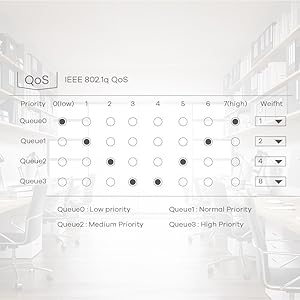
This is a very basic 5 port switch with PoE and VLAN capabilities. I am using it in a media cabinet to tie in a Roku, IP control for a TV and AVR, a relay for a TV lift, and wireless AP that handles several VLANs on a trunk link. This does the job. The power budget is decent enough to handle most things (unlike other small switches that use PoE pass through and top out at like 15 watts). I am running the wireless AP and a relay to control a TV lift via the PoE. VLANing is dead simple. QoS exists in a basic form which probably matters more for folks running VoIP. It can create a mirror port. You can disable/enable PoE via the interface to reboot things remotely. It allows a basic 2 port LAG on port 3 and 4 (no LACP). It's a solid little switch for a tiny 5 port deal. Observations: * No HTTPS or SSH management * Monitoring is basic. It shows per port counters. There is no SNMP * You can't choose what ports to run the LAG. I'd rather use the unpowered port for one link personally. * It's hard set to jumbo frames. You can't not have jumbo frames if you care to limit your MTU. * Loop detection/prevention is NOT spanning tree based - which might be a good thing for those in an office. I've had small switches like this show up under folk's desks with a loop (people in a panic plugging and unplugging) and blow out a whole floor's switch stack (pre-802.1x). Spanning tree can be dangerous similarly. Dumb loop prevention such as this is probably best. I'm impressed. I really wish it has HTTPS, but for the money, it's solid.
E**Y
Good value PoE switch
Good quality PoE switch. Driving 2 WiFi AC access points and another switch via PoE. Like the "smart" functionality so could setup VLANs and see stats including power draw, for not much more cost than many unmanaged switches. Very satisfied.
A**S
Great price, link aggregation broken
I had a cheap 8 port switch where I let the magic smoke out (why don't they print the voltage for those barrel connectors!?!) and this looked like a good deal. I decided to try out the link aggregation since both my firewall and another switch support LACP. With both of these, I ended up getting broadcast storms whenever a LAG group is connected with two ports. This switch supports ports 3 + 4 an 7+8 for LAG groups. Other than this one feature, however, it works great. The loop prevention and loop detection features are nice. I had some issues with loops with my Wifi APs.
M**F
A lot of functionality for the price
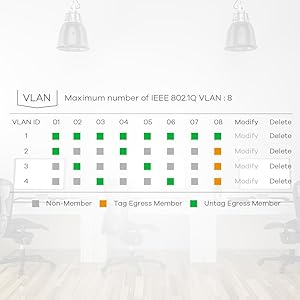
Good feature set for the price: Minuses: - switch can not tag the default VLAN on a trunk port (like most other entry-level managed switches); - web management only - confusing firmware upload (displays fake windows path for upload - update works anyway) Plusses: + Fanless/Silent + Metal case, solid build construction, small form factor + Quick boot + Actively supported (latest firmware as of this review 13 October 2021) + Can assign the web interface VLAN to something other than the default VLAN Others have complained about the web interface being windows specific. I haven't seen that. I've configured it on a Mac/Chrome and Linux/Firefox. Neither seems to be a problem. This is both with the firmware that came with the switch V2.00(ABKM.0)CO, and after I updated to the current (as of March 2022) revision V2.00(ABKM.1)CO Configuration isn't hard - it presents the standard * PVID configuration (policy for packets entering a port) and * VLAN membership configuration (which port belongs to which VLAN(s), policy for packets exiting a port) controls. The visual layout and coloring of the ports in the interface (grey - not a member, green - access port (member, emit without tag) and orange - trunk port (member, emit tagged) make it pretty easy to understand/update the configuration. I haven't speed tested the switch; it doesn't have to be very fast for its intended use is as an edge switch. I've got it in a media center at the edge of the network - connecting both untrusted network-of-things devices to a DMZ VLAN and a wireless guest access point to a GUEST VLAN, it's web interface configured on a CONTROL VLAN, with all VLANs trunked to a main switch. I haven't had it long enough to judge the reliability.
Trustpilot
1 month ago
2 weeks ago