
DOWNLOAD THE APP


Customer Services
Copyright © 2025 Desertcart Holdings Limited
DOWNLOAD THE APP

🎉 Unlock timeless gaming thrills with ultra-speed and endless classics!
The Kinhank 2TB External Hard Drive doubles as a retro game console featuring over 120,000 games and 85+ emulators. Equipped with a SATA 3.0 chip and USB 3.0 interface, it delivers fast data transfer speeds up to 6GB/s and low CPU usage. Compatible with Windows, Mac, and Linux systems, it offers plug-and-play convenience and comes with two controllers for multiplayer gaming.




| Hard Drive | 2 TB 2TB External Hard Drive |
| Brand | Kinhank |
| Series | 768161864977 |
| Item model number | 768161864977 |
| Hardware Platform | PC, Sony PSP |
| Item Weight | 7.2 ounces |
| Product Dimensions | 5.04 x 3.15 x 0.55 inches |
| Item Dimensions LxWxH | 5.04 x 3.15 x 0.55 inches |
| Color | With Controller |
| Flash Memory Size | 2 TB |
| Hard Drive Interface | USB 3.0 |
| Hard Drive Rotational Speed | 7200 RPM |
| ASIN | B09FDXNBYC |
| Date First Available | November 30, 2021 |
T**J
Not for non-tech people
Ok, so let's start with the ugly. Of you don't understand how to get into your BIOS.. AND boot setup on your computer (its not just BIOS and change boot sequence, you also have to disable secure boot from disk setup F12 on Dell laptop). If nothing I said makes sense and you don't want to learn it, walk away right now. That includes you Mac users. You'll be returning it saying it doesn't work.The Good 97% of the games work as intended. The menu system is decent if you use the default one.The Bad, to make sure 97% you need to experiment with different emulator. Especially for Arcade games, some work in MAME , but others only work on the other emulators. Same for N64 you'll have to find the emulator that runs best for a game. Dolphin (Game Cube) is pretty stable out of the box, but it can be improved. The Volume. I guess being a Laptop and the volume being on the FKeys I only have the intro sequence of Kinhank yo adjust the volume, since the FKeys are used for other menu things.
A**K
Not exactly plug and play, but…
This HDD comes preloaded with Batocera and a ton of games. Batocera runs with a Linux operating system, so if you’re using Windows like most of the world, then it’s not the easiest process to boot it up. It seems most people in the reviews had a tough time just getting this thing to boot properly, and I’ll just talk about what I did to get it to work. It took me a while to be able to boot into Batocera, and I was ready to give up and return this thing, but I finally got it working on my HP laptop and a mini pc. Once in your device’s bios, I had to disable secure boot, enable legacy mode, and change the boot priority so number 1 was USB hard disk. I would also make sure this is the only thing plugged into a USB port just to be safe (so no flash drives or controllers).I didn’t get into a ton of gameplay, but most of what I tried worked well. The MAME section was a little hit or miss. I’ve used RetroArch before, and if the emulator (whether it’s MAME 2003 or 2010 or whatever) doesn’t match the romset, then it’s not going to work. I’m not sure if that’s what’s happening here when some games don’t load up at all.Most of the negative reviews on here were about not being able to boot up the device and I wanted to share what I did to get it working. It comes with a tiny instruction manual, which was incredibly useless. It’s no surprise people have trouble with this thing, but I hope my experience can help someone.
M**Z
Defective USB cable - Good otherwise
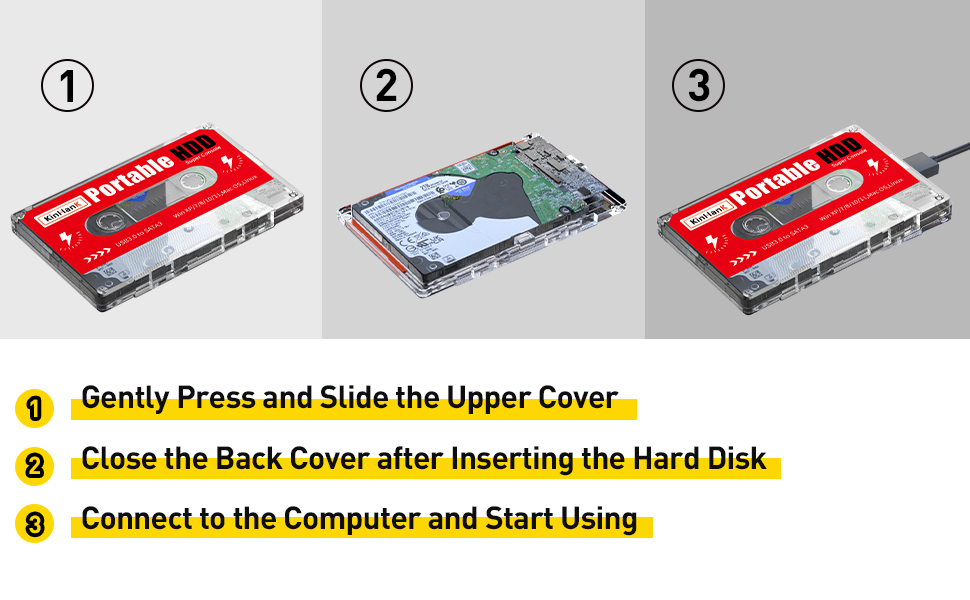
Let me start off by stating the primary reason why I gave this a 3-star instead of a 4 or 5 star review. The included USB cable on my unit is bad. I wasted just about 2 hours of my time trying to figure out why the drive was not being recognized by the UFEI BIOS on my PC. Tried re-plugging the drive and swapping USB ports with same failed result. I was contemplating the upcoming hassle of having to repackage and return the product for being defective when it dawned on me that I should try a different cable. I had to dig out one of my portable external HDDs and borrow the cable from it - the cable in question has the wide, thin USB3 "micro B" style connector on it. While this style of device-side connector is typical for small form factor portable external HDDs, it's not in common use for much else; I did not have a cable of this type in my spare cable box.After swapping the cables around, I was able to get the drive to boot after making the appropriate BIOS adjustments.The cable that came with the drive is not very well made. The wires are thin and I can feel them through the insulation. The connectors on each end seemed to be OK.The bad cable is really the only major negative I can cite for this setup, everything else is either positive or neutral. To summarize:The Good:- Included HDD is of decent quality, made by Western Digital - one of their "Blue" series drives, I think. Not high end, but not junk either.- Batocera (the emulator UI / device and game selection software) is set up properly for the most part.- More games installed then you could ever hope to play in a normal lifetime. Dozens of console/computer/hardware emulators.- I purchased the variant that came with two controllers. They are kinda cheap but they work. Given that I only paid around $10 extra and got two wireless controllers for that, I can't complain. Also, everything (HDD, cable, 2x controllers) was packaged in a nice hard case - it in itself is worth at least $10.The Bad:- Only one thing, really - the defective USB cable.The Ugly:- At present I'm using a "gaming" laptop PC as my primary platform, and almost always run it with an external monitor. This configuration was not recognized by Batocera - there was no way I could get it to run using my external monitor (was not listed in the Batocera video options), nor could I get it to use the external monitor audio.- The KinHanK cassette tape label on the HDD enclosure is kinda cheesy.- Given the hassle I had getting my system to boot off this drive, I have not had a chance yet to really explore in depth how everything is set up, what games are available (esp. for the more obscure hardware). Others have complained that some of the games and software is not quite properly set up. I'm not saying that anything is -wrong-, only that I've yet to confirm that it is mostly-right (or not).Final verdict: 4 stars at least (and maybe 5) if it had worked 'out of the box'. 3 stars is what I gave it due to the time I wasted debugging the faulty cable issue.
N**S
Exactly as described
The media could not be loaded. With this hard drive you basically have a life time of games.How they run is depending on your system.I wouldn’t worry too much if they will run with frame rate problems since I’m using it on one of the cheapest laptops on Amazon without much issues.What’s really cool is you can pretty much use any windows based controller and have plenty of picture settings and bezel settings to your liking.If you run into any sound issues you go to system settings and put sound on auto.I put a pic of it up.For any boot issues you have to go into your secure boot menu and disable it.All very easy once you get the hang of things.Highly recommend this especially if you are into vintage gaming.P.s here’s a tip.Make select your hot key and when you want to exit a game you press start and select twice to exit
M**F
Cool ideal but doesn't work!!!!
I tried both of my computers and 3 laptops. I tried it 3 different ways that you tube had on and it never booted. Once it wiped out by password and I had to reset my whole account! But I not returning it. I'll try some more. If I get it to work, I'll rewrite this review. If not, maybe a friend can get it to work! But for now, I'll have to rate it as low as possible. The usb lights up so I don't think it's a hard drive problem. But until I see it work , I can't rate it any higher!
Trustpilot
2 weeks ago
1 week ago