


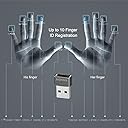
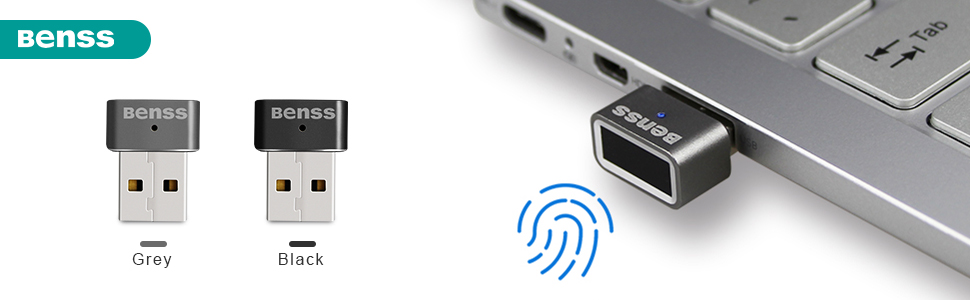
USB Fingerprint Reader, Benss Portable Security Key Biometric Fingerprint Scanner Support Windows 10 32/64 Bits with Latest Windows Hello Features, 0.05s Login Windows & PasswordFree - Grey
Product ID: 307473703
More Feature Support OS Windows 7 8 10 32/64-bits. Not compatible with the Linux/Mac/Android operating system. Designed for Windows Login Adopting the uniqueness of one's fingerprint features to prevent unauthorized access to your computer Secure and Convenience Touch base Fingerprint dongle with great FAR("Accounts" 2."Sign-in Options", Fingerprint "Setup" 3.Need PIN code first; if no PIN code yet, Windows Hello will guide you to setup 4.Enroll and Register your fingerprint around 10~12 enrollments(touch, lift), Try to touch your finger by different area,not always touch by same finger area. If you already installed previous version drivers 1.Uninstall driver first 2.Upgrade by INF(following Windows Hello Validation requirement) 3.Since we insert "Scheduler" in by registry keys,please "reboot" system to make those "run once" effective. Warm Tips 1.Windows Hello only allows 3 times fingerprint matching, If you failed to login in for 3 times or more, please switch to PIN code to login again. 2.If any issues during the process, please feel free to leave us message directly. We'll be glad to show you in details.

| Are Batteries Included | No |
| Asin | B073Z7FGKV |
| Brand | Benss |
| Color | Gray |
| Customer Reviews | 4.2 4.2 out of 5 stars (366) 4.2 out of 5 stars |
| Date First Available | 21 February 2018 |
| Item Model Number | CA-101BK |
| Item Weight | 7 g |
| Manufacturer | Benss |
| Product Dimensions | 2.5 x 0.5 x 1.5 cm; 7 g |
User
This excellent little device works perfectly with Windows 10 Pro version 2004... but not right away
**** CHECK YOUR WINDOWS UPDATE SECTION FOR ADDITIONAL DRIVER UPDATES ****OK, so first thing's first... once it's working, this fingerprint reader works perfectly (in my quick testing). It's compact and it seems to accept my fingerprint pretty much immediately. I haven't tried any others, but I don't see how it could even be improved, so I would definitely recommend this one.I have Windows 10 Pro Insider Preview (Version 2004) and even though Windows said it was setting up the device when I plugged it in, it never really did. After looking at various reviews and Q&A here, it first looked like I was going to have to return this. I tried different USB ports and they all did the same thing. That wasn't completely unexpected, but I went to the Benss website for the drivers to install manually and the only driver package they have didn't seem to do anything other than change the listing in my Device Manager. Windows Hello said I didn't have a fingerprint reader and Device Manager said the device couldn't start, so the drivers wouldn't actually install. I restarted and tried again with all available ports, but was still stuck. I decided at that point I'd have to just return it thanks to the lack of driver support.Then I tried one more thing... I went into the Windows settings and in the updates section, I checked for additional updates (I remembered seeing extra driver downloads in there before). Lo and behold, there was one driver update for ELAN Finger Print - Biometric! 🥳 I took the update and since I still had the Device Manager open, I could see that it immediately fixed the issue and showed the fingerprint reader as available. Windows Hello agreed that it was ready and I was able to start adding my fingerprints. After setting it up, I tested it out and it seems to be working perfectly!I'm writing this review on the day I received it, so I can't speak to how it'll do in the long run, but it certainly seems perfect right now.
User
Much easier, faster, and leaves me with options.
Installation was easy. I did have to go to their website to get the drivers. I got Windows Hello setup and it's been working great since. Ever so often I have to bounce my finger around to get it to activate but that is few and far between and most often it activates so quickly (and I mean quick), I really don't care that it has a short misfire 1 out of 12 times.I like that I now have options with signing in to my computer and can use a password, pin, face ID, and fingerprint sensor. It works great. We'll done.
User
Good for convenience, not for real security
There were some hiccups with setting up, which may or may not be because of the fingerprint reader itself. The reader is Hello compatible and does work with Windows 10 without additional drivers. However, when I first connected the fingerprint reader to my keyboard's USB port so that it would be conveniently available on the backside, Windows 10 refused to treat the reader as something that is compatible with Hello. Moving the reader to a USB hub gave the same results. Only when I first moved the reader to a port that is directly attached to the PC motherboard, Windows accepted it as a Hello compatible device. After the reader started working and completion of Hello setup, I was able to move the reader back to the keyboard and it works fine.The reading surface is rather a small rectangle, unlike the larger and more square surface my laptop's reader has. My understanding is that the device is just a reader (scanner), and does not store anything -- Windows determines whether the fingerprint matches or not. The small area or low resolution may contribute to the fact that I can sometimes unlock my PC when I'm not supposed, namely using a different finger than what I used to train Hello. Maybe 1/10 times I'm able to unlock my PC using a random different finger (e.g. left hand's middle finger) rather than the right hand index finger used to set things up. This leaves me to believe some random person could unlock my computer after trying long enough. Maybe Windows asking for the PIN after three bad attempts will prevent that, maybe not.However, within your home this fingerprint reader is awesome for convenience. It reads quickly and Hello doesn't seem to be particularly sensitive to orientation, so just a quick tap and you're good to go.
User
Get one today and stop typing in password
Works great. Works the first time every time for me. I use it on my desktop computer since all my other devices have either face recognition or fingerprint recognition unlock. Works amazing. Worth the money. You can use in some apps and programs on your computer as well instead of using typing out a password like your password manager. Works great with Dashlane on PC. Windows hello setup is a breeze. Even if your not tech savvy. I personally am. But if your not this is about is simple as it gets for set up plug it in your USB port and within a few seconds it pops up and follow the instructions. Simple quick and easy. What more can you ask for. Grab one for yourself and someone you know that could use one as well. You can store a lot of fingerprints on it also. If you have shared computer as well. So it ticks all the boxes.
User
Update: Second Reader Worked Well
The fingerprint reader arrived on time and installed easily. Unfortunately I was only able to get it to register one finger out of ten. The one finger it was able to register was heavily scared so it may have been reading the scares, not the fingerprint. It did quickly and and accurately log me in using the recognized finger, but I was not willing to trust the process to just one fingerprint. I ultimately returned the product. I don't think there's anything unique about my hands but maybe someone else would have better results.Update: After returning the first figure print reader and writing a review the vendor contacted me and offered to send a second reader to try. The second reader arrived quickly and worked well. I'm very happy with this vendor's proactive response to my issue and confidence in their product. I have other computers that I'd like to add finger print readers to. Assuming this one continues to function well I'd definitely purchase this reader from this vendor.
Trustpilot
4 days ago
2 weeks ago