We remain fully operational. Our teams are working around the clock to ensure your deliveries continue safely.

DOWNLOAD THE APP


Customer Services
Copyright © 2025 Desertcart Holdings Limited
DOWNLOAD THE APP


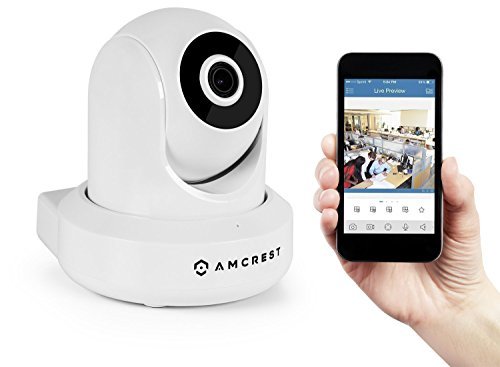


🔒 Elevate your security game with pro-grade clarity and control!
The Amcrest ProHD 1080P POE IP Camera combines true Full HD 1080p video at 30fps with advanced low-light Sony Exmor sensor technology and a powerful Ambarella chipset. Featuring a 90° wide-angle lens with remote pan/tilt and digital zoom, it ensures comprehensive coverage. Night vision extends up to 32 feet with built-in IR LEDs. Compatible with Alexa and AmcrestCloud, it offers two-way audio, motion alerts, and versatile recording options including cloud storage, microSD, and NAS. Secure SSL/HTTPS connections and AES/WPA2 encryption protect your data, backed by a 1-year US warranty and lifetime support.


| ASIN | B01H2JSC6U |
| Alert Type | Motion Only |
| Batteries Required? | No |
| Color | White |
| Compatible Devices | Smartphone |
| Connectivity Protocol | Ethernet |
| Control Method | Voice |
| Controller Type | Amazon Alexa, Android, iOS |
| Customer Reviews | 4.3 4.3 out of 5 stars (694) |
| Date First Available | June 14, 2016 |
| Effective Video Resolution | 1080 Pixels |
| Field Of View | 90 Degrees |
| Focus Type | Manual Focus |
| Form Factor | Dome |
| Frame Rate | 30 fps |
| Global Trade Identification Number | 00859888005566 |
| Indoor/Outdoor Usage | Indoor |
| International Protection Rating | IP2M 841EW |
| Is Discontinued By Manufacturer | No |
| Item Weight | 9.6 ounces |
| Item dimensions L x W x H | 4 x 3.9 x 4.5 inches |
| Item model number | IP2M-841EW |
| Low light technology | Night Color |
| Manufacturer | Amcrest |
| Manufacturer Part Number | IP2M-841EW |
| Maximum Webcam Image Resolution | 2.07 MP |
| Mounting Type | Wall Mount |
| Night Vision Range | 32 Feet |
| Number of Channels | 1 |
| Number of Items | 1 |
| Power Source | Battery Powered |
| Product Dimensions | 4 x 3.9 x 4.5 inches |
| Room Type | Bedroom, Classroom, Hallway, Kitchen, Living Room, Office, Study Room |
| Size | 1 Count (Pack of 1) |
| Specific Uses For Product | Surveillance |
| UPC | 859888005566 |
| Unit Count | 1.0 Count |
| Video Capture Format | MPEG-4 |
| Video Capture Resolution | 1080p |
| Viewing Angle | 90 Degrees |
| Voltage | 5 Volts |
| Wireless Communication Technology | Wi-Fi |
| Zoom Type | Digital Zoom |
C**D
Satisfied
Camera was easy enough to set up. I assigned it a static IP on my router, used the IP Config software from Amcrest's website to log into the camera and change the password, and followed a guide by Amcrest to get up and running on Blue Iris. Image quality is good and Pan/Tilt is working fine through Blue Iris. Night vision is adequate for the small room I have it located in. Only encountered two minor issues. Firstly, the microphone and speaker are a bit underwhelming. The built in microphone won't detect sounds under a certain decibel point and even when hooking external speakers up to the camera the sound quality leaves much to be desired. Everything comes through with large amounts of static. It's possible this is a configuration issue on my end and at this price point not much of bother to me anyways. The other issue has been setting up preset Pan/Tilt locations in Blue Iris. I can configure them easily enough but when going back and forth between them they start shifting to new locations almost immediately. Not sure if this the servo's in the camera not being accurate enough or again an issue with my setup. Not an issue for me since I'm using this camera in a static position, but if you are purchasing with the intent to scan over an area on a loop be aware. Despite the minor grievances you probably won't find much else better at this price point with the included features.
J**F
Perfect for DIYers with a bit of elbow grease
My home lab is VMware ESXi running Home Assistant (HassOS) and a Unifi Controller in Docker. I wanted a cheap security cam to plug into my Unifi US-8 60W PoE switch and this fit the bill perfectly. It integrates in Home Assistant rather nicely and easily, although it uses polling to update the webpage so don't expect to view a smooth live stream. The camera switches very nicely automatically between night vision and disabling it when necessary. The stock app does leave a lot to be desired, as it would've been nice to just save to an SMB/CIFS share directly from the app. What really made this camera awesome though is I discovered the XPEnology project. This allows you to run Synology's Surveillance Station software without purchasing their NAS. I'm running on a virtual machine in ESXi and the Surveillance Station software integrates very nicely with this camera! Using XPEnology, I now have the camera record only on motion, using CIFS to write directly to my Windows Server's hard disk, with a current 1GB retention for testing. I didn't even have to put a microSD card in it, and I don't see much of a point when a thief could just take the camera. Ultimately though, you do still need to have footage offsite to account for someone stealing your footage. Luckily I'm on a O365 Home Family plan, so my next plan is to use rsync (with file encryption) to consistently upload new footage in the cloud and I'll be able to view it from anywhere while keeping my home footage safe.
D**S
Using as a baby monitor
I don't know if it's just the WiFi in my house - even though we can stream to and from our phones just fine - but I've never found a WiFi baby monitor that doesn't have terrible connectivity issues, maybe because they all make you do HTTP tunneling through their own service? Our house is wired for Ethernet, but all of the baby monitors are WiFi. This is just about the only Ethernet camera I could find that also had the ability to look around the entire baby's room (pan/tilt in this case) and had built-in two-way audio. Plus it's PoE, which is just convenient. (You'll need a PoE injector if you want to go this route, FYI, but it lets you run only one cable to the camera instead of two.) I made the mistake of using the Amcrest Cloud app, first. Don't do it! It uses HTTP tunneling, is slow and unresponsive like all the other baby cams I used. Switched to the Amcrest View Pro app, and suddenly everything snapped into place. Awesome picture, very responsive and easy to use over my home network. In lieu of using the cloud service, I needed to configure my router with port forwarding and a DDNS provider so I can access the router outside my home network. It's a bit of a pain (especially if you want to run multiple cameras), but worth it. Your techie friend can probably help you with this if you aren't up to it. It can be hard to find what you're looking for in the web console, but it's all there if you go digging for it. Be sure to check the tabs within individual setup pages for more options. One mistake I made was installing it upright. You probably don't want to do this unless you're mounting it on the floor, because it can't tilt down past the horizontal level. I had to change the mounting to be upside-down on the ceiling, then flip and mirror the image in the settings. That gets me a bird's eye view of the entire room. My biggest complaint is that it's fairly noisy when it pans or tilts, much more so than the other baby monitor camera I had. It won't be noticeable at night with a sound machine on, though. I'm happy enough that I'm immediately buying two more to use for security purposes inside my house.
K**R
These are excellent little cameras
These are excellent little cameras. You can see where someone did some quality work on the interface and the camera itself. These come in very nicely packed boxes. The video is excellent. I have around 6 on our property, I'll probably have 6 more... Yes, some are mounted outside (even though they are not really meant for outdoor). Very well done! :) One lesson I did learn - this relates to those that run Blue Iris - is if you are running - say BlueIris on a slower/older PC, you'll want to go into the configuration utility for the camera and slow the frame rate down to - say 5 frames per second vs 30. The HD images from these cameras are top notch and work perfectly at 5fps. The high frame rates (with HD size images) will really bog down an older PC - especially if you get 3 or 4 of these going at one time. 5fps seems to work really well for me. Experiment with it as you see fit. These are outstanding little cameras.
Trustpilot
2 weeks ago
3 weeks ago