Desert Online General Trading LLC
Dubai, United Arab Emirates
Desert Online General Trading LLC
Dubai, United Arab Emirates

🔗 Connect smarter, work greener, live clutter-free.
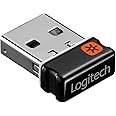
The Logitech Unifying Receiver (Renewed) is a compact, ultra-lightweight USB receiver that connects up to six compatible Logitech wireless devices simultaneously. Certified carbon neutral by SCS Global Services, it offers eco-conscious professionals a reliable, plug-and-play wireless solution that minimizes desk clutter while maximizing productivity.
| Brand | Logitech |
| Item model number | 910-005235 |
| Item Weight | 0.01 ounces |
| Product Dimensions | 0.6 x 0.2 x 0.8 inches |
| Item Dimensions LxWxH | 0.6 x 0.2 x 0.8 inches |
| Color | Black |
| Power Source | Corded Electric |
| Batteries | 1 Lithium Ion batteries required. |
| Manufacturer | Logitech |
| ASIN | B01DFPG5CS |
| Is Discontinued By Manufacturer | No |
| Date First Available | March 25, 2016 |
Z**W
Durable With Good Connection
I mean it works. Nothing else to say here. Shell won't come off like some other dongles, and it's grippy enough to transfer from port to port easily. Stays connected even a floor away.
D**U
Works great, just make sure your peripherals are compatible.
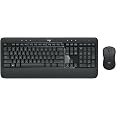
The receiver itself worked great. I could pair it with my newer wireless mouse and it worked perfectly fine. I was worried about some bad reviews on this refurbished version, but it worked OK and also looked almost brand new. It doesn't come with instructions; just the receiver in a little bag. You have to download the Unifying software from Logitech's website and use that to pair your peripherals to it.However, you have to make sure your peripherals support Unifying before buying this. They have to have the little star logo somewhere on them. I originally bought this as a replacement for a lost receiver for a Logitech Wave keyboard and mouse combo. Since the one on Logitech's website is sold with a Unifying receiver, I assumed that this one would work just fine. However, it wouldn't pair with mine, because apparently I have an older model of the exact same keyboard that doesn't support Unifying. Just be sure your peripherals have the logo on them, and you'll be fine.
K**D
I have a universal Logitech mouse and had lost the receiver so I was happy I found this one at such a good price
This was supposed to be a universal receiver. I have a universal Logitech mouse and had lost the receiver so I was happy I found this one at such a good price. Unfortunately it doesn't work so now I know why it was priced so low.
D**3
Works as Advertised
I was skeptical at first due to some of the negative reviews, but took a chance anyhow. For those that may not be aware, these receivers are not perfectly plug n play. You will need to download the Logitech Unifying Software in order to pair the receiver to a list (up to 6) unifying Logitech mice and/or keyboards. The download can be found here: [...] There is also a Linux hack that works really well with the Logitech Unifying hardware. The only downside to the pairing is that most (maybe all) Logitech devices only allow one receiver to pair with. So, if you pair with one receiver, then any other receiver the device was paired with is effectively ignored by the mouse or keyboard until the Unifying Software is ran again to pair the target device to the target receiver. Even though that is a bit annoying the nano-receivers work as advertised.
T**R
Does not work for my M570 trackball, product does not match picture in listing. EDIT: Got it working
I have an M570 trackball that has the orange star logo on the bottom of it. The original unifying receiver that came with my M570 has the orange logo as well. I broke the original receiver and did not want to purchase a whole new trackball. I just received the Unifying Receiver from this listing and it does not work with my M570! The original receiver that came with my M570 looks EXACTLY like the picture. The one I received looks different than my original and different than the picture on this listing. Hopefully I can return it. If not, at least it was cheap!EDIT: I actually got it working. The issue was that it did not automatically pair. The solution was to install the unifying receiver agent (Never had to install it before) and manually pair the device. My issue was compounded by fact that I was trying to do this on a work computer that is locked down and I could not install the software. I had to use my home computer to pair the device, and then I was able to use it on my work computer without issue.
L**N
Great Product
Product arrived on time and looks brand new. Works as advertised and I’m so happy that I can use all 3 of my Logitech wireless devices off of this one receiver.
T**E
Works, but needs additional software for set-up
Had to download additional software to handle the set-up (notice or instructions not included in packaging from what I saw), but worked as intended afterwards.
N**O
Mello
Did NOT work at all.
Trustpilot
2 months ago
4 days ago