We remain fully operational. Our teams are working around the clock to ensure your deliveries continue safely.

DOWNLOAD THE APP


Customer Services
Copyright © 2025 Desertcart Holdings Limited
DOWNLOAD THE APP

🚀 Elevate your network game with 10Gtek’s powerhouse adapter!
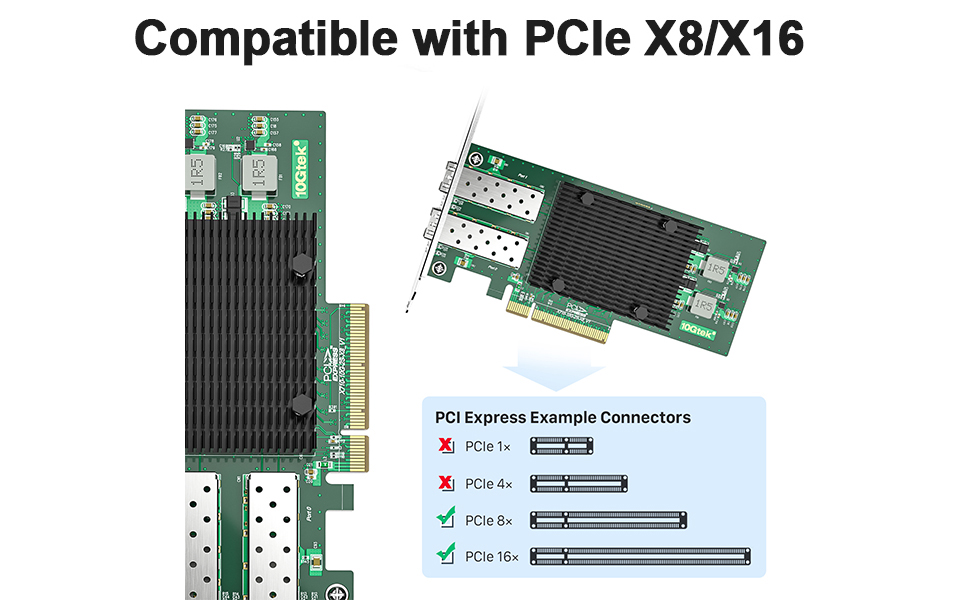
The 10Gtek 10Gb PCI-E NIC Network Card features dual SFP+ ports powered by the original Intel X710-BM2 controller, delivering ultra-fast 10Gbps speeds and advanced I/O virtualization. Compatible with Windows Server, Linux, and ESX, it supports network virtualization offloads such as Geneve, VXLAN, and NVGRE, ensuring stable, high-performance connectivity for professional-grade networking environments.






| ASIN | B07PM4QCZR |
| Best Sellers Rank | #9,748 in Computers ( See Top 100 in Computers ) #15 in Network Cards |
| Country of origin | China |
| Item model number | X710-DA2(Intel-1pc) |
| Manufacturer | 10Gtek |
| Package Dimensions | 22.71 x 15.19 x 3.2 cm; 259 g |
S**I
Prodotto funzionale e perfetto. Venditore buono
H**B
Article fonctionne (attention, pas compatible avec tous les SFP+), mais emballage inadéquat: emballage etait percé, métal tordu, heureusement tout juste à côté de la carte même. Un meilleur emballage serait préférable.
T**E
Good card, works “ok” with Windows 11 but better in other OSes. It keeps me from having to use the awful built-in Marvell NICs on my motherboard that seemed to slowly fail if the PC went to sleep or if they were active too long or got too warm. We live in the future!
A**O
J'avais déjà acheté cette carte en version Intel x540. Avec cette version (Intel x710) j'améliore amplement ma connexion internet. Très satisfait
J**F
I don't know what it is, but I have the WORST luck with my gaming towers. Even now I'm unable to get it to wake from sleep correctly, requiring me to wake, then force power off, then power on, then click Exit because it goes into the BIOS, restart, and finally login. EVERY TIME I try to wake it from sleep. Anyway, that's something else. The point is, I was dismayed (but not surprised) when my first X710-DA2-based card would not work. I spent hours trying to figure it out, but ultimately I gave up. I think with my luck such as it is, I just happened to get a dud. But this one works great. I did the usual dance for Windows 11 that I had become so accustomed to while trying to get the last one to work: Install to PCIe slot, reboot, install X710 drivers from the Intel website, and that was it! Plugged in the transceivers and it instantly negotiated a 10GbE connection with my switch. I then ran the Intel NVM Update utility to update the card to the latest firmware, and all is good. Oh, and a note to those (like me) that may not have memorized the data sheet for your motherboard -- on mine (MSI X670-P) the fourth PCIe slot is shared with the fourth M2 slot. So if you have several NVMe drives and that fourth slot is populated, nothing you put into the PCIe slot will work. Luckily I figured it out pretty quick and moved it, but it's something to look out for.
Trustpilot
3 weeks ago
2 weeks ago