We remain fully operational. Our teams are working around the clock to ensure your deliveries continue safely.

DOWNLOAD THE APP


Customer Services
Copyright © 2025 Desertcart Holdings Limited
DOWNLOAD THE APP


🎮 Elevate your 1080p game with silent power and sleek cooling — don’t get left behind!
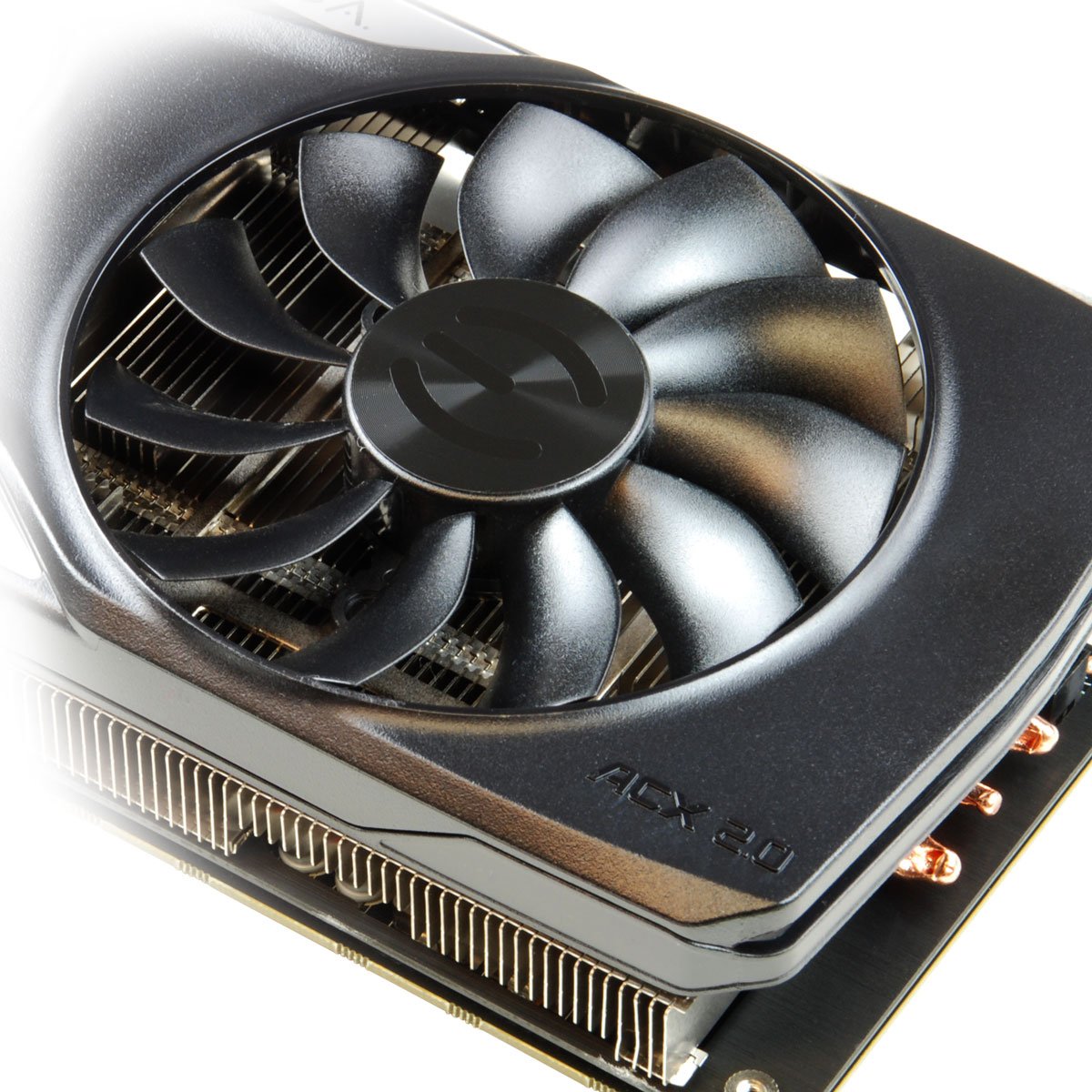
The EVGA GeForce GTX 960 2GB SSC GAMING ACX 2.0+ is a mid-range graphics card engineered for professional-grade 1080p gaming. Featuring a 1279 MHz base clock with boost up to 1342 MHz, 2GB of high-speed GDDR5 memory at 7010 MHz, and advanced ACX 2.0+ cooling technology, it delivers quiet, efficient performance. NVIDIA Maxwell architecture ensures 60% faster speeds and twice the power efficiency compared to previous generations, while support for Dynamic Super Resolution and NVIDIA G-Sync enhances visual fidelity and smoothness. Ideal for millennial professionals seeking a balance of power, silence, and future-ready features in their gaming or creative workflows.
| ASIN | B00SL2TQ2C |
| Antenna Location | Gaming |
| Best Sellers Rank | #2,805 in Computer Graphics Cards |
| Brand | EVGA |
| Built-In Media | Graphics card, manuel, cables |
| Compatible Devices | Desktop |
| Customer Reviews | 4.6 out of 5 stars 2,137 Reviews |
| Display Resolution Maximum | 4096x2160 |
| Global Trade Identification Number | 00843368033583, 04250812407290, 08809321845862 |
| Graphics Card Interface | PCI Express |
| Graphics Card Ram | 2 GB |
| Graphics Coprocessor | Nvidia GeForce |
| Graphics Description | GeForce GTX 960 |
| Graphics Processor Manufacturer | NVIDIA |
| Graphics RAM Type | GDDR5 |
| Graphics Ram Size | 2 GB |
| Graphics Ram Type | GDDR5 |
| Item Weight | 1.5 Pounds |
| Manufacturer | EVGA |
| Memory Clock Speed | 7010 MHz |
| Model Name | 04G-P4-3962-KR |
| Number of Fans | 2 |
| UPC | 796594551966 809395323851 801947305773 843368033583 804904128729 808113008711 804067325294 792745285247 |
| Video Output Interface | DVI , HDMI |
| Video Processor | NVIDIA |
| Warranty Description | Limited warranty; 3 years warranty |
S**.
The GTX 960: A good middle road graphics card.
This review is for both the GTX 960 2G and 4G as I have owned both. Overview: The most important thing you want to know is if this is a good card, whether it can run modern games at high settings, and will it last me a few years. The short version is: Yes this is a great card that can run most modern games at high to ultra settings with 45-60FPS at 1080p, however the 2G version is a terrible purchase for future proofing, so do yourself a favor, pay the extra $30 and get the 4G. More games are requiring 2.5-3G for high to ultra settings at 1080p, so 2G just isn't enough anymore. How it runs: Now the card runs perfectly, as Nvidia does a great job with the drivers. I have had a few crashes, but mostly due to overclocking and the occasional updated driver issues). The card overclocks relatively well and quite easily using EVGA's Precision X or MSI afterburner, however you will only see around a 2-6 FPS boost even at max overclock with air cooling, so it's really up to you if you would prefer to risk it. The fans are silent when idle, and very quiet under load, and since case fans are much louder in general, you will probably not notice them. How it performs: Before we discuss the card, here are some benchmarks for the GTX courtesy of Tom's Hardware: http://www.tomshardware.com/reviews/nvidia-geforce-gtx-960,4038-4.html As you can tell from the benchmarks, the GTX 960 is very middle of the road and runs most games at high or ultra settings at 48-60FPS at 10180p, and that is what you expect from a $200-240 card. Price wise you could probably get more frames per dollar with an Radeon R9 280X, Which is slightly more powerful at a lower price, but comes with 3G instead of 4G, and features AMD's less than stellar drivers so it is a bit of a toss up. The better question is whether you should simply fork over $100 more dollars and get the significantly better GTX 970 (Which technically only has 3.5G), which will take much longer before requiring an upgrade. Warning: ATTENTION HP PAVILION USERS WITH DESKTOPS MADE IN 12012 OR EARLIER. These graphics card will not post on many of the older HP Pavilion desktops (Specifically the ones that still use the Chicago Motherboard) because the card is incompatible with their very outdated bios. I had to return the 960 2G card for that reason, and ended up building a new PC from scratch with the 960 4G.
R**O
the EVGA 04G-P4-3969-KR is one of the best NVidia GTX 960's available.
The price-versus-performance "sweet spot" if you are only interested in 1080p gaming (@ max/high settings), and a steal at the current sale price of $184.99 (11/27/2015). Based on a lot of research that I have done over the last month or so, the EVGA 04G-P4-3969-KR is one of the best overall GTX 960's available, by all accounts. It has a high factory-default clock speed (1304/1367 MHz), runs cool/quiet, isn't excessively long, has reinforced back-plate, and looks good. It's also the perfect/maximum GPU to comfortably run with a ~500W PSU (go with ~600W PSU if you want a GTX 970). If you are only interested in 900p (1600 x 900) gaming or less, then you can run a GTX 950 @ max/high settings, and save a few extra bucks (and get away with using a 400W PSU). My Current System Build: - PHANTEKS Enthoo Evolv mATX Aluminum Case (White) - $129.99 - ENERMAX Revolution X't ATX 530 Watt Gold-Rated Power Supply (ERX530AWT) - $79.99 - GIGABYTE LGA-1151 Intel H110 mATX DDR4 Motherboard (GA-H110M-S2HP) - $76.99 - KINGSTON HyperX FURY Black 16GB (2x8GB) 2133MHz DDR4 CL14 Memory (HX421C14FBK2/16) - $96.99 - INTEL Core I5-6500 3.20Ghz LGA-1151 Processor - $199.99 - EVGA GeForce GTX 960 4GB FTW GAMING ACX 2.0+, Graphics Card (04G-P4-3969-KR) - $184.99 - INTEL 240GB SATA 2.5" SSD (DC S3500 Enterprise Class) - Primary Boot/OS Drive - $159.99 - WESTERN DIGITAL 1TB SATA 3.5" HDD - Secondary Drive - $59.99 - WESTERN DIGITAL 500GB SATA 2.5 HDD - Misc. Storage/Backup Drive - $49.99 - HP BH40N Blu-ray DVD Internal 5.25 Drive - $37.99 - Planar 1600x900 20" LED Monitor + HP 1920x1080 27" IPS Monitor Update 12/6/2015: Computer is now up and running as configured above, without issues. Everything works fine, thus far. I cannot even hear the GTX 960 running inside my system. I tested the system running the latest 3DMark software (Fire Strike & Sky Diver @ 1080p) and was satisfied with the results. Update 4/26/2016: No issues to report. Maximum "real world" gaming temperature thus far has been 69 Celsius - while running Final Fantasy XIV Online at maximum graphic settings for the better part of a day (w/game-capped 60 FPS settings). My desktop system is air-cooled, with 1 front 200mm fan and 1 rear 140mm fan. Update 6/8/2018: Still working like a champ. No issues to report. This has been a perfectly reliable & satisfactory GPU for me over the last 2-3 years, though the newer GTX 1060 is now the new 'sweet spot' for 1080p gaming, if you are building a system at this time.
M**H
Great Mid-Range Gaming Card, Benchmark FPS' In Review!
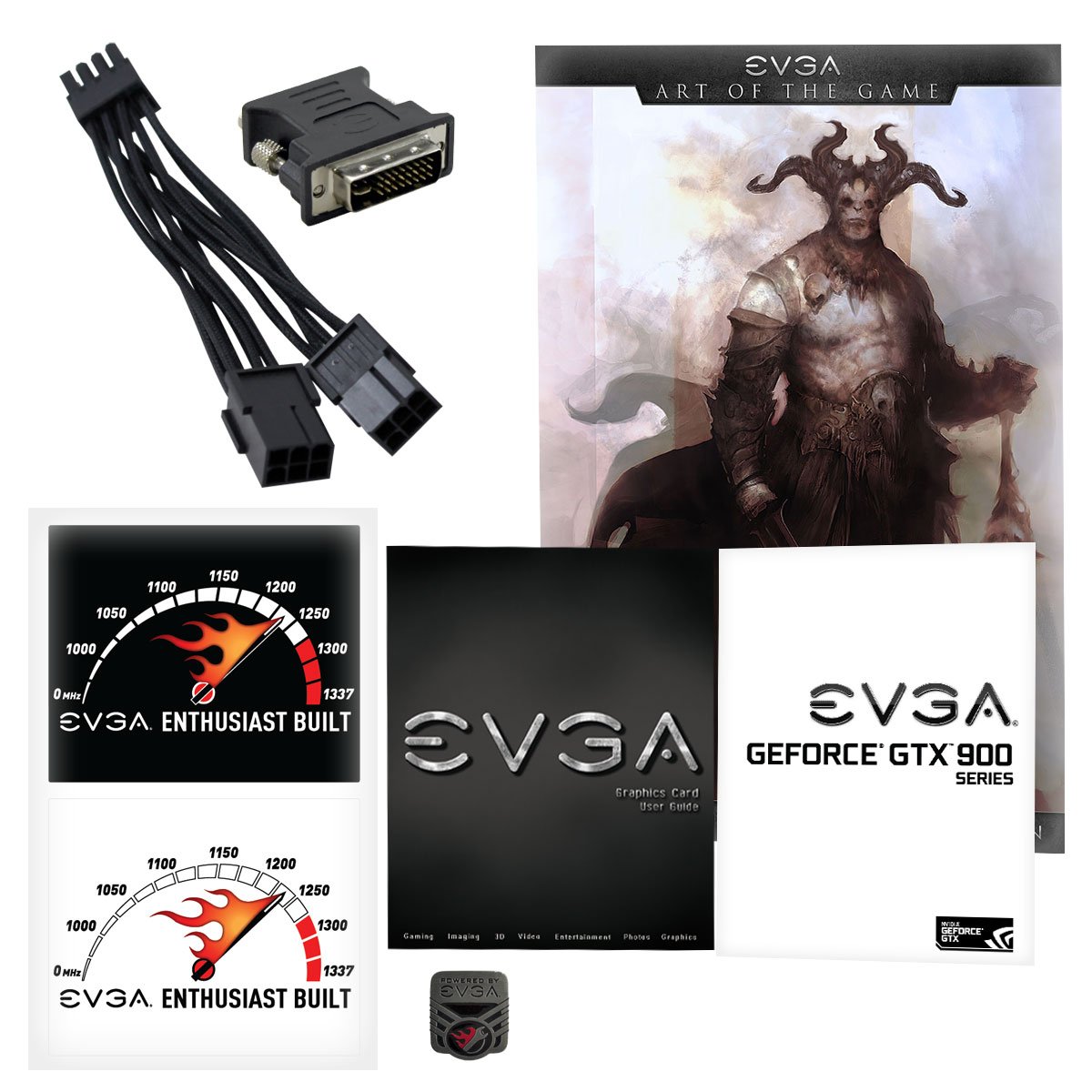
Purchased for my first ever desktop computer custom build, designed for heavy gaming, but without blowing the bank account to smithereens, this graphics card really hit the right spot for me. To start with, I chose NVIDIA over AMD for two main reasons: 1 - AMD cards ALWAYS require more power, and use more power (substantially more) than the comparable NVIDIA cards (for example, this card will draw about 108 Watts in a gaming scenario, whereas the comparable AMD Radeon R9 285 in a comparable gaming scenario will draw about 176 Watts). No, this difference isn't going to destroy an electric bill, but over time, it would add up, making the AMD card more expensive in the long run. 2 - AMD cards typically run hotter than the comparable NVIDIA cards as well, not as much of a difference here, but I preferred to play it safe. Now why I chose the EVGA model? It didn't come down to much, just really chose something I figured would be solid. I really liked that this card had a backplate, as well as so many connectivity options. I also purchased the Super SuperClocked version, giving this card the biggest possible advantage for it being a 960, and EVGA's overclocking software is fairly convenient to use, especially when you're using one of their cards. On to actual thoughts: I really like this card. I had really high hopes for how it would perform, and it holds up to most of those. You won't be playing Dying Light or The Witcher III: Wild Hunt on completely maxed Ultra settings, that I can guarantee you. But it does stand up very well to modern titles and is completely capable of playing anything on the market right now, at varying qualities, but it can play most titles around about one step down from Ultra. It runs fairly cool, I need to rework my fan setup and some other cooling things in my case, but it does cool itself just fine, no worry of thermal bottlenecking. I was surprised by the weight when I got it out of the package, not to mention the size, this card is hefty to say the least. The coating is a matte finished black with some decals, and the backplate is a glossy black (nice feature by the way). The connection ports all come with black port blockers to keep dust and debris from causing connectivity issues, and it also comes with a power cable adapter, which most people will need to use, and it comes with a DVI to VGA adapter, so this can literally use nearly every display connection type there is, granted there is a clear bias towards Display Port with 3 of them being included. The card fit just fine in my Zalman Z11 Plus case, and works well with my ASUS Z97-A motherboard. ====================================================================================================== I will include game benchmarks scores for my rig with this graphics card in it: My Rig: Intel i5-4690K EVGA SSC NVIDIA GTX 960 4GB ASUS Z97-A 8GB DDR3 Corsair CX600M PSU Windows 10 Pro BioShock Infinite: Ultra ~ Maxed Settings - AVERAGE: 72 MINIMUM: 26 MAXIMUM: 117 Tomb Raider (2013): Ultra Preset - AVERAGE: 86 MINIMUM: 70 MAXIMUM: 102 Hitman: Absolution: Ultra Preset w/ MSAA OFF - AVERAGE: 70 MINIMUM: 58 MAXIMUM: 82 Thief: High Preset - AVERAGE: 60 MINIMUM: 49 MAXIMUM: 78 Middle Earth: Shadow of Mordor: Very High Preset - AVERAGE: 64 MINIMUM: 46 MAXIMUM: 90 ARMA 2: ALL Settings on High - Benchmark 1 AVERAGE: 60 Benchmark 2 AVERAGE: 24 Metro 2033 Redux: High Preset w/ Tesselation on High, Texture Filtering on AF 16X, SSAA OFF, Advanced PhysX OFF - AVERAGE: 71 MINIMUM: 21 MAXIMUM: 222 Metro: Last Light: High Preset w/ Tesselation on High, SSAA OFF, Advanced PhysX OFF - AVERAGE: 69 MINIMUM: 22 MAXIMUM: 153 S.T.A.L.K.E.R.: Call of Pripyat: Extreme Preset - Day AVERAGE: 67 Day MINIMUM: 35 Day MAXIMUM: 99 Night AVERAGE: 72 Night MINIMUM: 44 Night MAXIMUM: 102 Rain AVERAGE: 76 Rain MINIMUM: 53 Rain MAXIMUM: 111 Sun-shafts AVERAGE: 51 Sun-shafts MINIMUM: 35 Sun-shafts MAXIMUM: 73 Just Cause 2: ALL Settings Maxed - The Dark Tower AVERAGE: 69 Desert Sunrise AVERAGE: 77 Concrete Jungle AVERAGE: 64 Far Cry 2: Ultra High Preset - Ranch - Long Benchmark AVERAGE: 117 MINIMUM: 66 MAXIMUM: 253 Sleeping Dogs: High Preset w/ NO HD Texture Pack - AVERAGE: 58 MINIMUM: 46 MAXIMUM: 63
S**E
A Great GPU, struggles with ultra settings on Fallout 4
I purchased this card with the sole intention of playing Fallout 4 on ultra settings, completely maxed out. I had read previous reviews stating that it played it flawlessly, but as usual, flawlessly is relative to every person's experience and opinion. I just finished building a high end gaming PC devoted to making Fallout run @ a steady 60FPS. Although I snagged this card for a ridiculous $185 during black Friday, it still didn't quite pay dividends for what I was hoping. While the game would average 53-60FPS for about 60-70% of the time, most scenes that took place inside buildings, in the rain, or in graphic/shaded heavy areas would easily drop into the 40FPS range, and at times would even hit the 30FPS range. I initially thought that overclocking it to the max safe speeds I'd found online would help, but the additional 50Mhz to the GPU and 500Mhz to the memory didn't squeeze much more performance out, at least as Fallout was concerned. I do realize that a GTX 970 is recommended by Bethesda if you want to max everything out, but I thought I could maybe squeeze by with this card. Nope...turns out they know what they are talking about afterall. I ended up going with an EVGA GTX 970 FTW+ in it's place, and as expected, it doesn't even break a sweat with Fallout 4 maxed out. That said, with Fallout aside, I am still giving this card a SOLID 4 stars, as it does pack a lot of bang for the buck, and seemed very solidly built. It's solid overclocking ability is a huge factor, as I mentioned that you can easily squeeze an additional 50 out of the GPU and 500 out of the memory without adjusting voltage or any other factors. I want to make sure I'm giving this card a fair shake too, because it didn't have any other issues, and even played Fallout perfectly on high settings, just not on ultra. On the stock fan profile, it got as hot as 72°C and averaged in the 62-68°C range most of the time. This wasn't a huge shock, as the ACX2.0 cooling "upgrade" means that the fans don't even turn on until it reaches 60°C, which seemed quite high before the fans even start turning. I felt that was too hot for my liking and made a custom (and very moderate) fan curve via MSI Afterburner, which easily dropped the max temp to 58°C and averaged 48-54°C. When the fans run at 100%, it does sound like a Harrier jet taking off, but even with my custom fan curve I rarely heard the fan reach more than 50%, which was very tolerable. In closing, this card may very well work perfectly for those of you that don't have to have the absolute best graphics on every game, and if that is you, this is definitely your card. However, if you are an ultra graphics gamer on anything released in the last year, stepping up at least 1 tier to the GTX 970 would be strongly advised. For reference, my build included: i7-4790 CPU (stock clock) G.SKILL Sniper 32GB (8GBx4) 1866mhz RAM MSI Gaming 5 Z97 mobo (2) Intel 240GB SSD (1 windows, 1 gaming) 640GB HDD (storage) Cooler Master EVO212 EVGA 750 Bronze PSU
M**B
Good while it lasted.
I plugged one of these into my DX58SO2 with PCIE 2.0 to replace two aging 460GTX in SLI (This card's system requirements say "PCIE, PCIE 2.0, or PCIE 3.0"). I got one warning that the system failed to POST, but I hit reset and the PC booted normally. After installing the latest drivers from Nvidia and rebooting, I fired up FarCry 4 and bumped the graphics settings to the "very high" preset. I got about 55-70FPS, peaked the temp at about 50 Celsius, and yes..the monkeys even had fur. Totally satisfied with my purchase, I shut down the game after playing for an hour and was watching some TV and thinking about which game I should try next..... ....and then..... ....my PC instantly powered off with no warning or blue screen. I hit the power button and it tried to power on for about half a second, then it stopped responding to the power button completely. Quite upset, I ordered a new power supply, and days later, put it in the system. With a great feeling of dread, I pushed the power button.....nothing.....So it now seems that the motherboard is dead. It's about 7 months out of warranty too! Now I have to buy a new motherboard, and probably a new CPU, and new RAM to go with it All to compliment the new power supply and the seemingly awesome and inexpensive new GTX960 that I was so excited about. For the skeptics, the Power supply was more than sufficient, the case was very clean and well ventilated. The CPU has a tower cooler with heat pipes and a year old application of arctic silver. Nothing was overclocked. Now I'm not going to come right out and say that this card fried my motherboard. I'll leave the readers to decide if it was operator error or even pure coincidence that the flagship Intel motherboard died 1 hour after installing this. Your guess is as good as mine. All I know is the fuzzy warm feeling I had from buying a decent display adapter upgrade at a reasonable price wore off very quickly. Update: New Power Supply, Motherboard, Memory, CPU, on top of this video card...and I am finally back to gaming again. So far I see no issues with the GXT960 SSC so far. Certainly nothing like what happened before. The card runs very cool, as you can guess by all the Nvidia promotional material touting it's cooling ability. I have to assume this means you have lots of room to overclock, but given the way the last 2 weeks have gone for me..I won't be overclocking for the time being. I sort of wonder why it's not clocked higher by default though if it's generating so little heat that the fans can turn off completely. As far as performance goes, I can get a solid synced 60 fps with pretty high quality settings in just about every game I've tried. Maybe not "Ultra" in a very modern game, but a respectable "High". Minecraft on the other hand runs like a champ, even with the highest possible quality settings using Optifine HD Ultra and 8x MSAA and 8x transparancy antialiasing. I get 120 FPS if I turn off vsync, or I can turn it on and limit the FPS to 60 and the card only uses about 30% of the GPU. Watch Dogs runs great at around "High", and while you can go higher and get 60fps most of the time, it's better to lower the quality a bit to make sure the FPS doesn't ever drop below 60. It's really not fun trying to make a turn at 120mph and having a FPS lag spike mess with your timing. One of these GTX960 cards absolutely beats the two GTX460 cards running in SLi that I had before. I don't need benchmarks to tell you that, it is clearly obvious with the naked eye.
A**R
This is a wonderful item, brand new (still in boxes original shrink-wrap)
This is a wonderful item, brand new (still in the box's original shrink-wrap), works like a champion, my gaming rig is now the envy of my LAN parties. I've been a long time (well, my entire PC Gaming career now that I think of it) buyer/user of NVIDIA(R) video cards, AMD(R) in my opinion, (not trying to bad-talk AMD products or services) has always left me either wanting more, or wanting to throw my rig from frustration of their installation process, that being said, I only bring up AMD and my opinion because, NVIDIA has sought out (and fixed!) these problems: *Installation is fast, each video card comes with a NVIDIA Driver Installation Disc, which can quickly and easily navigate the install windows. Don't have the disc anymore? Maybe you bought your card second-hand? No worries! This feature is still used, simply by downloading NVIDIA's Geforce Experience(R) (the disc by default will also install it if using express settings, though you can choose to not install it if you choose), it will automatically keep your drivers up-to-date, so you never have to look for them yourself! *NVIDIA has worked to bring many features with their products: 1) VR. Yes, the new "ultimate-gaming experience" is supported by NVIDIA, who even sells their own VR Headset (Oculus(R), forgive the typo if there is one). 2) Game Optimization. This allows NVIDIA to look at all the performance-aspects of a game (limited to those it supports {older games such as those on Windows Vista or before cannot be Optimized}, though that is a large, and ever-growing library), including your RAM, Processor, and your video card, to help bring you the best (and smoothest in most cases) quality-to-performance ratio. 3) NVIDIA Shield(R). You can't call yourself a true gamer if you don't know of Steam(R), and if you know of Steam, you must know of the new Steam Link(R). Well, the people at NVIDIA have brought you an item akin to the Link(R), the Shield allows you to stream games, as well as add many other applications and features from your computer to your HDMI TV! *NVIDIA also offers lots of more features, though these are immediate to a video card and its installation/use. On top of NVIDIA, there is another name/brand to be recognized: EVGA(R). I've owned around 24 videos cards give-or-take in my career, and all but one were EVGA, and I wouldn't choose another sub-brand for the world! EVGA brings you NVIDIA's full potential, incorporating custom cooling systems, rebuilds of the cards body, and they "factory-Overclock" (called Super Clocking(R). or SC for short) the card for you, even on their cheapest version of a model, meaning you don't have to bear the risk of trying to maximize your card yourself, and possibly destroying it! Along with all these, they also offer quite a bit of "goodies" in their product's boxes, including two decals saying "EVGA: Enthusiest Built" (white and black schemes), one decal-token/badge saying "Powered by EVGA" (a silver/grey token with black lettering and a flaming-wrench symbol), a EVGA poster (the poster varies as far as what picture is shown/used. no pattern has been noted, though, my posters have changed through the years, though I never noticed a "cause", or a schedule), and all the misc. items you need for your computer's newest edition, including a DVI-D/A-VGA adapter (White-to-Blue cable adapter/converter), as well as 1-2 MOLEX-to-6 Pin (video card's power cord) - as your video card requires, meaning one to three if needed, though some higher-ends, such as the Titan(R) series. may come with their 8 Pin counterparts, though I've never bought above a 960. so I cannot confirm this. Overall, this was a great purchase, I got a great product, accompanied by great/fast service, A+ product and service, would buy again!
D**E
Fast card but apparently 2gb isn't enough
Fast card that runs pretty smooth BUT If you plan to play certain newer games on high settings I'd strongly suggest getting a 4bg ram card, even a lesser model like the 950. A game like GTA V requires 2.5gb+ of ram just to play with textures above "normal" setting, and If you are looking at getting this specific card, you probably want those extra 2gb. I really like the fans on this thing. they are nice and quiet and you don't even always need them. This thing requires much less fan power and cools much better than the last card I had which was a 9800 gtx+. I rarely put the fans above 60%. one thing I like and also dislike about the card is how the clock value is automated by the included "precision" software. It will sometimes lower the clock value when I need it fully on. Like it's supposed to run around 1400mhz on normal high, but sometimes stops at 1100mhz or 1200mhz. when idle or doing normal tasks it runs around 130mhz and uses very little power, which is nice. I was able to find a used "pristine" 4gb 960 ssc card for about the price of the 2gb version, but sadly warehouse deals sent me this 2gb but with a sticker for the 4gb on it(see pic). I realized too late that returning the 2gb would have been worth the extra cost, massive inconvenience of having no card for weeks, and having to find another cheap 4gb version. It's actually kind of suspicious considering they deal with small product difference all the time, they labeled this packed, inspected it's condition, then someone went and grabbed the box based on the box name. Maybe they grab the wrong box, sure, but what are the chances they grab the wrong box with the right label? if someone there kept track of returns they could make 60-70$ easy by buying the 4gb for the price of the unreturned 2gb, then selling the bonus face plate and card. or they just didn't want to correct their mistake and put the burden on me.
N**E
Mid-Level Pricing For Top-Tier Performance
I've had this card going on about 3 months now and WOW - I haven't regretted my purchase one bit! I see a lot of folks throwing around "mid level" talk and while the price is indeed mid level, the performance competes up at the top. Of course it's not a card five times its price, but for the vast majority of todays games, it works wonderfully. For instance, when I play The Witcher 3 at all ultra settings (everything possible thing is cranked as high as it will let me!), I easily get a playable framerate. It doesn't often get to 60FPS, but it does remain completely playable and that's what matters most to me. Another great aspect as been the cooling system. It can get a little noisey but that noise is not in vain. Using the software that came with the cards (EVGA Precision), I adjust the fan speeds depending on what I am doing. For instance, at this moment when I am not gaming, I keep the speed at 20%; it is quiet and the temperature is at 25-30C. When gaming, I crank it up to 90-100% and the temperature never goes over 55C. Even if I kept it at a lower fan speed, which I have accidentally done before while gaming, it doesn't go above 75C - very impressive! I am extremely pleased overall with my purchase. About a decade ago I was very much into the latest and greatest. As I've grown up and had more financial obligations, I haven't been able to upgrade my computer as freely. This was my first graphics card update in sometime. I was previously running a GT640 and the difference is truly night and day. If you're looking for a budget friendly powerhouse of a card, that in my opinion has future-proof power for some time to come, you can't go wrong with this card. One word of caution: these things are big! I got the single fan version so it is a bit "chunkier" than it is long and it just barely fit in my miniATX case. It also requires a separate power source so be aware of that as well. I have a 460W power supply and it works just fine with my other computer components. Enjoy!
Trustpilot
1 day ago
2 months ago