Buy anything from 5,000+ international stores. One checkout price. No surprise fees. Join 2M+ shoppers on Desertcart.
Desertcart purchases this item on your behalf and handles shipping, customs, and support to Netherlands.
🚀 Unlock your SSD’s full potential—speed, style, and simplicity in one sleek enclosure!
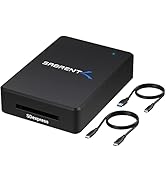
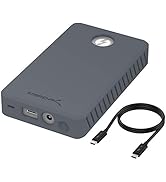
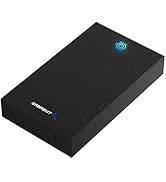
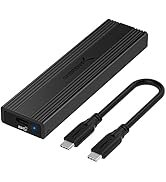
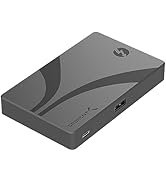
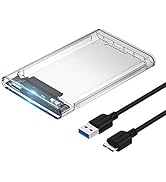
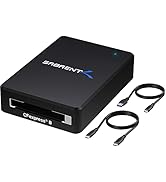
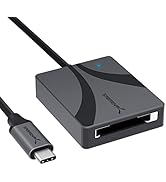
The Sabrent USB 3.2 Type-C Tool-Free Enclosure (EC-SNVE) is a compact, ultra-slim external SSD adapter designed for M.2 SATA and NVMe drives in 2242, 2260, and 2280 sizes. Featuring a durable aluminum and ABS frame, it supports blazing-fast USB 3.2 data transfer speeds up to 10Gbps and enables quick, tool-free SSD installation. Bus-powered and driver-free, it’s perfect for professionals needing rapid, portable access to high-performance storage.


| ASIN | B08RVC6F9Y |
| Best Sellers Rank | #2 in Enclosures |
| Brand | SABRENT |
| Built-In Media | 8" Type-C to Type-C cable., Instruction manual., USB Tool-free Enclosure. |
| Color | Black |
| Compatible Devices | Laptop |
| Connectivity Technology | SATA, USB |
| Customer Reviews | 4.6 out of 5 stars 15,850 Reviews |
| Data Transfer Rate | 10000 Megabytes Per Second |
| Enclosure Material | Metal |
| Global Trade Identification Number | 00840025251694 |
| Hardware Interface | USB |
| Hardware Platform | Mac |
| Item Dimensions L x W x H | 4.59"L x 1.24"W x 0.5"H |
| Item Type Name | Enclosures |
| Item Weight | 113 Grams |
| Manufacturer | SABRENT |
| Material | Metal |
| Memory Storage Capacity | 1000 MB |
| Mfr Part Number | EC-SNVE |
| Model Number | EC-SNVE |
| Product Dimensions | 4.59"L x 1.24"W x 0.5"H |
| Supported Devices Quantity | 1 |
| UPC | 840025251694 |
| Unit Count | 1.0 Count |
| Warranty Description | 1 Year Limited |
J**S
Very nice but a things to note
This feels like a well made product. The top of the case appears to be aluminum metal but the bottom tray is plastic. The tray is hinged at one end and can be opened like a clamshell at the other end. The star ratings for this product do not relate to the intended purpose of what this adapter does. The three star ratings are for Capacity, For gaming, and Easy to Install. The first two have nothing to do with what this product does so be cautious of looking simply as star ratings. There is no capacity because it's a drive adapter and does not come with a drive. Also, I don't see how this could be used specifically for gaming other than transporting saved game files or install files This product is an M.2 Solid State Drive (SSD) ADAPTER. M.2 is a style of SSD that mounts directly to the motherboard of a computer. When not connected to a motherboard, you can't access the drive without an adapter such as this. The underside of the top lid has a kind of thermal tape which presumably transfers heat to the aluminum lid and is dispersed. While the top of the lid has grooves which "look" somewhat like heat fins, they are too small to really do anything. I mention all of this because this product can get quite warm to the touch. There are three screw options for different sized M.2 drives like the 42mm version. The adapter does come with a single screw for this type of mounting. Whar this product does not come with and which you may need is a USB C (female) to USB (Male) adapter. The product comes with an 8 inch USB C male to male cable. Without the aforementioned adapter, you can't connect it to you PC unless you have a USB C port on your computer. One thing you want to be careful of is not to try to open the adapter while the USB C cable is attached. When the cable is attached, it blocks the hinge from rotating and you could damage the cable or the female connector inside the adapter. I would not use this as a portable drive as it gets too hot for my liking and there are far better options for this. The reason I bought it is that my M.2 drive that was my C drive on my PC became damaged and would not load windows. There were files on that drive that I wanted to retrieve so this adapter basically turned it into a large USB drive and I was able to get then without issue. Hope that helps. This product did what it said and overall I am happy with its performance.
A**S
WORKS!
First and foremost, it works as advertised! Just plug an M2 SSD in, close the door, connect to computer, use windows Disk Management tool, configure the SSD, DONE. Afterwards, it shows as an external drive. It's got an external aluminum body which makes it sturdy and works as a heat sink. As such, it gets warm to the touch which is to be expected. It's about 4-5/8" (11.7 cm) long and 1-1/4" (3.2 cm) width and 1/2" (1.2 cm) thick, so it's very small and portable, and so MUCH more convenient than a common USB memory stick. It comes with a small USB-C to USB-C cable. Tested on my HP laptop with USB 3, I get 523 MB/s sequential read speed 192 MB/s write. This of course depends on so many things that it's only useful to show that it works fast. Your conditions can be much better or much worse. Be sure to use a USB 3 port for maximum speed.
A**S
Disk Copy Savior!
My Alienware laptop had a pretty small SSD hard drive. Realizing that it had two slots available, I bought a Crucial P310 2TB SSD to install for more storage. Well, the joke was on me, because Dell split the 512 GB drive supposedly installed in the system into two 256 GB drives. Probably to save money. That meant I had no expansion slot. Enter the Sabrent USB 3.2 Type-C Tool-Free Enclosure for M.2 PCIe NVMe to the rescue. With it, I was able to connect the new SSD and use the EaseUS Disk Copy Pro utility to perform a sector-by-sector copy of the boot partition to the new SSD. The whole process, from unboxing to snapping the new drive into the laptop, took maybe 25 minutes. The laptop booted perfect on the new drive, and you'd never know anything was changed. The best part of all is that I still have a second SSD slot if I need even more storage someday. I almost didn't go with this model, as I had just the previous day requested to return a SABRENT Enclosure 3.5” Internal SATA Hard Drives (EC-KSL3), as it had been freezing up on me. But this Sabrent Enclosure for M.2 PCIe NVMe and SATA SSDs (EC-SNVE) worked like a charm. Super easy to use, no problems at all, fast, cool, quiet. I would most definitely buy it again.
J**H
Great SSD Enclosure, speeds are good.
Plug and Play, works great! Only issue is the rubber knob to hold the drive in place, tricky to do with a ball point pin to push into place.
D**E
Great Prduct-Slightly Confusing Official Product Video from Sabrent
I bought this Sabrent branded enclosure because I planned to upgrade my daughter's HP Pavilion "Gaming" PC model 790-0010. I also bought this HP PC from Amazon circa June 2018. The stock loadout of this HP PC had a 1TB WD Blue SATA HDD. Not too long into the life cycle of this HP PC, I bought a WD Blue M.2 SATA 512 GB SSD and installed it into the HP PC's vacant M.2 socket and migrated the WD Blue 1TB HDD "boot" drive to the M.2 SATA SSD and turned the WD Blue 1TB HDD into a data drive. This gave a nice performance boost to this HP PC. Fast forward October 2023 and my daughter is telling me how the 512GB SSD is always full. My daughter who is not overly PC savvy didn't even realize that the 1TB HDD was still there for data storage of things like pics, videos and things of that nature. Still, she managed to fill her 512GB M.2 SSD with Steam and Blizzard games and needed more space. I purchased a 2TB Crucial P3 drive during Amazon's "Prime Day in October 2023" event. Per Crucial's website this NVME drive would work in the HP PC even though it was NVME and not M.2 SATA. I used Clonezilla Live via bootable USB thumb stick to clone the M.2 SATA SSD to the M.2 NVME Crucial drive. So let's talk about the Sabrent enclosure. I selected this because it supports BOTH M.2 SATA and M.2 NVME drives. Other products that I saw supported one or the other but not both. I also have other Sabrent products such as usb to SATA/IDE cables for connecting drives via USB. The handful of Sabrent products appear to be of good quality. They may cost a few bucks more but I like the piece of mind of having a quality product. The enclosure is easy to open up and install a M.2 drive into. Here is my minor quibble and why I removed one star from a perfect 5 from my rating. And this is more on me an not Sabrent. So the product page on Amazon has pictures of the product and has a product video that is officially from Sabrent with a guy named Mike in it. The guy says his name is Mike so I assume that's his name. Mike is happily demoing and showing off the enclosure. It's a great video and I am glad to have watched it. That said, it falsely put me under an impression about the product's use that was not true. To be clear though, the false impression that I was under is clearly documented in the included enclosure product manual. Had I consulted the enclosure manual first, I would have had no confusion. Still, Mike's charisma and charm were intoxicating and I was instantly captivated and trusting of anything Mike was telling me about this enclosure. During the video, Mike claimed that this enclosure supports multiple size M.2 drives. To accomodate this , the video indicates how easy it is to move the "locking pin/nub" to the appropriate locking hole in the enclosure so you can accommodate those shorter M.2 drives. Fantastic! This is great! So the video gave me the impression that regardless of the size of the M.2 drive you are working with, you will have to install a locking pin/nub into the correct locking hole to hold your drive in place so as to close the enclosure. This is not the case. I gather that most M.2 drives are of the 2280 size and the enclosure has permanently installed a turning locking pin at the front of the enclosure that will lock a 2280 sized drive in place. The included locking pin/nub for a shorter drive is in the packaging but not needed nor installed by default in the enclosure. The vide with Mike in it gave me the impression that the locking pin/nub had to be manually removed and reinserted each time a drive was put into the enclosure. That is not the case. Again, the manual calls this out clearly. But I didn't look at the manual because Mike told me everything I needed to know. When it became clear that the turning locking pin/numb in the enclosure is not removeable and then when I consulted the manual, it all made sense. So the confusion is clearly on my end. I should have looked at the manual first. That aside, this is a great product. If you need to clone an M.2 drive to another M.2 drive, you need this in your PC toolbox. I wish the enclosed USB C to USB C cable was a tad longer but not a big deal. I would happily buy more of these and use them as glorified thumb sticks for discarded M.2 drives I have from other upgrades. Great product. Thanks again, Mike! I still trust and believe in you.
T**D
Solid choice!
Great enclosure for the money. Swap out cards with the flick of a button. No screws, no mess, no worries. The cooling strip works perfectly, over and over again!
S**G
Perfect Tool-Free Solution for Expanding Boot Storage – No Heat Hassle, Just Works
Perfect Tool-Free Solution for Expanding Boot Storage – No Heat Hassle, Just Works I needed more space on my boot drive, but my motherboard only has one M.2 PCIe NVMe slot. So I replace it with a 1TB NVMe. The SABRENT EC-SNVE aluminum USB 3.2 Type-C enclosure was exactly what I wanted — no thermal pads, tape, or paste to fuss with. Unboxing & Setup (5/5): The hardest part? Peeling off the plastic wrap — seriously. The tool-free design is brilliant: slide open the aluminum shell, drop in the M.2 (NVMe or SATA), lock the clip, slide it shut. Done in under 30 seconds. No screws, no thermal goo, no guessing. Performance & Build: Connected via USB-C and immediately hit ~1000 MB/s read/write (matching my internal NVMe speeds). The brushed aluminum body acts as a heatsink — stays warm but never hot, even during large file transfers or cloning. Feels premium, not cheap plastic. Cloning & Repurposing: Used Macrium Reflect to clone my 500GB boot drive to a 1TB NVMe, expanded the partition, then swapped them. System booted without issue. Why This Over Others? Truly tool-free • Aluminum = better heat dissipation • Supports both NVMe AND SATA M.2 • USB 3.2 Gen 2 = full 10Gbps • Worth every penny. If you want a no-drama, high-quality enclosure that just works — buy this one. Highly recommended for anyone repurposing internal NVMe or SATA M.2 or building fast external storage.
R**R
Easy to use and very fast
Works great. Has never let me down. I use several of these when imaging servers and they are fast, with the appropriate m2 drive
E**R
منتج سيء وبائع سيء
طلبت المنتج كما في الاعلان وتم ارسال منتج بديل بدون علامة تجارية وقمت بارجاعه
B**N
Clé USB bootable avec Ventoy
Boitier de bonne qualitée et débit bien suppérieurà une clé USB. Multi-boot avec Ventoy devient un vrai plaisirs.
A**O
The Perfect Portable Storage Solution: SABRENT USB 3.2 10Gbps Type C Enclosure
I recently purchased the SABRENT USB 3.2 10Gbps Type C Tool Free Enclosure as a way to keep my additional NVMe as a compact and fast storage device, and I couldn't be happier with my purchase. The tool-free design made it incredibly easy to set up and the transfer speeds are incredibly fast thanks to the USB 3.2 10Gbps technology. The compact size also makes it incredibly portable, perfect for taking my additional storage with me on the go. I highly recommend this product to anyone in need of a high-quality and reliable external storage solution. Thank you SABRENT for creating such a fantastic product!
C**N
Boîtier SSD NVMe ultra-performant et facile à utiliser !
Ce boitier est une solution parfaite pour transformer votre SSD M.2 en un disque dur externe rapide et fiable. Avec sa connexion USB 3.2 Gen2 10Gbps, il permet des transferts de données ultra-rapides, idéals pour les sauvegardes et le stockage de gros fichiers. Le boîtier en aluminium offre une excellente dissipation thermique, maintenant votre SSD à une température optimale même lors de transferts de données lourds. Ce boîtier est compatible avec les SSD NVMe ce qui le rend très polyvalent pour différents types de stockage. La fonction sans outil est un véritable gain de temps, permettant une installation rapide et simple de votre SSD. Ce boîtier est à la fois compact, robuste et pratique, idéal pour ceux qui recherchent à maximiser la performance de leur SSD tout en ayant un produit facile à utiliser et transporter. Un produit de qualité, fiable et performant. Je recommande vivement !
S**E
Fast, Cool and Trouble Free
Very fast and cool. I have experienced no issues with the enclosure. Easy to install the card and easy to use. I especially liked the design with the flip up lid to access the enclosure. This means that the case is able to have good contact between the drive and the thermal pad to allow heat transfer. Other cases with slide on covers will not be able to get good contact leading to potential overheating. (One of the main reasons I went with this product over others)
Trustpilot
3 days ago
2 months ago