Desert Online General Trading LLC
Dubai, United Arab Emirates
Desert Online General Trading LLC
Dubai, United Arab Emirates


🌍 Elevate Your Weather Game!
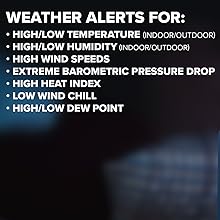
The Logia 18-in-1 Wi-Fi Weather Station is a comprehensive monitoring system that provides real-time environmental data, including temperature, humidity, wind speed, and UV exposure. With a user-friendly indoor console and Wi-Fi connectivity, it allows for seamless integration with mobile apps and web services, ensuring you stay informed about the weather conditions in your home and backyard.





| Sensor Technology | Radio Frequency (RF) and various environmental sensors |
| Are batteries included? | Yes |
| Frequency | 915 MHz |
| Display Type | LED |
| Connectivity Technology | Wi-Fi |
| Number of Batteries | 1 CR2 batteries required. (included) |
| Temperature Accuracy | 0.5 °C |
| Power Source | Corded Electric |
| Additional Features | Barometric Pressure, Professional, Wi-Fi, Indoor and Outdoor, All in One |
T**W
Incredible Logia 7-In-1 Weather Station
And the service was great! More about that later. This unit is quite incredible with all its features, and every one of them performs as advertised. I can't believe it tells me I have 15 minutes until I burn if I don't get some suntan lotion on here in California!It should say 21-In-1 by the time you count all the information about your site and your neighborhood in the Wunderground App. I always wondered where Wunderground was obtaining its data. Now I know - from you and me. It's all good. They protect your privacy while reporting the weather.I went to Home Depot and bought a 10 ft 1 x1/4 inch (1 1/2 inch outside diameter) electrical conduit. This placed the sensor well above plants and shrubs in my garden. I will probably cut the conduit pipe in half so I can bury a portion and unscrew the top portion when it comes time to change the AA batteries in the sensor (about 2 years according to the manual (solar collector on sensor assembly lengthens battery life)).I had only one problem with the unit after setting everything up - it does take some time (a Sunday afternoon) to get everything to talk to each other - Weather Console to two sensor assemblies wirelessly, Weather Console to your Wi-Fi, and Weather Console to Wunderground and/or Weathercloud and installing one or both Apps on your Smartphone - the latter you probably don't have to do, but it does give you bragging rights for your children and grandkids since you can show them the information anywhere in the world.Oh yes, the "problem". All displays worked on the Weather Console except the Sunrise/Sunset times. I didn't think that was a "biggy," but it still bothered me. Sunday night (obviously after hours), I left a message to the chat site www.logiaweatherstation.com (Manual info again). I almost immediately got back an e-mail telling me that they would contact me and gave me my case #. After reading some of the other reviews posted, I thought "fat chance" I would hear from them. But on Thursday, William called me back. He indicated that be sure and put "-8" in the time zone (California) and accurate location values (Latitude and Longitude) for Sunrise/Sunset - in fact, he gave me very accurate coordinates to load into the system. When I went back to the Settings page for the unit - sure enough, I found that the Longitude had been programmed for "0" instead of my longitude. I put the proper number in, and everything works. Thank you, William, for the excellent service.
O**.
Easy Setup If You Have Basic Networking Skills
I was a little worried about the negative reviews regarding internet setup -- those worries were unfounded. The setup is very straightforward with only one minor gotcha. My steps went like this:1: put batteries in the sensors.2: plug in the base unit. Wait a few moments and the sensors all automagically pair.3: put the base unit into AP mode so that it becomes in essence a wifi router (press and hold wifi button on back for 6 seconds -- the display then says "AP").4: connect to the device's SSID with a laptop or phone (the SSID will start PWS...). You won't have any outside internet access when connected to the base unit this way, which makes sense because it isn't connected to anything but your laptop/phone. The reason you connect this way is so you give the base unit the info it needs to connect to your home router and a couple other config details. The form is obvious, clean, and simple.5: once connected to the base unit via wifi, enter the base unit's address in your browser (192.168.1.1). A simple form will show up and you can select your home wifi's SSID and enter the password. You can also enter Wunderground account info, time zone, select a time server, and enter GPS coordinates for the device.5a. I would suggest having your Wunderground account setup first, otherwise you will have to repeat the process by putting the device in AP mode, connecting to it, etc. The gotcha I noted was that when you go into AP mode, it does not remember the last home wifi SSID you picked, so you have to reselect the correct SSID. If you don't, it will of course fail to connect because it is giving the wrong router your password. When you signup for Wunderground, you will get a page that shows the info you need to fill in on the two fields you get when the base unit is in AP mode. Just copy and paste. Wunderground will also give you your GPS coordinates.5b. When you choose your time zone, I found that the sunrise/sunset time was wrong when I entered the UTC info for regular time, and correct when I used the DST time (I'm in Pacific zone so correct was UTC -8).6. Once you've entered all the info to the device and press submit, it drops out of AP mode and tries to connect to your home wifi. If you entered all the correct info, it happens in seconds and it's easy to tell from the front of the display -- if the wifi icon blinks, not connected. Solid, you are connected. If you fail to connect, go through the AP process again and ensure you have selected the correct SSID for your home router.The first time I went through this it probably took me half an hour because I did it piece by piece, including setting up my Wunderground account, while carefully reading the directions. If I was to blank it out and start over, it would take me less than five minutes now. It's a very straightforward process. There is another weather service like Wunderground in the setup screen for which I can't recall the name. I didn't try that one because once I set up the Wunderground info, the device started reporting immediately. It appears to update Wunderground about four times per minute.Anyway, I love it so far. Only had it a day so I can't talk about longevity, but I can say the setup is about as easy and straightforward as can be without having a keyboard and general purpose monitor built directly into the base unit. I think Logia's solution to getting the necessary info stored on the device is a very good one.
K**R
Display Wanting
The console display is excellent if viewed head-on. But when viewed at any angle, the display becomes unreadable very quickly. I tried different backlight and contrast settings but the problem remained. The 7-in-1 sensor did not automatically connect with the console and required a manual reset which requires access to the sensor to accomplish. Luckily, I didn't put it on the roof. The WiFi setup went smoothly. Note that the time zone is entered as a deviation from GMT. In the case for EST -5. Overall, pleased with the unit so far.
K**N
Bad product Don’t buy!!
Very poor quality product. Thought I was going to be able to get info on my phone and that is not the case. Need to purchase to get you info on your phone. Have set this thing up many many many times.1. Temperature outside in F says it 45 degrees outside when it is 90 degree.2. Inside temperature says it is 90 degrees F when it is 70F.3. Can’t get the sunrise and sunset to display on the Digital screen.4. Humidity is not correct.5. Nothing come up on the weather part of the screen.6. I am in UTC -5 and I have to set it up in the setting as UTC-6 to get time right.7. Had some rain and it seemed to give me amount it rained but I don’t trust it to tell me right amount.8. Setting this up is a pain in the rear so when people say easy setup, they a not telling you the truth. Setup still isn’t right.Just all around not a good product!!! I could go on. Amazon must have a deal with reviews you look at online because every time you look up top rated products it sends you to an amazon product. This seems far from being good products.
Trustpilot
2 weeks ago
5 days ago
1 week ago
1 day ago