Desertcart purchases this item on your behalf and handles shipping, customs, and support to Netherlands.
🔧 Restore your iPad Mini like a pro — DIY brilliance in every kit!
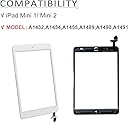
This premium replacement touchscreen digitizer and display assembly is engineered exclusively for Apple iPad Mini 1 and Mini 2 models, featuring ultra-clear 7.9-inch glass with 9H hardness for superior scratch resistance. The kit includes the home button with IC chip, camera bracket, pre-installed adhesive, and a comprehensive set of professional tools, empowering you to perform a flawless DIY repair. Backed by thousands of positive reviews and top rankings, it delivers an original-quality touch experience and vibrant HD visuals, making it the ultimate choice for restoring your iPad Mini’s touchscreen functionality.
| ASIN | B07QL17D65 |
| Best Sellers Rank | 2,622 in Computers & Accessories ( See Top 100 in Computers & Accessories ) 1 in Computer Tablet Components & Replacement Parts |
| Brand | JPUNG |
| Brand Name | JPUNG |
| Clarity | 99.9 |
| Colour | White |
| Compatible Devices | Tablet |
| Compatible Phone Models | Apple iPad Mini 1, 2 |
| Compatible Tablet Computer Models | Apple iPad mini 2 |
| Compatible devices | Tablet |
| Compatible phone models | Apple iPad Mini 1, 2 |
| Customer Package Type | Standard Packaging |
| Customer Reviews | 4.2 out of 5 stars 5,533 Reviews |
| Item Hardness | 9H |
| Item hardness | 9H |
| Manufacturer | JPUNG |
| Material | Glass |
| Model Name | Reemplazo de visualización para iPad Mini 1/iPad Mini 2 |
| Model Number | 8541525132 |
| Number of Items | 1 |
| Part Number | jpung-mini-w |
| Screen Size | 7.9 Inches |
| Screen Surface Description | Glossy |
| Special Features | High Definition, Scratch Resistant |
| Special feature | High Definition, Scratch Resistant |
| UPC | 745302427765 |
| Unit Count | 1.0 count |
A**L
Great product.
This is excellent. First off I have to say if you want to do this screen replacement yourself then go on YouTube and watch a few videos first. It’s not easy and you have to be slow and patient to get it right. Remember these screens are glass and they will crack if you use too much force. Anyway took me around a hour or so to fit it all. I was very pleased with the result. What I will say is you need to swap the center button if you want it to be fingerprint which is risqué to the glass screen so just be aware Top tip…. Heat the iPad before you do this. I put mine near to electric fire for 3 mins to warm up the glue. You can also use a heat gun or hairdryer.
P**E
As good as original.
I’ve bought twice now. Both times the iPad lcd arrived next day and worked perfectly. The reason for buying twice is my son dropped the iPad again and I needed to replace another part and then I damaged the lcd connection when refitting. I can confirm they are equally as delicate as the original apple part.
C**E
Great product and service
I was drawn to this product by other reviews and the quality of the video showing how to do the repair. The video takes time to emphasise the challenging parts such as not rushing when pushing connectors on. This is important for folk with little experience. The razor blade to help open the case is a really useful addition - it was as easy as it looks in the video - do pay attention to where the cables are though! The one part not explained in the video is how to remove the home button safely from your old screen - something we’ll all want to do if we can, to keep the Touch ID going - the cable is very thin and glued down in places, so care is required. You can find a good walk-though of this procedure on ifixit.com. I tested the screen with all connections in place before gluing it down, and all was fine. I then detached cables as shown, prepared the glue strips, reconnected cables and sealed all up. Then it didn’t work correctly! I suspected I must have not quite got the connectors on right - sent an email to the vendors to confirm this was the right thing to try. They got back to me in around 3 hours to confirm that. So - reopened, reconnected, hard reset, as advised - tested and then resealed and all was good this time. The quick response was reassuring.
R**N
Good screen, poor fitting instructions.
Screen fitted and replaced no problem. The tools provided broke while fitting. The instructions provided are not the best, no mention of using the double sided tape. Quick Look on YouTube and fitted following that.
G**D
Good fix for damaged digitiser (ipad7)
Ordered this digitiser glass to replace a cracked one on my grand-daughter's iPad7. Order came quickly and attempted repair. The first screen had brittle cables which cracked when folded over but an email to GoodFixer (who sold the screen) solved that with a 'no questions asked' refund given within a few hours, and then I ordered the same digitiser again which arrived today. The cables on that 2nd digitiser seemed a lot better and all fitted without any problems. Note that the digitiser comes with a pre-fitted home button: This replacement home button is not touch-ID compatible... it's just a button. If you want touch ID then you need to carefully lift your old button from your old digitiser and similarly remove the pre-fitted home button, and replace it with the touch ID button, on your new digitiser glass. There's plenty of youtube videos you can watch to show you how to do that and complete the replacement, but overall I found it fairly easy and the iPad is working fine again now. The digitiser is supplied with all the tools you need and double sided mounting tape... basically everything you need is in the kit you are sent.
M**F
Hard task - kit okay, instructions badly presented
Replacing and iPad screen is hard. Apple has put lots of glue inside and would much rather you bought another iPad rather than fix it. I've built and repaired many PCs in my time, but phones and iPads are much more fiddly. Unless you have a lot of patience, I'd suggest taking your iPad to a repair store rather than trying to fix it. The instructions that go with this product are really the best case scenario. They show the screen without any cracks and it comes off pretty easily, and the LCD just lifts up. The reality is that you are replacing the screen because it is cracked. You'll want rubber gloves and to take care with the fine sharp shards. The LCD won't just lift up because Apple has squirted glue behind it. It needs very careful lifting. There is more tape inside the iPad than shown in the videos too. To get the screen off your iPad, you need to heat the glue around the edges of the screen to around 70C. The best way to do this is with a heated mat for tablet repair. You can also use a heat gun. Chances are you won't own either, so you can use a hairdryer to do this but blows everything on your worktop in all directions. There is an important detail when removing the screen - the existing screen has the touch-id sensor in the button. If you manage to remove the screen super carefully, you can use the touch-id sensor that is attached to the origin screen. If your screen is cracked keeping the touch-id sensor in working condition is quite challenging (I failed). The replacement screen in the kit includes a non-touch-id button so you can use that as a fallback. Getting the connectors re-attached is fiddly. I can't get the connector to the main button to go back in. It was originally taped in place and it appears to just slide back in position, but it does not remain there. The cable is going to need folding to make this work. This might be okay when you are doing it for the 10th time, but it is gnarly the first time you try. Ultimately, this was worth a try, but not something I'd recommend for the average iPad owner. The written instructions are not really intelligible and the videos posted here highlight things to avoid, but it is quite hard to avoid some of those when your screen is cracked. The video also has multiple voices talking at the same time which does not help.
L**D
Doesnt last long
Bought in November. Worked fine for a couple months, started going a bit dodgy in Feb and now the entire left side of the screen doesnt respond at all.
P**.
Perfect Replacement iPad Screen
Excellent product. Arrived on time and was well packaged and protected. Like many iPads, this is NOT an easy replacement and requires some skill and patience, so don't blame the new screen if you break it, although this seller does offer a free replacement, once only, if you damage it on installation. An impressive deal. I will buy from this seller again.
T**A
Great item and experience
The item fits perfectly. We accidentally damaged the first one during the replacement, and I contacted the seller directly as advised on the card that came with the item. There was no negotiation at all—they simply sent a new screen for free, without even charging for delivery. It was a great experience, and the screen is excellent. Highly recommend!
O**E
Very simple, saved me hundreds of dollars
Pretty easy. I had an iPad mini with a badly badly cracked/shattered screen. Unusable. Couldn’t track finger movement. I was quoted various prices from 150 to nearly 300 to have it repaired professionally either through OEM or third party. A refurbished model was only about a 100 bucks. So I decided to have a go if trying the repair myself for under 20 bucks. Mine probably went easier than most. My screen was so badly damaged, the glass literally just popped out. I didn’t have to fight to remove it at all. From there, just a handful of screws, and an electrical connection swap, and it was done. Start to finish less than 15 minutes. It works great. Just like new. Every movement is recorded perfectly everywhere on screen. I also had a “crunchy” home button before (it was a prize that was won, and when received, it had been purchased too long ago to be covered by warranty. The box had apparently been dropped, as there was already a small chip on screen and a small crack in LCD off to extreme side where it didn’t interfere with display or function, and home button was crunchy). The replacement glass came with new home button. So technically, this works better than when it was originally received. Also, I learned how easy it would be to swap the LCD screen out too for 40 bucks. Far easier to repair this little guy than I realized. After learning this, I’m appalled at the rip off level charging being done by OEM and aftermarket repair groups. A 15 to 17 dollar part (probably only 10 bucks when bought in bulk) and less than 20 minutes of work with a return of 200 to 300 dollar charge to end user. Disgraceful. These groups should be ashamed. Don’t get suckered. Try it yourself. It was really not that difficult. Just go slow, follow instructions, watch at least 2 different videos on it, and you can do this too.
A**G
ممتاز
انصح بالشراء مطابقة للجهاز تشبه الاصليه
A**R
Not sure if it’s the right one for ipad7 A2197
I tried, but it did nit work, so returned it. The screen was getting pressed/touched on its own.
B**N
Great
Fantastic screen. It fit in my daughter's iPad perfectly without too much trouble. Works great.
Trustpilot
3 weeks ago
1 month ago