Desertcart purchases this item on your behalf and handles shipping, customs, and support to Netherlands.
🔥 Level up your fight game with the ultimate budget arcade stick 🎯
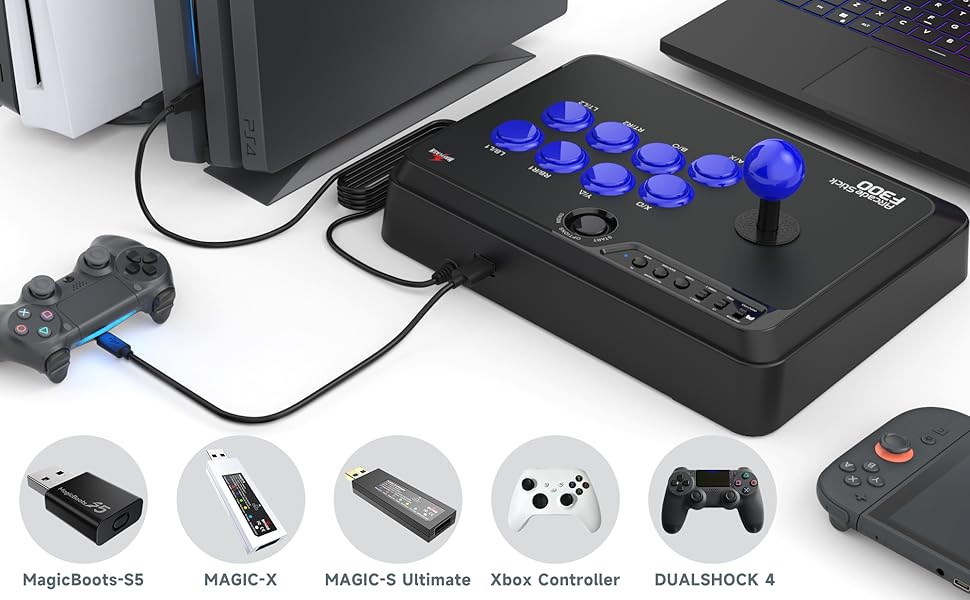
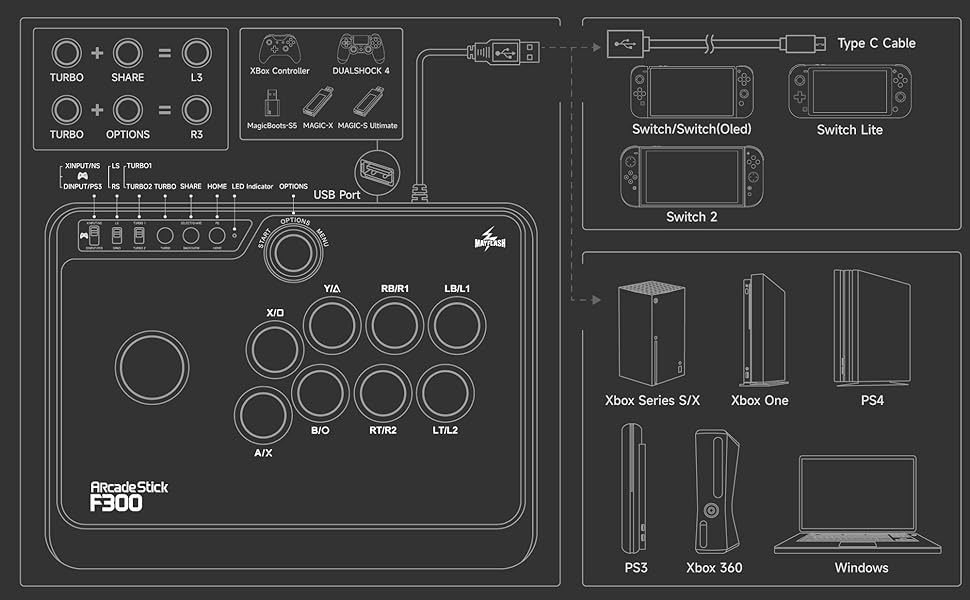
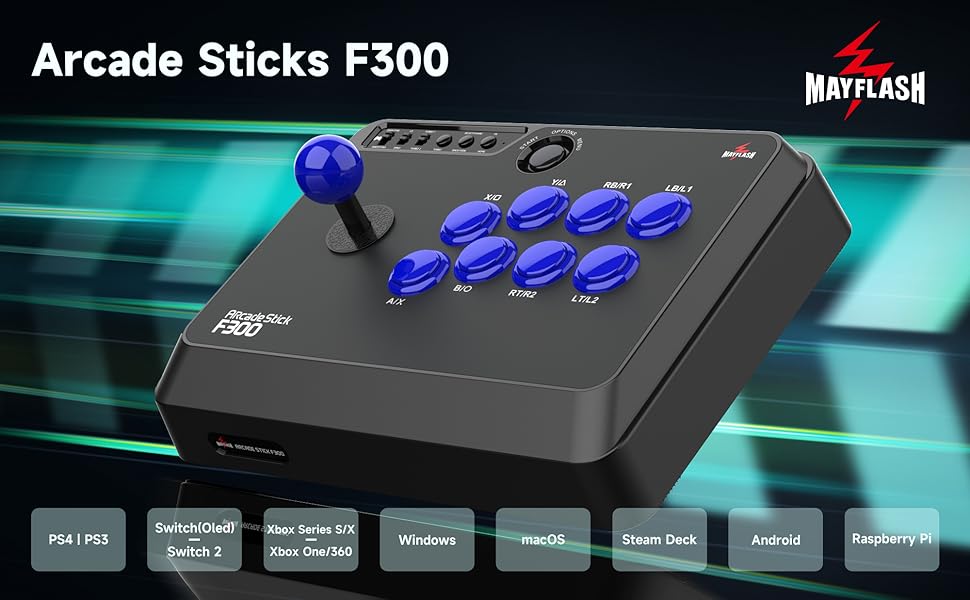
The MAYFLASH F300 Arcade Fight Stick is a versatile, USB-powered joystick controller compatible with a wide range of platforms including Switch, PlayStation, Xbox, PC, macOS, and Steam Deck. It supports Sanwa Denshi buttons and joysticks for easy customization, features a turbo function with adjustable speeds, and offers both square and octagonal gate options for precise control. Designed for gamers seeking pro-level performance without breaking the bank, the F300 delivers solid build quality, responsive controls, and effortless modding potential, making it a top choice for both newcomers and seasoned arcade enthusiasts.


| ASIN | B019MFPLC0 |
| Additional Features | Customizable Buttons & Joystick, Turbo Function, Multi-platform Compatibility |
| Best Sellers Rank | #1,724 in Video Games ( See Top 100 in Video Games ) #2 in Xbox One Game Joysticks #26 in PlayStation Accessories #28 in PlayStation 4 Controllers |
| Brand | MAYFLASH |
| Brand Name | MAYFLASH |
| Button Quantity | 4 |
| Color | Black, Blue |
| Compatible Devices | Switch, PS4, PS3, Xbox Series S/X, One, 360, PC Windows, macOS, Steam Deck, Android, NeoGeo mini, SEGA Mega Drive, Genesis Compatible Devices Switch, PS4, PS3, Xbox Series S/X, One, 360, PC Windows, macOS, Steam Deck, Android, NeoGeo mini, SEGA Mega Drive, Genesis See more |
| Compatible Video Game Console Models | Microsoft Xbox 360, Microsoft Xbox 360 E, Microsoft Xbox One, Microsoft Xbox One S, Microsoft Xbox One X, Microsoft Xbox SERIES X, Nintendo Switch 2, Sony PlayStation 2, Sony PlayStation 3, Sony PlayStation 4 |
| Connectivity Technology | USB |
| Controller Type | Joystick |
| Customer Reviews | 4.5 out of 5 stars 6,874 Reviews |
| Global Trade Identification Number | 06910201509070 |
| Hardware Platform | Nintendo Switch, PC/Mac, PlayStation 4, Xbox One, Xbox Series X |
| Item Dimensions | 22 x 13 x 11 inches |
| Item Weight | 2 kg |
| Manufacturer | MAYFLASH |
| Manufacturer Part Number | F300 |
| Model Name | F300 Arcade Fight Stick |
| Model Number | F300 |
| Package Quantity | 1 |
| Power Source | Corded Electric |
| UPC | 672773741741 |
| Unit Count | 1 Count |
| Warranty Description | 90 days |
M**E
Budget stick that truly holds it's own against the big boys.
I've been getting back into fighting games and I also play a lot of arcade games and Bullet Hell shooters on my PC so I thought an Arcade stick would be nice to have and mess around with. Of course I wasn't prepared to drop over $100 on one when I wasn't even sure if I'd like it. I had been eyeballing the Hori Fighting Stick Mini 4 for a while and have been wanting to pick one up but after Street Fighter V came out pretty much everyone sold out of them with no signs of when or if they might be back in stock. I saw the other Mayflash sticks like the V2 (the Ps2 and Ps3 compatible one) and the one that looks like it's modeled after the Hori Fighting Edge. The feedback on them though was pretty mixed though with some saying the Joystick was mounted rather loosely and the buttons rest on the PCB and are hard to swap out. Then I came across this one. I saw some pretty decent reviews and opinions on it and heard it was built way better and is easier to mod than the other sticks so I finally decided to check it out. This stick is excellent for it's price. I don't have a lot of experience with other sticks but I've played with my friends Mad Catz Tournament Edition and various sticks in the Arcade and this definitely holds it's own against other higher priced sticks. The stick isn't very big but it still has some heft so it'll stay in place but not so heavy that it's uncomfortable in your lap though there's only rubber feet and no cushion on the bottom. The stock buttons and joystick are nice and clicky and very responsive. I personally don't feel any need to change out the buttons or stick until they start to give out. I might change the square gate to an octagonal gate though. So far it works great with everything I've used it in. Street Fighter (II Turbo HD Remix, III Third Strike Online and IV Ultra), Guilty Gear (XX Accent Core Plus R and Xrd), Skullgirls, Metal Slug, Mushimesama, Samurai Shodown, Raiden Fighters, etc. I play on PC and PS3 mainly and the stick was plug and play for both. I use the Xinput on PC so it acts like an Xbox controller and the Dinput on PS3 and have had no issues. Being able to switch between DPad and Joystick is pretty great as it does respond differently in some games. I don't use the Turbo a lot but the fact that it's there is still a nice touch for when I do want to use it. As I said I haven't modded the stick at all but apparently this stick is incredibly easy to mod. The back of the stick just screws right off. The buttons all just snap in and out and the cables are all color coded. The Joystick though uses Microswitches rather than the 5 pin connector on say the Sanwa JLF or the Hori Hayabusa stick so if you want to change it to one of those you'll need an adapter of some kind. Frankly if you just wanted to buy this stick and add all your own parts to it you'd still be saving money compared to a Hori Rap or a Mad Catz TE. Overall if your on the market for a stick but aren't willing to take the plunge on the more high end sticks, this stick honestly holds up to it's more expensive competition at a much more affordable price.
J**E
An AMAZING budget arcade stick for first-timers and veterans alike
Having only had this arcade stick for a day, I'm still getting used to some of the finer points of use, but just off of that one day, I can safely say it's EXTREMELY solid for the money. The joystick and buttons are clicky and responsive, and the inclusion of an octagonal gate means that you have that as an option if you need the extra precision it provides. Nothing feels TOO horribly cheap, though I would suggest looking into replacing the buttons with higher grade parts sooner rather than later, as while they do feel GOOD, they also don't feel AMAZING. For those that want to do the button swap, or just mod the stick completely and remove all the stock Mayflash components, it's able to take Sanwa Denshi buttons right out of the box, and only needs you to purchase a 5-pin harness to swap out the joystick. As for system compatibility, this stick is so universally compatible out of the box, it's almost unbelievable. The only system so far that it seems to not work with out of the box is PS5, but Mayflash even offers a component to address that issue. All in all, between its low price point of $50-$70, performance, quality, and easy upgradability, I can very safely say that, if you're looking for your first arcade stick, or just a base for a weekend stick modding project, you cannot go wrong with the Mayflash F300.
P**1
Good stick for beginners, but instructions regarding older consoles need to be completely redone
This is my first arcade stick, and I'm extremely happy with it. Yes it's cheap, yes it's a "budget" stick, but for what you pay the quality is there. The buttons feel good, and the stick is solid and "click-y". It can be modded and the buttons/stick can be swapped out very easily, even for someone like me who's never done anything like that before. So far I've used it on PS4 and PC, I don't own Xbox One or the NeoGeo Mini so I can't speak to how well it works on those, and I don't have much of an interest in using it on my Android or my PS3 (currently in storage). The issue for me, however, has to do with the stick's compatibility on Xbox 360 and Switch. Just because the instructions say it's just "plug and play" for Switch and just "plug a wired Xbox 360 controller into the stick" for the 360, it doesn't REALLY mean that. For Switch compatibility, depending on what version of the stick you get (yes there are different versions, mine is the Rev. 1.3), you may need to go online to the Mayflash official site and download the firmware update onto the stick that allows Switch compatibility. As for XBox 360, the instructions fail to mention that it CANNOT be a controller that uses ANY kind of battery or optional wire/wireless function whatsoever. No chargeable battery pack, no battery case for wireless use, nothing like that. It MUST be a generic 360 controller with the cable HARDWIRED in for it to work with the stick, and even then if it's not an official Microsoft Xbox 360 controller, it still may not work. At that point, your best bet is to look for the Magicboots Xbox 360 dongle (which Mayflash also sells, how convenient), then and only then is the stick guaranteed to work on the 360. I know because I bit the bullet and purchased the dongle, and I've had no issues with the stick on my 360 since then. Final words: The stick works great, it's a pretty solid bang for your buck, it's easy to mod, but the folks at Mayflash really need to step their game up with regards to informing their customers on getting the stick to actually work on everything it's meant to be compatible with.
E**S
A top arcade stick easy to adjust for PC
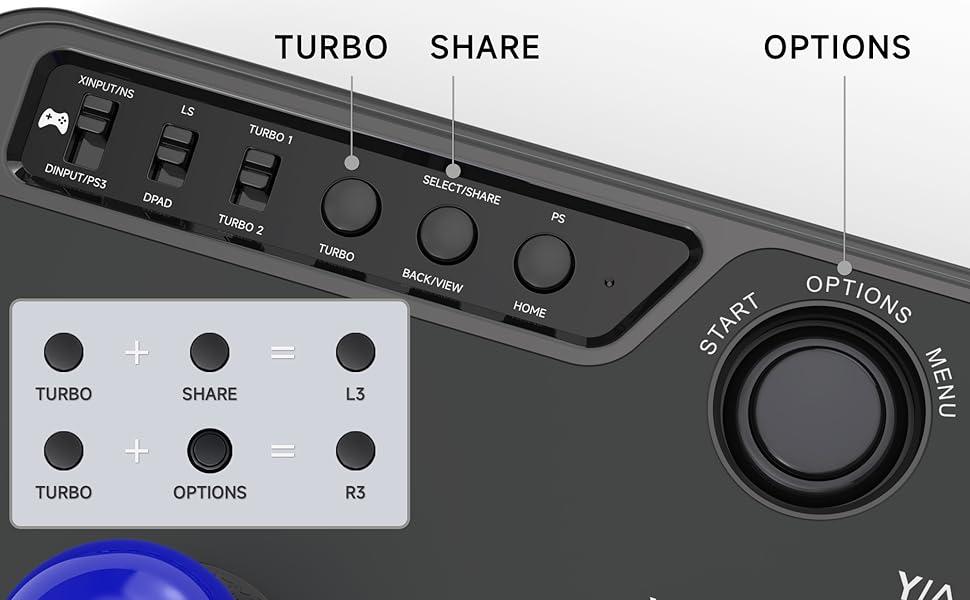
Very comfortable, solid, and it really reminds me of the arcades of yesteryear. Street Fighter, Dragon Ball FighterZ, Guilty Gear Strive... everything is going great. The installation is simple: in the attached photo, we see the setting that is enough to play on PC as with an Xbox controller. You have to put the switch on XINPUT and LS. I also put the Turbo 2 (25 presses per second) to make the button response even faster - super practical on fighting games. Plug & play: recognized directly by Windows as an Xbox controller, no drivers to install. I liked it so much that I plan to buy a second one to play as a family with my siblings. Even the youngest, who are not used to modern controllers, find it easy to handle. It's like having a real arcade terminal at home! Excellent quality for the price, guaranteed arcade sensations!
J**Y
Pro Gamer?
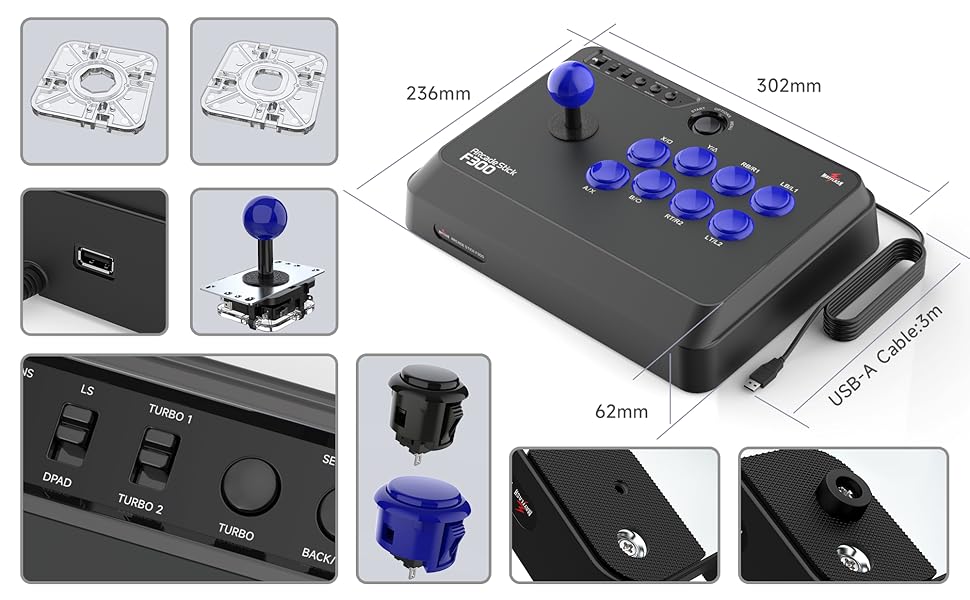
I am not a professional Gamer, I just like to play for a while without stress. I was looking for many options, but was tired of not finding an option congruent with my budget. So I opted for this "low cost" alternative and what a surprise I got. Includes: -Arcade control with 8 Game buttons, 4 configuration buttons, 3 switches to adjust compatibility and ball stick. -By default the lever comes with a square restrictor, but INCLUDES an Octagonal one that you can change in 5 minutes using only a star screwdriver. -USB to USBmini cable (for you to connect console controllers) -USB to USB-C cable (For you to connect the cell phone or the Neogeo miniArcade) -4 extra-regatta type tires- with their respective screws (they are not necessary; they are optional if you want to put them on the bottom) ADVANTAGES: 1) USB cable (2mts) and comes with a piece of velcro to tie it, which is more functional than it seems. 2) It is compatible with ALL these devices: PC, XBOX, PS3, PS4, Android 3) THE PRICE (Unbeatable by the competition). 4) The buttons and lever can be MODIFIED and EXCHANGED for others (Example Sanwa buttons) without the need for welding. 5) Simple user manual. DISADVANTAGES. 1) Modest button quality (without being bad) 2) Lever can be a bit small for some people. IMPORTANT NOTE FOR CONSOLES: The control of your console must be connected to the arcade controller and this in turn to the console for it to work. Your controller ---> This Arcade controller ---> console However, after a while you settle in, get used to it and you don't even notice it. NOTE FOR PC: It is plug and play, it immediately recognizes it as a generic control without problems drafted with Windows 10 and Win7 FINAL COMMENTS -The truth is I really liked knowing that in the future I will be able to customize and maintain it very easily and quickly. -Do not believe the people that complain about the buttons. The arcade stick will last for a long time and will be cheaper than other options
R**O
BEST ARCADE STICK I HAVE EVER USED! HEADPHONE USERS MUST READ.
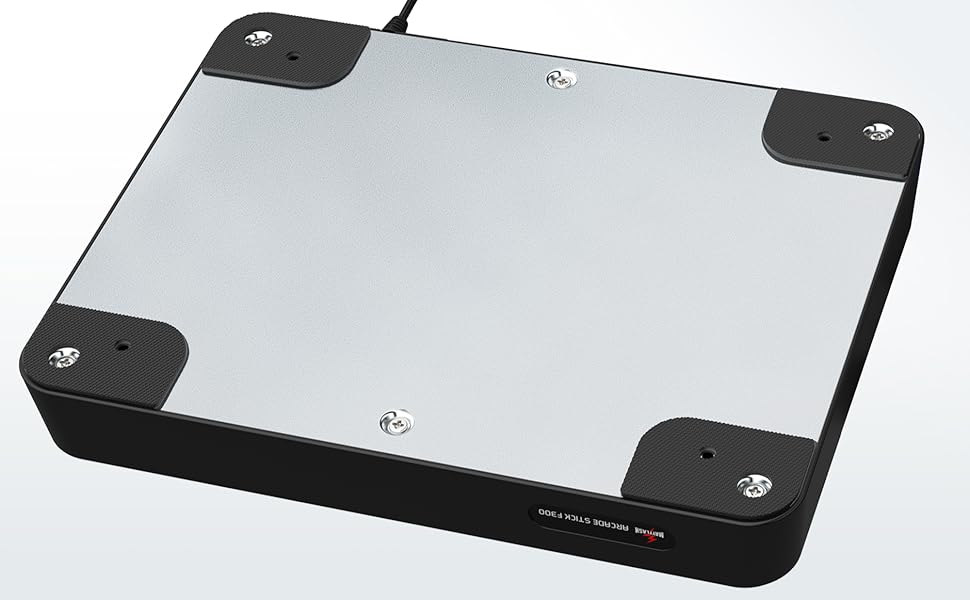
The MAYFLASH F300 arcade stick is amazing for gamers to bring back that nostalgia feel of being back in the arcade and its very comfortable with its anti friction grips at the bottom of the arcade stick, it wont slip when placed on top of a desk or table (but id figure you would put it on your lap and its still very comfortable and a great size). NOTE: YOU NEED THE CONTROLLER IN ORDER TO USE FOR PLAYSTATION AND XBOX OWNERS. It is very easy to use and the best part is that its universal which means you can connect it to almost any device. I have used this on both new and last gen Xbox, Playstation, PC, and Nintendo Switch also works with the NEO GEO MINI. It comes with the USB-Type C cable for players who want to use this on Nintendo Switch. Its 8 way joystick is very comfortable and I want to point out that it is a Japanese 8 way Joystick. It means that it does not use a circular gate like how USA,EURO, and KOREA do. Instead It uses a square gate which is not a problem at all. It comes with the use of a TURBO button and a use of a touchpad button. It has switchable inputs weather your playing on console or PC such as XInput, DInput(PS3) and Controller. It has Two Turbo Modes from TURBO 1 and TURBO 2 and a switch for weather you want your Joystick to act like a joystick or to act like a D-PAD. It has your PS HOME button and START, SELECT, BACK, and MENU buttons for all consoles and the SHARE button to share those great gaming moments. Everything can be fully customized to your gaming standards such as replacing the joystick and buttons. The only thing about this arcade stick is the lack of a headphone jack, which means if your planning to use a 3.5mm headphone jack on this arcade stick on Xbox or PlayStation and you want to be able to chat with your friends, then you are out of luck. Most people think that because you are connecting the controller to the arcade stick, the use of headphones might work. Sadly this is not the case because i have tried it. But a SOLUTION to this problem is to get a USB headset. You can use a USB headset wired or wireless but it must be connected directly to the console. Using a USB headset and connecting it to the console directly will work with this arcade stick and free you from using too many wires. If you are willing to pay a little extra and get the MAYFLASH F500 then that one does have the use of a built in headphone jack and can be used to have a vibrating wrist strap for vibration. I would personally go with the F300 because you'd basically be paying way more just for the use of a headphone jack. id say its cheaper to get a usb headset. IF YOU DONT WANT TO SPEND MONEY ON A USB HEADSET, then buy a 3.5mm to usb adapter which can go around for $8.00 on amazon.
D**S
Very Nice Joystick let down by the 4 way restrictor gate.
The first thing you're going to want to do with this joystick is open it up and replace the 4 way restrictor gate with the provided 8 way one. Yes, even for classic games. They will control much better if you do this. Fighting games will work better as well. The 4 way restrictor plate is more than useless since it CANNOT be adjusted into a diamond shape. This is what is required for proper Donkey Kong play. Throw that "flat" 4 way gate into the trash. Please put the 8 way gate on by default.
V**C
Reliable
Awesome budget friendly Arcade Joystick, simple to modify and not cheap feeling or looking. Good for any platform, just plug this bad boy in and you're good to go!
A**S
Best One
Good quality and price and amazing for street fighter
|**I
Really satisfied about this product
This is insane, you can play in ps4, phone whatever. It is easly to connect it. Cable is also long enough to play from sofa. Shipping was fast, so i'm really glad about it.
A**R
Great arcade stick
This is a versatile joystick that is great for gaming on all sorts of platforms.
D**E
MODİFİYE EDİLİYOR
ÜRÜN GİRİŞ VE ORTA SEVİYE OYUNCULAR İÇİN OLDUKÇA YETERLİ.. SANWA TUŞ TAKIMLARI VS İLE UYUMLU TEPKİMESİ VS ÇOK İYİ ... BEN BAYA MEMNUN KALDIM.. ÜRÜNÜN VİDEOSUNU İZLEMEK İSTEYENLER barRUNN ADLI KANALA BAKABİLİRLER
D**.
Top, zu dem Preis unschlagbar
Ich habe 3 Qanba, einen Madcatz und nun auch diesen Mayflash Arcadestick. Der Preis ist unglaublich, die Qualität schwer in Ordnung. Es ist recht klein, weshalb ich ihn auch besorgt habe. Sehr toll ist der Support diverser Konsolen out of the box, vor allem Neogeo Mini hat mich sehr erfreut, mit den anderen Sticks musste ich mit verschiedenen Kabeln und Adaptern hantieren, mit diesem Stick klappt es out of the box und ohne Schnickschnack. Ich habe Sanwa silent buttons eingebaut, damit meine Familie nebenbei auch in Ruhe andere Dinge tun kann, ohne dass es zu laut klackt. Die original Mayflash Knöpfe scheinen recht gut zu sein, für eine faire Bewertung habe ich sie aber nicht lange genug drinnen gehabt. Die Knöpfe sind minimal weiter voneinander entfernt als bei den besagten anderen 4 sticks, aber der Umstieg dauerte keine habe Stunde und es macht wirklich Spaß mit dem kleinen Stick zu spielen. Die Deckplatte ist allerdings nicht so einfach mit eigenem Artwork zu versehen wie zB der große Bruder F500, was mich jedoch wenig stört weil er auch so recht gut aussieht. klare Empfehlung für Gelegenheitszocker
Trustpilot
1 week ago
2 days ago