

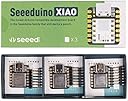


XIAO SAMD21
Product ID: 203224713
Details
- Brandseeed studio
- CPU ModelNone
- Memory Storage Capacity256 KB
- Model NameSeeeduino XIAO
- Ram Memory Installed Size32 KB
⚡48MHz ARM Cortex-M0+ CPU
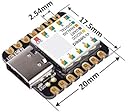
📏Tiny 20x17.5mm footprint
🔌14 GPIO pins with I2C, SPI, UART
Desertcart purchases this item on your behalf and handles shipping, customs, and support to Netherlands.
🚀 Tiny Tech, Massive Impact: The Microcontroller That Fits Your Boldest Ideas
The Seeed Studio XIAO SAMD21 is the smallest Arduino-compatible microcontroller board featuring a powerful 48MHz ARM Cortex-M0+ CPU, 256KB flash memory, and 32KB SRAM. Despite its thumb-sized 20x17.5mm form factor, it offers 14 GPIO pins with analog and digital capabilities, plus I2C, SPI, UART, and USB-C interfaces. Perfectly compatible with the Arduino IDE, it empowers rapid prototyping and wearable device innovation with efficient power use and versatile connectivity.

| ASIN | B08745JBRP |
| Best Sellers Rank | #161 in Single Board Computers (Computers & Accessories) |
| Brand | seeed studio |
| Built-In Media | / |
| CPU Model | None |
| CPU Speed | 48 MHz |
| Compatible Devices | Devices compatible with Arduino IDE |
| Connectivity Technology | I2C, SPI, UART, USB |
| Customer Reviews | 4.5 out of 5 stars 493 Reviews |
| Manufacturer | seeed studio |
| Memory Storage Capacity | 256 KB |
| Mfr Part Number | 110010004 |
| Model Name | Seeeduino XIAO |
| Model Number | 110010004 |
| Number of Items | 1 |
| Operating System | Windows, macOS, Linux |
| Processor Brand | ARM |
| Processor Count | 1 |
| Processor Speed | 48 MHz |
| RAM Memory Installed | 32 KB |
| RAM Memory Technology | SRAM |
| Ram Memory Installed Size | 32 KB |
| Total Usb Ports | 1 |
| UPC | 886268758132 |
| Warranty Description | / |
| Wireless Compability | 802.11b |
R**S
My go to for sooo many reasons
I bought 3 of these a couple years ago to play around with. At the time, it was just because they were cheap and quick to get on Amazon. I quickly fell in love. Though they aren't perfect. Pros: Size. They're tiny. Even 2 years on, most microcontrollers are *at least* 2 to 4 times the size. The small size makes them easy to fit into almost any project. They're literally the size of a postage stamp. I can cover one with my finger. Which brings me to the next pro: I/O. Even at this tiny size, you still have tons of I/O, with support for hardware interrupts, UART, I2C, SPI, and true analog pins with DAC. The big one for me, though, is HID support through the USB type C port. That's a much less common feature than you'd think. If you want to make devices that can talk to other devices as an input device, you need this. Speed. You don't really think that a simple Arduino device needs to be fast, but having a 48mhz processor and 32mb of SRAM to work with open up a LOT of possibilities. Take, for example, my most recent project. I wanted to make a vintage laptop keyboard work with a modern laptop motherboard. But I wanted to do so without damaging the original keyboard. So to interface the two, I needed the Xiao to be able to read the PS/2 protocol that the keyboard was talking in, and give USB HID protocol commands to the computer. Reading the PS/2 protocol takes very precise timing. Your code has to execute within a certain number of microseconds, otherwise the command will fail. Because of the speed of the processor, I could have more code executing in the interrupts while still staying under the threshold. Cons: Storage. While I've never run up against the limit, the Xiao has 256 kB of flash memory. That's not the smallest, but it's certainly not the biggest I've seen on a microcontroller. So I do get a little nervous when I start importing a bunch of libraries. So far, my most involved project, the keyboard that I talked about earlier, only uses about 25% of that storage. And that's importing two different libraries plus my custom code. But if you have a large project that takes many libraries or a whole lot of code, you might run into problems with storage. Bootloader Corruption. I've only had it happen once and it was after hundreds upon hundreds of code uploads. These guys saying they're bricking after 50 uploads have to be doing something wrong. Or maybe it's because they're on Mac hardware, I don't know. But I've had to upload 50 times pretty much everyday I've worked on this project and so far it's not been a problem. But like I said, I did have one of my original three stop responding to USB. So the problem does exist. The device itself still does what the last upload of code told it to do, but I can no longer get it to talk with the Arduino software. And resetting the unit didn't resolve it. So you're mileage may vary.
G**Y
An excellent buy! SAMD21 @ 48MHz + USB-C + Arduino IDE Support + Thumbnail size = AWESOME!
I can't comment on alot of the specific ins and outs of the product because I've yet to run anything other than a blink test sketch to confirm that they work with Arduino and are functional, all 3 were! Like I mentioned in the title, this product has alot going for it: Price: $21.99 for 3 of them so..roughly(rounded up from $7.3) $8 per controller! That's $1-$2 less than Adafruit's Trinket M0 which features the same hardware but does include an RGB LED. I'll take price-to-performance value over a stupid RGB light any day! Size: They are tiny! Perfect for permanent installation onto a breadboard/protoboard or even a PCB(They have castellated edges so you could indeed SMT solder these with the proper technique and good paste/equipment) Specifications: Very good for something so small. SAMD21(Cortex M0) @ 48MHz w/ 256K of Flash! ** I will say that I would've liked to see(and would've paid an extra dollar or two) an external Flash chip, maybe a 1MB or 2MB size? Adafruit does this in their larger boards and premium products in order to accomodate CircuitPython, they don't have external/extra flash on the Trinket M0(Which this is comparable too), so maybe its simply a size thing. ALTHOUGH, I think they could've easily fit a 1-2MB SOIC Type flash chip on the bottom of the pcb. Overall, a great buy for anyone on a budget or with limited funds thats looking for some bang out of their buck!
A**O
Great value! If you're thinking of getting one, GET THEM. You won't be disappointed.
Absolutely a great value. Not a shill here, but I'm happy to say these are by far some of the best value micro controllers you can be get. I mean, 32 bit and you get 3 for $20 (I'm a prime member and you get them for $19.79 for the 3 pack), what a deal. Now, granted you don't get as many I/O pins, but if you're interested in a controller that truly is tiny and reliable, this is your board. They're also Arduino compatible. You will have to download a new library, but it's not that hard. Go to the Seeeduino website and scroll down really far and it'll show exactly what you need to do to get them working with the Arduino IDE. Some of the instructions may be a little out of date, but they're still useful. In Arduino go to preferences and then boards. You'll need to paste a.link to have the boards added to the IDE. Then search for the "Seeeduino" library. It should say something like Seeeduino boards or something like that. They recently consolidated the library into one. If it's taking long to download, that's the one, you're not doing anything wrong. Then, just plug it in (did I mention it's USB C! yay! Buy a cable or 3 if you don't have one, they're cheap), click verify and upload, it should pop up like a USB stick, do some stuff and then it'll disappear. It'll seem like something went wrong, but it should work. If not, try loading a different example sketch or change a value like making the led flash faster. The default/preloaded code is the blink sketch so change the 1000 to say 100 so you'll be able to tell if it worked. Happy coding!
6**6
Great... but missing stickers
I love these little things. Perfect microcontrollers for small spaces. The user should be aware it works 3.3v and not 5v. It also has a USB Type C connection which is different from many microcontrollers like the Arduino Nano. Since it is small, pins are labeled on the underside of the board. I was disappointed that mine did not come with the stickers for the top side marking of the pins. Wish I had the stickers rather than having to refer to a printout to figure out pins.
P**5
Power and Size—amazing!
These are amazing alternatives to arduino boards. They are tiny, inexpensive, USB C compatible and very capable. The added bit depth of the inputs was helpful in a strain gauge project I have been working on. The cons are that you have to download board profiles from seeeduino which is not too hard and there are some incompatibility issues with libraries specifically written for, for example, Arduino Uno. They come with header pins that you can solder on to make them easy to plug into breadboards. If you love Arduino Uno you should really try these on your next project—I am still stunned by how small and inexpensive these are!
A**N
Small and functional but not Linux friendly
Fired up all three that came in the three-pack and they are fine. Spent considerable time trying to get them working on Linux (Mint) using the Arduino IDE with (nearly) no success. Tried to flash them about a dozen times and only got it to work once. I suspect there is something messed up with the USB drivers. The only reference on the Seeed website to using Linux and the Arduino IDE for the Xiao is a post on their blog that simply says “Run arduino-linux-setup.sh”. I did that and it did seem to improve the USB responses in syslog when I plugged the board in. Still only got it to work once. Set it up in Windows and it worked perfectly fine, every time. Next ill try Arduino CLI but given my experience with the GUI IDE, I don’t think the CLI version is going to work either. I haven’t logged a lot of hours working with these yet but they appear to be a good choice if you need something REALLY small and only need to make a few external connections. You should also know that the memory is limited on these. The vaunted “blinky” sketch that we’ve all run a million times occupies 13% of available memory. Again, this shouldn’t be a problem as you aren’t going to be controlling eight motors and connecting to 12 sensors with one of these.
T**N
My GO TO Microcontroller, for small projects
The Short Version: A great little chip, powerful, well supported, I use many different microcontrollers for various projects but this one has quickly become my favorite. A Bit Deeper: Pros: Fast, With its higher than average 48Mhz over the common 16Mhz I don't see nearly as many micro timing issues during complex operations or while using multiple interrupts Reliable, so far the only problem I have encountered is normal and easily remedied a simple double reset to get back to the boot loader Flexible, With digital and analog sharing almost the entirety of the I/O interface circuit integration is simple, along with I2C, UART, SPI, And a Built in 3.3v DAC, it really is rich with connectivity for such a dense package Resource Friendly, this little guy seems to eat almost nothing... really I could measure it and blah blah but.... Cons: 3.3v logic only, only really been a problem once or twice more of a hitch in the plan not very difficult to get past but it can be a pain on occasion No big Brother: this ones personal, I would love to see a one set up chip like this guy with a bit more I/O for projects requiring more connectivity, But there's other microcontrollers of course
P**L
Super Powerful - So Tiny
Super powerful board and runs really fast (48hz) - definitely could tell over my older Arduino boards. I was scared by the lack of pins, coming from the big boards - but for working a sensor or two and or a display - its brilliant. You have to solder the headers on, but that only takes a few minutes - and even my sloppy job worked right away. Note it's a usb C connection and the mcu and logic pins are 3v. The 3v is great for some displays so you don't need any logic converters, and for a RGB/LED matrix's there is also a 5v off the usb. overall feeling... NOICE!
N**N
All 3 tested and working good
Very satisfied with the purchase, all 3 SAMD21 board tested and confirmed working. I will be able to prototype easily with these spare boards
P**K
Ein tolles kleines Board, das erstaunlich viel kann und richtig Spaß macht.
Ich bin wirklich vollkommen begeistert von diesem kleinen Board. Es ist inzwischen schon das zweite Dreier‑Set, das ich bestellt habe, weil der XIAO einfach zuverlässig funktioniert und sich super in die Arduino‑IDE einbinden lässt. Ich habe ihn mittlerweile in mehreren Projekten verbaut, und mit dem passenden Expansion Board wird er noch vielseitiger: kleines Display, ein Taster – mehr braucht es manchmal gar nicht. Für meine Frau habe ich damit einen einfachen Teetimer gebaut, der total unkompliziert zu bedienen ist und jeden Tag im Einsatz ist.
J**Y
1 out of 3 is faulty
One of the 3 isn't work. It refuses to let me upload a program. Even rebooting doesn't help
Trustpilot
1 month ago
2 weeks ago