Some deliveries may take a little longer than usual due to regional shipping conditions.

DOWNLOAD THE APP


Customer Services
Copyright © 2025 Desertcart Holdings Limited
DOWNLOAD THE APP
![Uno REV3 [A000066] - ATmega328P Microcontroller, 16MHz, 14 Digital I/O Pins, 6 Analog Inputs, 32KB Flash, USB Connectivity, Compatible with Arduino IDE for DIY Projects and Prototyping](https://m.media-amazon.com/images/I/71ok6q+8tEL.jpg)
🚀 Unlock your maker potential with the iconic Arduino Uno REV3!
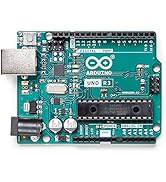
The Arduino Uno REV3 features a 16 MHz ATmega328P microcontroller with 32KB flash memory, 14 digital I/O pins (6 PWM), and 6 analog inputs, all accessible via USB for easy programming. Fully compatible with the Arduino IDE, it’s the definitive development board for prototyping, education, and DIY electronics projects.





| ASIN | B008GRTSV6 |
| Batteries | 1 9V batteries required. |
| Best Sellers Rank | #2,074 in Electronics ( See Top 100 in Electronics ) #2 in Robotics (Industrial & Scientific) |
| Brand | Arduino |
| Color | Green |
| Computer Memory Type | SRAM |
| Customer Reviews | 4.7 4.7 out of 5 stars (10,187) |
| Date First Available | November 25, 2009 |
| Flash Memory Size | 1 GB |
| Is Discontinued By Manufacturer | No |
| Item Dimensions LxWxH | 3.15 x 2.17 x 0.98 inches |
| Item Weight | 1.6 ounces |
| Item model number | A000066 |
| Manufacturer | ARDUINO |
| Number of Processors | 1 |
| Operating System | arduino |
| Power Source | 5 |
| Processor | 16 MHz |
| Processor Brand | Atmel |
| Product Dimensions | 3.15 x 2.17 x 0.98 inches |
| RAM | 8 KB SRAM |
| Series | ARD_A000066 |
| Standing screen display size | 1.5 Inches |
| Voltage | 12 Volts |
| Wireless Type | Bluetooth |
L**E
Easy buy
There’s a reason this is one of if not the most popular microprocessor, at least for beginners. So easy to use. Compatible with nearly any other component. Compared to most microprocessors, it’s a great price for what you’re getting. Quality is consistent and long lasting.
I**V
Exact (and branded) replacement.
Perfect functioning and pin-for-pin match for a generic unit I burned up and needed to replace in a small learning kit. Plug and play install, basically. These are supposed to be more robust as well, so we'll test that, too... I also love the little included tray the board fits perfectly into as well!
C**L
Terrific - And it's expandable in many ways. POWER my world.
Great device. I bought 3 of these and they are my go-to controller for some pretty sophisticated DIY projects. Do read about how not to over-drive the pins (demanding too much current from them). And, DO read about the difference in the +5v and "Vin" pins. There is a company that sells just the processor chip. They are reasonable (pkg 3) and I recommend having them on hand in case Murphy stops by for a visit. If you follow basic principles and NEVER try connecting a pin to something for "trial & error" but instead, be certain of the voltage AND current potential that you are supplying (or demanding), and this beautiful device will work like a horse. When it comes to your connection to the computer, some Windows serial "portage" issues arise but it's a matter of persistence. The Arduino IDE (programmer) has ways to let you see how things are going and which PORTs are connected and working. This is the only part that can be frustrating (other than writing software bugs. :-) Enjoy.. here's what I think about it and how I use it this week: Have fun: Keep in mind that if your project is complex and you need more pins, you can use the nice I2c bus that this UNO has available and you can connect Slave devices to expand the "pin-age". :-) I am going to add a AdaFruit Trinket Pro (powered from this UNO 5v bus) and let these two guys talk to each other over I2c; exchange info, and I get tons more PWMs and digital pins too. The cool thing is that the Trinket fits right on the back of this UNO's added shield. SWEET !! As usual, these are great. Notice that this is the R3 -- exactly what you want. I've written some great control software for controlling the RF oscillator in radio transmitters and this made the project a success. I added a stacking shield (Gikfun Prototype) for the additional hardware I needed and this UNO allows the flexibility of updating my own sketches if a new feature in my RF unit is warranted.
R**D
It was great.
It was wonderful until I hooked some wires up wrong and burnt something out on the board. All my fault.
R**D
Arduino UNO R3 is a cool micro-PLC
This is a micro-PLC. (Programmable logic controller). The setup () loop does first time execution. the loop() does continual scanning of Inputs and writing outputs. I'm an electrical engineer and control systems engineer, and I was enjoying learning to program the arduino as an embedded controller (PLC). The arduino.org arduino is a spec product (same as other Chinese knockoffs, but as long as they meet spec, they are a hammer...just not with the same namebrand). If you look on the web, arduino.cc is the Italian webpage with rights...but arduino s.r.l. also says that they have rights. it is confusing. the software from arduino.org for the ARDUINO IDE (The programming environment to make arduino code, to compile it, and to push it to the controller) is software revision 1.7.5. When you load it, it says that it is a modified version of the arduino.cc software. this is messed up, as arduino.cc has version 1.6.5. I found it suspect after installing the .org software so I uninstalled, ran a virus scan, and installed the .cc software. (.cc software will work on any arduino that meets the arduino specification). All in all it is a cool product. for intro to programming, it gives quick results. if you are a control systems engineer like me, then you have a $25-ish PLC that you can make to do any amount of awesomeness (provided that you use the 14 digital In/outs and 6 analogs to accomplish said awesomeness). Tomorrow night I get to work on using add-on cards. Word of advice: D13 is internally connected to an LED with inline resistor on the board. You don't need any extra stuff (LEDS, resistors, etc) in order to do a first program to make the D13 an output and toggle it high and low, and feel good that the board works. Similarly, a blinking D13 can prove that a program is running when it blinks on at the beginning of the loop() function and off in the midst of the loop() function. Word to the wise.
M**K
Terrific little board, except for the soldering
GOOD: This is indeed the Rev-3 UNO board with the reset button in the upper left corner. It arrived very quickly and seems to work well so far. My C-language test "sketches" (apps) downloaded and ran on the first attempt, using the version 1.0 software download. The components and PCB appear cosmetically to be of reasonably good quality, but ... BAD: The soldering workmanship is very disappointing; the worst I've ever seen in a production job. SMT devices on the top seem to be mounted OK, but the bottom of the board had numerous defects in the (wave?) soldering. Two of these joints appear to have been manually touched up (residual flux present). Several other joints had large gaps in cold solder joints, but were apparently not bad enough to warrant manual repair. I hope the Italian manufacturer (SMART PROJECTS) works out these process kinks soon. *** UPDATE July 2012 *** My subsequent purchase of an UNO-R3 board indicates that the soldering issues in early production boards have been solved. (FYI, CanaKit is an approved distributor for Arduino.) The Arduino concept is terrific, and has enabled a LOT of people to easily create smart projects. The C compiler and IDE work well; I've never had an easier time writing an embedded application, and the price can't be beat. The only thing lacking is the ability to debug code via single-step.
E**D
Great product, Great price.
This Arduino is a very quality build, From now on I will buy name brand items when possible. This is well worth the extra pennies.
A**R
TUDO OK COM O ITEM
W**L
Werkt goed, op Windows 11 64bits.
E**R
ATML iC programbel chep , it’s all about it, green or blue, doesn’t mean anything Bay it as it’s ATML
M**N
Ok
M**G
Pros. Good quality Cons. None
Trustpilot
2 weeks ago
2 weeks ago