
DOWNLOAD THE APP


Customer Services
Copyright © 2025 Desertcart Holdings Limited
DOWNLOAD THE APP


🖤 Cool in Black, Quiet in Action — Own the Silence, Rule the Performance
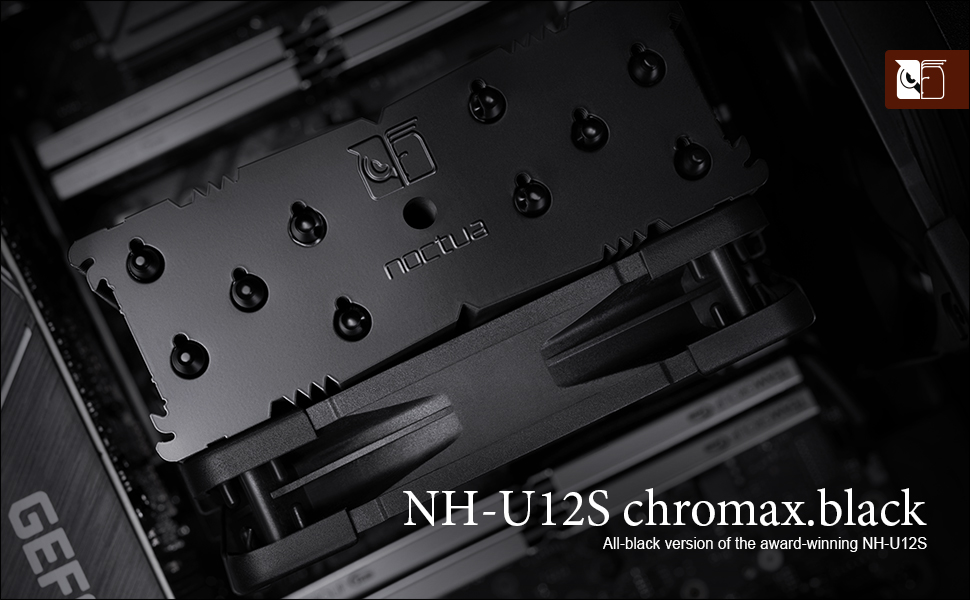
The Noctua NH-U12S chromax.Black is a premium 120mm single-tower CPU cooler featuring an all-black coated heatsink and the award-winning NF-F12 PWM fan. Designed for exceptional cooling performance with whisper-quiet operation, it fits most modern tower cases without blocking RAM or PCIe slots. Equipped with the SecuFirm2 mounting system and high-grade NT-H1 thermal paste, it supports a wide range of Intel and AMD sockets. Backed by a 6-year warranty, it’s the ultimate choice for professionals seeking reliable, stylish, and efficient CPU cooling.






| ASIN | B07Y88BNYZ |
| Best Sellers Rank | #94 in Computer CPU Cooling Fans |
| Brand | Noctua |
| Brand Name | Noctua |
| Compatible Devices | Desktop |
| Cooling Method | Air |
| Customer Reviews | 4.8 out of 5 stars 5,727 Reviews |
| EU Spare Part Availability Duration | 2 Years |
| Global Trade Identification Number | 09010018000177 |
| Included Components | Keyboard |
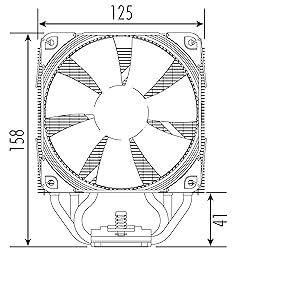
| Item Dimensions L x W x H | 4.92"L x 2.8"W x 6.22"H |
| Manufacturer | Noctua |
| Material Type | Copper (base and heat-pipes), aluminium (cooling fins), soldered joints & nickel plating |
| Maximum Rotational Speed | 1500 RPM |
| Noise Level | 22.4 Decibels |
| Power Connector Type | 4-Pin |
| Product Dimensions | 4.92"L x 2.8"W x 6.22"H |
| UPC | 841501100178 |
| Voltage | 12 Volts |
| Warranty Description | 6 year manufacturer’s warranty |
A**R
Affordable and powerful
Great price for an amazing quality cooler. Easy to mount with clear instructions. Immediately cooled my cpu down to beautiful temperatures as well as being extremely quiet and efficient.
R**D
Great Cooling Power and Exemplary Quality!
This cooler is made by Noctua. This is my first purchase from them, and they live up the their reputation for excellent quality and performance! I was using the stock AMD cooler (Wraith?) that came with my Ryzen 3600. While the stock cooler was adequate for simple tasks such as word processing or the Internet, it fell short for intensive tasks such as video encoding. Starting an encode would immediately shoot temperatures up to 95°C and stay there, severely throttling the CPU. After installing this cooler (it comes with a tube of Noctua's own quality NT-H1 thermal paste) and a fan curve adjustment to accommodate the greater cooling performance, the CPU temperatures are much lower and the computer is much quieter! Idle temperatures are about 32°–36°C. Testing the performance with some video encoding, temperatures where at 70°–75° after an hour and the CPU never throttled once—Full boost throughout the entire process! Mounting the cooler was simple and straightforward with excellent instructions and diagrams. All necessary parts are included in the box. The AMD and Intel components are separate to avoid mixing them up. Extra mounting pads and brackets where provided in case you wanted to install a second fan in a push/pull configuration. The black color looks great, as black goes with everything! (No, I am not just saying that because the rest of my build is black as well.) I also used the included paste to reapply the thermal compound on my PS4 Pro, with more left over for future applications as well! Overall, Noctua has earned a costumer in me and a spot on my recommendation list.
K**G
Noctua is still one of the best air coolers. But for i9-9900k, the NH-D15 will be better suited.
First off, I like to congratulate Noctua for embracing aesthetics improvements to their coolers. With matt black finish and black fan designs, I am certain that it will be one of the most popular air coolers. And with Noctua's credibility in the air cooler scene, buyers can be sure of the cooling potential. That said, my PC setup consist of a Asus ROG XI Gene with Intel's i9-9900k. And I wanted to pair this Noctua NH-U12S, as it has a smaller footprint compared to the NH-D15. In hindsight, I should have gone for that one for the 9900k. On Noctua's website of CPU compatibility with this cooler, it mentions that supports 'medium turbo/overclocking headroom'. Technically it is not wrong, but I must say that become pretty subjective. For the Asus ROG XI Gene, with 'Load Optimized Defaults' selected; and no other settings adjusted. The 'Multi Core Enhancements' will be on Auto (which is enabled). And with this setting, the Vcore applied with this BIOS setting will cause the CPU to reach highs of between 90-100 DegC (ambient of 25 Deg C) on this cooler with a 'Standard Fan Profile' setup. To me, personally, this is too high. But I contribute this temperatures to the 'over voltage' setting by the Asus BIOS setup. And I must reiterate that the Noctua NH-U12S is performing great with dissipating heat and having a fan that is barely audible (even at ~1500rpm max). It is impressive in a lot of regards; and will serve as an extremely good cooler for other support CPUs (less the OC 9900k). With MCE disabled or after using Asus 5-way Optimization, the temperatures immediately becomes acceptable, around the 80 to mid 90s DegC. With MCE disabled, the strict thermal/freq limits to the CPU kicks in and will throttle back the CPU aggressively. With Asus 5-way optimization, the Vcore is 'tuned' accordingly to an 'acceptable' temperature limit; and with this done, I had the 'All Cores' turbo boost at 4.8GHz @ ~1.14. Currently, I am running the stock (single fan) setup for this cooler. I shall be trying different fan (and dual fans) setups soon. And of course, using Noctua's fans, my current favourite. Other good ones are Corsair ML fans, or the old school Sycthe Gentle Typhoon. Cheers, Ken
A**R
A beast of a cooler. Both functional and gorgeous.
I bought this to replace the stock cooler for the i7 9700f that came in my prebuilt. The product was packaged beautifully, with a small box for mounting hardware, thermal paste and a few other accessories in the top. There was a large box containing the cooler itself in the bottom. (edited) The installation took about 2 hours (mind you, I am new at upgrading computers) and would have taken a lot less time if I had realized initially that the back panel of my PC case was removable and had a cutout allowing me to access the rear of my motherboard. Noctua provides very well written and clear instructions for how to mount this cooler. In the box, you will find instructions for both Intel and AMD platforms. If you're building a system and you know what you're doing, it'll probably take no more than 10-15 minutes for you to put this cooler in. If you're swapping a cooler like me and have no clue what to do, you'll get by with the instructions in 1-2 hours, maybe faster. (edited) As for noise, when my system is idling, I don't hear this cooler at all. At full load, it ramps up to about 1200RPM, but the noise level remains minimal and it is certainly a huge improvement over my original cooler. Sound tests show it peaking at around 30 decibels, whereas my old cooler would top out around 55. The performance of this cooler is beyond anything I could have expected. My CPU used to idle at around 55C and would heat up to 88+ with my old stock cooler. Thanks to the NHU 12 S I am now seeing idle temps at 33C and peak temps no higher than 55. Overall , my system feels much more stable thanks to this upgrade. Lastly, this cooler is absolutely gorgeous. I've made a few upgrades since purchasing my prebuilt and I think it really pulls them all together. I did make the mistake of not measuring the inside of my case, however, and I failed to account for the raised position of the body of the cooler over the CPU. The heatsink has a couple of protrusions on the top of it which have prevented me from being able to place the glass panel back onto my case once I finished swapping coolers. My case is 19.61" x 7.28" x 16.57", so if your case has a similar width 7.28", you might want to consider buying the smaller NHU 9S cooler.
I**I
The little cooler that could
I purchased this cooler to cool an AMD Ryzen R5 3600 in a Fractal Design Meshify C case. The stock cooler for the 3600 is anemic (and loud) and the goal for this build was quiet operation. After reading a bunch of reviews, I opted for this cooler (even though it was more expensive than some of the Scythe options I was looking at and I love Scythe products) as the black color would look nice in the case and the emphasis in reviews on how silent it operated. The install was extremely easy. The only complaint I have is that you have to remove the fan from the cooling tower to install it; in contrast I can pull and install my Scythe Fuma 2 without having to do so (though I often remove the middle fan for ease when blowing apart my build for various reasons). I found the spring clips on the Noctua for securing fan to be a bit more temperamental than Scythe's, but no so much that it warrants giving this cooler anything less than 5 stars. The cooler comes with Noctua's NT-H1 thermal paste, which is my go-to paste for my builds, so that's a nice feature if you don't already have a syringe of this lying around (and would set you back about $13 US to buy separately). The real proof of what a gem this cooler is appears when you first power on your system. The fan spins to life without so much as a whisper. Even under load you can barely notice it running. I repeatedly had to look at the cooler to make sure the fan was spinning (the case fans are also very quiet as is the EVGA 2060 SC Ultra GPU in the case). I was very impressed at the noise level. What's even more astonishing is how effective this thin tower, single fan cooler is at cooling the CPU at such a low noise level. Noctua really knows what they are doing with their cooler and fan designs. The recipient absolutely loves the performance and noise level of the build as well as the aesthetics of the components (cooler included), so thanks for making me look good, Noctua!
C**Y
Easy to install - Maintains Excellent Thermals
As Most people that are currently buying this are most likely fans of Linus Tech Tips on YouTube, the LTT edition is pretty sweet in my opinion, the additional orange anti-vibration pads and the LTT stickers and badge are great. This is my first time reviewing a product that i have purchased on amazon and i felt that i needed to do just that, because this cooler aside from being the LTT edition, is the best CPU cooler that i personally have ever bought. i have built a couple of computers before and i'm not one of the ones who goes for all the overclocking and max speed that some people will do. i put this NH-U12S Chromax Black on my computer that i built in 2016, a Gigabyte 990FX ATX Motherboard with an AMD FX6350 Black Edition processor, in a Corsair Carbide Air 540 case. Unlike most of the recent CPU's that have came out in the last year or so that only use 65 to 90 Watts of power, the FX6350 is rated at 125 watts, and therefore gets quite toasty under full load. as of writing this i have been working my CPU to the max pretty frequently lately as i have found the joy in having my own Plex Server and using my PC to rip and encode my collection of old dvd's. with the stock cooler that came with my CPU, sitting there just idle (nothing running) it was staying around the 50C (122F) range , when running Handbrake to encode video, all cores on the CPU at 99% load, i was getting temps in the 80C - 90C (176F-195F) range and a max of 95C (203F) a couple of times on really long encodes. after installing the NH-U12S Chromax Black, i can't say enough about how well this thing works, it cut my CPU temps far more than i was expecting, now at idle running right around the 24C (75F) mark and i have seen it dip to 19C (66F) once. Now running Handbrake to do the same encode jobs i have not seen the CPU get past 50C (122F) at all. All of this is with what came in the box, no extra fan or anything just the 1 that came with it, and did i mention that this thing is stupidly quiet as well? i have my PC about 2 feet from me and it is about chest level when sitting in a chair and i can't hear it at all even when computer is under load. For my next PC build or for a friend/family member build, i will definitely be buying more Noctua Products, if the NH-U12S Chromax Black is still available at that time i will be buying another one hands down. hopefully this review is helpful to someone trying to make a decision
S**L
Great quality CPU heatsink
Pros: - Great directions included. - Tons of accessories to work with. - High quality hardware. - All hardware was included as stated. - 5 heat pipes instead of the standard 3 or 4 heat pipes. - Solid and clean nickel plate for the bottom of the heatsink. - The black finish on the heatsink is great to look at. It also reduces the fins from slicing you. - The heatsink fins have weight to them. They are not flimsy at all. - The fan is nice if you are looking for low noise and a max air flow of 55 CFM. - Not made in China. It's made in Taiwan. Definitely a little step up from products made in China. Cons: - Mounting was a pain! I thought I was going to break the heatsink, CPU or motherboard. I followed directions but the screws wouldn't thread properly, and when they did...it was too much threading and I wouldn't have slack to mount the other side. I prefer the 4 screw brackets instead. They are so much easier to work with and feel more secure. - The fan is nice for low noise and max air flow of 55 CFM but after stress tests, I feel like more air flow is wanted on my setup. I'm replacing the fan with a Fractal Design fan to get more air flow and help bring down the thermals, even if it's a couple of degrees. Overall, I love this cooler and believe it was worth $70. The heatsink is worth $45 - $50 but the fan is worth about $20 in my opinion. If I could of just purchased the heatsink, I would of done that instead. Either way, you cannot go wrong with this CPU cooler or Noctua in general. *** Update - August 9, 2020 *** Fractal Design fans were nice but only at 1,300 RPM's. Higher then 1,300 RPM's and the fans were grinding and giving off a lot of noise. At 2,000 RPM's, the sound was unbearable and only decreased CPU temps by 1 - 2 C's. It's not worth the trade off. Sticking with Noctua fans!
S**N
Exceptional Cooling Performance in Sleek Black Design!
The Noctua NH-U12S chromax.Black is a top-tier 120mm single-tower CPU cooler that not only excels in cooling performance but also adds a touch of elegance to any desktop setup. This cooler has far surpassed my expectations, providing outstanding cooling capabilities with a sleek black design that complements my desktop aesthetics. The standout feature of the Noctua NH-U12S chromax.Black is its exceptional cooling performance. The single-tower design, coupled with the 120mm NF-F12 PWM fan, efficiently dissipates heat from the CPU, ensuring optimal operating temperatures even during demanding tasks and heavy workloads. The sleek black color scheme elevates the overall look of my desktop build. The chromax.Black design adds a touch of sophistication and seamlessly blends into various themed builds, enhancing the overall aesthetics of my system. The NH-U12S chromax.Black is compatible with a wide range of motherboards and memory modules, providing sufficient clearance for tall RAM modules and ensuring ease of installation. The SecuFirm2 mounting system offers a hassle-free and secure installation process, reducing the risk of damage during setup. I appreciate the low noise level of the NF-F12 PWM fan, even at maximum speeds. This ensures a quiet and undisturbed computing experience, even during intensive tasks. Noctua is renowned for its high-quality cooling solutions, and the NH-U12S chromax.Black is no exception. The cooler is built with precision and premium materials, ensuring reliability and durability. In conclusion, the Noctua NH-U12S chromax.Black CPU cooler is a top-notch cooling solution that not only delivers exceptional performance but also enhances the visual appeal of any desktop setup. Its outstanding cooling capabilities, sleek black design, and quiet operation make it the perfect choice for enthusiasts and gamers alike. If you're looking for a high-performance CPU cooler with a touch of elegance, the Noctua NH-U12S chromax.Black is the ultimate option. I highly recommend this CPU cooler for its outstanding performance and the stylish aesthetics it brings to my desktop build!
Trustpilot
3 days ago
2 days ago