
DOWNLOAD THE APP


Customer Services
Copyright © 2025 Desertcart Holdings Limited
DOWNLOAD THE APP
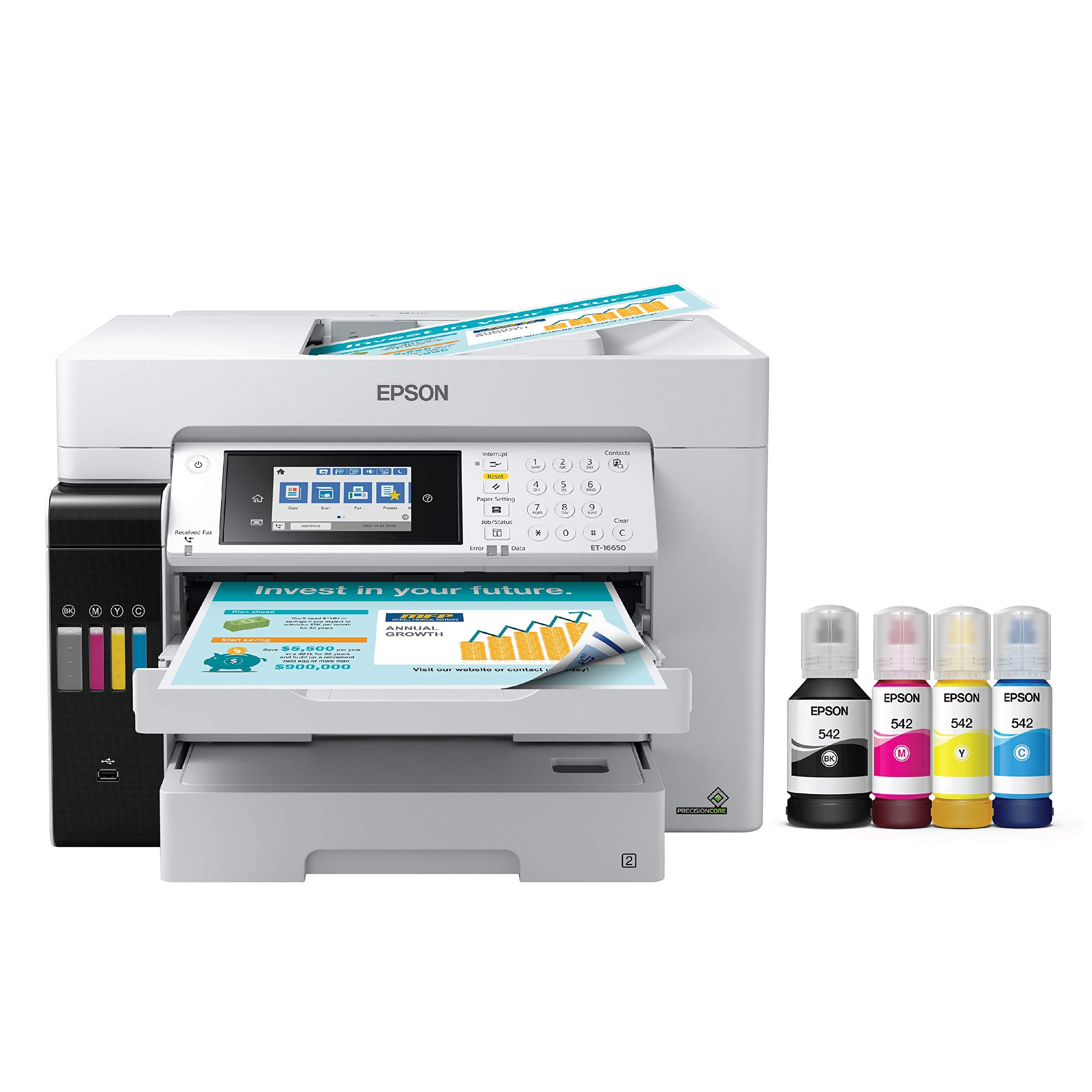
🚀 Print Big, Save Bigger, Work Smarter!
The Epson EcoTank Pro ET-16650 is a wireless wide-format all-in-one inkjet printer designed for high-volume professional use. It delivers fast 25 ppm black and color prints up to 13" x 19" using cartridge-free refillable ink tanks that drastically reduce printing costs and waste. Featuring PrecisionCore Heat-Free Technology, a 500-sheet capacity, advanced connectivity options including Wi-Fi Direct and Ethernet, plus robust security features, it’s built to handle demanding office workloads with vibrant, instant-dry DURABrite pigment inks. Backed by a 2-year limited warranty, this printer combines eco-conscious efficiency with pro-grade performance.




| ASIN | B084TV9QYF |
| Additional Printer Functions | All In One |
| B&W Pages per Minute | 25 ppm |
| Best Sellers Rank | #40,166 in Office Products ( See Top 100 in Office Products ) #48 in Ink Tank Printers |
| Brand | Epson |
| Built-In Media | EcoTank Pro ET-16650 all-in-one, power cord, 1 bottle of 542 Black ink (127 mL) and 1 bottle each of 542 Cyan, Magenta, Yellow (70 mL), CD-ROM for product setup |
| Color | White |
| Color Depth | 24 bits |
| Color Pages per Minute | 25 ppm |
| Compatible Devices | PC |
| Connectivity Technology | Wi-Fi |
| Control Method | Touch |
| Controller Type | Android |
| Customer Reviews | 3.7 out of 5 stars 465 Reviews |
| Dual-sided printing | Yes |
| Duplex | Automatic |
| Hardware Interface | Ethernet |
| Ink Color | White |
| Item Dimensions D x W x H | 22"D x 23.3"W x 17.3"H |
| Item Type Name | Printer |
| Item Weight | 46.1 Pounds |
| Manufacturer | Epson |
| Maximum Copies Per Run | 99 |
| Maximum Copy Resolution Black and White | 600 x 1200 dpi |
| Maximum Copy Resolution Color | 600 x 1200 dpi |
| Maximum Copy Speed Black and White | 40 ppm |
| Maximum Media Size | 11 x 17 inch |
| Maximum Print Resolution Black and White | 4800 dots_per_inch |
| Maximum Sheet Capacity | 250 |
| Maximum print Resolution Color | 4800 x 2400 dpi |
| Model Name | ET-16650 |
| Model Number | ET-16650 |
| Model Series | EcoTank Pro |
| Number of Licenses | 1 |
| Number of Trays | 3 |
| Other Special Features of the Product | Refillable Ink Tank |
| Paper Size | 11x17 |
| Power Consumption | 19 Watts |
| Print media | Paper (plain) |
| Printer Connectivity Type | Wi-Fi |
| Printer Output Type | Color |
| Printer Type | Inkjet |
| Printing Technology | Inkjet |
| Resolution | 4800 x 2400 |
| Scanner Type | Sheetfed |
| Special Feature | Refillable Ink Tank |
| Specific Uses For Product | Office |
| Total USB 2.0 Ports | 1 |
| Total Usb Ports | 3 |
| UPC | 010343950184 |
| Warranty Description | 2 Years Limited Warranty |
| Warranty Type | Limited Warranty |
| Wattage | 19 watts |
D**R
Amazingly Well Made
Let's start with quality of shipping. Incredibly well packaged and prepared for shipment. Lots of Styrofoam, blue tape hermetically sealed ink bottles, etc. Needed to say all claim in great condition. Setup manual was ok, but a manual on how to actually use the printer would be useful. Printer is very well designed and put together. Nothing cut short to use this for routine printing as well as the 11x17 capability which can be done on both of the printer trays if needed. The ink bottles are well designed. I remember back in the day with ink bottles that were very easy to spill. Not these. Well engineered. Well done Epson.
B**B
Failed within a year and denied warranty coverage.
I purchased this printer in December 31, 2023. I used OEM ink to top off my printer as the ink that came with the printer was getting low. In mid December 2024, I did a nozzle check and saw that the Cyan was not printing except for a few segments. I did 20+ cleans, and even a power clean with no results. I contacted EPSON and they stated since the printer was still under warranty they would replace it. They asked for pictures of the ink lines and asked that I call back immediately after submitting the data. When I called back they declined my warranty because the ink tubes were colored (except the black). After speaking to a local Epson repair shop, they said the ink system on some of these models fails to draw the ink correctly and doesn't feed the print head. After the denial, I ordered some cheap ink and a print head cleaning kit. Cleaned the print head, recharged the head and still no cyan, but all the other colors worked for a while. Now nothing. It's just an overpriced scanner. Update February 2025. I found a company that sells new printhead and ordered a new one. I also bought new ink dampers just in case. Primed ink and ran a power clean. It prints perfect again. New printhead was over $400 and dampers were $50. Still a one star for bad warranty experience. I'm still using the cheap ink that was in the system.
J**G
Big, Intricate, and Fragile
The printer is a big beauty. It dwarfs my old Epson EF-3540 dual tray all-in-one, which I used to think was huge. This printer essentially provides a new version of my old workhorse, but enlarged to work at tabloid size. You really need a substantial stand with a pad of 21w x 16d to accommodate the base. But that's only part of the story. It requires at least 11-12 more inches behind it to allow for the rear feed tray to fully unfold. And it has this really glamourous MOTORIZED output tray that extends to the front by a good 9 inches when you print something (It auto-retracts when it is powered off.) So your real working area is 24w x 32d. Not trivial in a small office. I have printed and copied letter and tabloid (11x17) using the automated document feeder, and can attest to that function. The fax checked out and got dial tone. It has two paper feed cassettes, both of which can hold full tabloid sized paper. The manual incorrectly states that the maximum size is A3 (11.7 × 16.5 inches). Keep in mind that the cassette(s) actually expand toward the front to hold this larger paper, so they stick out of the front of the printer by about 6 extra inches when loaded with tabloid. One thing I noted is that when I first expanded the cassette, placed the tabloid paper, and inserted the cassette, it felt 'funny', and sure enough, the printer said that there was a cassette load error. I got around this by making the cassette normal sized, inserting it (it felt better), then reaching in and pressing the expansion button to make it large again. I could then insert the paper and print. I will have to troubleshoot this to understand why that bottom cassette had to be 'babied'. I manually set up the printer for fax and network, set up my paper loads, then loaded the driver on my PC and printed away. Everything worked as expected. I printed an 11x17 graphic from PowerPoint (I had specified the tabloid size in the page setup), by simply printing it. I didn't have to choose the paper feed tray, the printer/driver figured it out. Which brings me to a praise - and a concern. This is not your father's all-in-one. With the elegant high definition touch panel, the Lexus-like motorized output tray, and soft sounds, it feels like a multiple thousand dollar office printer. Lots of control over what is happening and elegance. But what concerns me is the fragility of the thing. If I lift a corner of the printer it flexes. My old WF-3540 did not do that; it was much stiffer. The feed trays feel like if I am not careful, I am going to break one. They may well last me another 9 years (They'd better after spending 9 bills!), but I really can't drop one or jam it in hard. A soft touch will be required to ensure longevity. Based on a not insignificant minority of people who experienced failures right at the one year point, I did something uncommon for me, I bought the extended warranty. That means I'll probably never need it!
M**R
An astonishing printer
if you're used to consumer/small office printers, this one will elevate you immediately to a higher level of printer awareness. The quality is incredible, and despite having an intimidating array of settings and features it is remarkably easy to set up and to get printing on, considering the complexity. Connecting to the printer literally could not be easier; adding it to the company wifi was simple and everything else on the network (including my cellphone) have instant access, so you don't need to be some kind of tech genius to get it going. The ink process was a little scary at first, having worked with older generation liquid ink printers, but clearly Epson has a lot of experience here and has devoted a lot of their engineering effort to ensuring the ink reloading was easy, clean, and a no-brainer once you've done it once. The free ink for 2 years is also a great bargain considering that ink is the main expense and headache of printers in general. I'm very impressed with this machine and hope that we get many years of use out of it.
L**S
It's solid
The EcoTank Pro ET-16650 prints fast and it is so quiet. It is easy to install to your wifi but I strongly suggest that you read the 'Start Here - Installation Guide' before turning on the printer or installing the Epson software. Things to keep in mind are that I noticed that the ink was consumed by at least 20 percent during the initialization ink charging process (it takes appx 9 minutes). Not having prior experience with ink printers, I called Epson to complained about this and I was assured that this is normal and that it would only happen this one time and so far that is holding up to the truth. Sure enough, Epson does mention this in their 'Start Here - Installation Guide': 'Note: Part of the ink from the included bottles is used for printer setup. You will notice ink levels in the tanks decrease during charging. This decrease is normal and does not affect the stated in-box yields' So far the 16650 has been a dependable and solid printer. We deal with 11"x17" AutoCad plans and print quality with an 11"x17" scanner is a must-have. Unlike it's more affordable charming buddy, the Epson WorkForce WF-7710, I have had no paper jams during a duplex scanning with the 16650. Thanks to Amazon's exceptional return policy I do not regret upgrading from the WF-7710 to the ET-16650. Not that the WF-7710 is not a good printer and of course it's unfair to compare them when one is so much more expensive but the performance does justify the price. Not worrying about having to replace expensive ink cartilage (genuine Epson brand) with the longer-lasting ink bottles helps too. A tip I read is to keep your ink printers on all the time, it saves ink and it avoids clogged heads. The power consumption from this beast is very little in its idle state. Ink is consumed every time you turn on your ink printer. This printer is so quiet that I barely noticed that it's on. Don't forget that you can assign a personal email address to your Epson printer. You will need to install 'Epson Connect'. Sure there are many ways to printing your stuff but isn't a nice perk for us the consumer to have this as a convenience :-) The EcoTank Pro ET-16650 is a big and heavy boy and it looks like we are going to have a good relationship.
P**L
This is the best printer I have owned.
I used to be a HP fan. I have had various Epson printers over the years too and I have to say that I am a fan of the super tank versions because ink cartridges are a pain. I have a smaller format version of this one, but the 16600 blows the doors off of the smaller versions. We use this printer for commercial printing projects (high end book publishing) and it really delivers high quality prints, stunning graphics and excellent performance across a wide range of papers and canvas. I highly recommend the investment in this.
J**E
Lemon right out of the box
I own another Epson printer - the 8550 and love it so I decided to get this one. I thought I would save some money by purchasing a renewed one. I don't know if they didn't fix it right or what cause this thing was a LEMON. The print head got stuck almost immediately and had to reset. This happ multiple times. Then the paper got jammed for absolutely no reason and when it did print - black smears on everything. SO incredibly disappointed. Also the ink they include does NOT even fill the damn tank. You would need two bottles of each color so you are already behind right out of the box. Also, it does not use the same kind of ecotank ink as the others so I would have had to buy straight from epson or amazon at full price (I get a lot of ink deals on ebay for ink people are not using but are genuine bottles). This was a huge waste of an entire day. I do NOT NOT NOT recommend. Run from this hunk of junk!
R**N
Love this multi-use printer!
I had seen the commercials for this printer and thought, "hey I spend way too much money for printer cartridges for my Canon MX870 ($50 a piece). I'm going to try this Epson." It has been amazing! It is a high quality machine and so easy to operate on hour home network. We filled up the ink reservoir with the ink bottles provided and have printed hundreds of pages and still have half the ink left. Exceptional value and great performance!
Trustpilot
2 months ago
4 days ago