🚀 Tiny Board, Massive Possibilities — Power Your Next IoT Breakthrough!
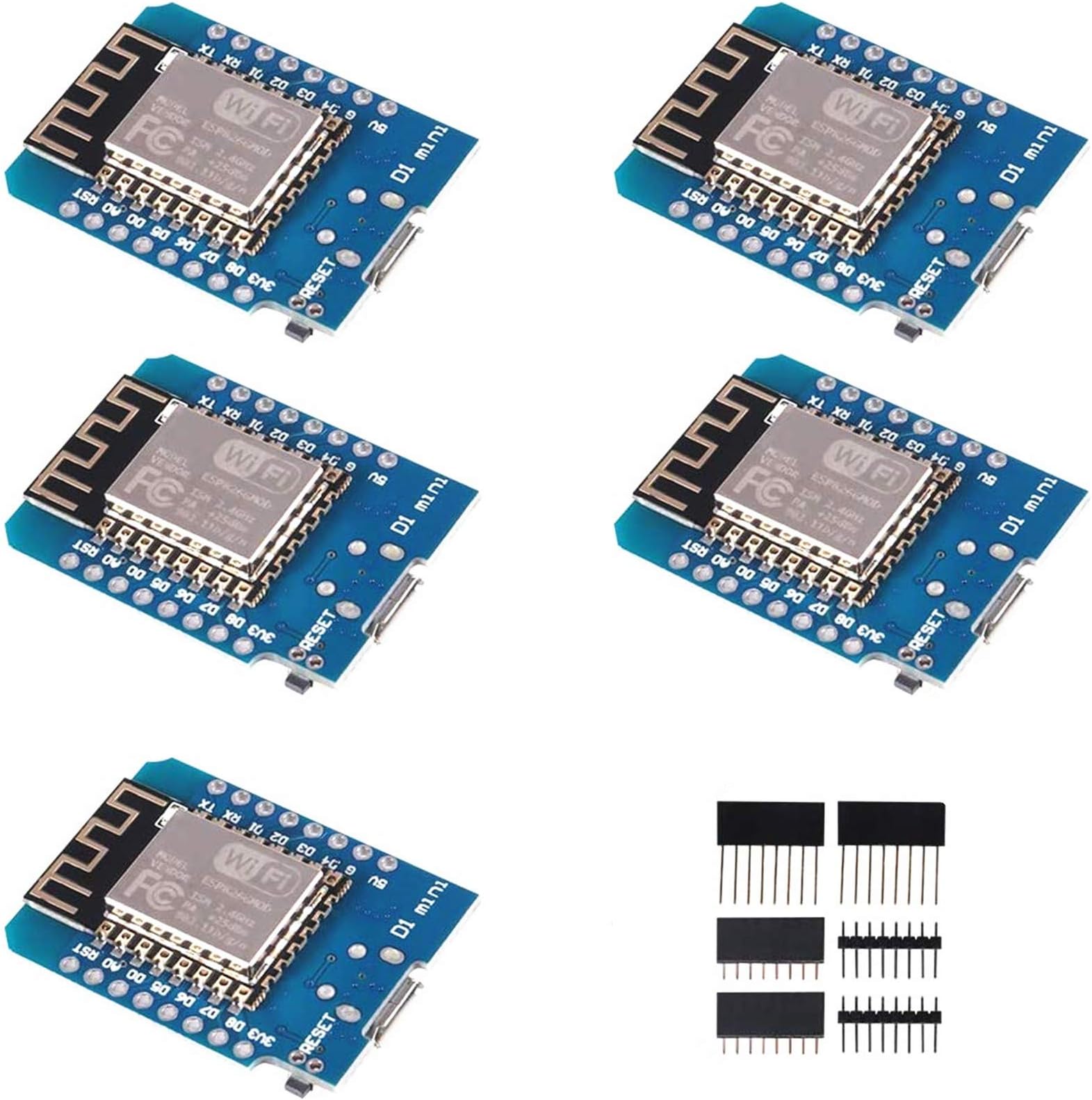
The ACEIRMC 5pcs ESP8266 ESP-12F NodeMcu Mini D1 Modules are compact, WiFi-enabled development boards featuring 4MB flash memory and 11 digital I/O pins. Designed for seamless Arduino IDE compatibility, these boards support multiple protocols including PWM and I2C, powered via micro USB with onboard 5V 1A switching supply and resettable fuse. Ideal for professional-grade IoT projects and rapid prototyping.


| ASIN | B081PX9YFV |
| Best Sellers Rank | #109 in Single Board Computers (Computers & Accessories) |
| Brand | ACEIRMC |
| Built-In Media | esp8266 d1mini |
| Compatible Devices | Arduino, WeMos |
| Connectivity Technology | I2C, USB, WLAN, Wi-Fi |
| Customer Reviews | 4.4 4.4 out of 5 stars (961) |
| Manufacturer | ACEIRMC |
| Memory Storage Capacity | 4 MB |
| Mfr Part Number | 10550 |
| Model Name | D1 Mini |
| Operating System | Linux |
| Processor Count | 1 |
| RAM Memory Installed | 4 MB |
| RAM Memory Technology | LPDDR3 |
| Total Usb Ports | 1 |
| UPC | 701715431645 |
| Warranty Description | 1 |
| Wireless Compability | 802.11a/b/g/n/ac |
F**R
Three Computers for Ten Dollars
Building a YouTube subscriber counter internet clock from HackMakeMod got all the parts I needed from the Jungle Site, with some simple soldering and simple coding: BOOM! Works great, still have to print the case, which will be out of PLA. Used Arduino IDE, added the specified library packages, and uploaded to the ESP8266, along with my wifi pw and my YT channel info, and worked right off the bat. When testing initially, all the eight LED grids were on and the ESP got VERY warm; now running the program, gets warm, but you can keep your finger on it. I went with green LED's which I think came out much nicer than the red. I bought the 3-pack of the ESP8266 so I would have a couple spares, and a pair of the MAX7219 4-up 32x8 dot matrix LED panels, both combined for under $25 and runs off the micro USB 5-volt port. Worked flawlessly with the IDE. Highly recommend.
A**.
Cheap esphome devices
No issues with any of them as esphome devices for Home Assistant!
S**R
Awesome ESP8266 boards
Awesome inexpensive ESP project boards. Used with DHT22s for temp/humidity sensors, and a couple wifi clocks. Easy to setup and configure. Endless ideas.
B**E
Awesome value for tinkering with wireless projects
Using these for various LED projects, and man what a good bang for the buck. All 5 modules I received tested and work fine with my WiFi. I am taking off one star for not providing adequate instructions for installation to get this thing up and running. For those having issues with not detecting the device when plugged in.. **MAKE SURE YOUR USB CABLE IS FOR DATA, NOT ONLY CHARGING!** I wasted several hours messing with Windows and trying to install drivers for CH340G, didn't even dawn on me that the cable could be the problem. After trying about 6 different cables in the house I finally found one that worked, and everything worked fine after that. I'll post instructions for anyone having trouble -- these really should be part of the description (not just "install drivers" and "install board to Arduino IDE"). Installation for drivers only: 0. Ensure you have a DATA micro USB cable (typically one that came with a phone should work -- mine came with vapes and so only supported charging). 1. Try plugging in the board without installing drivers -- if you hear the connection sound for an external device you are good to go (skip to 3). 2. If you need drivers, SparkFun has them hosted (official wemos site seems to be down) -- I can't link to them but search google for "sparkfun CH340 drivers," and the first result should be "How to Install CH340 Drivers" 3. Verify you can see the device: open Device Manager --> Ports (COM & LPT) --> USB Serial CH340 (COMXYZ) Getting setup in Arduino IDE: 0. You will need a link to copy and paste, but I can't link it here. Search Google for "arduino ide esp8266 board manager" -- the first result should be for a "readthedocs" website, and that should have all the instructions you need. However, for clarity I will list them here as well. 1. Ensure you have Python installed (this might be optional -- I haven't installed Python directly, but I installed the Arduino IDE and had no issues). 2. Open the Arduino IDE and go to File --> Preferences 3. Under "Additional Board Manager URLs" at the bottom, paste the link (it's to a JSON file) you copied from the other page into that box and hit "OK" 4. Go to Tools --> Board --> and select Board Manager (near the top) 5. Search for "ESP8266" and install the result (should be from "ESP8266 Community") Selecting the board for your sketch: 1. Go to Tools --> Board and select either “LOLIN(WEMOS) D1 R2 & mini” or "NodeMCU 1.0 (12-E Module)" — either of these worked for me 2. Be sure to select which COM port the board from Tools -> Port 3. Check that the upload rate is 115200 (it should already be) Test the board with "Blink": 1. Go to File --> Examples --> ESP8266 and select "Blink" at the top 2. You shouldn't need to change anything, so click Upload 3. Once it's finished, check that your blue led light is blinking Test the board's WiFi with "ArduinoOTA": 0. This isn't necessary, but to be sure your WiFi module actually works you need to try connecting 1. Go to File --> Examples --> ArduinoOTA and select "BasicOTA" 2. Only changes you have to make are on lines 7 and 8 for your WiFi SSID and password 3. (Optional) Save the sketch 4. Go to Tools --> Port: If all was successful, you should be able to see the ESP8266 board here (COM whatever) -- select it 5. Hit upload and open the serial monitor 6. Once the program is finished uploading, make sure to change the baud rate to 115200 on the serial monitor 7. Check to make sure you get the "Ready" message, followed by an IP address Hope this helps everyone, this really is a bargain product but without installation instructions it's infuriating.
S**K
Nice small size and easy to configure.
These Mini D1 modules are perfect for small projects. I use them connected to temperature and humidity sensors for ESP Home projects. Easy enough to configure with low power consumption. I really like the compact size. Will purchase again.
B**S
Less then $3 per computer with variouis connector, great deal!
Great deal. 10 computers with wifi for under $30. They come with male, female and dual pin connectors. They run a little slow but will do for about any IoT project. Useful labeling too, don't have to look up which pins for SCL, SDA, MISO, MOSI, ... Thoughtfully designed.
S**O
They work
Some arduino products (based on NINA wifi) simply don't work reliably. This seems to work perfectly. Note: this isn't the board's fault, but the Arduino IDE takes some setup to talk to these, and the latest version (3.1.0) of the board manager package does not work. You get an incomprehensible error message about time_ns and things fail to compile. Drop back to 3.0.2 and all is well. This sort of thing isn't atypical with Arduino projects, which seems to be very much the wild west in terms of software,
L**B
I cannot recommend this vendor: poor workmanship resulting in DOA boards
These are supposed to be clones of the NodeMcu D1 mini. They fail to boot or respond to loaders. I have a variety of other ESP8266 and ESP32 modules which all work fine. There is nothing in the searches indicating any sort of issue with these boards, yet I cannot communicate with them. They came sealed and with good reviews, so I don't know what the issue is except that I waited too long to open one up (working on another project) to find it is DOA. I opened a second (pack of five) and it too is DOA. but I am past the return window. edit: The three remaining boards work and programmed as expected. One of them, the ADC didn't work. second edit: Turns out the ESP board was not properly soldered down and with some touch up I was able to resurrect one of the dead boards and the ADC input of the other board. Due to the poor workmanship, I cannot recommend this vendor.
C***
Just like many clone D1 Minis, you may have to fuss with the CH341SER drivers. Arduino IDE on Windows anyway. That's why I still gave it 5 stars. Try the drivers on the Sparkfun site link.
V**T
I get these 10 pack of ESP8266 for a small project. Unfortunately, I tried a lot of things to flash them unsuccessfully (other USB ports, all cables around, using USB2 hub, another computer, and as last resort I connected directly a ESP programmer board I know is working well to the ESP8266 ship on one of these boards, unable to program). As I wasn't able to flash them, and there was different from the ones on the photos, maybe I got fake ESP8266 chips. I asked for a return. I bought a 5 pack of ESP8266 from another seller. Received these today and I am able to program them with the same exact settings without any issue.
Trustpilot
2 weeks ago
3 weeks ago