Desertcart purchases this item on your behalf and handles shipping, customs, and support to Netherlands.
๐ง Elevate your voice, own every conversation.
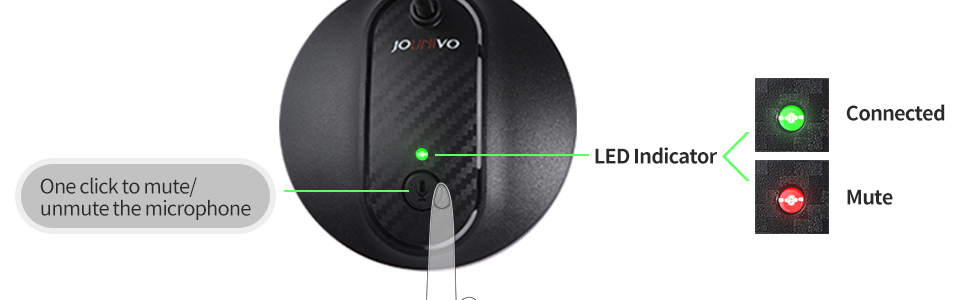
The JOUNIVO JV603PRO USB Recording Microphone delivers professional-grade cardioid condenser audio with intelligent noise-canceling technology. Featuring a flexible metal gooseneck, one-touch mute button with LED indicator, and plug & play USB compatibility, itโs designed for seamless use across laptops, Macs, and gaming consoles. Perfect for podcasting, streaming, voiceovers, and remote meetings, this mic offers crystal-clear sound and durable construction to upgrade your audio experience instantly.


| ASIN | B07N2WRHMY |
| Antenna Location | Video Conference |
| Audible Noise | 76 db |
| Best Sellers Rank | #2 in Computer Microphones |
| Brand | JOUNIVO |
| Built-In Media | microphone |
| Color | JV-601 |
| Compatible Devices | Laptop, Personal Computer |
| Connectivity Technology | USB |
| Connector Type | USB |
| Customer Reviews | 4.4 out of 5 stars 11,833 Reviews |
| Enclosure Material | Acrylonitrile Butadiene Styrene, Metal |
| Frequency Range | 20Hz-20kHz |
| Hardware Platform | Laptop, PC |
| Item Dimensions | 3 x 3 x 9 inches |
| Item Weight | 7.06 ounces |
| Manufacturer | JOUNIVO |
| Mfr Part Number | JV-601 |
| Microphone Form Factor | Gooseneck |
| Model Name | JV-601 |
| Model Number | JV-601 |
| Number of Batteries | 1 Lithium Ion batteries required. |
| Number of Channels | 1 |
| Number of Items | 1 |
| Polar Pattern | Omnidirectional |
| Power Source | Corded Electric |
| Recommended Uses For Product | Video Conference |
| Signal-to-Noise Ratio | 76 db |
| Special Feature | Volume Control |
| UPC | 743815047845 |
| Unit Count | 1 Count |
J**W
This is literally the BEST PC microphone under $50.00 you'll find. It's excellent!
I've spent quite a bit of time messing around with PC microphones and such over the years, and after trying, using, trying other microphones, going back to this one, I can feel confident is the statement that this is the BEST PC microphone you'll find out there under the $50.00 price point. I'd say it's probably better than some in the $70.00 range, if not comparable at-least. The microphone itself is simple and straightforward. It's simply an electret condenser element in the small head, and inside the weighted base is the amplification/power circuity to drive the element. It's a very simple and time tested design that works well. For under $20.00, this is a bargain. I own two of them on two different PC's and they both work flawless. I have the basic model with JUST the mute button. I didn't like the option of having a gain knob there, it's a little redundant to me when one can control their microphone sensitivity with Windows anyway. The audio quality of the microphone is excellent for most users. You're NOT going to get super high fidelity wide range audio with this microphone. What you ARE going to get though is clean, clear, communications grade audio that's perfect for Skype, Zoom, VOIP calls, basic speech recording, and the like. Higher audio quality is going to require a more expensive microphone obviously, that's just how microphones work. Don't let this deter you though. The audio quality and frequency response for basic use is exceptional. It's a winner. Highly recommend.
S**L
Reliable, high-quality sound capture at a very reasonable price
Reliable, convenient, high sound quality, and great price. My mic is very reliable: works consistently without needing drivers or setup; and no failures of any kind in the 5 years I've been using it on a daily basis. The sound quality is a significant improvement over the built-in mic on my company issued laptop. My voice is noticeably clearer on calls, and it does a surprisingly good job of isolating background noise. The ergonomics is good too. The gooseneck is easy to position and flexible, and the mute button is convenient for long meetings. My next mic would probably still be from this Jounivo brand, worth every of my hard-earned dollars.
D**D
Perfect microphone for work calls, but annoying setup issue
This little microphone is exactly what I needed for my home office work calls. Everyone says it sounds perfectly clear, always. It's also pretty good at ignoring my keyboard and space heater. However, I wish it was plug-and-play for me like it is for so many others. Here's what I had to do to get it to work (as others have posted): "Here's how I got these working for windows 10. 1. Right click on your sound icon and go to open sound settings. 2. Under the Input section, find the device in the dropdown which in my case is labeled Jounivo, select it, and click the device properties link below the dropdown. 3. Important part, change the volume setting, to anything. For some reason, I get no input on any computer until I change the setting from the default 97%. After that it works fine even if I go back to 97, but if I don't change it, no worky."
G**E
Works great!
Easy to setup. Just plug into your device and go. Works great.
R**S
Well worth it.. nice product
My cell reception locally isn't as good as it could be it seems. I caved and got this for my PC for Zoom calls, etc. The reviews are in from my peers - the sound quality is far superior than what they had been listening too over Bluetooth/phone/cell. The Red/Green mute light is perfectly placed. Very good deal
M**S
I would buy it again
So far it has worked just fine. People can hear me quite clearly. One of the great things for me is that I didn't have to go through 10 different steps to get it to work with my desk top.
J**C
Excellent microphone
It's great. Easy to connect and use. The sound quality is good even at 100% volume.
M**M
Good mic, but problems setting up in Windows 10 version "2004"
The mic itself works fine once it is set up correctly, but because of a bizarre interaction with Windows you may think it's defective (as I did). Turns out there is a very unintuitive fix that doesn't involve typical steps like updating drivers, changing permissions, etc. If you find that your mic is connected and recognized correctly by Windows, but no signal is being transmitted, then give this a try. All menu and setting names are written here exactly as they appear on my machine- Windows 10 version 2004 (name for the May 2020 update, I believe). The review that I got this method from had them labeled slightly different, so it may differ based on your machine. 1) Right-click the speaker icon on your taskbar, which opens up a dropdown menu. Click on "Sounds" 2) A new menu opens up. Click on the "Recording" Tab in the top left. 3) Find this microphone in that menu (mine is labeled "Microphone- JOUNIVO JV601") and double click on it. 4) A sub menu opens up. Click on the "Levels" Tab in the top left. 5) Now simply change the slider to any other value than what it is currently on. Not sure if it matters what, I just moved it down a couple points and hit "Ok" on each menu to close it. The microphone now (hopefully) works. The microphone sound quality is good and the flexible arm is a good length, just very annoying that this fix was so unintuitive. I was about to throw in the towel and buy a different model. Can't give it more than 3 stars because of this headache. Not necessarily the manufacturer's fault- maybe it worked perfectly out of the box on the current version of Windows when it was made, but here we are. It needs a firmware update.
C**S
Does the job
A good mic for teams meetings
C**R
Insane value for money
This is an amazing budget mic. I use it mostly for gaming but also for video creation. My friends immediately noticed the difference in sound quality compared to my old headset mic. The mic feels pretty solid but light. The cheapest feeling part is the mute button. Some people were complaining about a loud sound when muting/unmuting, but either they were exaggerating or the problem was fixed, because I think the sound is pretty much standard volume for when you mute on a mic. Volume control is done through windows settings, which definitely works, but itโs not the most convenient. If volume control is important to you, I think the same company is offering a model of the same mic with a volume dial for only $5 CAD more. This mic is a STEAL for its amazing price, and it completely surpassed my expectations. The sound is crisp and consistent. My only issue would be that it does pick up a lot of background noise, even my quiet mouse movements and keyboard buttons. This problem can easily be fixed by changing the mic volume though. Highly recommend this mic for anyone looking for a cheap but good microphone. It can be used for anything like gaming, videos, or online classes.
A**W
Discrete & accurate for transcription,
Mainly for using voice dictation.
P**K
Product works well
Great service and product works well.
A**R
Poor customer support
Worked immediately. Plug it in, download program and it works. No volume control from my end. If it was too loud I just advised receiver to turn down their volume which worked well. I was very pleased. Above was what I wrote when I first started using this product. For 2 months it worked well. Then is started cutting out. By 9 weeks it died. I have emailed the company twice and have still not heard from them. There is no other way to contact them through their web page. I'm very disappointed as it seems I will have to buy another product. This is no longer even listed with Amazon.
Trustpilot
4 days ago
1 month ago