
❄️ Stay Cool, Stay Ahead — The Ultimate Thermal Paste Upgrade
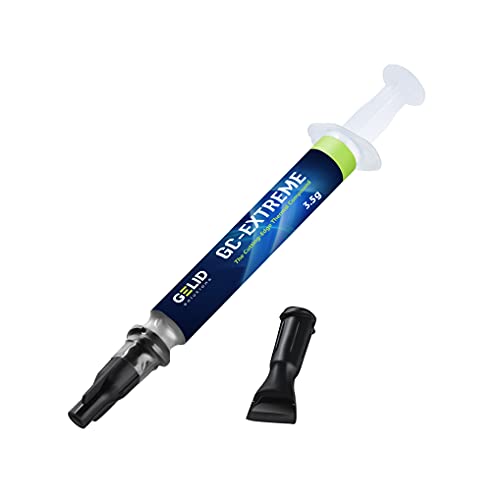
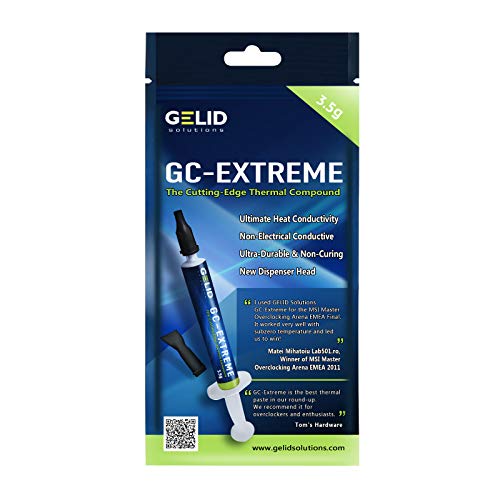
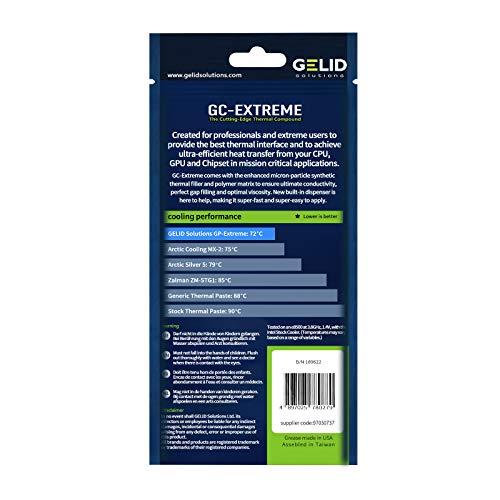
Gelid Solutions GC-Extreme 3.5g thermal paste delivers industry-leading 8.5 W/mK thermal conductivity with a thick, easy-to-apply formula that’s non-corrosive and safe for all PC components. Designed for gamers and professionals seeking reliable, long-lasting cooling performance, it drastically reduces CPU and GPU temperatures under heavy workloads, outperforming stock and generic pastes. Includes precision tooling for flawless application, making it the go-to choice for maintaining peak hardware efficiency.


| ASIN | B002P5W4RU |
| Are Batteries Included | No |
| Best Sellers Rank | #6,159 in Computers & Accessories ( See Top 100 in Computers & Accessories ) #21 in Thermal Paste |
| Brand | Gelid Solutions |
| Colour | silver |
| Country of Origin | China |
| Customer Reviews | 4.5 4.5 out of 5 stars (2,021) |
| Date First Available | 7 August 2012 |
| Generic Name | Thermal Paste |
| Global Trade Identification Number | 04897025780279 |
| Importer | Balaji Imports, India, [email protected] |
| Item Dimensions LxWxH | 41 x 10 x 41 Millimeters |
| Item Height | 1.6 Inches |
| Item Weight | 3.5 g |
| Item Width | 0.4 Inches |
| Item model number | TC-GC-03-A |
| Manufacturer | Gelid Solutions |
| Mounting Type | CPU Mount |
| Net Quantity | 1 Count |
| Packer | Gelid Hong Kong |
| Product Dimensions | 4.06 x 1.02 x 4.06 cm; 3.5 g |
| UPC | 637282916028 807320229797 168141424717 191120058030 666674973486 163120890569 172302660951 803982904393 012304362944 851905114763 780411579950 132017921198 872182808763 |
| Voltage | 8.5 Volts |
| Wattage | 8.5 |
M**U
Very good product and reasonably priced.
I used GC extreme because it was recommend to me and I'm thankful that i did. I used to hit TJ-Max on both my CPU and GPU as soon as i started playing RDR2 on my laptop. (With AC on at 25/26 degrees) I finally changed it's stock thermal paste after 3 months of use. Even though i don't play much, my stock thermal paste was almost dried out on GPU and CPU. Pros- 1. Very reasonably priced. 2. Works flawlessly 3. Non-Conductive 4. Much much better than stock thermal paste or the generic thermal paste these companies apply to our laptop in the name of "service". 5. Heavy games like RDR2 are showing temps under 85 degree Celsius without undervolting/disabling turbo boost, which was not the case for me previously on the stock thermal paste. Idle temp was around 30-40. I'm personally very satisfied. (with AC on at around 26 degree Celsius) Neutral- 1. Bit difficult to apply but good thermal pastes are generally thick and they are not easy to apply. I have also not done it before so, Kinda new experience for me. Cons None as of day 1. Things to note- 1. This is a day one review. Will edit it in the future as the need arises. 2. If you want to have a rough idea about the temps (like really rough) use Hwinfo app and monitor idle/gaming temps. If you Want a better idea run Antutu, 3Dmark and other benchmark tests before and after applying this thermal paste. If someone is not willing to change the thermal paste themselves (which is fine) ask your laptop service guy to apply this thermal paste (buy it yourself), if the service guy is hesitant tell him that this is non-Conductive thermal paste (it won't damage the motherboard even if some of it spills on to the motherboard).
V**Y
Absolutely Amazing product. Highly recomended.
Amazing thermal paste. Using it for Rxt 3070ti and temp never went 80c and Hotspot to 88C. Also it si resistance to pump out effect. Truely Amazuig product and better than Arctic-MX4.
A**.
Great Results
This is the first thermal paste which I have bought. I applied it on my laptop Asus TUF 505DT which was been on the stock thermal paste for the past 3 years. The results were surprising. 30-40fps boost in games, GPU temp is around 60C and CPU is around 60-65 on idle. When playing games 5-10C rise only. I think this is one of the best thermal paste for laptops.
C**N
Best option for laptops
This is great for laptops. It has high viscosity. And it comes in good quantity for the price compared to other options. Earlier i got my paste replaced at a repair center and they used cryofuze violet. Within three months my laptop was severely throttling and i saw many frame drops even after reducing quality settings. Read a lot of reviews and suggestions about high performance paste for laptops and how they are not suitable, about pump out effect, dry out etc. This has lower conductivity at around 7 while violet has over 12. However, that doesn't matter when the paste just spills over. This is much more viscous (and harder to apply and spread but manageable). After application I have noticed significant temperature drop in idle. Although my laptop still throttles under load, that's because of the bad cooling design of asus TUF a15 (2020).
A**H
good thermal paste for laptops
i purchased this paste in may of 2024 and as of writing this review its oct 2025 and i have seen very consistent results for laptop, i think there is no pump out in this paste as i have used noctua nth2 which has pump out effect in laptop.
S**T
Meh for laptops...
Trash if youre gonna use this on an intel laptop cpu... get PTM 7950... if u cant then go for Cryofuze 7. This paste pumped out in 3 days, not suited for laptop application imo. Its not that easy to apply either.
A**Y
Amazing. Really a champ when it comes to cooling.
I had an HP omen 15 2021. Which started to heat after ig the stock paste ran out. Tried circling the service center multiple times used mx4, cryonaught. Literally nothing worked. For 4 months it was a pain until I applied Gelid and put an end to my misery. The paste works flawlessly and does the job well. Really I would recommend this paste to be for laptops. It's viscous enough to withstand the high temperatures. Mx4,cryo they work well but pump out quickly.
T**.
Really good product
I have used may thermal paste over time like Thermal Grizzly Kryonaut, Noctua NT-H1, Coolermaster Cryofuze. This Product felt like the best value for money which actually out performs some of the above mentioned and performance is some what equal to kryonaut which is double the price now. The temperature of my laptop was quiet high when i used NT-H1 where CPU reached 97-99 C ( Even reached 100 C) and GPU reached 67 C under GPU and CPU stress test. Under CPU only stress test the temps were around 90-96 C. After using Gelid the temps dropped significantly to 86-89C on the CPU and 64 C on GPU. Under CPU only stress test the temps were very low 78-84 C. ROOM TEMP IS 29 C. My device is Hp Pavilion gaming 16. The problem with this device is it will only kicks the fan to the full speed when the temps reach high and no fan control. So first the temps reaches High enough to turn the fans to the max like it will reach 94 C then stays there for some time and when the fans finally run at full speed the temps some time even reach as low as 80 if the room is cooler for CPU only stress test.
M**E
Expérience avec GELID SOLUTIONS GC-Extreme 3.5g nouvelle version (paquet bleu) + backplate + vis sur processeur socket 1150 J'ai 2 supports ventilo avec attaches en plastique et je me suis aperçu que le contact n'était pas OK avec le cpu (mauvaise expérience aussi avec un vieux cpu AMD socket 939 grillé (car pas protection) à cause d'un support ventilo plastique fendu à cause de la chaleur et d'une position verticale), j'ai décidé de changer les vis plastiques par un backplate + des vis métal Avant : en idle 40-45 °C, en Full 100 °C Avec Gelid-Extrême nouveau modèle : en idle 27-35 °C, en Full 60°C Donc oui au niveau thermique, elle est super efficace. J'avais l'habitude d'étaler la pâte précédente car plus fluide, la Gelid-Extrême nouveau modèle est beaucoup plus épaisse : j'ai essayé de l'étaler avec ou sans l'applicateur mais le résultat est à peu près le même, après plusieurs tests, j'en mets beaucoup trop (d'autant plus que je peux serrer à fond le ventilo sur le proc) et je galère ensuite à l'enlever. Donc je suis revenu à la bonne vieille méthode, une boulette au milieu du proc. J'ai changé ma méthode d'étalage à cause de sa viscosité, du gaspillage engendré et de la fixation avec des vis métal, mais au final j'ai appris que mon proc pouvait monter à 100°C mais avec la Gelid-Extrême, il reste la plupart du temps à 60 °C. Bien sûr qu'une grosse partie du gain est dû au changement de fixation du ventilo mais les -15° à -18°C en idle prouve qu'elle est super efficace.
F**V
Resulta un poco espesa a la hora de aplicarla, pero considero que es una ventaja que ayuda a que no se esparrame y llegue donde no debe. Buena cantidad para el precio que tiene, la he usado en procesadores y en gráficas, con muy buen resultado. Los mejores resultados de temperatura, se notan a partir de las 48 horas, cuando la pasta ya se ha asentado. Un tubo da para varias aplicaciones, comprar pastas mas baratas, puede salir caro. No lo penséis, esta es de las mejores.
N**A
Ürün olması gerektiği gibi beklentiyi karşılıyor.
S**N
Leí muy buenas reseñas de ella, está entre las primeras 5 pastas según reseñas de varios foros en internet. Es una pasta que tiene creo más de 10 años en el mercado. aunque no está tan disponible, por lo cual tardó en llegar unas dos semanas, realmente no me importó, ya que valió la pena esperarla estando confiado que había adquirido una pasta de calidad. Además no tenía urgencia en usarla. Recién la apliqué y aunque estuve midiendo antes la temperatura de la laptop la cual llegaba hasta los 81 grados bajo carga constante. Al aplicarla se.noto una diferencia de 5 a 7 grados centígrados a la baja promedio, esto es muy bueno. Sin embargo no conforme, no me refiero al producto sino con el deseo de bajar aún más la temperatura, modifique la tapa inferior viendo que era factible hacerlo y sorprendentemente se logró bajar hasta uno 60 grados como máximo a carga constante. Quedé muy satisfecho con la modificación hecha, con la aplicación de la pasta y con el resultado. El equipo es una HP Pavilion dm1, siendo AMD y muy viejito, le estoy dando una segunda oportunidad a este hardware antigüo, además agregué un SSD e instalé Linux mint con el escritorio Xfce. Con este último las carga del procesador es mucho menor que con Windows 10 instalado, el cual ponía al 100% al procesador cuabdo reproducía videos en el navegador, y con mint, cuando mucho llega a 65%, obvio con algunos picos de 100% pero solo momentaneos. En resumen recomiendo la pasta. Más adelante actualizaré con fotos y más resultados del comportamiento de temperaturas.
M**R
Funcionou bem para instalar cooler novo sobre a CPU do desktop Dell.
Trustpilot
1 week ago
1 week ago



