๐ Upgrade your internet gameโfast, secure, and wallet-friendly!
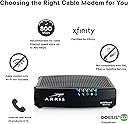
The ARRIS SURFboard SBV2402 is a DOCSIS 3.0 cable modem designed exclusively for Xfinity Internet & Voice services. It supports speeds up to 800 Mbps, helping you save up to $168 per year by eliminating rental fees. With a simple app-based setup and a compact design, itโs the smart choice for professionals seeking reliable, high-speed connectivity backed by ARRISโs 70-year legacy of innovation.


| ASIN | B07M9J3YZM |
| Best Sellers Rank | #5,773 in Computers & Accessories ( See Top 100 in Computers & Accessories ) #33 in Computer Networking Modems |
| Brand | ARRIS |
| Built-In Media | SURFboard SBV2402- DOCSIS 3.0 Voice Modem for Xfinity - AMZ |
| Color | Black |
| Compatible Devices | Personal Computer |
| Connectivity Technology | Ethernet |
| Customer Reviews | 4.1 out of 5 stars 421 Reviews |
| Data Transfer Rate | 800 megabits_per_second |
| Global Trade Identification Number | 00612572216156 |
| Internet Service Provider | Xfinity ONLY |
| Internet service provider | Xfinity ONLY |
| Item Dimensions L x W x H | 2.4"L x 8.5"W x 10.25"H |
| Item Type Name | Xfinity Voice Cable Modem |
| Manufacturer | CommScope |
| Maximum Downstream Data Transfer Rate | 800 megabits_per_second |
| Maximum Upstream Data Transfer Rate | 262 megabits_per_second |
| Mfr Part Number | SBV2402 |
| Model Number | SBV2402 |
| Modem Type | Cable |
| Number of Ethernet Ports | 1 |
| Number of Items | 1 |
| Number of Ports | 3 |
| Product Dimensions | 2.4"L x 8.5"W x 10.25"H |
| UPC | 612572216156 |
| Unit Count | 1 Count |
| Warranty Description | 2 Year |
S**3
Pays for itself. It's a no brainer!
Paying $14 per month for XFInity's modem/router was bugging me, especially since I use my own router for the "router" part of the network and only need the modem. $99 for this modem seemed like a no brainer! I also purchased three $30 Rokus since you can use them as Xfinity cable boxes by running the Xfinity app. So for about $200 with tax for the whole lot, I'll save $44 per month on my bill which is about a 5 month pay off. Bill went from $211 to $167. Some things to note before you purchase: 1. This is NOT a router. It is only a DOCSIS modem. It does NOT have WiFi. You are likely replacing Xfinity's gateway which is a combined Modem AND WiFi router. This is not the same thing. In addition to this you will need a router to run your network. Your router plugs into the back of this modem. 2. Make sure that this modem is on your list of approved devices for your account. You can find this in the Xfinity app or on the Xfinity website - log into your account. If you have voice (phone) even if you don't use it, you need a modem with data and voice. This one has that. If you buy a modem that is not on that list, Xfinity will not set it up. 3. It took me about 90 mins on the phone with Comcast. Reading other reviews, this seems to be the norm for adding your own modem. The MAC address for the modem was not being accepted by Comcast's system so I went through three support folks before I got to John who had the authority to add the MAC address into the system. After that it was plain sailing and he provisioned the modem and we were up and running. 4. This is NOT a router (I thought I'd mention that again). No WiFi. 5. Internet speed right after install is about 400MBps. I pay for 600 but it ranges from 350-550 depending on who is online in the house so nothing has changed there. All in all, I'm very happy with this modem. If anything changes, I will update. I just wanted to add that my 90 mins with Comcast was on a Sunday during the Coronavirus lockdown. All four of the folks I spoke to were helpful and friendly and AMAZING. This is not the same Comcast support from a few years ago. Kudos to them all.
J**D
Internet product
Worked great, price was reasonable
P**Y
Worked out of the box
Not much to say. It worked out of the box. Connected it up, called Comcast, talked to the network people to authorize the network part then the voice people to authorize the VOIP. Why you can't just talk to one person is beyond me. In a few minutes everything was working perfectly. Network speed is as I would expect. Voice quality is clear. I have had it for two weeks with no issues. Just be aware that is just a plain vanilla modem. I provides no firewall or routing ability. The only thing in its interface is serial numbers and signal strengths.
M**U
Great modem for speeds less than 1GB
Great modem for speeds less than 1GB, which is more than enough for the average home. I've got the blaster internet option and get over 200MB downloads - plenty. For a new Xfinity install Easy setup, plugin the new modem then wait for the power - US/DS - online lights to be solid blue. Use a browser, most likely on your mobile phone, and go to xfinity /activate and follow the instructions. If you are replacing and existing modem for higher speeds it's a little more than easy but not bad. Unplug your old modem and plug everything into your new modem. Wait til you get the 3 solid blue lights then call xfinity for a tech that handles connectity issues, you'll spend a little time with them to get the internet up and working on the new modem. Then you'll be switched to someone else to move you phone to the new modem. Plan on around an hour on the phone, but well worth it. My old modem maxed out at 133MB and now I'm good for up to 912MB, so this modem should last a few years. Oh I'm now getting around 220MB, not that I had problems with 133MB but might as well get what I paying for.
D**I
Modem is not compatible with Comcast/Xfinity
I bought 2 of these modems, neither of them was able to be activated by Comcast/Xfinity. I returned them and bought a (cheaper!) NETGEAR Cable Modem CM500 instead. The NETGEAR modem activated immediately with Comcast/Xfinity, it works great. I do not recommend ARRIS SURFboard modems any longer, they used to be reliable but not anymore.
Y**N
You WILL need to contact Comcast(for Comcast customers) but it will all work out, have patience.
Replaced an older Arris cable modem that was providing 140 MB speed. Upgraded to 250 MB speed so it was time to upgrade. As a Comcast customer, they will only update your modem to cable/WiFi modem. I have a WiFi mesh network so I purchased this modem. The instructions recommend to use the Comcast self service activation at xfinity/activate, which I tried, but eventually had to call Comcast. I spoke to Maria and she was pleasant. Initially the modem wouldnโt activate, after numerous attempts, but eventually Maria said the modem was downloading an update that will take about 30 minutes. I was told the modem should activate after update. After about 20 minutes, it activated and I was able to get Internet. Speeds are actually faster than 250 MB.
H**E
This is a fine TELEPHONE MODEM for use with VOIP...
(Revised to fix spelling errors) The main issue is to get the device provisioned with Xfinity. That is the problem! You will likely have to keep trying to get a technician who REALLY knows what they are doing. I spent over five hours on the cell phone until I finally was talking to a knowledgeable technician. THAT IS XFINITY 's problem, not this modem. My absolute intention is to simply use the modem ONLY for the telephone. I had a similar model that worked for years, but it got fried when a water pipe leaked on it. There was no reason for this modem not to be provisioned. I had to explain this many times to various technicians , but it isn't easy. Xfinity REALLY needs better education for its representatives. The modem is fine! If you don't have patience, don't consider Xfinity.
G**N
Working modem, easy to install, however, NO TECH SUPPORT from the manufacturer.
You should know that if you purchase this modem this model DOES NOT come with any technical support from the manufacturer. You will need to contact Comcast.
Trustpilot
1 week ago
4 days ago